2009 JAGUAR XF change wheel
[x] Cancel search: change wheelPage 219 of 391
219
Wheels and tyres
The following procedure should be used to
check and adjust the tyres pressures.
1.Remove the valve cap.
2. Firmly attach a tyre pressure gauge/inflator
to the valve.
3. Read the tyre pressure from the gauge,
and add air if required.
4. If air is added to the tyre, remove the gauge
and re-attach it be fore reading the
pressure. Failure to do so may result in an
inaccurate reading.
5. If the tyre pressure is too high, remove the
gauge and allow air out of the tyre by
pressing the centre of the valve. Refit the
gauge to the valve and check the pressure.
6. Repeat the process a dding or removing air
as required until the correct tyre pressure
is reached.
7. Refit the valve cap.
Note: It is an offence in certain countries to
drive a vehicle with incorrect tyre pressures.
Note: It is the driver's responsibility to ensure
that the tyre pressures are correct.
Tyre valves
Keep the valve caps screwed down firmly to
prevent water or dirt entering the valve. Check
the valves for leaks when checking the tyre
pressures.
Pressure compensation for ambient
temperature changes
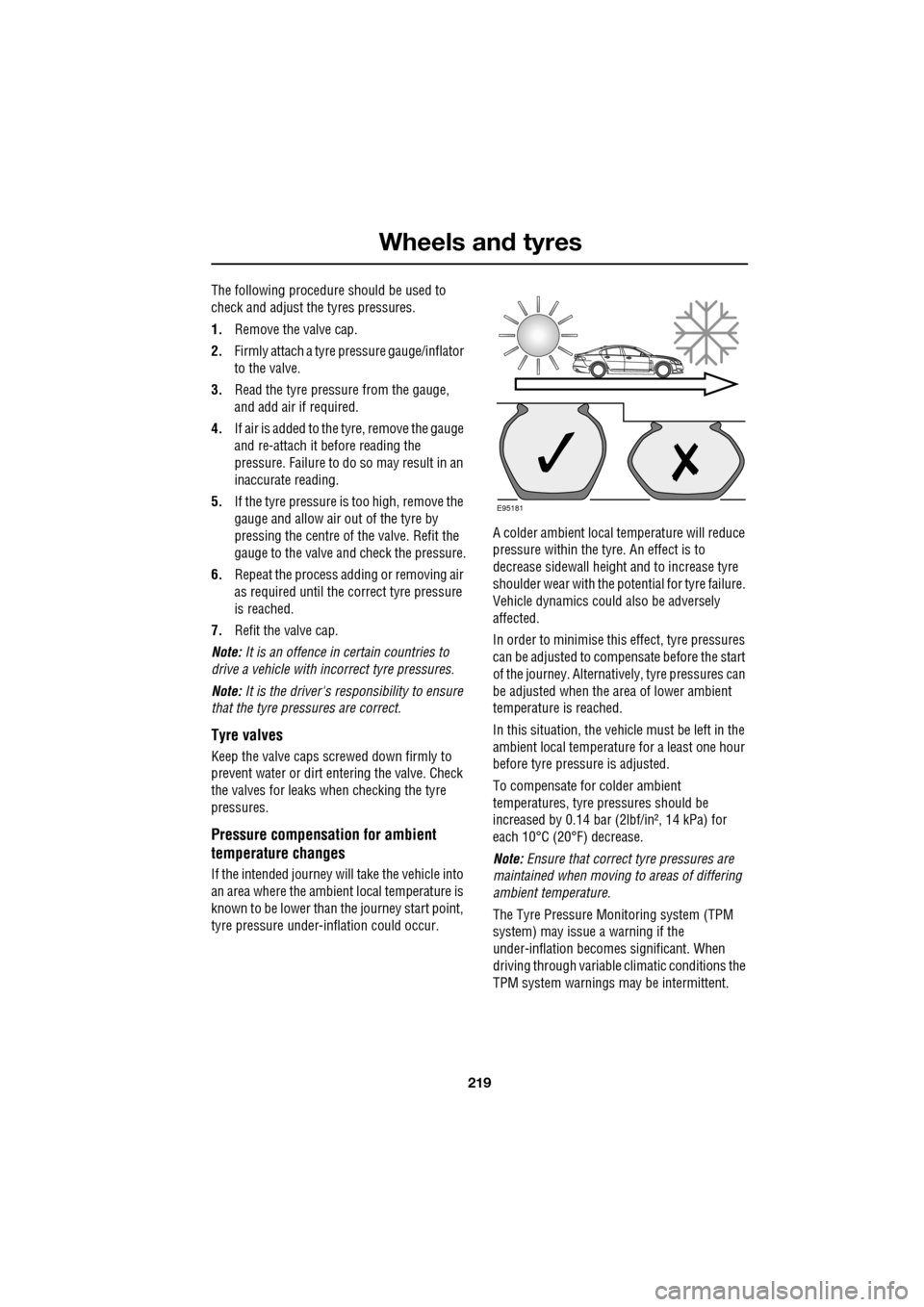
If the intended journey will take the vehicle into
an area where the ambien t local temperature is
known to be lower than the journey start point,
tyre pressure under-i nflation could occur. A colder ambient local temperature will reduce
pressure within the tyre. An effect is to
decrease sidewall height
and to increase tyre
shoulder wear with the potential for tyre failure.
Vehicle dynamics could also be adversely
affected.
In order to minimise this effect, tyre pressures
can be adjusted to compensate before the start
of the journey. Alternatively, tyre pressures can
be adjusted when the area of lower ambient
temperature is reached.
In this situation, the vehicle must be left in the
ambient local temperature for a least one hour
before tyre pressu re is adjusted.
To compensate for colder ambient
temperatures, tyre pressures should be
increased by 0.14 bar (2lbf/in², 14 kPa) for
each 10°C (20°F) decrease.
Note: Ensure that correct tyre pressures are
maintained when moving to areas of differing
ambient temperature.
The Tyre Pressure M onitoring system (TPM
system) may issue a warning if the
under-inflation becomes significant. When
driving through variable climatic conditions the
TPM system warnings may be intermittent.
E95181
Page 221 of 391

221
Wheels and tyres
Wear indicators
When the tread has worn down to
approximately 2 mm, wear indicators start to
appear at the surface of the tread pattern. This
produces a continuous band of rubber across
the tread as a visual indicator.
To maintain performance and grip the tyre
must be replaced as soon as the wear indicator
becomes visible. Sooner, if legislation requires
replacement at a greater tread depth.
Note: Tread depth should be checked
regularly, in some case more frequently than
the service intervals. For advice on checking
tyres contact your Dealer/Authorised repairer
or a tyre dealer.
Age degradation
Tyres degrade over time due to the effects of
ultraviolet light, extreme temperatures, high
loads, and environmen tal conditions. It is
recommended that tyres are replaced at least
every six years, but they may require
replacement more frequently.
Jaguar recommends that even if unused, the
spare tyre be replaced at the same time as the
four road tyres.
Punctured tyres
Tyre checks
Not all punctures result in the tyre deflating
immediately. Therefore, it is important to check
the tyres for damage and foreign objects,
regularly.
When driving, if a sudden vibration, or change
to the vehicle's hand ling is noticed, reduce
speed immediately. Do not brake hard, or make
any sudden manoeuvres or direction changes.
Drive slowly to an area off the main highway
and stop the vehicle.
Note: Driving the vehicle to a safe area may
cause damage to th e punctured tyre, but
occupant safety is far more important.
Inspect the tyres for signs of punctures,
damage or under inflati on. If any damage or
deformity is detected, the tyre should be
replaced. If a spare tyre is not available, then
the vehicle should be reco vered to a tyre repair
centre, or Dealer/Approved repairer.
WARNING
Wear indicators show the minimum
tread depth recommended by the
manufacturers. Tyres which have
worn to this point will have reduced grip and
poor water displacement characteristics.
CAUTION
If tread wear is uneve n across a tyre, or
the tyre wears excessively, the vehicle
should be checked by your Dealer/Authorised
Repairer as soon as possible.
E91698
WARNING
Do not drive the vehicle with a
punctured tyre. Even if the punctured
tyre has not deflated, it is unsafe to
use, as the tyre may deflate suddenly at any
time. See TYRE REPAIR KIT (page 229).
Page 225 of 391

225
Wheels and tyres
CHANGING A ROAD WHEEL
If a wheel change is required, pull off the road
completely. Park on ground which is as level
and solid as possible. Ensure that the vehicle is
clear of any objects that will obstruct the safe
removal of the wheel. Switch on hazard
warning lamps and, where legally required,
display the warning triangle.
Regular maintenance of tyres contributes not
only to safety, but to the designed function of
the vehicle. Road-holdi ng, steering and braking
are especially vulnerable to incorrectly
pressurised, badly fitted or worn tyres.
Tyres of the correct size and type, but of
different make can have widely varying
characteristics. It is therefore recommended
that Jaguar approved tyres are fitted to all
wheels.
Temporary use spare wheel
Observe the following wa rnings before using
the wheel:
WARNINGS
Always ensure replacement tyres
have the correct rating and
specifications (e.g. load index, size,
speed rating) for your vehicle.
When using tyres other than those
recommended by Jaguar, do not
exceed the speed capacity
recommended by the manufacturer.
Wheels are extremely heavy. Take
care when lifting and particularly
when removing and replacing a wheel
in its storage position in the luggage
compartment.
CAUTION
Ultra high performance tyres. This
vehicle is equipped with an Ultra High
Performance (UHP) tyre and wheel
combination designed to give maximum dry
road performance with consideration for
aquaplaning resistan ce. UHP tyres have
performance enhancing soft rubber tread
compound. If driven aggressively they may
suffer rapid tread wear and a shorter life than
can be expected from other tyre types. This
wheel and tyre comb ination is more
susceptible to damage from road hazards.
Do not use this combination for driving on
snow or ice. High perf ormance tyres must be
replaced with winter tyres when weather
conditions dictate.
WARNINGS
Note the temporary use spare wheel
warning label. Adhere to instructions
on the label. Failure to comply can be
dangerous.
When a temporary use spare wheel is
fitted, drive with caution and replace
with the specified wheel and tyre as
soon as possible.
Do not fit more than one temporary
use spare wheel and tyre assembly at
one time.
The temporary use spare wheel must
be inflated to 4.2 bar (60 lbf/in²,
420 kPa) and cannot be repaired.
Temporary use spare wheel,
maximum speed is 80 km/h
(50 mph).
Page 227 of 391

227
Wheels and tyres
Wheel changing safety
Before raising the vehicle, or changing a wheel
ensure that you read, and comply with the
following warnings.
WARNINGS
Always find a safe place to stop, off
the highway and away from traffic.
Ensure that the vehicle is on firm level
ground.
Disconnect traile r/caravan from
vehicle.
Switch on the hazard warning lamps.
Ensure that all passengers, and
animals, are out of the vehicle and in
a safe place away from the highway.
Place a warning triangle at a suitable
distance behind th e vehicle, facing
towards oncoming traffic.
Ensure that the front wheels are in the
straight ahead position, and engage
the steering lock.
Apply the parking br ake, and engage
Park (P).
Ensure that the jack is on firm level
ground.
Never place anything between the
jack and the ground, or the jack and
the vehicle.
When one rear wheel is lifted off the
ground the selection P (Park) position
will not prevent the vehicle from
moving and possibly slipping off the jack as
the park brake only operates on the rear
wheels.
Do not start or run the engine while
the vehicle is supported only by a
jack.
The jack is designed for use when
changing a wheel only. Never work
beneath the vehicle with the jack as
the only means of s upport - use vehicle
support stands.
Always chock the wheel diagonally
opposite the wheel to be changed,
using the wheel chock supplied in the
tool kit. Chock the front of a front wheel, or the
rear of a rear wheel.
If jacking the vehicle on a slight slope
is unavoidable, place chocks on the
downhill side of the two opposite
wheels. An additional chock will be
needed.
Take care when lifting the spare
wheel, and removing the punctured
wheel. The wheels are heavy, and can
cause injuries if not handled
correctly.
Remove the spare wheel prior to
jacking the vehicle. To avoid
destabilising the vehicle when raised.
Take care when loosening the wheel
nuts. The wheel brace may slip off if
not properly attached, and the wheel
nuts may give way suddenly. Either
unexpected movement ma y cause an injury.
WARNINGS
Page 236 of 391

Wheels and tyres
236
Tyre pressure warning with speed
If the vehicle is to be driven at speeds in excess
of 160 km/h (100 mph), the tyre pressures
should be increased as stated in this handbook
or on the placard label. Failure to increase the
tyre pressures and driving in excess of
160 km/h (100 mph), will illuminate the yellow
warning telltale and display a text message
TYRE PRESSURES LOW FOR SPEED . In the
event of this warning be ing displayed, vehicle
speed should be reduced
Temporary use spare wheel and tyre
change
If the temporary use spare wheel is fitted the
system will automatically recognise the change
in wheel positions. The n after approximately
ten minutes of driv ing above 25 km/h
(18 mph), a message TYRE NOT MONITORED
will be displayed accompanied by illumination
of the warning telltale and the corresponding
block in the vehicle graphic.
The warning telltale will initially flash and will
subsequently revert to continuous illumination.
Extended use of the temporary use spare wheel
will produce an additional text message TYRE
PRESSURE SYSTEM FAULT .
This TPM system display sequence will be
activated at every ignition cycle until the
temporary use spare wheel is replaced by a
fully operational full size wheel and tyre
assembly.
Always replace the temporary use wheel before
having TPM system faults investigated. The
fault may well be rectified with the fitment of a
fully operational full size running tyre in lieu of
the temporary use spare wheel assembly.
Tyre changing
Always have your tyres serviced or changed by
a qualified engineer.
Care must be taken to avoid contact between
the bead of the tyre and the sensor during
removal and refitting of the tyre, otherwise the
sensor may become damaged and or
inoperable.
Sensors can be removed from the wheel by the
unscrewing of the va lve retention nut.
Replacement sensor
Should the sensor require replacing, it should
be carried out by a Dealer/Authorised Repairer.
A replacement sensor must be fitted to a
running wheel in order to be recognised by the
system. The vehicle needs to be stationary for
15 minutes during the se nsor fitment before
the system is ready to detect the new sensor.
The vehicle must be driven for a minimum of
fifteen minutes after the sensor change, and
then remain stationary for fifteen minutes to
activate full TPM system operation.
If the TPM system warning for any wheel does
not clear, even after ensuring correct inflation
and driving for more than ten minutes above
25 km/h (18 mph), you should seek qualified
assistance as soon as possible.
CAUTION
Valve stem seal, washer, nut, valve core
and cap should be replaced at every tyre
change. Valve stem seal, washer and nut must
be replaced if valve re tention nut is loosened.
Sensor units and nuts must be refitted using
correct torque figures and associated profile.
Damage to the vehicle may result if these
precautions are not taken.
Page 275 of 391
275
Audio unit operation
STATION PRESET BUTTONS
Tuning stations
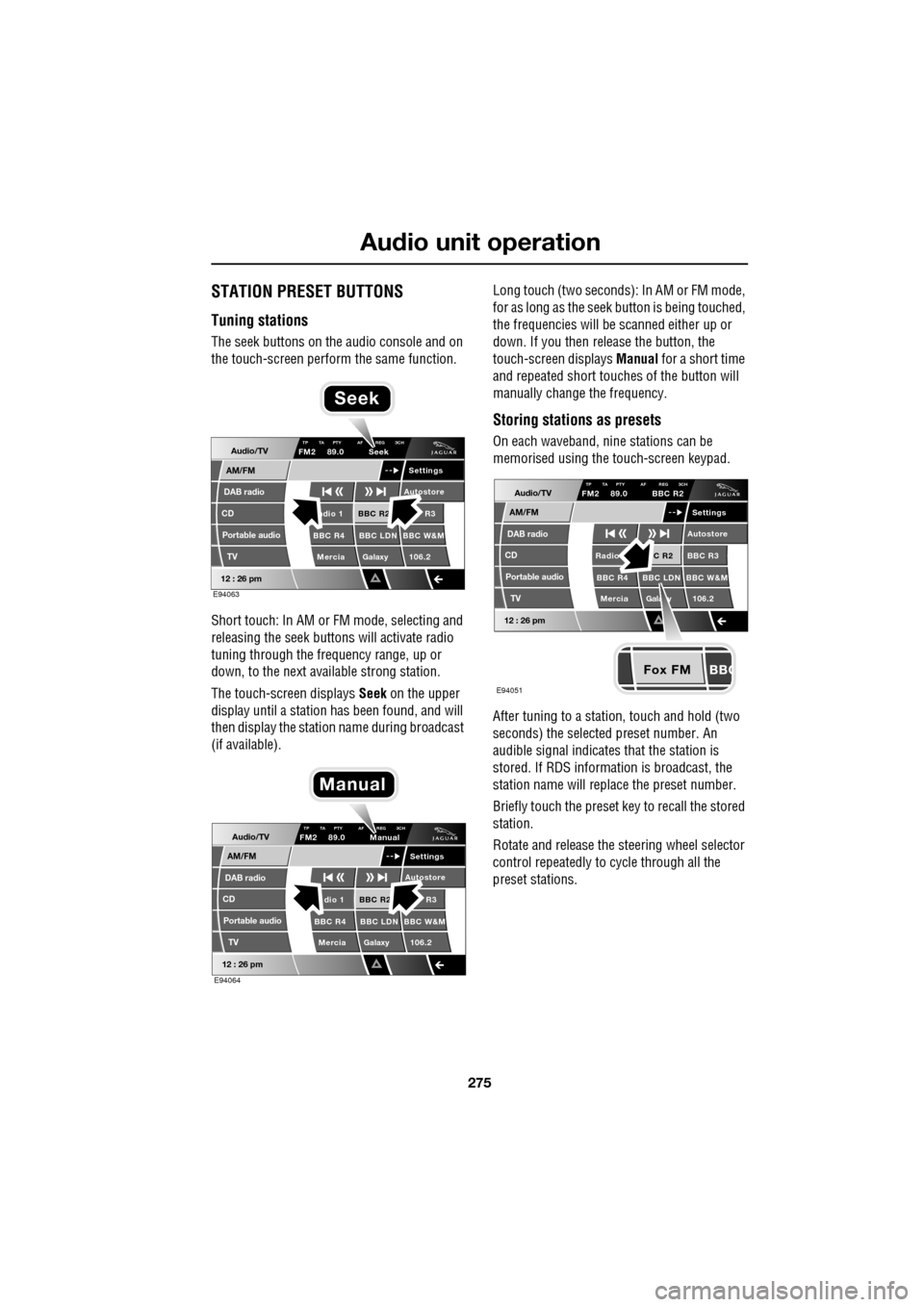
The seek buttons on the audio console and on
the touch-screen perform the same function.
Short touch: In AM or FM mode, selecting and
releasing the seek buttons will activate radio
tuning through the frequency range, up or
down, to the next available strong station.
The touch-screen displays Seek on the upper
display until a station has been found, and will
then display the station name during broadcast
(if available). Long touch (two seconds): In AM or FM mode,
for as long as the seek
button is being touched,
the frequencies will be scanned either up or
down. If you then release the button, the
touch-screen displays Manual for a short time
and repeated short touc hes of the button will
manually change the frequency.
Storing stations as presets
On each waveband, ni ne stations can be
memorised using the touch-screen keypad.
After tuning to a stati on, touch and hold (two
seconds) the selected preset number. An
audible signal indicates that the station is
stored. If RDS informat ion is broadcast, the
station name will replace the preset number.
Briefly touch the preset key to recall the stored
station.
Rotate and release the steering wheel selector
control repeatedly to cycle through all the
preset stations.Audio/TV
DAB radio
CD
AM/FM
12 : 26 pm
BBC R2 R3
BBC R4 BBC LDN BBC W&M Mercia Galaxy 106.2adio 1
Settings
Autostore
TP TA PTY AF REG 3CHFM2 89.0 Seek
Portable audio TV
E94063
Seek
Audio/TV
DAB radio
CD
AM/FM
12 : 26 pm
BBC R2 R3
BBC R4 BBC LDN BBC W&M Mercia Galaxy 106.2dio 1
Settings
Autostore
TP TA PTY AF REG 3CHFM2 89.0 Manual
Portable audio TV
E94064
Manual
Fox FM
Audio/TV
DAB radio
CD
AM/FM
12 : 26 pm
C R2 BBC R3
BBC R4 BBC LDN BBC W&M
Mercia Gala y 106.2Radio
Settings
Autostore
TP TA PTY AF REG 3CHFM2 89.0 BBC R2
Portable audio TV
E94051
Page 317 of 391

317
Telephone
MAKING A CALL
Before you make a call, your mobile phone
must be paired and docked with the vehicle’s
Bluetooth system.
From the Home menu, select Comms.
Key in the phone number, including the area
code, if applicable - the number will be
displayed. Touch the connect icon.
Changing a phone number
When entering a number, you can change the
phone number shown on the touch-screen
using the C button.
A momentary touch erases a single digit, a long
touch erases the complete number.
Receiving a call
If the audio system is in use when the phone
becomes active, the audio system source is
suppressed for the dur ation of the call. If automatic answer has been programmed, the
call will automatically answer after a few
seconds. Refer to
Answer options.
To answer a call: The preferred method to
accept an incoming call, if Automatic answer is
not active, is to use th e hands-free controls on
the steering wheel (refer to Hand-free
controls ). Alternatively, you can accept or
reject the incoming call, from the pop-up
displayed on the touch-screen.
Ending a call
The preferred method to end a call is to use the
hands-free controls on the steering wheel.
Refer to Hands-free controls .
Alternatively, select the End call icon
(arrowed).
Continuity of calls
Whilst in a call, the ca ll remains connected if
the vehicle is in convenience mode. When the
call ends, another call cannot be made or
received through the vehicle system, unless
the ignition is on and the touch-screen system
active.
Home
Audio/TV
Climate
Comms
Navigation
VehicleExternal
Left Right
20 17CC
15C
.5 .5
DAB radio DAB1
BBC 5Live Xtra
BBC National DAB
TA FM DAB i Subch. PL II
Valet12 : 26 pm
E96908
Digit Dial
Names
Last 10
Settings
7
1
4
*8
2
5
0 9
3
6
Options
C
E96924
Comms02476303080Digit Dial
Names
Last 10
Settings
7
1
4
*8
2
5
0 9
3
6
Options
C
E96925
Comms
00:00:05
Page 332 of 391
Television
332
Channel list
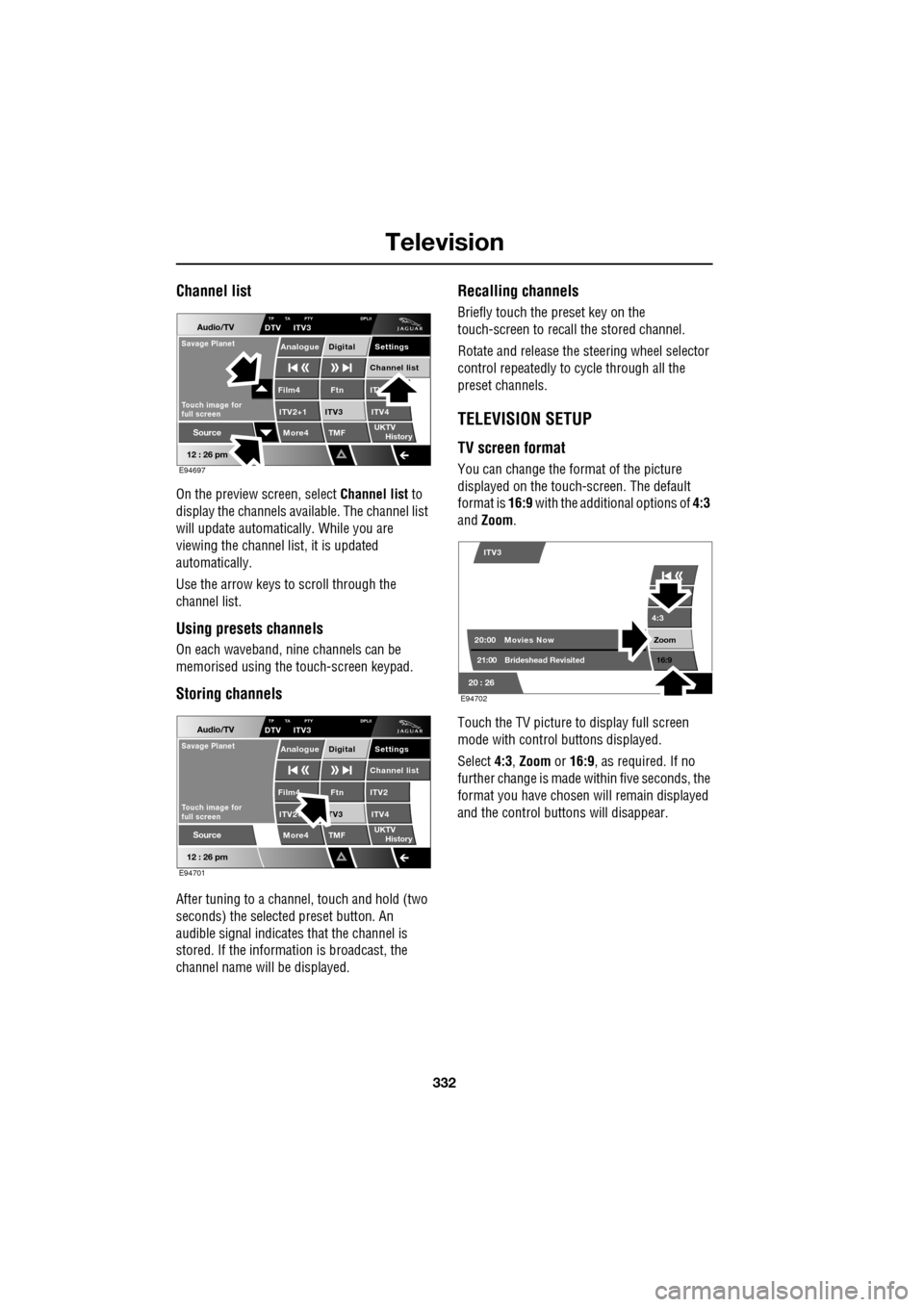
On the preview screen, select Channel list to
display the channels available. The channel list
will update automatically. While you are
viewing the channel list, it is updated
automatically.
Use the arrow keys to scroll through the
channel list.
Using presets channels
On each waveband, ni ne channels can be
memorised using the touch-screen keypad.
Storing channels
After tuning to a channe l, touch and hold (two
seconds) the selected preset button. An
audible signal i ndicates that the channel is
stored. If the informat ion is broadcast, the
channel name wi ll be displayed.
Recalling channels
Briefly touch the preset key on the
touch-screen to recall the stored channel.
Rotate and release the steering wheel selector
control repeatedly to cycle through all the
preset channels.
TELEVISION SETUP
TV screen format
You can change the format of the picture
displayed on the touch-screen. The default
format is 16:9 with the additional options of 4:3
and Zoom .
Touch the TV picture to display full screen
mode with control buttons displayed.
Select 4:3, Zoom or 16:9 , as required. If no
further change is made within five seconds, the
format you have chosen will remain displayed
and the control butt ons will disappear.
Audio/TV
12 : 26 pm
More4 TMF
TP TA PTY DPLIIDTV ITV3
UKTV
HistorySource
ITV
ITV2+1 ITV4Film4
Settings
Channel listAnalogue Digital
Ftn
ITV3
Touch image for
full screen
Savage Planet
E94697
Audio/TV
12 : 26 pm
More4 TMF
TP TA PTY DPLIIDTV ITV3
UKTV
HistorySource
ITV2
ITV2+ ITV4Film4
Settings
Channel listAnalogue Digital
Ftn
TV3
Touch image for
full screen
Savage Planet
E94701
4:3
Zoom 16:9
ITV3
20:0021:00 Movies Now
Brideshead Revisited
20 : 26 E94702