2009 HYUNDAI VERACRUZ lock
[x] Cancel search: lockPage 98 of 425

417
Features of your vehicle
D050300AENImpact sensing door unlock sys-
tem (if equipped)All doors will be automatically unlocked
when an impact causes the air bags to
deploy.D050400BEN-EUAuto door lock/unlock feature All doors will be automatically locked
when shifting the transaxle shift lever
out of P(Park).
All doors will be automatically unlocked
when shifting the transaxle shift lever
into P(Park).✽ ✽
NOTICEAn authorized HYUNDAI dealer can
activate or deactivate some auto door
lock/unlock features as follows;
• Speed sensing auto door lock
• Auto door unlock by using the dri-
ver's door lock button
• Auto door unlock when the ignition
key is removed from the ignition
switch
• Auto door lock/unlock by shifting the
transaxle shift lever out of P (Park) or
into P (Park)
If you want to activate or deactivate
some door lock/unlock feature, consult
an authorized HYUNDAI dealer.
D050500AENChild-protector rear door lockThe child safety lock is provided to help
prevent children from accidentally open-
ing the rear doors from inside the vehicle.
The rear door safety locks should be
used whenever children are in the vehi-
cle.
1. Open the rear door.
2. Push the child safety lock located on
the rear edge of the door to the lock
( ) position. When the child safety
lock is in the lock position, the rear
door will not open even though the
inner door handle is pulled.3. Close the rear door.
To open the rear door, pull the outside
door handle (1).
Even though the doors may be unlocked,
the rear door will not open by pulling the
inner door handle (2) until the rear door
child safety lock is unlocked ( ).
WARNING
- Rear door
locks
If children accidentally open the
rear doors while the vehicle is in
motion, they could fall out and be
severely injured or killed. To pre-
vent children from opening the rear
doors from the inside, the rear door
safety locks should be used when-
ever children are in the vehicle.
OEN046010
procarmanuals.com
Page 99 of 425

Features of your vehicle18 4D070100AEN-EEOpening the tailgate The tailgate is locked or unlocked
when all doors are locked or unlocked
with the key, transmitter (or smart key)
or central door lock switch.
Only the tailgate is unlocked if the tail-
gate unlock button on the transmitter
(or smart key) is pressed. Once the
tailgate is opened and then closed, the
tailgate is locked automatically.
If unlocked, the tailgate can be opened
by pressing the handle switch and
pulling the handle up.
✽ ✽
NOTICEIn cold and wet climates, door lock and
door mechanisms may not work proper-
ly due to freezing conditions.
D070200AUNClosing the tailgateTo close the tailgate, lower and push
down the tailgate firmly. Make sure that
the tailgate is securely latched.
TAILGATE
OEN046011
WARNING
The tailgate swings upward. Make
sure no objects or people are near
the rear of the vehicle when open-
ing the tailgate.
CAUTION
Make certain that you close the tail-
gate before driving your vehicle.
Possible damage may occur to the
tailgate lift cylinders and attached
hardware if the tailgate is not
closed prior to driving.
WARNING
- Exhaust
fumes
If you drive with the tailgate open,
you will draw dangerous exhaust
fumes into your vehicle which can
cause serious injury or death to
vehicle occupants.
If you must drive with the tailgate
open, keep the air vents and all
windows open so that additional
outside air comes into the vehicle.
procarmanuals.com
Page 100 of 425

419
Features of your vehicle
D070300AENEmergency tailgate safety releaseYour vehicle is equipped with the emer-
gency tailgate safety release lever locat-
ed on the bottom of the tailgate. When
someone is inadvertently locked in the
luggage compartment, if the lever is
pushed, the tailgate latch mechanism is
released and the tailgate is opened by
pushing rearward.
WARNING
For emergencies, be fully aware
of the location of the emergency
tailgate safety release lever in
this vehicle and how to open the
tailgate if you are accidentally
locked in the luggage compart-
ment.
No one should be allowed to
occupy the luggage compartment
of the vehicle at any time. The
luggage compartment is a very
dangerous location in the event
of a crash.
Use the release lever for emer-
gencies only. Use extreme cau-
tion, especially while the vehicle
is in motion.
OEN046014
WARNING
- Rear cargo
area
Occupants should never ride in the
rear cargo area where no restraints
are available. To avoid injury in the
event of an accident or sudden
stops, occupants should always be
properly restrained.
procarmanuals.com
Page 102 of 425
421
Features of your vehicle
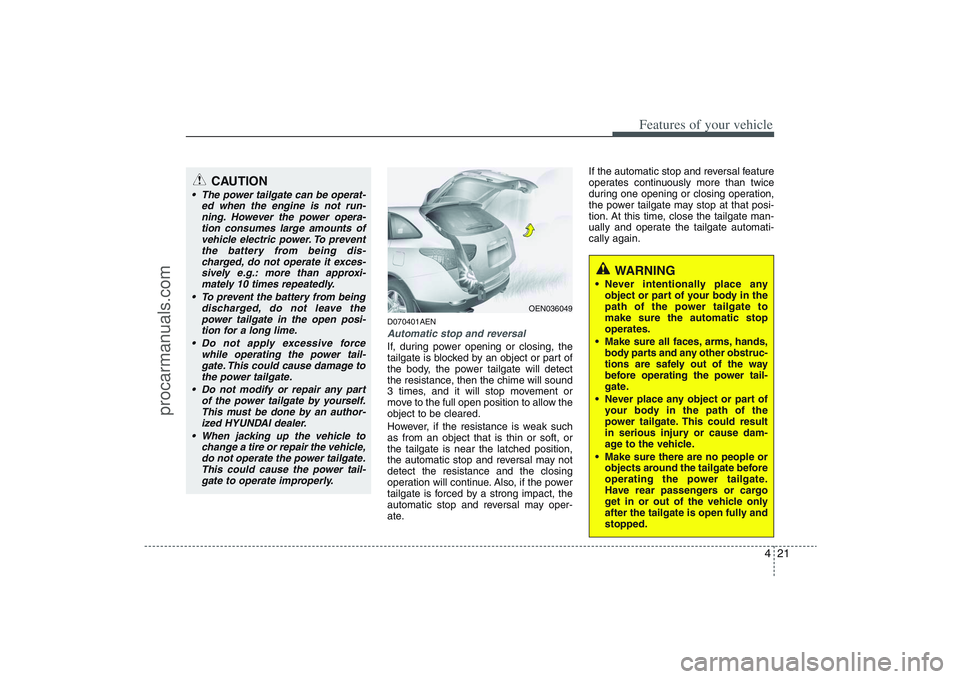
D070401AENAutomatic stop and reversalIf, during power opening or closing, the
tailgate is blocked by an object or part of
the body, the power tailgate will detect
the resistance, then the chime will sound
3 times, and it will stop movement or
move to the full open position to allow the
object to be cleared.
However, if the resistance is weak such
as from an object that is thin or soft, or
the tailgate is near the latched position,
the automatic stop and reversal may not
detect the resistance and the closing
operation will continue. Also, if the power
tailgate is forced by a strong impact, the
automatic stop and reversal may oper-
ate.If the automatic stop and reversal feature
operates continuously more than twice
during one opening or closing operation,
the power tailgate may stop at that posi-
tion. At this time, close the tailgate man-
ually and operate the tailgate automati-
cally again.
OEN036049
WARNING
Never intentionally place any
object or part of your body in the
path of the power tailgate to
make sure the automatic stop
operates.
Make sure all faces, arms, hands,
body parts and any other obstruc-
tions are safely out of the way
before operating the power tail-
gate.
Never place any object or part of
your body in the path of the
power tailgate. This could result
in serious injury or cause dam-
age to the vehicle.
Make sure there are no people or
objects around the tailgate before
operating the power tailgate.
Have rear passengers or cargo
get in or out of the vehicle only
after the tailgate is open fully and
stopped.
CAUTION
The power tailgate can be operat-
ed when the engine is not run-
ning. However the power opera-
tion consumes large amounts of
vehicle electric power. To prevent
the battery from being dis-
charged, do not operate it exces-
sively e.g.: more than approxi-
mately 10 times repeatedly.
To prevent the battery from being
discharged, do not leave the
power tailgate in the open posi-
tion for a long lime.
Do not apply excessive force
while operating the power tail-
gate. This could cause damage to
the power tailgate.
Do not modify or repair any part
of the power tailgate by yourself.
This must be done by an author-
ized HYUNDAI dealer.
When jacking up the vehicle to
change a tire or repair the vehicle,
do not operate the power tailgate.
This could cause the power tail-
gate to operate improperly.
procarmanuals.com
Page 104 of 425

423
Features of your vehicle
Also, the tailgate can be opened or
closed manually by pressing the tail-
gate handle switch and pulling the han-
dle up or pushing the tailgate down-
ward.
D070404AEN-EEPower tailgate operation Push the power tailgate main control
button on the driver side crash pad to
open or close the power tailgate.
However, the power tailgate will not
open with the main control button
when all doors and tailgate are locked
and closed and the key is removed
from the ignition switch.
The power tailgate can be opened or
closed by the transmitter (or smart key)
regardless of the door lock status.
When the power tailgate is operated
with the main or sub control button or
transmitter (or smart key), the chime
sounds and hazard warning lights flash
3 times. When the power ON/OFF button is ON
(depressed), do as follows to open or
close the power tailgate:
- Pushing the sub control button on the
bottom of the tailgate will close the
power tailgate automatically.
- Pressing the tailgate handle switch
will open the power tailgate automat-
ically when the tailgate is unlocked.
OEN036051
On the driver side crash pad
OEN046013
On the tailgate
WARNING
Do not allow children to play with
the power tailgate. Keep the power
ON/OFF button in the OFF (not
depressed) position when not in
use. Serious injury or death can
result from unintentional power
operation by a child.
CAUTION
Close the tailgate, and keep the
power ON/OFF button in the OFF
(not depressed) position before
washing the vehicle in an automatic
car wash.
procarmanuals.com
Page 106 of 425

425
Features of your vehicle
D080000AEN(1) Driver’s door power window switch
(2) Front passenger’s door power win-
dow switch
(3) Rear door (left) power window switch
(4) Rear door (right) power window
switch
(5) Window opening and closing
(6) Automatic power window up/down
(Driver’s window)
(7) Power window lock switch✽ ✽
NOTICEIn cold and wet climates, power windows
may not work properly due to freezing
conditions.
WINDOWS
OEN046015
procarmanuals.com
Page 107 of 425

Features of your vehicle26 4D080100AUNPower windowsThe ignition switch must be in the ON
position for power windows to operate.
Each door has a power window switch
that controls the door's window. The driv-
er has a power window lock switch which
can block the operation of passenger
windows. The power windows can be
operated for approximately 30 seconds
after the ignition key is removed or turned
to the ACC or LOCK position. However, if
the front doors are opened, the power
windows cannot be operated within the
30 second period after the ignition key
removal.✽ ✽
NOTICEWhile driving, if you notice buffeting
and pulsation (wind shock) with either
side window open, you should open the
opposite window slightly to reduce the
condition.
D080101AUNWindow opening and closingThe driver’s door has a master power
window switch that controls all the win-
dows in the vehicle.
To open or close a window, press down
or pull up the front portion of the corre-
sponding switch to the first detent posi-
tion (5).
D080103AUNAuto up/down window
(Driver's window)Depressing or pulling up the power win-
dow switch momentarily to the second
detent position (6) completely lowers or
lifts the window even when the switch is
released. To stop the window at the
desired position while the window is in
operation, pull up or depress and release
the switch to the opposite direction of the
movement.
OUN026012
OMG035014
procarmanuals.com
Page 108 of 425

427
Features of your vehicle
If the power window is not operated cor-
rectly, the automatic power window sys-
tem must be reset as follows:
1. Turn the ignition switch to the ON posi-
tion.
2. Close driver’s window and continue
pulling up on driver’s power window
switch for at least 1 second after the
window is completely closed.
Automatic reversal
If the upward movement of the window is
blocked by an object or part of the body,
the window will detect the resistance and
will stop upward movement. The window
will then lower approximately 11.8 in. (30
cm) to allow the object to be cleared.
If the window detects the resistance
while the power window switch is pulled
up continuously, the window will stop
upward movement then lower approxi-
mately 1 in. (2.5 cm). And if the power
window switch is pulled up continuously
again within 5 seconds after the window
is lowered by the automatic window
reversal feature, the automatic window
reversal will not operate.
✽ ✽
NOTICEThe automatic reverse feature for the
driver’s window is only active when the
“auto up” feature is used by fully
pulling up the switch. The automatic
reverse feature will not operate if the
window is raised using the halfway posi-
tion on the power window switch.
WARNING
Always check for obstructions
before raising any window to avoid
injuries or vehicle damage. If an
object less than 0.16 in. (4 mm) in
diameter is caught between the
window glass and the upper win-
dow channel, the automatic reverse
window may not detect the resist-
ance and will not stop and reverse
direction.
OUN026013
procarmanuals.com