2009 Hyundai Santa Fe AUX
[x] Cancel search: AUXPage 109 of 269
1FEATURES OF YOUR HYUNDAI
98
Press the SEEK switch 1 sec. or more.
1. RADIO mode When the SEEK (
) is pressed, the unit
will automatically tune to the next higher frequency and when the SEEK (
)
switch is pressed, it will automatically tune to the next lower frequency.
MODE Switch Press the MODE switch to select Ra- dio, Tape, CD (Compact Disc) and CDC (Compact Disc Changer).Each press of the switch changes the display as follows:
RADIO (FM1 FM2 AM) TAPE CD CDC
SEEK ( / ) Switch 2. TAPE mode
o Pressing the SEEK (
) will play the
beginning of the next music seg- ment.
o Pressing the SEEK (
) will start
replay at the beginning of the music just listened to.
3. CD (Compact Disc)/CDC (Compact Disc Changer) mode
o Press the SEEK (
) once to skip
forward to the beginning of the next track.
o Press the SEEK (
) once to skip
back to the beginning of the track.
MUTE Switch
o Press the MUTE switch to disappear the sound.
o Press the MUTE switch again to
reproduce the sound.
VOL (
/ ) Switch
o Press the VOL (
) switch to in-
crease volume.
o Press the VOL (
) switch to de-
cease volume.
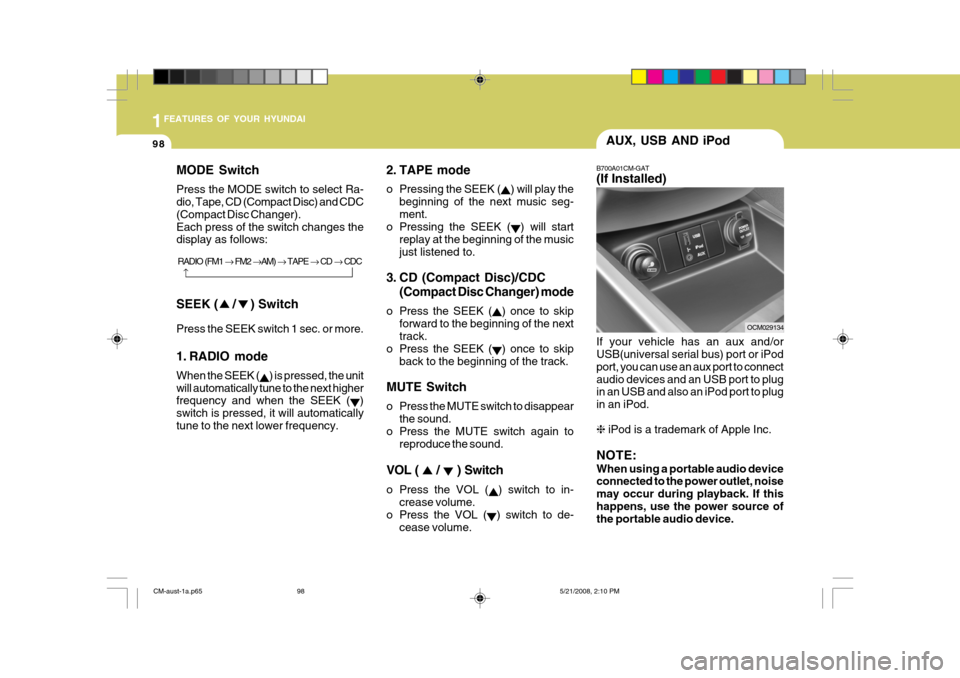
B700A01CM-GAT (If Installed) If your vehicle has an aux and/or USB(universal serial bus) port or iPod port, you can use an aux port to connectaudio devices and an USB port to plug in an USB and also an iPod port to plug in an iPod. ❈ iPod is a trademark of Apple Inc.
NOTE: When using a portable audio device connected to the power outlet, noise may occur during playback. If thishappens, use the power source of the portable audio device.
OCM029134
AUX, USB AND iPod
CM-aust-1a.p65
5/21/2008, 2:10 PM
98
Page 135 of 269
1FEATURES OF YOUR HYUNDAI
124
TREBLE Control To increase the TREBLE, rotate theknob clockwise, while to decrease the TREBLE, rotate the knob counterclock-wise. FADER Control Turn the control knob clockwise to emphasize rear speaker sound(front speaker sound will be attenuated). Whenthe control knob is turned counterclock- wise, front speaker sound will be emphasized(rear speaker sound will beattenuated). BALANCE Control Rotate the knob clockwise to empha- size right speaker sound(left speaker soundwill be attenuated). When the control knob is turned counter clockwise, left speaker sound will be emphasized(right speaker sound will be attenuated). 9. TA Selection Button In FM, CD, AUX mode, turns on/off the reception of TA channels of RDS. 10. PTY(FLDR) Button
o Moves [FOLDER
] Button when
searching PTY in RDS Broadcasting Program Type selection.
o Moves [PTY
] button when search-
ing PTY in RDS Broadcasting Pro- gram Type selection.
CM-aust-1b.p65 5/19/2008, 6:33 PM
124
Page 136 of 269
1
FEATURES OF YOUR HYUNDAI
125
1
FEATURES OF YOUR HYUNDAI
125
1
FEATURES OF YOUR HYUNDAI
125
1
FEATURES OF YOUR HYUNDAI
125
1
FEATURES OF YOUR HYUNDAI
125
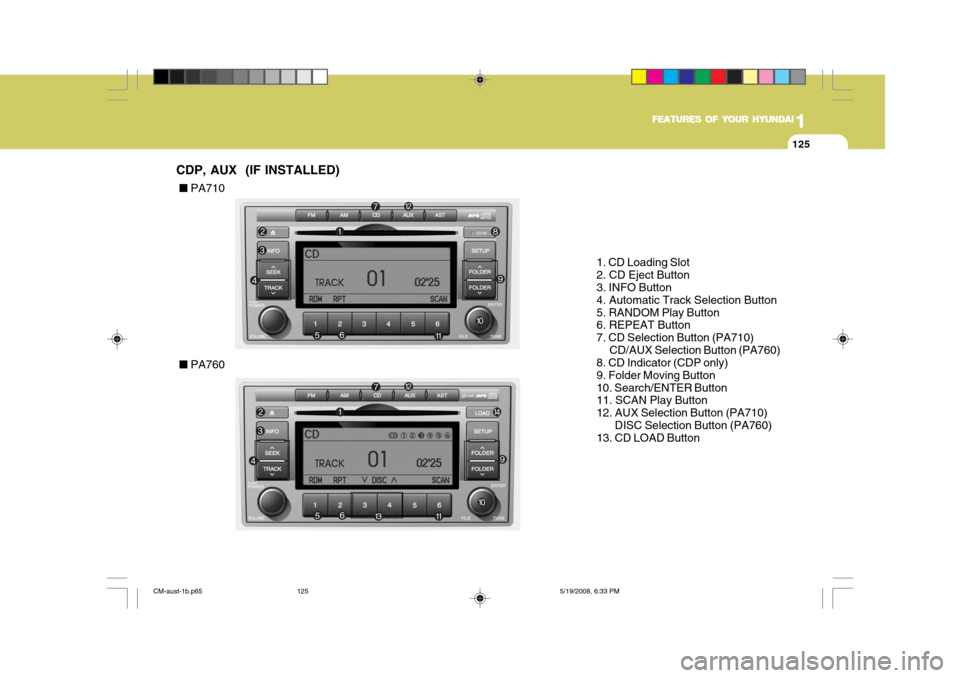
1. CD Loading Slot 2. CD Eject Button 3. INFO Button 4. Automatic Track Selection Button5. RANDOM Play Button 6. REPEAT Button 7. CD Selection Button (PA710) CD/AUX Selection Button (PA760)
8. CD Indicator (CDP only)9. Folder Moving Button10. Search/ENTER Button 11. SCAN Play Button 12. AUX Selection Button (PA710)
DISC Selection Button (PA760)
13. CD LOAD Button
CDP, AUX (IF INSTALLED) ■
PA710
■ PA760
CM-aust-1b.p65 5/19/2008, 6:33 PM
125
Page 138 of 269
1
FEATURES OF YOUR HYUNDAI
127
1
FEATURES OF YOUR HYUNDAI
127
1
FEATURES OF YOUR HYUNDAI
127
1
FEATURES OF YOUR HYUNDAI
127
1
FEATURES OF YOUR HYUNDAI
127
7. CD or CD/AUX Selection But- ton
CD Selection Button If the CD is loaded, turns to CD mode. If no CD, it displays "NO Disc" for 3seconds and returns to th previous mode. CD/AUX Selection Button If the auxiliary device is connected, it switches to the AUX mode from theother mode to play the sound from the auxiliary player. If the CD is loaded, turns to CD mode, and if a device isconnected to AUX then it toggles. CD ➟AUX ➟CD... when the button is
pressed each time.(It will not turn to AUX if the auxiliary device is not con- nected) If no CD and auxiliary device is not connected, it displays "NO Media"for 3 seconds and returns to the previ- ous mode. 8. CD Indicator(CDP Only) When car ignition switch is ACC or ON and if the CD is loaded, this indicator is lighted. If the CD is ejected the light is turned off. 9. Folder Moving Button
o Moves [FOLDER
] button child
folder of the current folder and dis- plays the first song in the folder.Press TUNE/ ENTER knob to move to the folder displayed. It will play the first song in the folder.
o Moves [CAT
], [PTY ],
[FOLDER
] button parent folder
and displays the first song in the folder. Press TUNE/ENTER knob to move to the folder displayed.
10. Search/ENTER Button Turn this button clockwise to display the songs next to the currently played song. Turn the button counterclock-wise to display the songs before the currently played song. Press the button to skip and play the selected song. 11. SCAN Play Button Plays first 10 seconds of each song in the DISC. To cancel the mode, pressthe button once again. 12. AUX or DISC Selection But-
ton
AUX selection button If the auxiliary device is connected, it turns to AUX mode from the other modeto play the sound from the auxiliary player. If no auxiliary device is con- nected, it displays "NO Media" for 3seconds and returns to the previous mode. DISC selection button
o [DISC
] Change Button Changes
disc to the previous disc.
o [DISC
] Change Button Changes
disc to the next disc.
13. CD LOAD Button Push [LOAD] button to load CDs to available CDC deck (from 1~6). Push [LOAD] button for more than 2 seconds to load into all available decks.The last CD will play. 10 seconds idle status will disable loading process.
CM-aust-1b.p65 5/19/2008, 6:33 PM
127
Page 142 of 269
1
FEATURES OF YOUR HYUNDAI
131
1
FEATURES OF YOUR HYUNDAI
131
1
FEATURES OF YOUR HYUNDAI
131
1
FEATURES OF YOUR HYUNDAI
131
1
FEATURES OF YOUR HYUNDAI
131
1. INFO Selection Button Displays the information of the file cur- rently played in the order of FILE NAME ➟ TITLE ➟ARTIST ➟ALBUM ➟FOLDER
➟ TOTAL FILE ➟NORMAL DISPLAY ➟
FILE NAME ➟... (Displays no informa-
tion if the file has no song information.) 2. Track Moving Button
o Press the [TRACK
] button for
less than 0.8 second to play from the beginning of the song currently played. Press the button for less than 0.8 second and press it againwithin 1 seconds to move and play the previous track. Press the button for 0.8 second or longer to play thesong in reverse direction in fast speed.
o Press the [SEEK
] button for less
than 0.8 second to move to the nexttrack. Press the button for 0.8 second or longer to play the song in forward direction in fast speed. 3. RANDOM Playback Button Press this button for less than 0.8 seconds to activate 'RDM' mode and more than 0.8 seconds to activate 'ALLRDM' mode.
o RDM : Only files in a folder are
played back in a random sequence.
o ALL RDM : All files in a USB memory
are played back in the random se- quence.
4. REPEAT Button Press this button for less than 0.8 seconds to activate 'RPT' mode and more than 0.8 seconds to activate 'FLD RPT' mode.
o RPT : Only a file is repeatedly played back.
o FLD RPT : Only files in a folder are
repeatedly played back.
5. USB Selection Button If USB is connected, it switches to the USB mode from the other mode to playthe song files stored in the USB. If no CD and auxiliary device is not con- nected, it displays "NO Media" for 3seconds and returns to the previous mode. 6. Folder Moving Button
o Moves [FOLDER
] button child
folder of the current folder and dis- plays the first song in the folder.Press TUNE/ ENTER knob to move to the folder displayed. It will play the first song in the folder.
o Moves [CAT
] button parent folder
and displays the first song in the folder. Press TUNE/ENTER knob tomove to the folder displayed.
7. Search/ENTER Button Turn this button clockwise to display the songs next to the currently played song. Turn the button counterclock-wise to display the songs before the currently played song. Press the button to skip and play the selected song. 8. SCAN Selection Button Plays 10 seconds of each song in the USB device. Press the button onceagain to cancel scanning.
CM-aust-1b.p65 5/19/2008, 6:33 PM
131
Page 144 of 269
1
FEATURES OF YOUR HYUNDAI
133
1
FEATURES OF YOUR HYUNDAI
133
1
FEATURES OF YOUR HYUNDAI
133
1
FEATURES OF YOUR HYUNDAI
133
1
FEATURES OF YOUR HYUNDAI
133
In case the iPod exclusive cable is connected to the multiple terminal onthe left hand side of the driver's seat. When the iPod is connected, the 'iPod' icon will be displayed on the top leftcorner of the display screen. 1. INFO Selection Button Displays the information of the file cur- rently played in the order of TITLE ➟
ARTIST ➟ALBUM ➟NORMAL
DISPLAY ➟ TITLE ➟... (Displays no in-
formation if the file has no song infor- mation.) 2. Track Moving Button
o Press the [TRACK
] button for
less than 0.8 second to play from the beginning of the song currently played. Press the button for less than 0.8 second and press it againwithin 1 seconds to move and play the previous track. Press the button for 0.8 second or longer to play thesong in reverse direction in fast speed.
o Press the [SEEK
] button for less
than 0.8 second to move to the next track. Press the button for 0.8 sec- ond or longer to play the song in forward direction in fast speed. 3. RANDOM Playback Button Press the button for less than 0.8 sec- ond to activate or deactivate the ran- dom playback of the songs within thecurrent category. Press the button for longer than 0.8 second to randomly play all songs in the entire album of theiPod. Press the button once again to cancel the mode. 4. REPEAT Button Repeats the song currently played. 5. iPod Selection Button If iPod is connected, it switches to the iPod mode from the CD mode to play the song files stored in the iPod. If no CD and auxiliary device is not con-nected, it displays "NO Media" for 3 seconds and returns to the previous mode. 6. Category Selection Button Moves to the upper category from currentlyplayed category of the iPod.
To move to(play) the category(song)displayed, MENU(preset6) You will beable to search through the lower cat- egory of the selected category. The order of iPod's category is SONG,ALBUMES, ARTISTS, GENRES, and iPod. 7. Search/ENTER Button When you turn the button clockwise, it will display the songs(category) next to the song currently played(category in the same level). Also, when you turnthe button counterclockwise, it will dis- play the songs(category) before the song currently played(category in thesame level). If you want to listen to the song dis- played in the song category, press thebutton, then it will skip to the selected song and play.
CM-aust-1b.p65
5/19/2008, 6:33 PM
133
Page 145 of 269
1FEATURES OF YOUR HYUNDAI
134
NOTE - for using iPod device
o Some iPod models might not sup-port the communication protocol and the files will not be played.(iPod models supported: Mini, 4G, Photo, Nano, 5G)
o The order of search or playback of songs in the iPod can be differentfrom the order searched in the audio system.
o If the iPod crashes due to its own trouble, reset iPod. (Reset: Referto iPod manual)
o iPod may not operate normally on low battery.
! Caution in using iPod
device
o You need the power cable exclu- sive for iPod in order to operate iPod with the buttons on the audio system. The PC cable provided by Apple may cause malfunction anddo not use it for vehicle use.
o When connecting the device with
iPod cable, push in the jack fullynot to interfere with communica- tion.
o When adjusting the sound effects of iPod and the audio system, thesound effects of both devices will overlap each and might cause re-duce or distort the quality of the sound.
o Deactivate (turn off) the equalizer function of iPod when adjustingthe audio system’s volume, and turn off the equalizer of the audiosystem when using the equalizer of iPod.
o When the iPod cable is connected,the system can be switched to the AUX mode even without the iPod device and can cause noise. Dis- connect iPod cable when you arenot using the iPod device.
o When the iPod is not used at audio
system, iPod cable has to be sepa-rate from iPod device. Origin dis- play of iPod may not be displayed.
CM-aust-1b.p65 5/19/2008, 6:33 PM
134