2009 Hyundai Azera ignition
[x] Cancel search: ignitionPage 169 of 335

1FEATURES OF YOUR HYUNDAI
156
PA760SD01TG-AAT1. CD loading slotPlease face printed side upward and gen-
tly push in. When the ignition switch is on
ACC or ON and power is off, power is
automatically turned on if the CD is loaded.
This CDP supports 12 cm CD. If VCD, Data
CD are loaded, "Reading Error" message
will appear and CD will be ejected.2. CD IndicatorIf the LOAD button is pressed, this indicator
will begin to blink.3. CD eject ButtonPush
button to eject the CD during CD
playback. This button is enabled when
ignition switch is off.
4. CD LOAD ButtonPush [LOAD] button to load CDs to avail-
able CDC deck (from 1~6). Push [LOAD]
button for more than 2 seconds to load into
all available decks.
The last CD will play. 10 seconds idle
status will disable loading process.
5. CD/AUX Selection ButtonIf the auxiliary device is connected, it turns
to AUX MODE to play the sound from the
auxiliary player.
If no auxiliary device is connected, it dis-
plays ""NO MEDIA"" for 5 seconds and
returns to the previous mode.6. Automatic Track Selection Buttono Push [SEEK
] button for less than 0.8
second to play from the beginning of
current song.
o Push [SEEK ] button for less than 0.8
second and press again within 1 sec-
ond to play the previous song.
o Push [SEEK ] button for 0.8 or longer
to initiate reverse direction high speed
sound search of current song.
o Push [SEEK ] button for less than 0.8
second to play the next song.
o Push [SEEK ] button for 0.8 or longer
to initiate high speed sound search of
current song.
7. INFO ButtonDisplays the information of the current CD
TRACK in the order of DISC TITLE➟ DISC
ARTIST➟TRACK TITLE➟ TRACK
ARTIST➟TOTAL TRACK➟ Play Screen➟
DISC TITLE➟···.(not displayed if the infor-
mation is not available on the DISC.)8. TUNE/ENTER ButtonTurn this button clockwise to display songs
after current song.
Also, turn this button counterclockwise to
display songs before current song.
To listen to the displayed song, press the
button to skip to the song and play.
Pressing the button changes the BASS,
MIDDLE, TREBLE, FADER and BALANCE
TUNE mode. The mode selected is shown
on the display. After selecting each mode,
rotate the Audio control knob clockwise or
counterclockwise.
o BASS Control
To increase the BASS, rotate the knob
clockwise, while to decrease the BASS,
rotate the knob counterclockwise.
Page 179 of 335

1FEATURES OF YOUR HYUNDAI
166
1. FM Selection ButtonTurns to FM mode and toggles FM1 and
FM2 when the button is pressed each time.2. AM Selection ButtonPressing the AM button selects the AM
band. AM Mode is displayed on the LCD.3. CD Selection ButtonIf there is a cd in the CDP DECK it plays the
CD.
Press CD button to automatically insert CD
when the disc is ejected from the deck by
pressing CD EJECT.4. AUX Selection ButtonIf the auxiliary device is connected, it turns
to AUX MODE to play the sound from the
auxiliary player.
If no Disc and auxiliary device is con-
nected, it displays “NO Media” for 5 sec-
onds and returns to the previous mode.5. Automatic Channel Selection But-
tono When the [SEEK
] button is pressed,
it reduces the band frequency by 100khz
to automatically select channel. Stops
at the previous frequency if no channel
is found.o When the [SEEK
] button is pressed,
it increases the band frequency by
100khz to automatically select chan-
nel. Stops at the previous frequency if
no channel is found.
6. Power ON/OFF & Volume Control
ButtonTurns on/off the set when the IGNITION
SWITCH is on ACC or ON. If the button is
turned to the right, it increases the volume
and left, decreases the volume.7. SCAN ButtonIf this button is pressed, the frequencies
will become increased and receive the
corresponding broadcasts.
This function will play the frequencies for
5 seconds each and find other broadcasts
as the frequency increases.
Press the button again when desiring to
continue listening to the currently playing
broadcast.8. MUTE ButtonPress to temporarily cut off the Sound.9. SET UP ButtonPress this button to turn to the TEXT
SCROLL, and adjustment mode.If no action is taken for 5 seconds after
pressing the button, it will return to the play
mode.(After entering SET UP mode, move
between items using the left, right and
PUSH functions of the TUNE button.)
10. TUNE/ENTER ButtonTurn this button clockwise by one notch to
increase frequency by 200kHz from cur-
rent frequency.
Turn this button counterclockwise by one
notch to decrease frequency by 200kHz
from current frequency.
Press this button while holding SET UP
button to activate / inactivate the item to
select SET UP item using left and right
function of the Tune button.
Pressing the button changes the BASS,
MIDDLE, TREBLE, FADER and BALANCE
TUNE mode. The mode selected is shown
on the display. After selecting each mode,
rotate the Audio control knob clockwise or
counterclockwise.
o BASS Control
To increase the BASS, rotate the knob
clockwise, while to decrease the BASS,
rotate the knob counterclockwise.
Page 182 of 335
1
FEATURES OF YOUR HYUNDAI
169
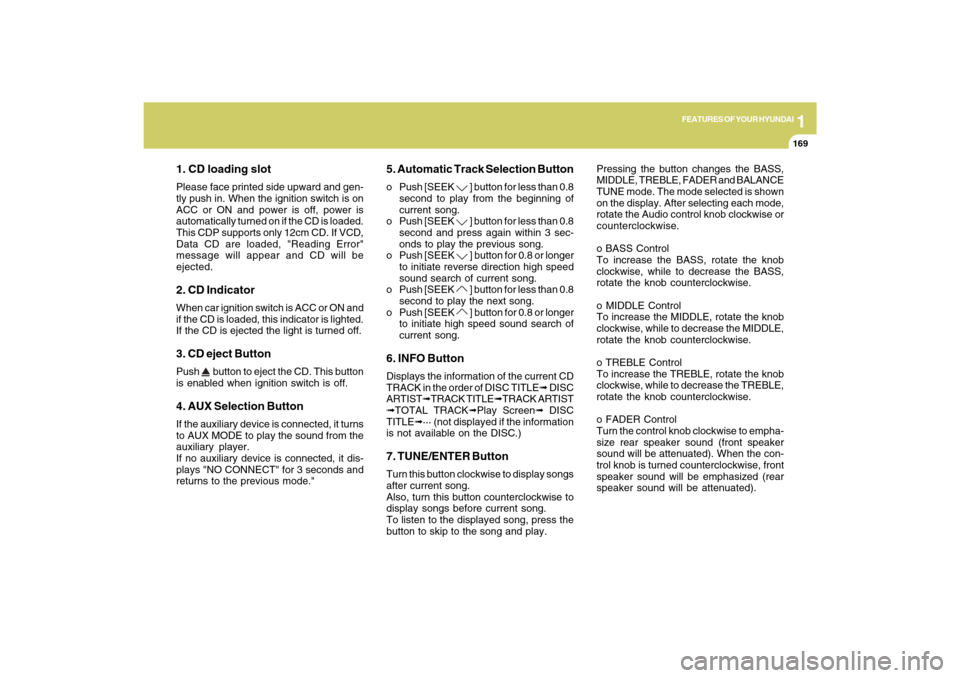
1. CD loading slotPlease face printed side upward and gen-
tly push in. When the ignition switch is on
ACC or ON and power is off, power is
automatically turned on if the CD is loaded.
This CDP supports only 12cm CD. If VCD,
Data CD are loaded, "Reading Error"
message will appear and CD will be
ejected.2. CD IndicatorWhen car ignition switch is ACC or ON and
if the CD is loaded, this indicator is lighted.
If the CD is ejected the light is turned off.3. CD eject ButtonPush
button to eject the CD. This button
is enabled when ignition switch is off.
4. AUX Selection ButtonIf the auxiliary device is connected, it turns
to AUX MODE to play the sound from the
auxiliary player.
If no auxiliary device is connected, it dis-
plays "NO CONNECT" for 3 seconds and
returns to the previous mode."
5. Automatic Track Selection Buttono Push [SEEK
] button for less than 0.8
second to play from the beginning of
current song.
o Push [SEEK ] button for less than 0.8
second and press again within 3 sec-
onds to play the previous song.
o Push [SEEK ] button for 0.8 or longer
to initiate reverse direction high speed
sound search of current song.
o Push [SEEK ] button for less than 0.8
second to play the next song.
o Push [SEEK ] button for 0.8 or longer
to initiate high speed sound search of
current song.
6. INFO ButtonDisplays the information of the current CD
TRACK in the order of DISC TITLE➟ DISC
ARTIST➟TRACK TITLE➟TRACK ARTIST
➟TOTAL TRACK➟Play Screen➟ DISC
TITLE➟··· (not displayed if the information
is not available on the DISC.)7. TUNE/ENTER ButtonTurn this button clockwise to display songs
after current song.
Also, turn this button counterclockwise to
display songs before current song.
To listen to the displayed song, press the
button to skip to the song and play.Pressing the button changes the BASS,
MIDDLE, TREBLE, FADER and BALANCE
TUNE mode. The mode selected is shown
on the display. After selecting each mode,
rotate the Audio control knob clockwise or
counterclockwise.
o BASS Control
To increase the BASS, rotate the knob
clockwise, while to decrease the BASS,
rotate the knob counterclockwise.
o MIDDLE Control
To increase the MIDDLE, rotate the knob
clockwise, while to decrease the MIDDLE,
rotate the knob counterclockwise.
o TREBLE Control
To increase the TREBLE, rotate the knob
clockwise, while to decrease the TREBLE,
rotate the knob counterclockwise.
o FADER Control
Turn the control knob clockwise to empha-
size rear speaker sound (front speaker
sound will be attenuated). When the con-
trol knob is turned counterclockwise, front
speaker sound will be emphasized (rear
speaker sound will be attenuated).
Page 192 of 335

1
FEATURES OF YOUR HYUNDAI
179
1. FM Selection ButtonTurns to FM mode and toggles FM1 and
FM2 when the button is pressed each time.2. AM Selection ButtonPressing the AM button selects the AM
band. AM Mode is displayed on the LCD.3. CD Selection ButtonIf there is a cd in the CDP DECK it plays the
CD.
Press CD button to automatically insert CD
when the disc is ejected from the deck by
pressing CD EJECT.4. AUX Selection ButtonIf the auxiliary device is connected, it turns
to AUX MODE to play the sound from the
auxiliary player.
If no Disc and auxiliary device is con-
nected, it displays “NO Media” for 5 sec-
onds and returns to the previous mode.
5. Automatic Channel Selection But-
tono When the [SEEK
]button is pressed,
it reduces the band frequency by 0.1Mhz
to automatically select channel. Stops
at the previous frequency if no channel
is found.
o When the [SEEK ]button is pressed,
it increases the band frequency by
0.1Mhz to automatically select chan-
nel. Stops at the previous frequency if
no channel is found.
6. Power ON/OFF & Volume Control
ButtonTurns on/off the set when the IGNITION
SWITCH is on ACC or ON. If the button is
turned to the right, it increases the volume
and left, decreases the volume.7. SCAN ButtonIf this button is pressed, the frequencies
will become increased and receive the
corresponding broadcasts.
This function will play the frequencies for
5 seconds each and find other broadcasts
as the frequency increases.
Press the button again when desiring to
continue listening to the currently playing
broadcast.
8. MUTE ButtonPress to temporarily cut off the Sound.9. SET UP ButtonPress this button to turn to the TEXT
SCROLL, and adjustment mode.
If no action is taken for 5 seconds after
pressing the button, it will return to the play
mode.(After entering SET UP mode, move
between items using the left, right and
PUSH functions of the TUNE button.)10. TUNE/ENTER ButtonTurn this button clockwise by one notch to
increase frequency by 200kHz from cur-
rent frequency.
Turn this button counterclockwise by one
notch to decrease frequency by 200kHz
from current frequency.
Press this button while holding SET UP
button to activate / inactivate the item to
select SET UP item using left and right
function of the Tune button.
Pressing the button changes the BASS,
MIDDLE, TREBLE, FADER and BALANCE
TUNE mode. The mode selected is shown
on the display. After selecting each mode,
rotate the Audio control knob clockwise or
counterclockwise.
Page 195 of 335
1FEATURES OF YOUR HYUNDAI
182
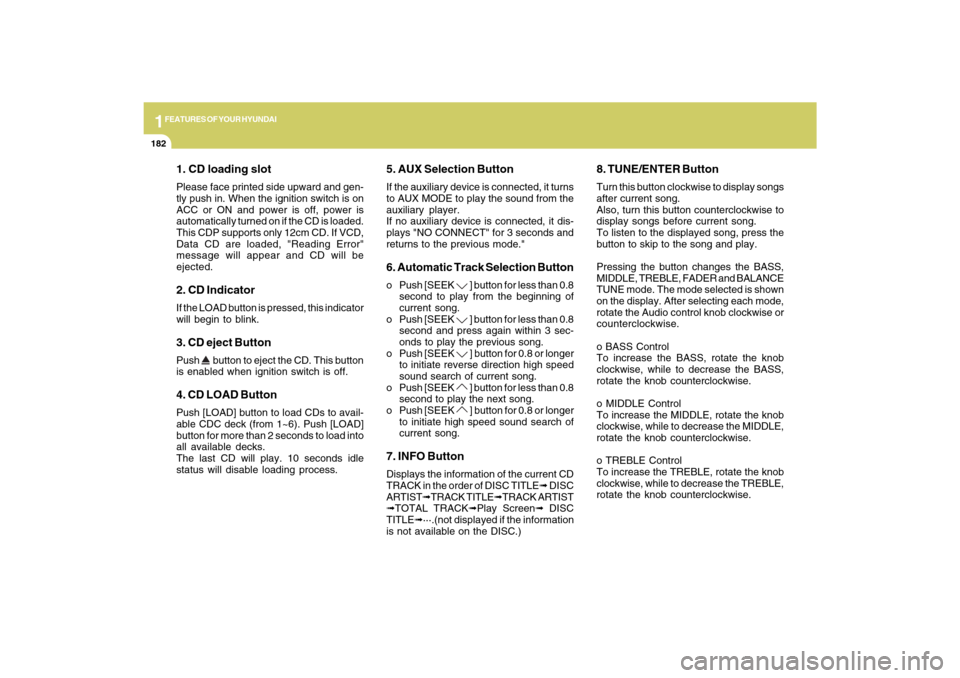
1. CD loading slotPlease face printed side upward and gen-
tly push in. When the ignition switch is on
ACC or ON and power is off, power is
automatically turned on if the CD is loaded.
This CDP supports only 12cm CD. If VCD,
Data CD are loaded, "Reading Error"
message will appear and CD will be
ejected.2. CD IndicatorIf the LOAD button is pressed, this indicator
will begin to blink.3. CD eject ButtonPush
button to eject the CD. This button
is enabled when ignition switch is off.
4. CD LOAD ButtonPush [LOAD] button to load CDs to avail-
able CDC deck (from 1~6). Push [LOAD]
button for more than 2 seconds to load into
all available decks.
The last CD will play. 10 seconds idle
status will disable loading process.
5. AUX Selection ButtonIf the auxiliary device is connected, it turns
to AUX MODE to play the sound from the
auxiliary player.
If no auxiliary device is connected, it dis-
plays "NO CONNECT" for 3 seconds and
returns to the previous mode."6. Automatic Track Selection Buttono Push [SEEK
] button for less than 0.8
second to play from the beginning of
current song.
o Push [SEEK ] button for less than 0.8
second and press again within 3 sec-
onds to play the previous song.
o Push [SEEK ] button for 0.8 or longer
to initiate reverse direction high speed
sound search of current song.
o Push [SEEK ] button for less than 0.8
second to play the next song.
o Push [SEEK ] button for 0.8 or longer
to initiate high speed sound search of
current song.
7. INFO ButtonDisplays the information of the current CD
TRACK in the order of DISC TITLE➟ DISC
ARTIST➟TRACK TITLE➟TRACK ARTIST
➟TOTAL TRACK➟Play Screen➟ DISC
TITLE➟···.(not displayed if the information
is not available on the DISC.)
8. TUNE/ENTER ButtonTurn this button clockwise to display songs
after current song.
Also, turn this button counterclockwise to
display songs before current song.
To listen to the displayed song, press the
button to skip to the song and play.
Pressing the button changes the BASS,
MIDDLE, TREBLE, FADER and BALANCE
TUNE mode. The mode selected is shown
on the display. After selecting each mode,
rotate the Audio control knob clockwise or
counterclockwise.
o BASS Control
To increase the BASS, rotate the knob
clockwise, while to decrease the BASS,
rotate the knob counterclockwise.
o MIDDLE Control
To increase the MIDDLE, rotate the knob
clockwise, while to decrease the MIDDLE,
rotate the knob counterclockwise.
o TREBLE Control
To increase the TREBLE, rotate the knob
clockwise, while to decrease the TREBLE,
rotate the knob counterclockwise.
Page 206 of 335
2
DRIVING YOUR HYUNDAI
3
!
!
PROPOSITION 65 WARNING:
Engine exhaust and a wide variety of
automobile components and parts, in-
cluding components found in the interior
furnishings in a vehicle, contain or emit
chemicals known to the State of Califor-
nia to cause cancer and birth defects
and reproductive harm. In addition, cer-
tain fluids contained in vehicles and cer-
tain products of component wear con-
tain or emit chemicals known to the State
of California to cause cancer and birth
defects or other reproductive harm.
BEFORE STARTING
THE ENGINEC020A02TG-AATBefore you start the engine, you should
always:
1. Look around the vehicle to be sure
there are no flat tires, puddles of oil,
water or other indications of possible
trouble.
2. After entering the car, check to be sure
the parking brake is engaged.
3. Check that all windows and lights are
clean.
4. Check that the interior and exterior
mirrors are clean and in position.
5. Check your seat, seatback and head-
rest to be sure they are in their proper
positions.
6. Lock all the doors.
7. Fasten your seat belt and be sure that
all other occupants have fastened
theirs.
8. Turn off all lights and accessories that
are not needed.
9. When you turn the ignition switch to
"ON", check that all appropriate warn-
ing lights are operating and that you
have sufficient fuel.
10. Check the operation of warning lights
and all bulbs when key is in the "ON"
position.
WARNING:
o Always wear appropriate shoes when
operating your vehicle. Unsuitable
shoes (high heels, ski boots, etc.) may
interfere with your ability to use the
brake and accelerator pedal.
o All passengers must be properly
belted whenever the vehicle is mov-
ing. Refer to pages: 1-27 through 1-
34 for more information on their proper
use.
o Always check the surrounding areas
near your vehicle for people, espe-
cially children, before putting a car
into 'drive'.
o When you intend to park or stop the
vehicle with the engine on, be careful
not to depress the accelerator pedal
for a long period of time. It may over-
heat the engine or exhaust system
and cause fire.
Page 207 of 335
2
DRIVING YOUR HYUNDAI
4
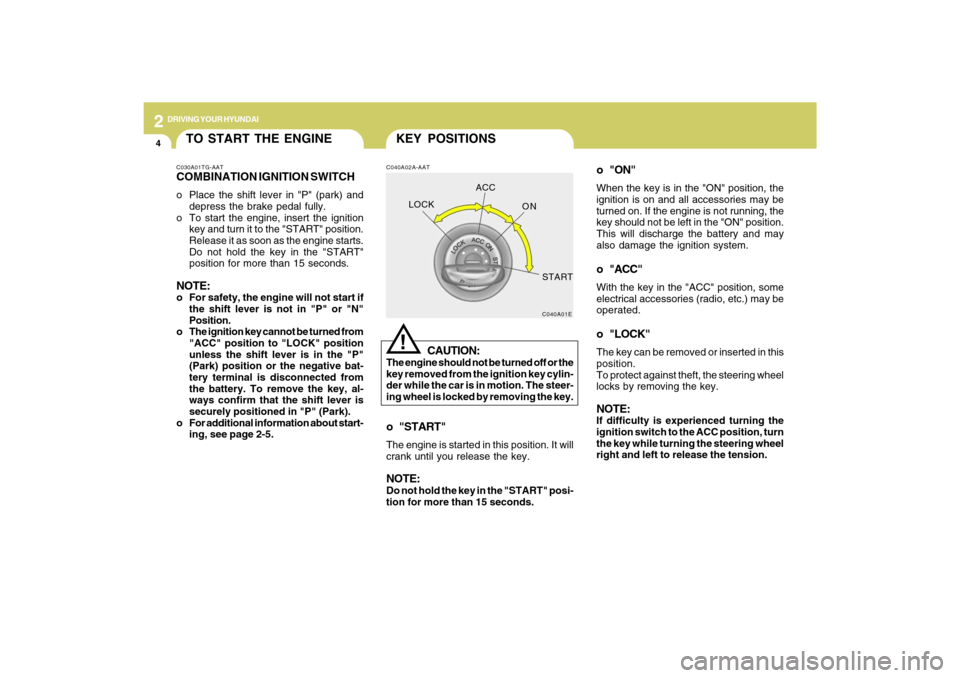
o "ON"When the key is in the "ON" position, the
ignition is on and all accessories may be
turned on. If the engine is not running, the
key should not be left in the "ON" position.
This will discharge the battery and may
also damage the ignition system.o "ACC"With the key in the "ACC" position, some
electrical accessories (radio, etc.) may be
operated.o "LOCK"The key can be removed or inserted in this
position.
To protect against theft, the steering wheel
locks by removing the key.NOTE:If difficulty is experienced turning the
ignition switch to the ACC position, turn
the key while turning the steering wheel
right and left to release the tension.
KEY POSITIONSC040A02A-AAT
CAUTION:
The engine should not be turned off or the
key removed from the ignition key cylin-
der while the car is in motion. The steer-
ing wheel is locked by removing the key.
!
o "START"The engine is started in this position. It will
crank until you release the key.NOTE:Do not hold the key in the "START" posi-
tion for more than 15 seconds.
C040A01E
LOCKACC
ON
START
TO START THE ENGINEC030A01TG-AATCOMBINATION IGNITION SWITCHo Place the shift lever in "P" (park) and
depress the brake pedal fully.
o To start the engine, insert the ignition
key and turn it to the "START" position.
Release it as soon as the engine starts.
Do not hold the key in the "START"
position for more than 15 seconds.NOTE:o For safety, the engine will not start if
the shift lever is not in "P" or "N"
Position.
o The ignition key cannot be turned from
"ACC" position to "LOCK" position
unless the shift lever is in the "P"
(Park) position or the negative bat-
tery terminal is disconnected from
the battery. To remove the key, al-
ways confirm that the shift lever is
securely positioned in "P" (Park).
o For additional information about start-
ing, see page 2-5.
Page 208 of 335
2
DRIVING YOUR HYUNDAI
5
!
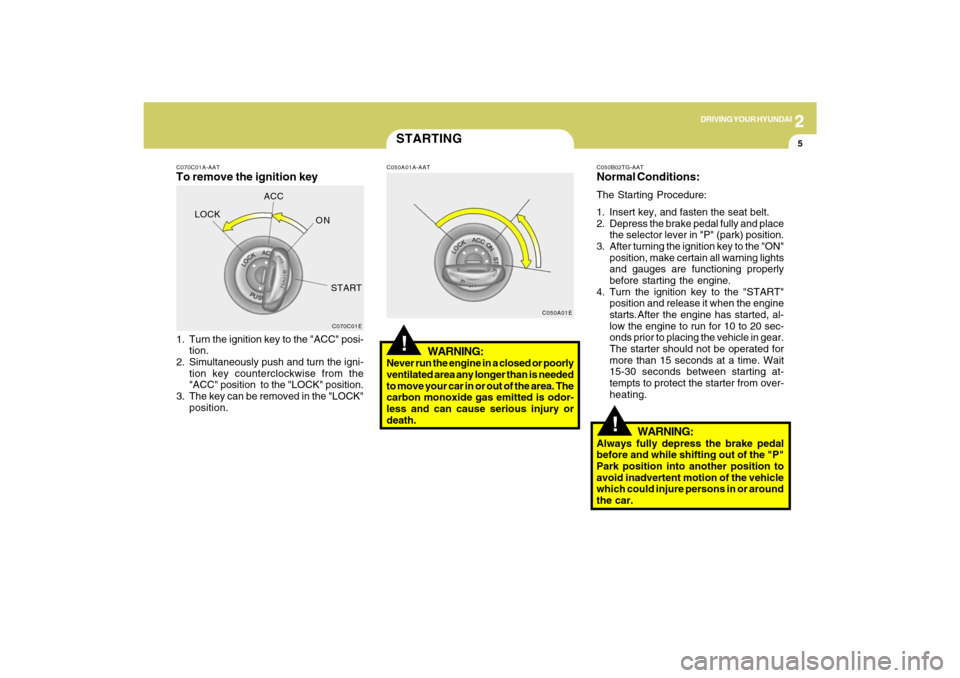
C070C01A-AATTo remove the ignition key1. Turn the ignition key to the "ACC" posi-
tion.
2. Simultaneously push and turn the igni-
tion key counterclockwise from the
"ACC" position to the "LOCK" position.
3. The key can be removed in the "LOCK"
position.
C070C01E
LOCKACC
ON
START
STARTING!
C050A01A-AAT
WARNING:
Never run the engine in a closed or poorly
ventilated area any longer than is needed
to move your car in or out of the area. The
carbon monoxide gas emitted is odor-
less and can cause serious injury or
death.
C050A01EC050B02TG-AAT
Normal Conditions:The Starting Procedure:
1. Insert key, and fasten the seat belt.
2. Depress the brake pedal fully and place
the selector lever in "P" (park) position.
3. After turning the ignition key to the "ON"
position, make certain all warning lights
and gauges are functioning properly
before starting the engine.
4. Turn the ignition key to the "START"
position and release it when the engine
starts.After the engine has started, al-
low the engine to run for 10 to 20 sec-
onds prior to placing the vehicle in gear.
The starter should not be operated for
more than 15 seconds at a time. Wait
15-30 seconds between starting at-
tempts to protect the starter from over-
heating.
WARNING:
Always fully depress the brake pedal
before and while shifting out of the "P"
Park position into another position to
avoid inadvertent motion of the vehicle
which could injure persons in or around
the car.