2009 HUMMER H3 lock
[x] Cancel search: lockPage 106 of 382

OnStar service is provided subject
to the OnStar Terms and Conditions
included in the OnStar Subscriber
glove box literature.
Some services such as Remote
Door Unlock or Stolen Vehicle
Location Assistance may not be
available until the owner of the
vehicle registers with OnStar.
After the rst prepaid year, contact
OnStar to select a monthly or
annual subscription payment plan.
If a payment plan is not selected,
the OnStar system and all services,
including airbag notication and
emergency services, may be
deactivated and no longer
available. For more information
visit onstar.com (U.S.) or onstar.ca
(Canada), or press the OnStar
button to speak with an advisor.
Not all OnStar services are available
on all vehicles. To check if this
vehicle is able to provide the
services described below, or for a
full description of OnStar servicesand system limitations, see the
OnStar Owner’s Guide in the
glove box or visit onstar.com (U.S.)
or onstar.ca (Canada), contact
OnStar at 1-888-4-ONSTAR
(1-888-466-7827) or TTY
1-877-248-2080, or press the
OnStar button to speak with an
OnStar advisor 24 hours a day,
7 days a week.
OnStar Services Available
with the Safe & Sound Plan
Automatic Notication of
Airbag Deployment
Advanced Automatic Crash
Notication (AACN) (If equipped)
Link to Emergency Services
Roadside Assistance
Stolen Vehicle Location
Assistance
Remote Door Unlock/Vehicle
Alert
OnStar Vehicle Diagnostic Email
GM Goodwrench On Demand
Diagnostics
OnStar Hands-Free Calling with
30 trial minutes
OnStar Virtual Advisor (U.S. Only)
OnStar Services Included with
Directions & Connections Plan
All Safe and Sound Plan Services
OnStar Turn-by-Turn Navigation
(If equipped) or Driving
Directions - Advisor delivered
RideAssist
Information and Convenience
Services
OnStar Hands-Free Calling
OnStar Hands-Free Calling allows
eligible OnStar subscribers to
make and receive calls using voice
commands. Hands-Free Calling
is fully integrated into the vehicle,
and can be used with OnStar
Pre-Paid Minute Packages.
2-40 Features and Controls
Page 114 of 382

Luggage Carrier
If the vehicle has this feature, cargo
can be loaded on top of the vehicle.
The luggage carrier consists of
siderails attached to the roof.
The crossrails attach into the
siderails and can be moved back
and forth to accommodate various
cargo sizes.
Notice:Loading cargo on the
luggage carrier that weighs more
than 250 lbs. (113 kg) or hangs
over the rear or sides of the
vehicle may damage the vehicle.
Load cargo only on top of the
crossrails and tie the cargo down
to the crossrail support cargo
tie-down loops, making sure
to fasten it securely
Do not exceed the maximum vehicle
capacity when loading your vehicle.
For more information on vehicle
capacity and loading, seeLoading
the Vehicle on page 4-35.Adjusting the Crossrails
To adjust the crossrails to t a load:
1. Turn the crossrail key
counterclockwise to unlock the
crossrail end cap.
2. Remove the end cap.
3. Pull the lever labeled “PULL”
from left to right to loosen the
crossrail.
4. Repeat Steps 1 through 3 to the
opposite end of the crossrail.5. Once both sides of the crossrail
are loose, adjust the crossrail to
the desired position.
6. Push the lever labeled “PULL”
from right to left to lock the
crossrail in place.
7. Reinstall the end cap and turn
the crossrail key to lock the
crossrail.
8. Repeat Steps 5 through 7 to the
opposite end of the crossrail.
Stop Tabs
If the vehicle has a sunroof, it has a
crossrail stop tab in the siderail.
This tab prevents the crossrail from
being moved past the opening of
the sunroof and cargo from
being loaded too far forward.
The vehicle may have cargo tie
downs. Once the cargo is loaded
onto the crossrails, use the cargo tie
downs to secure it. Do not load
cargo directly on the roof of the
vehicle. SeeCargo Tie Downs on
page 2-49for more information.
2-48 Features and Controls
Page 115 of 382

Rear Storage Area
The H3 has a rear storage area
located on the passenger side of the
cargo area. To open it, pull the
two tabs out and open lid.
Convenience Net
Use the convenience net, located in
the rear, to store small loads as far
forward as possible. The net should
not be used to store heavy loads.
Cargo Cover (H3)
Notice:Do not put items onto
the cargo cover. The weight of the
items could cause the attachment
clips to break. The cargo cover
could no longer be attached
and used. The repairs would not
be covered by the warranty.
Never put anything on top of the
cargo cover.
The vehicle may have a cargo
cover. It can be used to cover
items in the rear of the vehicle.To install the cover, place the loops
on each corner of the cover on
the four hooks in the rear of
the vehicle. The cover should be
stored securely when not in use.
Cargo Tie Downs
There may be four cargo tie-downs
that can be moved on the tracks
located on the roof. To move, loosen
the tie-down counterclockwise.
Turn clockwise to tighten and lock
in place.
Cargo Management
System (H3T)
The vehicle comes with a cargo
management system located in the
bed of the vehicle. The system
contains three rails located on the
front and sides of the bed.
The system has four adjustable
cargo tie-downs, that can be placed
on the upper and lower slides of
the rail.To adjust a tie-down, pull the locator
pin out and move the tie-down to
another location making sure
the locator pin lines up with a locator
hole on the rail. The tie-down pin
may not be installed correctly if the
pin does not line up, turn it over
and reinstall. The tie-down will not
move when the pin is completely
installed. The maximum load
for each rail is 500 lbs (227 kg).
The rails are notched at each end
which allows the tie-downs to
be removed and placed on another
rail. To remove, pull the locator
pin out and slide the tie-down to the
end of the rail and pull back.
Features and Controls 2-49
Page 119 of 382
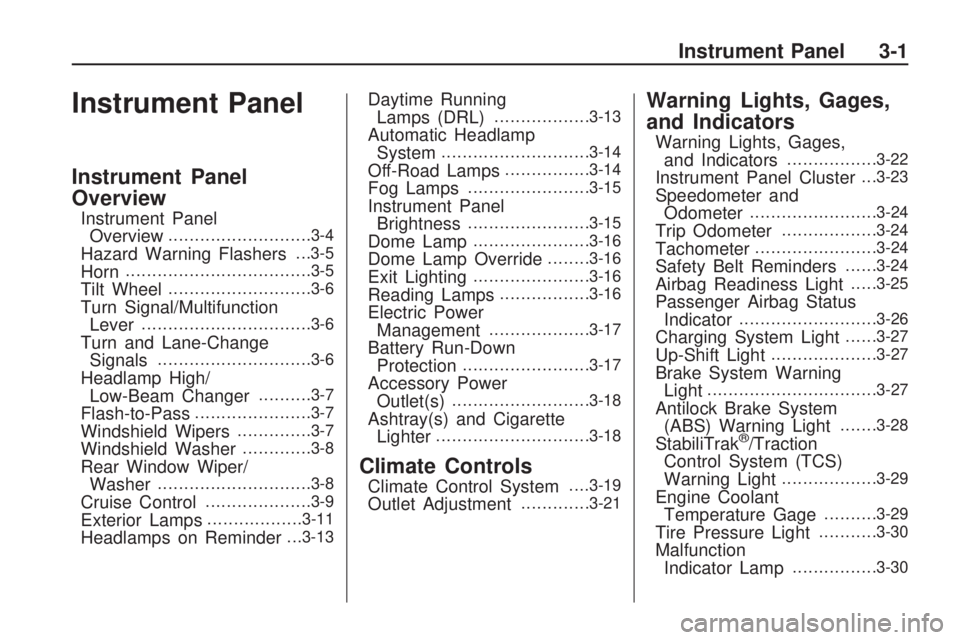
Instrument Panel
Instrument Panel
Overview
Instrument Panel
Overview...........................3-4
Hazard Warning Flashers. . .3-5
Horn...................................3-5
Tilt Wheel...........................3-6
Turn Signal/Multifunction
Lever................................3-6
Turn and Lane-Change
Signals.............................3-6
Headlamp High/
Low-Beam Changer..........3-7
Flash-to-Pass......................3-7
Windshield Wipers..............3-7
Windshield Washer.............3-8
Rear Window Wiper/
Washer.............................3-8
Cruise Control....................3-9
Exterior Lamps..................3-11
Headlamps on Reminder. . .3-13
Daytime Running
Lamps (DRL)..................3-13
Automatic Headlamp
System............................3-14
Off-Road Lamps................3-14
Fog Lamps.......................3-15
Instrument Panel
Brightness.......................3-15
Dome Lamp......................3-16
Dome Lamp Override........3-16
Exit Lighting......................3-16
Reading Lamps.................3-16
Electric Power
Management...................3-17
Battery Run-Down
Protection........................3-17
Accessory Power
Outlet(s)..........................3-18
Ashtray(s) and Cigarette
Lighter.............................3-18
Climate Controls
Climate Control System. . . .3-19
Outlet Adjustment.............3-21
Warning Lights, Gages,
and Indicators
Warning Lights, Gages,
and Indicators.................3-22
Instrument Panel Cluster. . .3-23
Speedometer and
Odometer........................3-24
Trip Odometer..................3-24
Tachometer.......................3-24
Safety Belt Reminders......3-24
Airbag Readiness Light.....3-25
Passenger Airbag Status
Indicator..........................3-26
Charging System Light......3-27
Up-Shift Light....................3-27
Brake System Warning
Light................................3-27
Antilock Brake System
(ABS) Warning Light.......3-28
StabiliTrak®/Traction
Control System (TCS)
Warning Light
..................3-29
Engine Coolant
Temperature Gage..........3-29
Tire Pressure Light...........3-30
Malfunction
Indicator Lamp................3-30
Instrument Panel 3-1
Page 120 of 382

Oil Pressure Light.............3-32
Security Light....................3-33
Cruise Control Light..........3-33
Highbeam On Light...........3-33
Fuel Gage........................3-33
Driver Information
Center (DIC)
Driver Information Center
(DIC)...............................3-34
DIC Operation and
Displays..........................3-34
DIC Warnings and
Messages........................3-37
Audio System(s)
Audio System(s)................3-41
Setting the Clock..............3-41
Radio(s)............................3-42
XM Radio Messages.........3-51
Navigation/Radio System. . .3-52
Bluetooth®........................3-52
Theft-Deterrent Feature.....3-62
Radio Reception...............3-62
Fixed Mast Antenna..........3-63
XM™ Satellite Radio
Antenna System..............3-63
3-2 Instrument Panel
Page 123 of 382

The main components of the
instrument panel are the following:
A.Outlet Adjustment on page 3-21.
B.Turn Signal/Multifunction Lever
on page 3-6.Windshield Wipers
on page 3-7.Windshield Washer
on page 3-8.Cruise Control on
page 3-9.
C.Horn on page 3-5.
D.Instrument Panel Cluster on
page 3-23.
E.Hazard Warning Flashers on
page 3-5.
F.Full-Time Four-Wheel Drive on
page 2-24.Passenger Airbag
Status Indicator on page 3-26.
Locking Rear Axle on page 4-8.
Locking Front Axle on page 4-9
(If Equipped) orTraction Control
System (TCS) on page 4-7.
G.Exterior Lamps on page 3-11.
Dome Lamp Override on
page 3-16.Instrument Panel
Brightness on page 3-15.
Fog Lamps on page 3-15.
OnStar
®System on page 2-39
andBluetooth®on page 3-52.H.Parking Brake on page 2-28.
I.Audio System(s) on page 3-41.
J.Climate Control System on
page 3-19.
K.Rear Window Wiper/Washer on
page 3-8(If Equipped).
L.Traction Control System (TCS)
on page 4-7(For vehicles with
Locking Front Axle).
M.Off-Road Lamps on page 3-14.
N. Shift Lever. SeeAutomatic
Transmission Operation on
page 2-19orManual
Transmission Operation on
page 2-22.
O.Accessory Power Outlet(s) on
page 3-18.
P.Glove Box on page 2-47.
Hazard Warning Flashers
|
(Hazard Warning Flasher):
Press this button located on
the instrument panel, to make the
front and rear turn signal lamps ash
on and off. This warns others that
you are having trouble.
Press
|again to turn the
ashers off.
Horn
To sound the horn, press the horn
symbol on the steering wheel pad.
Instrument Panel 3-5
Page 124 of 382

Tilt Wheel
A tilt wheel allows the steering
wheel to be adjusted.
The tilt lever is located on the left
side of the steering column.
To tilt, hold the steering wheel and
pull the tilt lever toward you.
Raise or lower the wheel to a
comfortable level, then release the
tilt lever to lock the wheel in
place.
Do not adjust the steering wheel
while driving.
Turn Signal/Multifunction
Lever
The lever on the left side of the
steering column includes the
following:
G: Turn and Lane Change
Signals
53: Headlamp High/Low-Beam
Changer
N: Windshield Wipers
L: Windshield Washer
J: Cruise Control
Flash-to-Pass.
Information for these features is on
the pages following.
Turn and Lane-Change
Signals
An arrow on the instrument panel
cluster ashes in the direction of the
turn or lane change.
Move the lever all the way up or
down to signal a turn.
Raise or lower the lever until the
arrow starts to ash to signal a lane
change. Hold it there until the
change is completed.
The lever returns to its starting
position whenever it is released.
If after signaling a turn or a
lane change the arrow ashes
rapidly or does not come on,
a signal bulb may be burned out.
3-6 Instrument Panel
Page 126 of 382

6(Low Speed):For steady
wiping at low speed, turn the band
away from you to the rst solid
position past the delay settings.
1(High Speed):For high-speed
wiping, turn the band to the
second solid position past the delay
settings.
9(Off):Move the band to off, to
stop the wipers.
Be sure to clear ice and snow from
the wiper blades before using
them. If they are frozen to the
windshield, carefully loosen or thaw
them. If the blades do become
worn or damaged, get new blades
or blade inserts.
Windshield wipers work in all power
modes, except when the ignition
is set to LOCK/OFF. After the
engine is turned off, wipers will work
in Retained Accessory Power
(RAP) mode until a door is opened.
SeeRetained Accessory Power
(RAP) on page 2-17.
Windshield Washer
L
(Washer Fluid):This feature is
located on the paddle marked
with
Lat the top of the
multifunction lever. Push the paddle
to spray washer uid on the
windshield. The wipers will clear the
window and then either stop or
return to the preset speed.
{CAUTION
In freezing weather, do not use
your washer until the windshield is
warmed. Otherwise the washer
uid can form ice on the
windshield, blocking your vision.
Rear Window
Wiper/Washer
For vehicles with this feature, the
knob is located on the instrument
panel below the climate controls.
Z(Rear Wiper):Turn to 1
for a slower wiping speed or to 2 for
a faster wiping speed.
0 (Off):Turn to 0 for off.
=(Washer Fluid):Press to wash
and wipe the window.
3-8 Instrument Panel