Page 225 of 427

TheHFLisoperatedbytheHFL
Talk and Back buttons on the left
side of the steering wheel. The next
f ew pages provide instructions f or all
basic f eatures of the HFL.Here are some guidelines f or using
voice control:
To enter a command, press and
release the Talk button. Then,
af ter the beep, say your command
in a clear, natural tone.
Close the windows and the
moonroof . Give a voice command in a clear
natural speaking voice without
pausing between words or
numbers. If the system cannot
recognize your command because
of the background noise, speak
louder.
If the HFL does not recognize a
command, its response is, ‘‘Pardon.’’
If it doesn’t recognize the
command a second time, its
response is, ‘‘Please repeat.’’ If it
doesn’t recognize the command a
third time, it plays the Help
prompt.
If the microphone picks up voices
other than yours, the system may
not interpret your voice
commands correctly.
Lower the A/C f an speed during
voice recognition operation.
Adjust the airflow from both the
dashboard and side vents so they
do not blow against the
microphone on the ceiling.
CONT INUED
How to Use the HFL
A ll phones may not
operate identically, and some
may cause inconsistent operation
of the HFL . Using Voice Control
BluetoothHandsFreeL ink
Features
221
NOTE:
�\f���—�\f���—�\f���y���\f��
��������y���
�(���������\f�y�\f�������y
2009 Ridgeline
Page 256 of 427
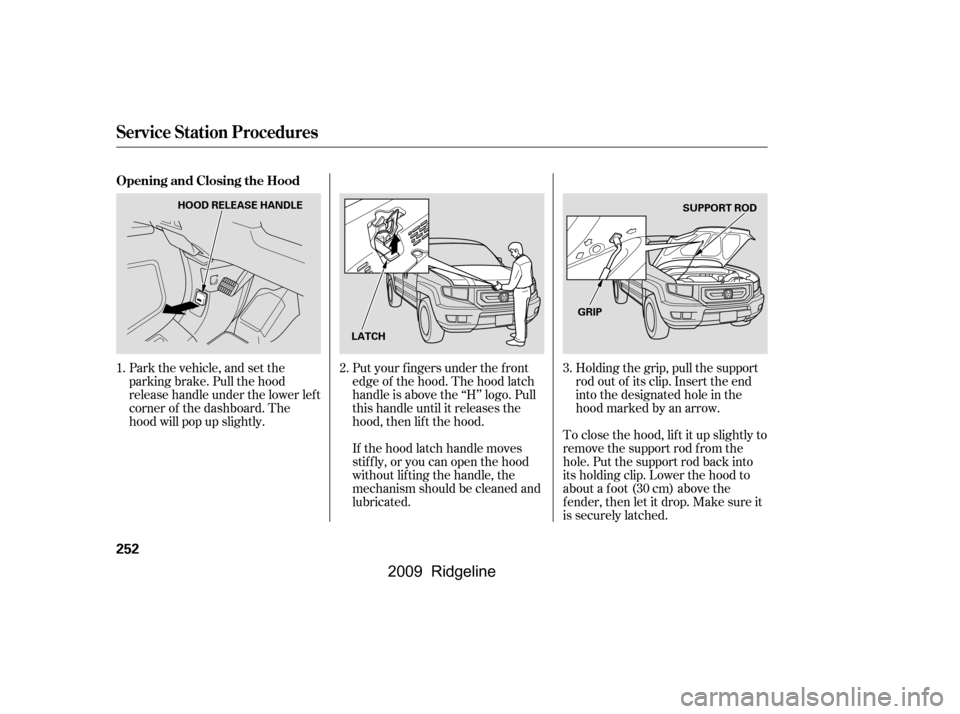
Put your f ingers under the f ront
edge of the hood. The hood latch
handle is above the ‘‘H’’ logo. Pull
this handle until it releases the
hood, then lif t the hood.To close the hood, lif t it up slightly to
remove the support rod f rom the
hole. Put the support rod back into
its holding clip. Lower the hood to
about a f oot (30 cm) above the
f ender, then let it drop. Make sure it
is securely latched.
If the hood latch handle moves
stif f ly, or you can open the hood
without lifting the handle, the
mechanism should be cleaned and
lubricated.
Park the vehicle, and set the
parking brake. Pull the hood
release handle under the lower lef t
corner of the dashboard. The
hood will pop up slightly.
Holding the grip, pull the support
rod out of its clip. Insert the end
into the designated hole in the
hood marked by an arrow.
1.
2.3.
Opening and Closing the Hood
Service Station Procedures
252
HOOD RELEASE HANDLE
LATCH SUPPORT ROD
GRIP
�\f���—�\f���—�\f���y���\f��
����
���y���
�(���������\f�y�\f�������y
2009 Ridgeline
Page 263 of 427
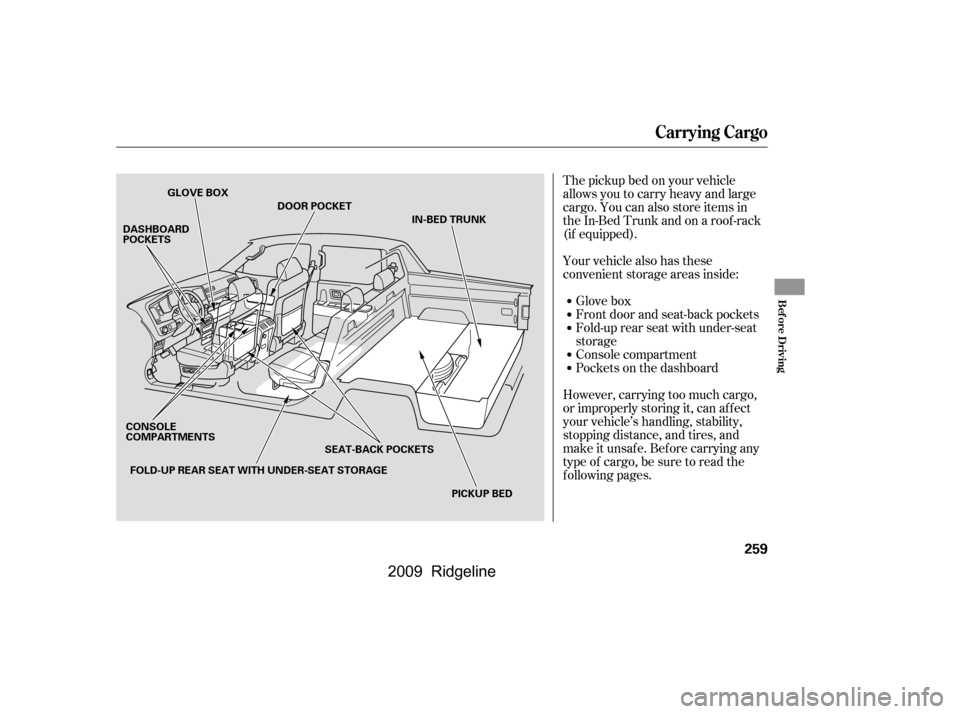
The pickup bed on your vehicle
allows you to carry heavy and large
cargo. You can also store items in
theIn-BedTrunkandonaroof-rack
(if equipped).
Your vehicle also has these
convenient storage areas inside:Glove box
Front door and seat-back pockets
Fold-up rear seat with under-seat
storage
Console compartment
Pockets on the dashboard
However, carrying too much cargo,
or improperly storing it, can af f ect
your vehicle’s handling, stability,
stopping distance, and tires, and
make it unsaf e. Bef ore carrying any
type of cargo, be sure to read the
f ollowing pages.
Carrying Cargo
Bef ore Driving
259
GLOVE BOX
DASHBOARD
POCKETS
PICKUP BED
CONSOLE
COMPARTMENTS
SEAT-BACK POCKETSIN-BED TRUNK
FOLD-UP REAR SEAT WITH UNDER-SEAT STORAGE DOOR POCKET
�����—�����—�����y������
��������y���
�(�����������y���������y
2009 Ridgeline
Page 319 of 427
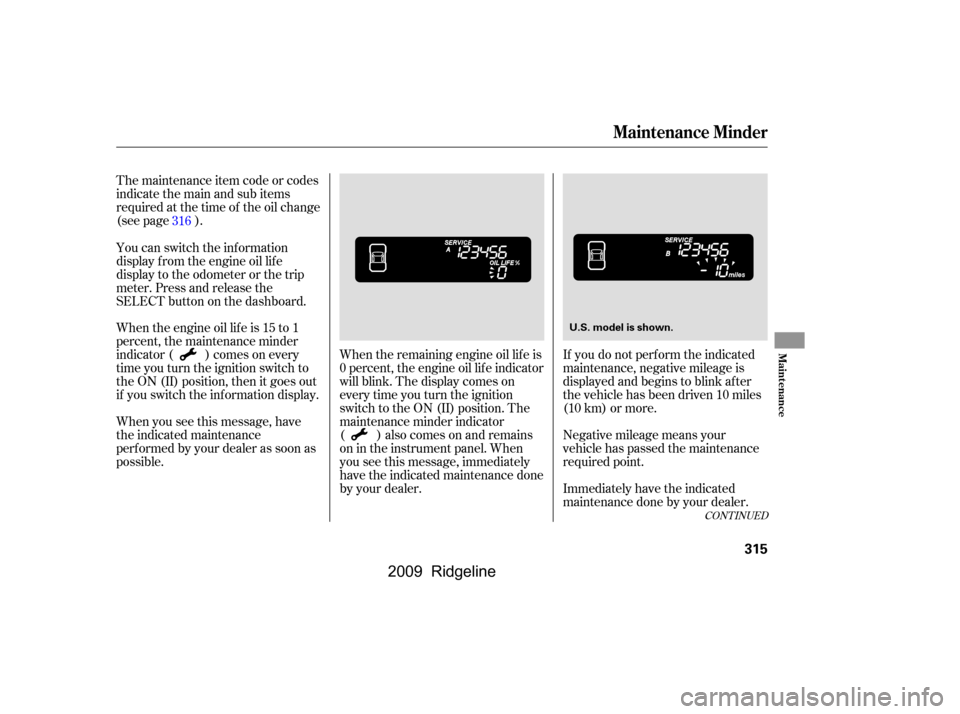
The maintenance item code or codes
indicate the main and sub items
required at the time of the oil change
(see page ).When the remaining engine oil lif e is
0 percent, the engine oil lif e indicator
will blink. The display comes on
everytimeyouturntheignition
switch to the ON (II) position. The
maintenance minder indicator
( ) also comes on and remains
on in the instrument panel. When
you see this message, immediately
have the indicated maintenance done
by your dealer.If you do not perf orm the indicated
maintenance, negative mileage is
displayed and begins to blink af ter
the vehicle has been driven 10 miles
(10 km) or more.
Negative mileage means your
vehicle has passed the maintenance
required point.
Immediately have the indicated
maintenance done by your dealer.
You can switch the information
display f rom the engine oil lif e
display to the odometer or the trip
meter. Press and release the
SELECT button on the dashboard.
Whentheengineoillifeis15to1
percent, the maintenance minder
indicator ( ) comes on every
time you turn the ignition switch to
the ON (II) position, then it goes out
if you switch the inf ormation display.
When you see this message, have
the indicated maintenance
perf ormed by your dealer as soon as
possible.
316
CONT INUED
Maintenance Minder
Maint enance
315
U.S. model is shown.
�\f���—�\f���—�\f���y���\f�������
���y���
�(���������\f�y�\f�����\f�y
2009 Ridgeline
Page 321 of 427
CONT INUED
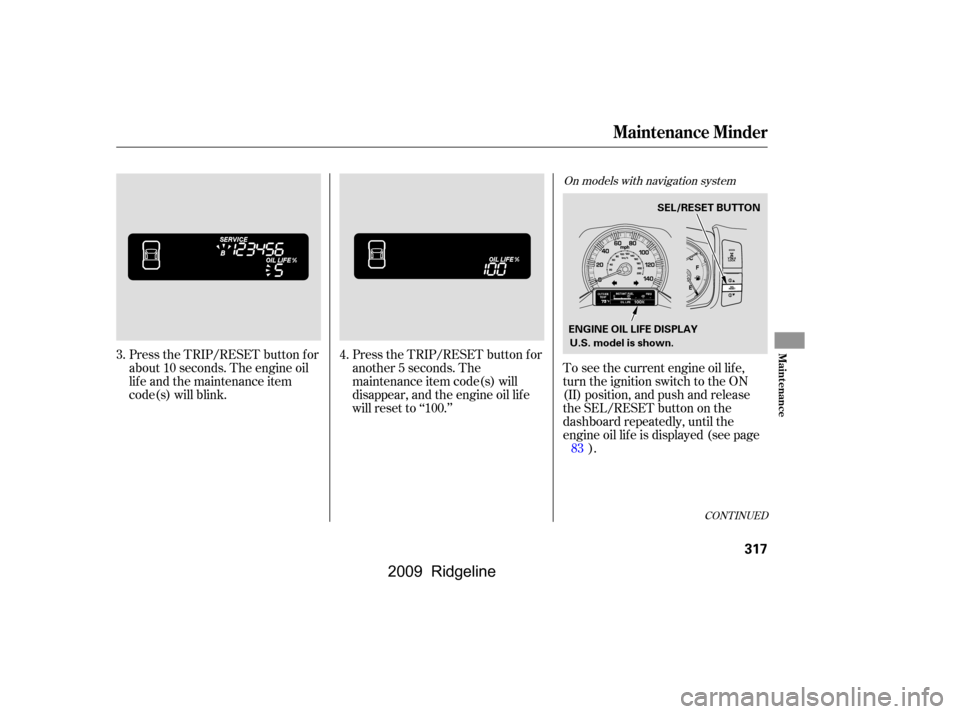
Press the TRIP/RESET button f or
about 10 seconds. The engine oil
lif e and the maintenance item
code(s) will blink.Press the TRIP/RESET button f or
another 5 seconds. The
maintenance item code(s) will
disappear, and the engine oil lif e
will reset to ‘‘100.’’To see the current engine oil lif e,
turn the ignition switch to the ON
(II) position, and push and release
the SEL/RESET button on the
dashboard repeatedly, until the
engine oil lif e is displayed (see page
).
3.
4.
83
On models with navigation system
Maintenance Minder
Maint enance
317
U.S. model is shown.SEL/RESET BUTTON
ENGINE OIL LIFE DISPLAY
�\f���—�\f���—�\f���y���\f���������\f�y���
�(���������\f�y�\f�������y
2009 Ridgeline
Page 322 of 427
�Û�Ý
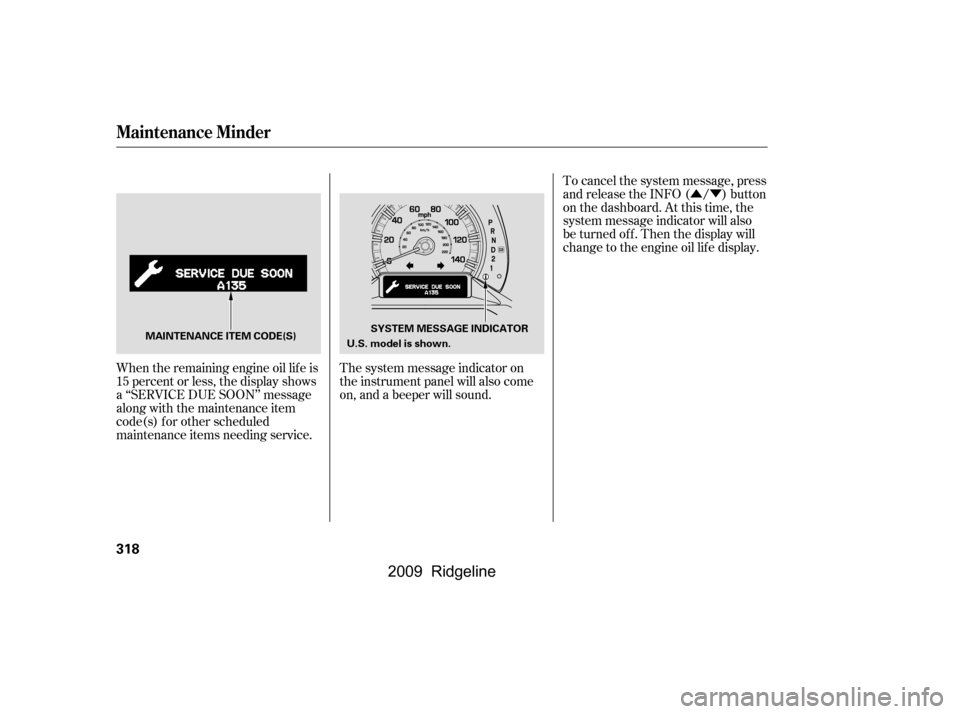
When the remaining engine oil lif e is
15 percent or less, the display shows
a ‘‘SERVICE DUE SOON’’ message
along with the maintenance item
code(s) f or other scheduled
maintenance items needing service. The system message indicator on
the instrument panel will also come
on, and a beeper will sound.To cancel the system message, press
and release the INFO ( / ) button
on the dashboard. At this time, the
system message indicator will also
be turned of f . Then the display will
change to the engine oil lif e display.
Maintenance Minder
318
MAINTENANCE ITEM CODE(S)
SYSTEM MESSAGE INDICATOR
U.S. model is shown.
�\f���—�\f���—�\f���y���\f�����������y���
�(���������\f�y�\f�������y
2009 Ridgeline
Page 323 of 427
�Û�Ý
You will also see the system
message every time you turn the
ignition switch to the ON (II)
position until you have the indicated
maintenance perf ormed by your
dealer.
The maintenance item code(s)
indicate the main and sub items
required at the time of the oil change
(see page ).
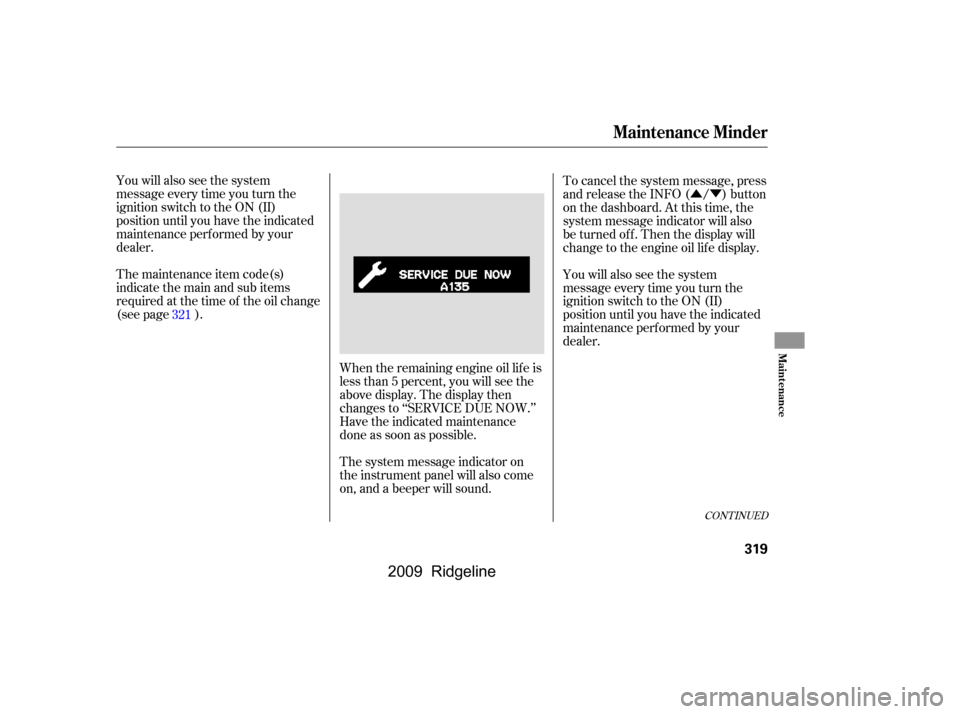
When the remaining engine oil lif e is
less than 5 percent, you will see the
above display. The display then
changes to ‘‘SERVICE DUE NOW.’’
Have the indicated maintenance
done as soon as possible.
The system message indicator on
the instrument panel will also come
on, and a beeper will sound.To cancel the system message, press
and release the INFO ( / ) button
on the dashboard. At this time, the
system message indicator will also
be turned of f . Then the display will
change to the engine oil lif e display.
You will also see the system
message every time you turn the
ignition switch to the ON (II)
position until you have the indicated
maintenance perf ormed by your
dealer.
321
CONT INUED
Maintenance Minder
Maint enance
319
�\f���—�\f���—�\f���y���\f�����������y���
�(���������\f�y�\f�������y
2009 Ridgeline
Page 324 of 427
�Û�Ý
�Û�Ý
Negative mileage means your
vehicle has passed the maintenance
required point.
The system message will appear
again by pressing the INFO ( / )
button after canceling it.
You will also see the system
message every time you turn the
ignition switch to the ON (II)
position until you have the indicated
maintenance perf ormed by your
dealer.
Immediately have the service
perf ormed, and make sure to reset
the display as described on page .
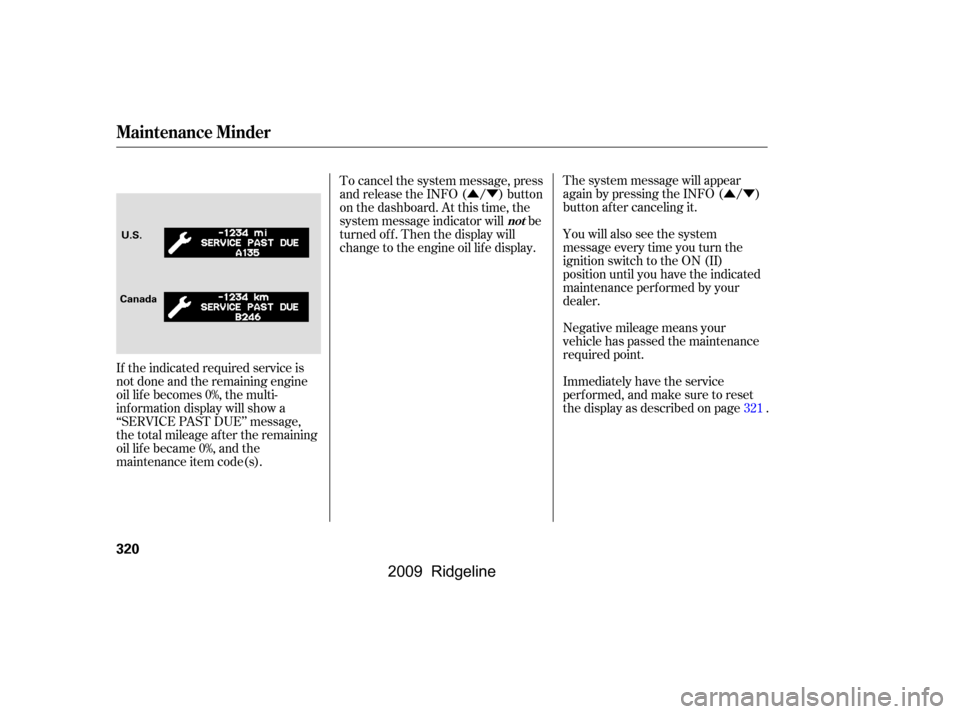
If the indicated required service is
not done and the remaining engine
oil lif e becomes 0%, the multi-
inf ormation display will show a
‘‘SERVICE PAST DUE’’ message,
thetotalmileageaftertheremaining
oillifebecame0%,andthe
maintenance item code(s). To cancel the system message, press
and release the INFO ( / ) button
on the dashboard. At this time, the
system message indicator will be
turned of f . Then the display will
change to the engine oil lif e display.
321
Maintenance Minder
not
320
CanadaU.S.
�\f���—�\f���—�\f���y���\f���������\f�y���
�(���������\f�y�\f�������y
2009 Ridgeline