Page 97 of 427
�Î�Î
�Î�Î�Î
�Î
�Î
�Î
�Î �Î
�Î �Î
�Î
�Î
�Î
�Î
�Î
�Û
�Ý
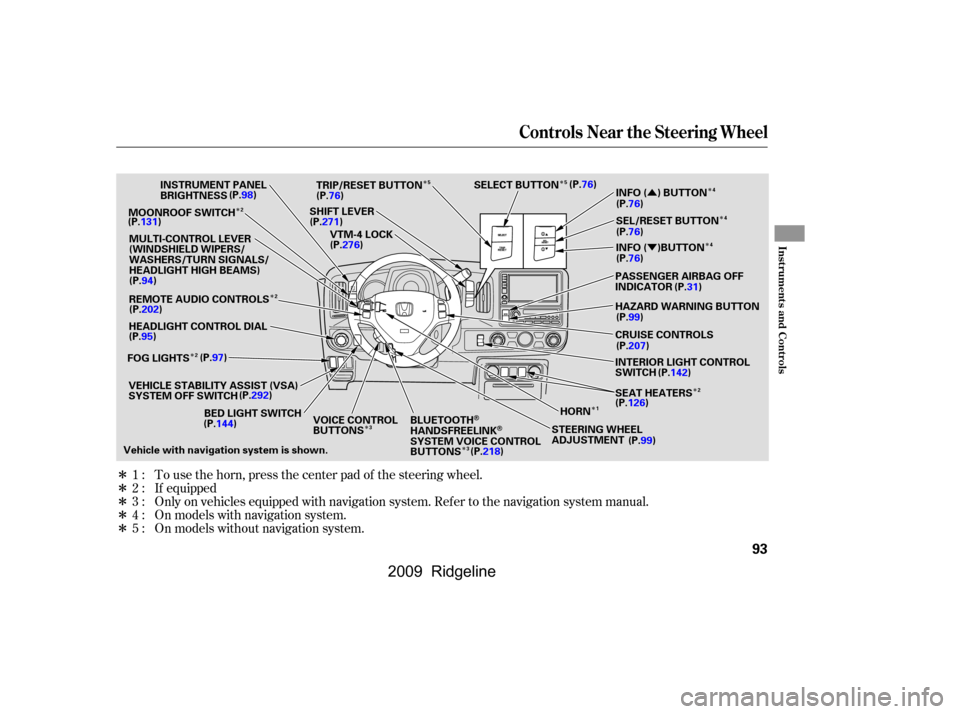
Only on vehicles equipped with navigation system. Ref er to the navigation system manual. To use the horn, press the center pad of the steering wheel.
If equipped
On models with navigation system.
On models without navigation system.
1:
2:
3:
4:
5:
Controls Near the Steering Wheel
Inst rument s and Cont rols
93
MOONROOF SWITCH
INSTRUMENT PANEL
BRIGHTNESS
REMOTE AUDIO CONTROLS
HEADLIGHT CONTROL DIAL
VEHICLE STABILITY ASSIST (VSA)
SYSTEM OFF SWITCH HORN
STEERING WHEEL
ADJUSTMENT SEAT HEATERS PASSENGER AIRBAG OFF
INDICATORSEL/RESET BUTTON INFO ( ) BUTTON
SELECT BUTTON
TRIP/RESET BUTTON
SHIFT LEVER VTM-4 LOCK
Vehicle with navigation system is shown. CRUISE CONTROLS HAZARD WARNING BUTTON
BED LIGHT SWITCH VOICE CONTROL
BUTTONSBLUETOOTH
HANDSFREELINKSYSTEM VOICE CONTROL
BUTTONS INTERIOR LIGHT CONTROL
SWITCH
MULTI-CONTROL LEVER
(WINDSHIELD WIPERS/
WASHERS/TURN SIGNALS/
HEADLIGHT HIGH BEAMS)
(P.98)
(P.131)
(P.94)
(P.202)
(P.95)
FOG LIGHTS (P.97)
(P.292)
(P.144) (P.99)
(P.126)
(P.142)
(P.207) (P.99) (P.31)
(P.76) (P.76) (P.76)
(P.76)
(P.76)
(P.271) (P.276) INFO ( )BUTTON
(P.218)
2 2
124
4
5
5
3 3
2 4
�����—�����—�����y�
�������������y���
�(�����������y���������y
2009 Ridgeline
Page 113 of 427
�µ
�µOr, until you hear two moreclicks (af ter about 10 seconds)
to activate the all doors unlock
feature.
Until you hear another click
(af ter about 5 seconds) to
activate the driver’s door unlock
feature.
Pushandholdtherearof the
master door lock switch on the
driver’s door. You will hear a click.
Continue to hold the switch:
Release the switch and, within 5
seconds, turn the ignition switch
to the ACCESSORY (I) position.
Move the shift lever to the Park
(P) position.
Turn the ignition switch to the
LOCK (0) position.If your vehicle’s battery is removed
or goes dead, the auto door lock/
unlock setting is reset to the
deactivated mode.
Push and hold the brake pedal,
then move the shift lever out of
the Park (P) position.
5.
4. 6.
3.
Door L ocks
Inst rument s and Cont rols
109
�\f���—�\f���—�\f���y�
�������������y���
�(���������\f�y�\f�
�
���y
2009 Ridgeline
Page 133 of 427

�µIf the driver’s
window senses any obstacle while it
is closing automatically, it will
reverse direction, and then stop. To
close the window, remove the
obstacle, then use the window switch
again.
Auto reverse stops sensing when the
window is almost closed. You should
always check that all passengers and
objects are away from the window
bef ore closing it. Your vehicle has a power back
window.
This indicator comes on when you
turn the ignition switch from the ON
(II) position to the ACCESSORY (I)
or LOCK (0) position without closing
the back window. With the ignition
switch in the ACCESSORY (I)
position, the indicator goes off after
about 30 seconds. With the ignition
switch in the LOCK (0) position, the
indicator goes of f af ter about 3
minutes.
If your vehicle’s battery is
disconnected or goes dead, or the
driver’s window f use is removed, the
AUTO f unction may be disabled. If
the AUTO f unction is disabled, the
power window system will need to be
reset af ter reconnecting the battery
or installing the f use.
If the power windows do not operate
properly af ter resetting, have your
vehicle checked by your dealer.
Pull and hold the driver’s window
switch to close the window
completely, then hold the switch
f or about 2 seconds.
Start the engine. Push down and
hold the driver’s window switch
until the window is f ully open.
1.
2.
CONT INUED
AUTO REVERSE
Back Window
Back Window Open
Indicator
Power Windows
Inst rument s and Cont rols
129
�\f���—�\f���—�\f���y���\f��\f�
��
���y���
�(���������\f�y�\f�
�����y
2009 Ridgeline
Page 163 of 427
CONT INUED
Playing the AM/FM Radio
Features
159
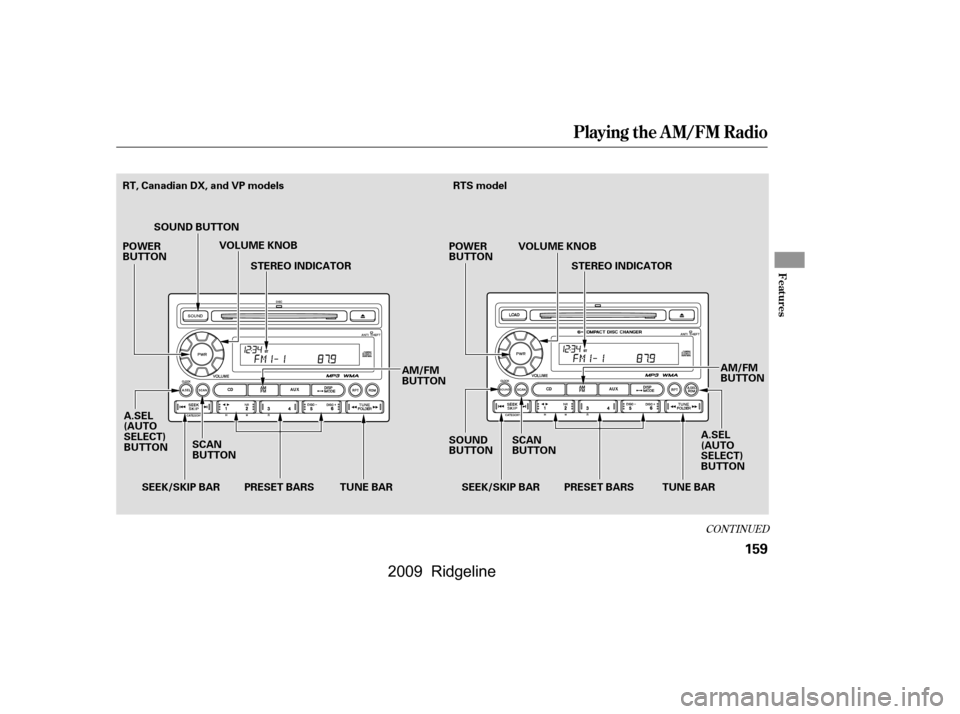
AM/FM
BUTTON
PRESET BARS
SCAN
BUTTON AM/FM
BUTTON
SEEK/SKIP BAR SEEK/SKIP BAR
RT, Canadian DX, and VP models
POWER
BUTTON
SOUND BUTTON
VOLUME KNOB
STEREO INDICATOR
TUNE BAR PRESET BARS TUNE BARA.SEL
(AUTO
SELECT)
BUTTON
A.SEL
(AUTO
SELECT)
BUTTON POWER
BUTTON
SOUND
BUTTONRTS model
VOLUME KNOBSTEREO INDICATOR
SCAN
BUTTON
�\f���—�\f���—�\f���y���\f��\f��������y���
�(���������\f�y�\f�
�����y
2009 Ridgeline
Page 164 of 427
Playing the AM/FM Radio
160
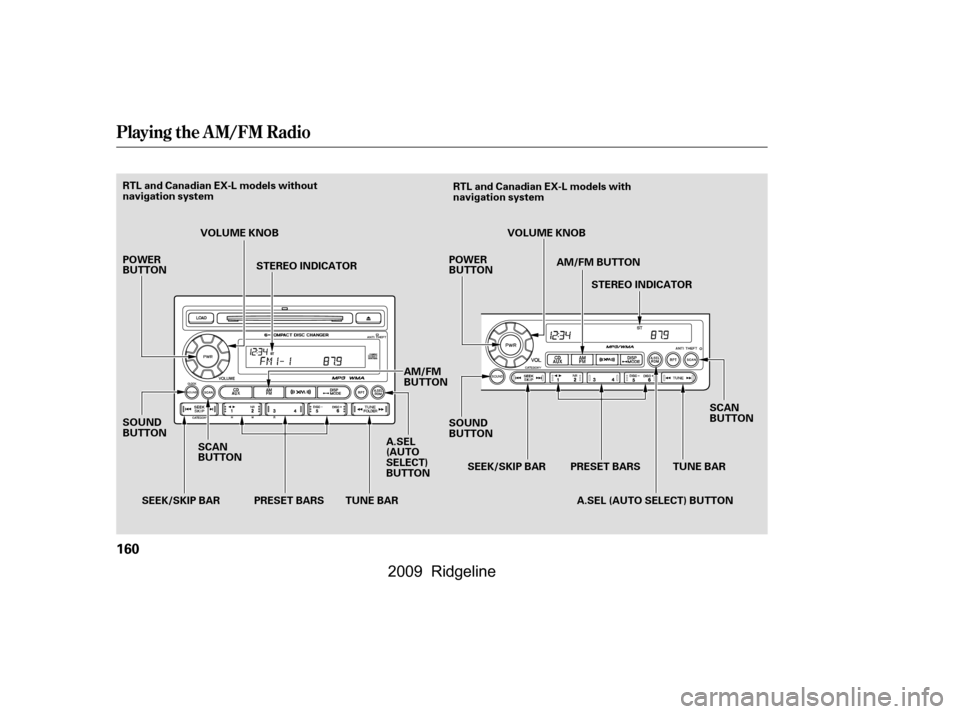
SCAN
BUTTONTUNE BAR
PRESET BARS
SEEK/SKIP BAR
RTL and Canadian EX-L models without
navigation system
RTL and Canadian EX-L models with
navigation system
POWER
BUTTON
SOUND
BUTTON VOLUME KNOB
STEREO INDICATOR
TUNE BAR
PRESET BARS A.SEL
(AUTO
SELECT)
BUTTONVOLUME KNOB
STEREO INDICATOR
AM/FM BUTTON
SCAN
BUTTON
A.SEL (AUTO SELECT) BUTTON
SEEK/SKIP BAR
POWER
BUTTON
SOUND
BUTTON
AM/FM
BUTTON
�\f���—�\f���—�\f���y���\f��\f��������y���
�(���������\f�y�\f�
�����y
2009 Ridgeline
Page 165 of 427

�µ
�µ�µ �µ�µ
�µ
You can use any of f ive methods to
f ind radio stations on the selected
band: tune, seek, scan, the preset
bars, and auto select.
Use the TUNE bar to tune
the radio to a desired f requency.
Press the side of the bar to tune
to a higher f requency, and press the side to tune to a lower
f requency.
The scan f unction samples
all stations with strong signals on the
selected band. To activate it, press
the SCAN button, then release it.
You will see SCAN in the display.
The system will scan f or a station with a strong signal. When it f inds
one, it will stop and play that station
f or about 10 seconds.
If you do nothing, the system will
scan f or the next strong station and
play it f or 10 seconds. When it plays
a station that you want to listen to,
press the SCAN button again.
Repeat steps 1 through 3 to store a
total of six stations on AM and
twelve stations on FM.
Pick a preset number (1 6), and
hold it until you hear a beep.
Usethetune,seek,orscan
function to tune the radio to a
desired station.
The ignition switch must be in the
ACCESSORY (I) or ON (II) position.
Turn the system on by pushing the
PWR button or the AM/FM button.
Adjust the volume by turning the
volume knob.
Pushing the AUDIO button will also
turn on the system (see page ).
The band and f requency that the
radio was last tuned to are displayed.
To change bands, press the AM/FM
button. On the FM band, ST will be
displayed if the station is
broadcasting in stereo. Stereo
reproduction in AM is not available.
On the AM band, AM noise
reduction turns on automatically.
Each side of the bars (1
6) can store one f requency on AM
and two f requencies on FM. Select the desired band, AM or
FM. FM1 and FM2 let you store
six stations each.
The SEEK f unction
searches up and down from the
current f requency to f ind a station
with a strong signal. To activate it,
press the or side of the
SEEK/SKIP bar, then release it. 1.
2.
3.
4.
163
On models with navigation system
T o Play the A M/FM Radio
T o Select a Station
TUNE
SCAN Preset
SEEK
Playing the AM/FM Radio
Features
161
�\f���—�\f���—�\f���y���\f��\f������\f�y���
�(���������\f�y�\f�
�����y
2009 Ridgeline
Page 166 of 427

�µ�µ
�µ �µ
�µ
�µ
If you do not like the stations auto
select has stored, you can store
other f requencies on the preset bars
as previously described.
,pressthe
A. SEL (auto select) button. This
restores the presets you originally
set.
If you are
traveling far from home and can no
longer receive your preset stations,
you can use the auto select feature to
find stations in the local area.
Press the A. SEL button. ‘‘A.SEL’’
f lashes in the display, and the system
goes into scan mode f or several
seconds. It stores the f requencies of
six AM, and twelve FM stations in
the preset bars.
You will see a ‘‘0’’ displayed af ter
pressing a preset bar if auto select
cannot f ind a strong station f or every
preset bar. Adjusts the
strength of sound f rom the
subwoof er speaker.
Adjusts the bass.Adjusts the treble.
Adjusts the front-to-back
strength of the sound.
Adjusts the side-to-
side strength of the sound.
For inf ormation on FM/AM radio
f requencies and reception, see page
.
Press the SOUND button repeatedly
to display the SUBWOOFER (if
equipped), BASS, TREBLE, FADER,
and BALANCE settings. Eachmodeisshowninthedisplayas
it changes. Turn the VOLUME knob
to adjust the setting to your liking.
When the level reaches the center,
youwillsee‘‘ ’’inthedisplay.
The system will automatically return
the display to the selected audio
mode about 10 seconds af ter you
stop adjusting a mode.
165
To turn of f auto select
If equipped
AUTO SELECT
SUBWOOFER
BASS
TREBLE
FADER
BAL ANCE
Adjusting the Sound
Playing the AM/FM Radio
162
�\f���—�\f���—�\f���y���\f��\f������
�y���
�(���������\f�y�\f�
�����y
2009 Ridgeline
Page 171 of 427
CONT INUED
Playing the XMSatellite Radio
Features
167
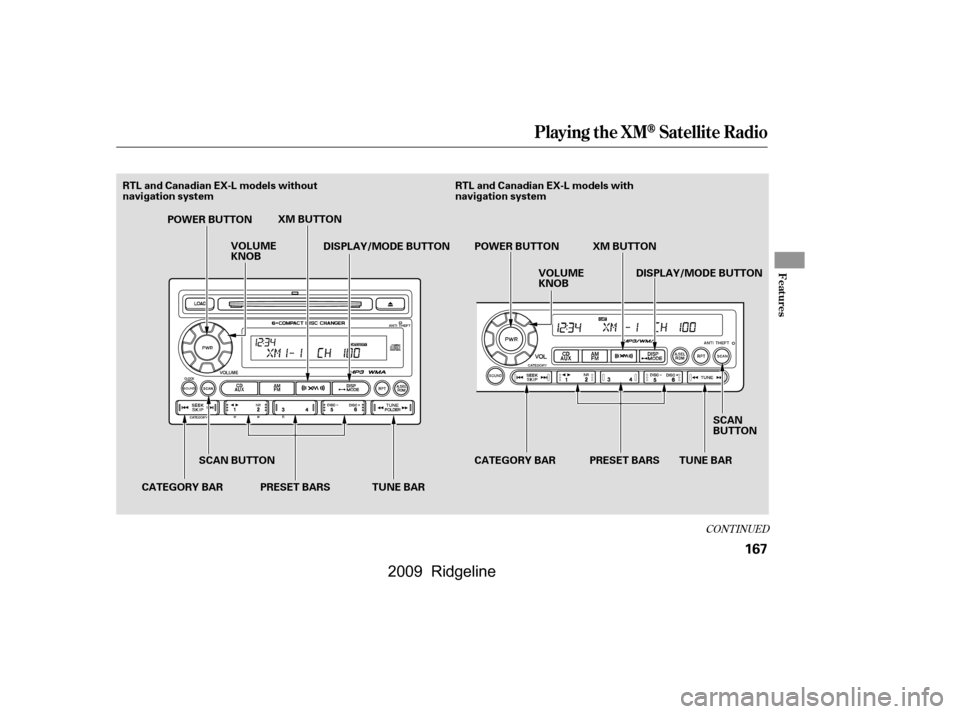
POWER BUTTONTUNE BAR
VOLUME
KNOB
DISPLAY/MODE BUTTON
SCAN BUTTON
CATEGORY BAR POWER BUTTON
VOLUME
KNOB
CATEGORY BAR DISPLAY/MODE BUTTON
PRESET BARS SCAN
BUTTON
RTL and Canadian EX-L models without
navigation system
RTL and Canadian EX-L models with
navigation system
TUNE BAR
PRESET BARS XM BUTTON
XM BUTTON
�\f���—�\f���—�\f���y���\f��\f������
�y���
�(���������\f�y�\f�
�����y
2009 Ridgeline