Page 198 of 427

�µ
�µ �µ
This f eature, when
activated, samples the first file in
each f older on the disc in the order
they are recorded. To activate the
f older scan f eature, press and
release the SCAN button repeatedly.
You will see ‘‘F-SCAN’’ in the display.
The system will then play the first
f ile in the main f olders f or about 10
seconds. If you do nothing, the
system will then play the f ollowing
f irst f iles f or 10 seconds each. When
it plays a file that you want to
continue listening to, press and hold
the SCAN button.
Pressing either side of the SEEK/
SKIP bar, or selecting a dif f erent
disc (using the preset buttons) or
f older (using the TUNE bar) turns
of f the SCAN or F-SCAN f eature.
This
f eature, when activated, plays the
f iles within a current f older in
random order, rather than in the
order they are compressed in MP3
or WMA. To activate folder random
play, press and release the RDM
button repeatedly. You will see
‘‘F-RDM’’ in the display. The system
will then select and play f iles
randomly. This continues until you
deactivate f older random play by
pressing and holding the RDM
button again, or you select a
different folder with the TUNE bar.
Each time you press and release the
RDM button, the mode changes
f rom f older random play, to within a
disc random play, then to normal
play. The SCAN f unction
samples all the tracks on the disc in
the order they are recorded on the
disc (all f iles in the selected f older in
MP3 or WMA mode). To activate the
scan feature, press and release the
SCAN button or touch the TRACK
SCAN icon on the screen. You will
see ‘‘SCAN’’ in the display. You will
get a 10 second sampling of each
track/f ile in the disc/f older. Press
andholdtheSCANbuttonortouch
the TRACK SCAN icon again to get
out of scan mode and play the last
track sampled.
In MP3 or WMA mode
In MP3 or WMA mode
CD Changer (Models with navigation system)
F-SCAN
FOLDER RANDOM SCAN
194
�\f���—�\f���—�\f���y���\f��
�\f��
���y���
�(���������\f�y�\f�
�����y
2009 Ridgeline
Page 199 of 427
�µ
CONT INUED
Each time you press and release the
SCAN button, the mode changes
from scan, disc scan, then to normal
play.
Each time you press and release the
SCAN button, the mode changes
f rom f ile scan, f older scan, disc scan,
then to normal play.
When the f irst track in the last disc,
or the f irst f ile in the last main f older
in the last disc begins to play, the
disc scan mode will be canceled.
Pressing either side of the SEEK/
SKIP bar or selecting a dif f erent
folder with the TUNE bar also turns
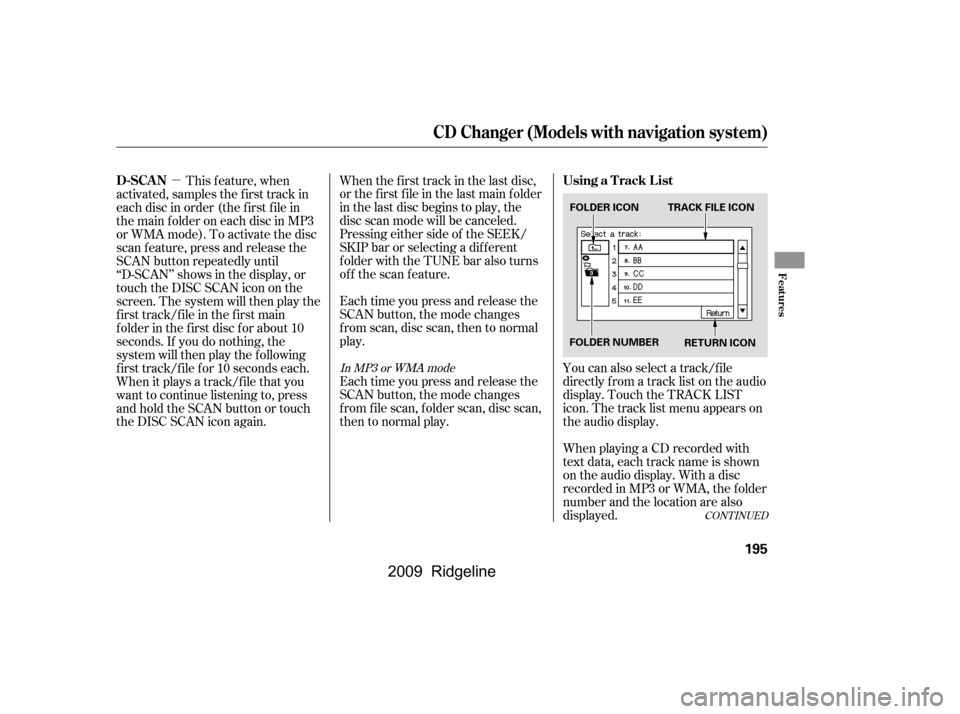
off the scan feature.You can also select a track/f ile
directly f rom a track list on the audio
display. Touch the TRACK LIST
icon. The track list menu appears on
the audio display.
When playing a CD recorded with
text data, each track name is shown
on the audio display. With a disc
recorded in MP3 or WMA, the f older
number and the location are also
displayed.
This f eature, when
activated, samples the first track in
each disc in order (the f irst f ile in
themainfolderoneachdiscinMP3
or WMA mode). To activate the disc
scan feature, press and release the
SCAN button repeatedly until
‘‘D-SCAN’’ shows in the display, or
touch the DISC SCAN icon on the
screen. The system will then play the
f irst track/f ile in the f irst main
f older in the f irst disc f or about 10
seconds. If you do nothing, the
system will then play the f ollowing
f irst track/f ile f or 10 seconds each.
When it plays a track/file that you
want to continue listening to, press
andholdtheSCANbuttonortouch
the DISC SCAN icon again.
In MP3 or WMA mode
CD Changer (Models with navigation system)
Using a T rack L ist
D-SCAN
Features
195
FOLDER ICON TRACK FILE ICON
RETURN ICON
FOLDER NUMBER
�\f���—�\f���—�\f���y�
������
������y���
�(���������\f�y�\f���\f�\f�y
2009 Ridgeline
Page 200 of 427

�Û�ÝTo remove the disc that is currently
playing, press the eject button. You
will see ‘‘EJECT’’ in the display.
When you remove the disc f rom the
slot, the system begins the load
sequence so you can load another
disc in that position. If you do not
load another CD within 10 seconds,
the system selects the previous
mode (AM, FM1, FM2, or XM
Radio).
To remove the disc f rom the
changer,firstselectitbypressing
the appropriate preset bar or
corresponding number on the screen.
When that disc begins playing, press
the eject button.
To take the system out of CD mode,
press the AM/FM button or XM
button. Each time you press the
AM/FM button, the system changes
to the next mode (AM, FM1, or FM
2). When you return to CD mode by
pressing the CD/AUX button, play
will continue where it lef t of f .
If you turn the system of f while a CD
is playing, either with the PWR
button or the ignition switch, play
will continue at the same point when
youturnitbackon.
If the disc was not recorded with text
data, only the track number is shown.
To scroll through the display, touch
the or icononthesideof
thedisplay.Togobacktothe
previous display, touch the Return
icon on the display.
Select the desired track/f ile by
touching the icon on the display. The
selected icon will be highlighted in
blue. The system begins to play the
selected track/f ile. With a disc in
MP3 or WMA, touch the f older icon
on the upper lef t of the screen to
move to the parent folder. The
current f older is highlighted in blue. Removing CDs f rom the In-dash
CD Changer
To Stop Playing a Disc
CD Changer (Models with navigation system)
196
�\f���—�\f���—�\f���y���\f��
�\f������y���
�(���������\f�y�\f���\f�
�y
2009 Ridgeline
Page 201 of 427
When you press the eject button
while listening to the radio, or with
the audio system turned of f , the disc
that was last selected is ejected.
Af ter that disc is ejected, pressing
the eject button again will eject the
next disc in numerical order. By
doing this six times, you can remove
all the discs f rom the changer.
To eject one disc, press and release
the eject button.
You can also eject discs when the
ignition switch is on or of f :
To eject all discs, press and hold the
eject button until the LOAD
indicator begins to blink.For inf ormation on how to handle
and protect discs, see page .
198
CD Changer (Models with navigation system)
Protecting Discs
Features
197
�\f���—�\f���—�\f���y���\f��
�\f������y���
�(���������\f�y�\f���\f���y
2009 Ridgeline
Page 202 of 427
When a CD is not being played, store
it in its case to protect it f rom dust
and other contamination. To prevent
warpage, keep CDs out of direct
sunlight and extreme heat.
To clean a CD, use a clean sof t cloth.
Wipe across the CD f rom the center
to the outside edge.
AnewCDmayberoughonthe
inner and outer edges. The small
plastic pieces causing this roughness
can f lake of f and f all on the re-
cording surf ace of the CD, causing
skipping or other problems. Remove
these pieces by rubbing the inner
and outer edges with the side of a
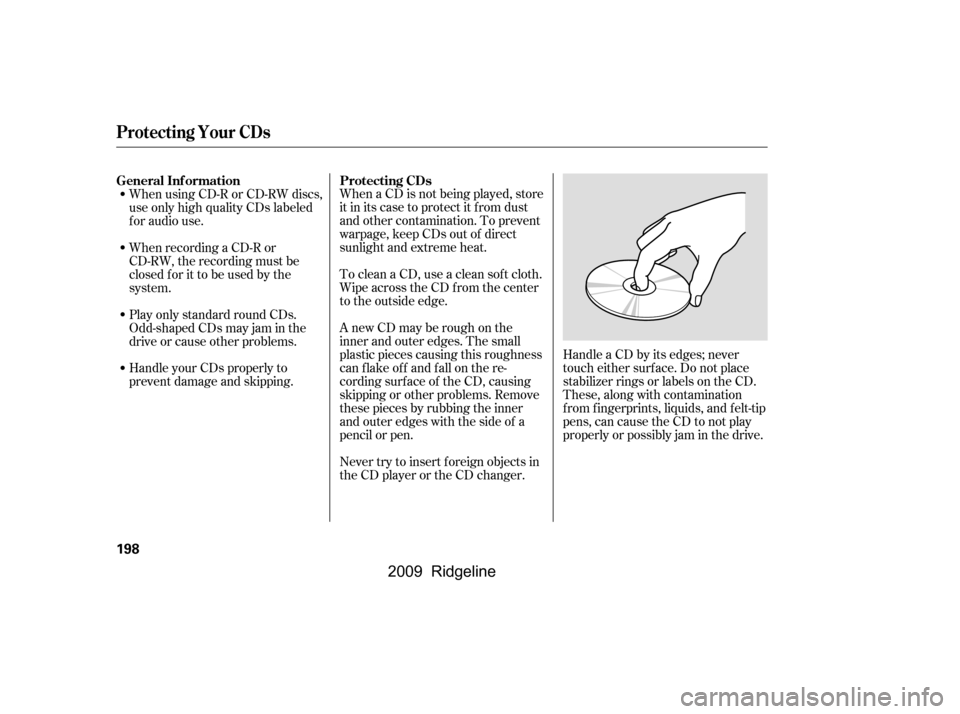
pencil or pen.Handle a CD by its edges; never
touch either surf ace. Do not place
stabilizer rings or labels on the CD.
These, along with contamination
f rom f ingerprints, liquids, and f elt-tip
pens, can cause the CD to not play
properly or possibly jam in the drive.
Never try to insert f oreign objects in
the CD player or the CD changer.
When using CD-R or CD-RW discs,
use only high quality CDs labeled
f or audio use.
When recording a CD-R or
CD-RW, the recording must be
closedforittobeusedbythe
system.
Play only standard round CDs.
Odd-shaped CDs may jam in the
driveorcauseotherproblems.
Handle your CDs properly to
prevent damage and skipping.
General Inf ormation
Protecting CDs
Protecting Your CDs
198
�\f���—�\f���—�\f���y���\f��
�\f������y���
�(���������\f�y�\f���\f���y
2009 Ridgeline
Page 203 of 427
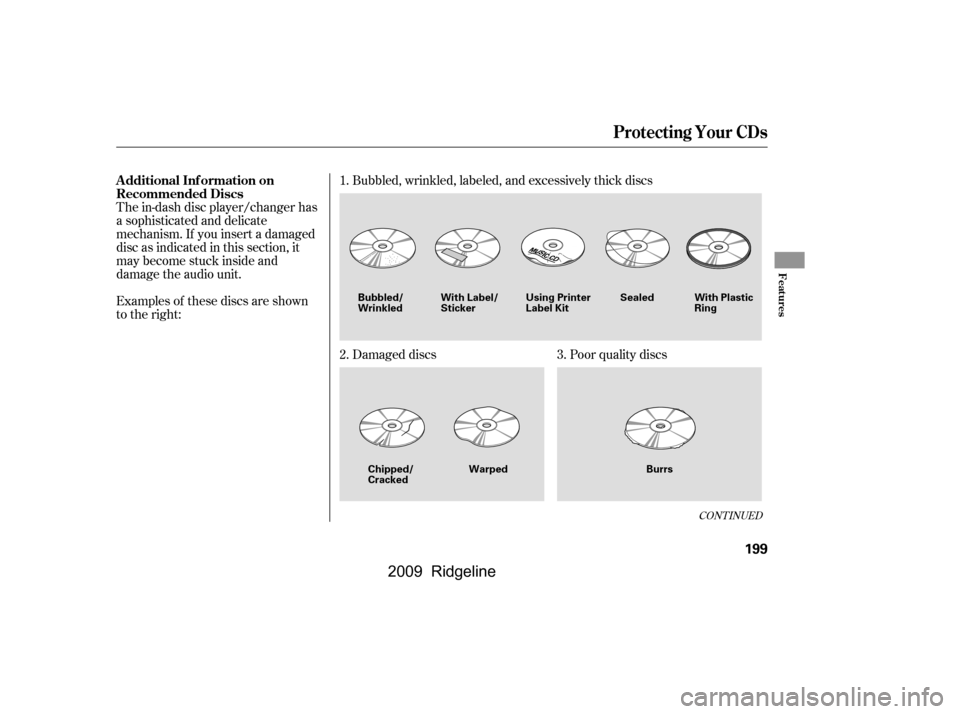
The in-dash disc player/changer has
a sophisticated and delicate
mechanism. If you insert a damaged
disc as indicated in this section, it
maybecomestuckinsideand
damage the audio unit.
Examples of these discs are shown
to the right:Bubbled, wrinkled, labeled, and excessively thick discs
Damaged discs
Poor quality discs
1.
2.
3.
CONT INUED
Additional Inf ormation on
Recommended Discs
Protecting Your CDs
Features
199
With Label/
Sticker
Warped Burrs
Chipped/
Cracked
Bubbled/
Wrinkled
Using Printer
Label KitSealed With Plastic
Ring
�\f���—�\f���—�\f���y���\f��
�\f������y���
�(���������\f�y�\f���\f���y
2009 Ridgeline
Page 204 of 427
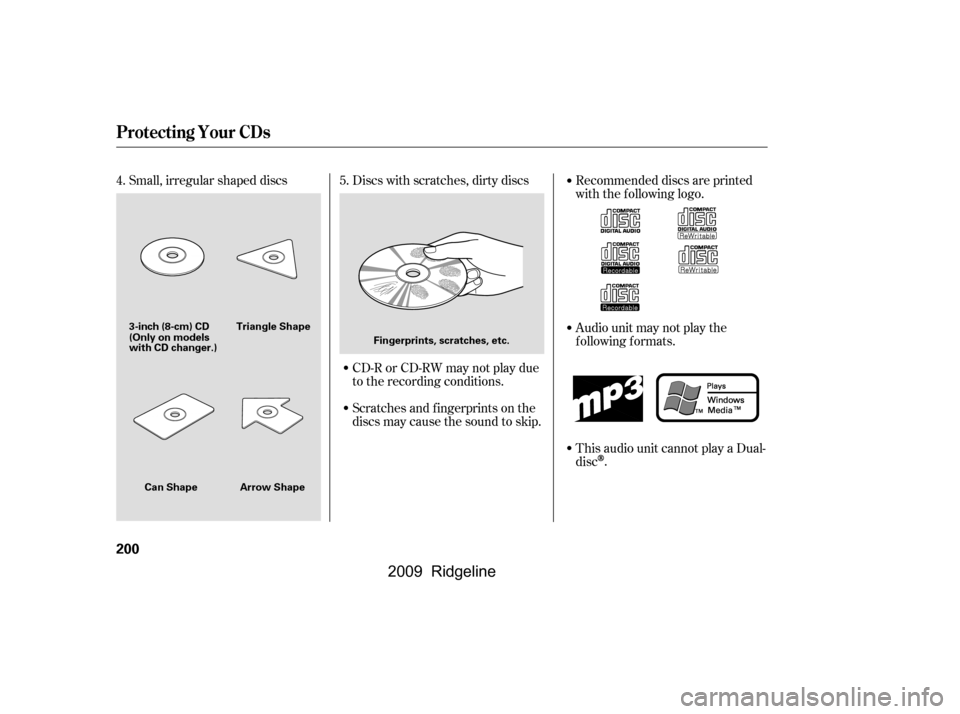
Small, irregular shaped discsDiscs with scratches, dirty discs
CD-R or CD-RW may not play due
to the recording conditions.
Scratches and f ingerprints on the
discs may cause the sound to skip. Recommended discs are printed
with the f ollowing logo.
Audio unit may not play the
following formats.
This audio unit cannot play a Dual-
disc
.
4. 5.
Protecting Your CDs
200
Fingerprints, scratches, etc.
3-inch (8-cm) CD Triangle Shape
Arrow Shape
Can Shape
(Only on models
with CD changer.)
�\f���—�\f���—�\f���y���\f��
�
��\f���y���
�(���������\f�y�\f���\f���y
2009 Ridgeline
Page 205 of 427

�Î
�Î �Î
�Î
�Î �Î
�Î
�Î
Thechartontherightexplainsthe
error messages you may see in the
display while playing a disc.
If you see an error message in the
display while playing a disc, press
the eject button. After ejecting the
disc, check it for damage or
deformation. If there is no damage,
insert the disc again.
For additional information on
damaged discs, see page .
Theaudiosystemwilltrytoplaythe
disc. If there is still a problem, the
error message will reappear. Press
the eject button, and pull out the disc.
Insert a dif f erent disc. If the new
disc plays, there is a problem with
the f irst disc. If the error message
cycle repeats and you cannot clear it,
take your vehicle to a dealer. Cause
Error Message Solution
199
High Temperature
Track/File format not
supported
Mechanical Error
Servo Error
Disc Error Will disappear when the temperature returns to
normal.
Current track will be skipped. The next
supported track or file plays automatically.
Press the EJECT button and pull out the disc(s).
Check the disc for serious damage, signs of
deformation, excessive scratches, and/or dirt
(see page199).Insert the disc again. If the code
does not disappear, or the disc(s) cannot be
removed, consult your dealer. Do not try to
force the disc out the player.
Check the disc for serious damage, signs of
deformation, excessive scratches, and/or dirt
(see page199).
On models without navigation system
On models with navigation system
1:
2:
CD Player/Changer Error Messages
Features
201
HEAT ERROR
HOT
UNSUPPORTED UNSUPPORT BAD DISC
PLEASE CHECK OWNER’SMANUAL
PUSH EJECT
MECH ERROR
CHANGER ERROR CHKDISCLOAD BAD DISC
PLEASE CHECK OWNER’SMANUAL
CHECK DISC
DISC ERROR1
2 1
2
1 2
�\f���—�\f���—�\f���y���\f��
�
��
���y���
�(���������\f�y�\f���\f���y
2009 Ridgeline