Page 63 of 427
This section gives inf ormation about
the controls and displays that
contribute to the daily operation of
your vehicle. All the essential
controls are within easy reach............................
Control Locations .60
............................
Instrument Panel .61
..........
Instrument Panel Indicators .62
.............................................
Gauges .76
..............
Multi-Inf ormation Display.82
Controls Near the Steering
...........................................
Wheel .93
........................
Multi-Control Lever .94
........................................
Headlights .95
...............
Headlight Control Dial .95
........................................
Fog Lights .97
........
Instrument Panel Brightness .98
.................
Hazard Warning Button .99
..........
Steering Wheel Adjustment .99
................................................
Keys .100
......................
Immobilizer System .101
..............................
Ignition Switch .102
....................................
Door Locks .103
............
Childproof Door Locks .104
Auto Door Locking/
..............................
Unlocking .104
.....................
Remote Transmitter .110
.....................
Dual-Action Tailgate .113
.............................
In-Bed Trunk .116
...............................................
Seats .119
..................................
Seat Heaters .126............................
Power Windows .128
.......................................
Moonroof .131
...............................
Parking Brake .132
...........................................
Mirrors .133
.........
Interior Convenience Items .135
.........................
Center Console .136
.......
Console Compartments .136
.........................
Cargo Hooks .137
.....................
Beverage Holders .137
..................................
Glove Box .138
................................
Coat Hooks .138
....................
Sunglasses Holder .138
........
Accessory Power Sockets .139
...................................
Sun Visor .140
............................
Vanity Mirror .140
........................
AC Power Outlet .141
...............................
Interior Lights .142
.....................................
Bed Lights .144
Instruments and Controls
Inst rument s and Cont rols
59
TM
�\f���—�\f���—�\f���y�
������
����\f�y���
�(���������\f�y�\f�\f�����y
2009 Ridgeline
Page 97 of 427
�Î�Î
�Î�Î�Î
�Î
�Î
�Î
�Î �Î
�Î �Î
�Î
�Î
�Î
�Î
�Î
�Û
�Ý
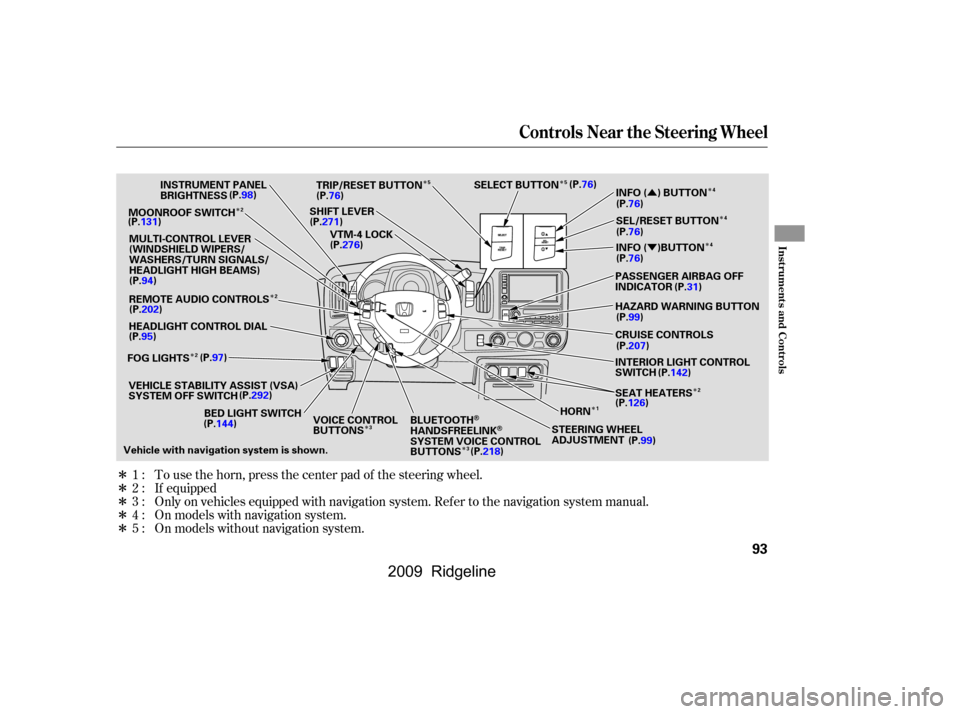
Only on vehicles equipped with navigation system. Ref er to the navigation system manual. To use the horn, press the center pad of the steering wheel.
If equipped
On models with navigation system.
On models without navigation system.
1:
2:
3:
4:
5:
Controls Near the Steering Wheel
Inst rument s and Cont rols
93
MOONROOF SWITCH
INSTRUMENT PANEL
BRIGHTNESS
REMOTE AUDIO CONTROLS
HEADLIGHT CONTROL DIAL
VEHICLE STABILITY ASSIST (VSA)
SYSTEM OFF SWITCH HORN
STEERING WHEEL
ADJUSTMENT SEAT HEATERS PASSENGER AIRBAG OFF
INDICATORSEL/RESET BUTTON INFO ( ) BUTTON
SELECT BUTTON
TRIP/RESET BUTTON
SHIFT LEVER VTM-4 LOCK
Vehicle with navigation system is shown. CRUISE CONTROLS HAZARD WARNING BUTTON
BED LIGHT SWITCH VOICE CONTROL
BUTTONSBLUETOOTH
HANDSFREELINKSYSTEM VOICE CONTROL
BUTTONS INTERIOR LIGHT CONTROL
SWITCH
MULTI-CONTROL LEVER
(WINDSHIELD WIPERS/
WASHERS/TURN SIGNALS/
HEADLIGHT HIGH BEAMS)
(P.98)
(P.131)
(P.94)
(P.202)
(P.95)
FOG LIGHTS (P.97)
(P.292)
(P.144) (P.99)
(P.126)
(P.142)
(P.207) (P.99) (P.31)
(P.76) (P.76) (P.76)
(P.76)
(P.76)
(P.271) (P.276) INFO ( )BUTTON
(P.218)
2 2
124
4
5
5
3 3
2 4
�����—�����—�����y�
�������������y���
�(�����������y���������y
2009 Ridgeline
Page 103 of 427
Push the lever up to lock the
steering wheel in position.
Make sure you have securely
locked the steering wheel in place
by trying to move it up and down.
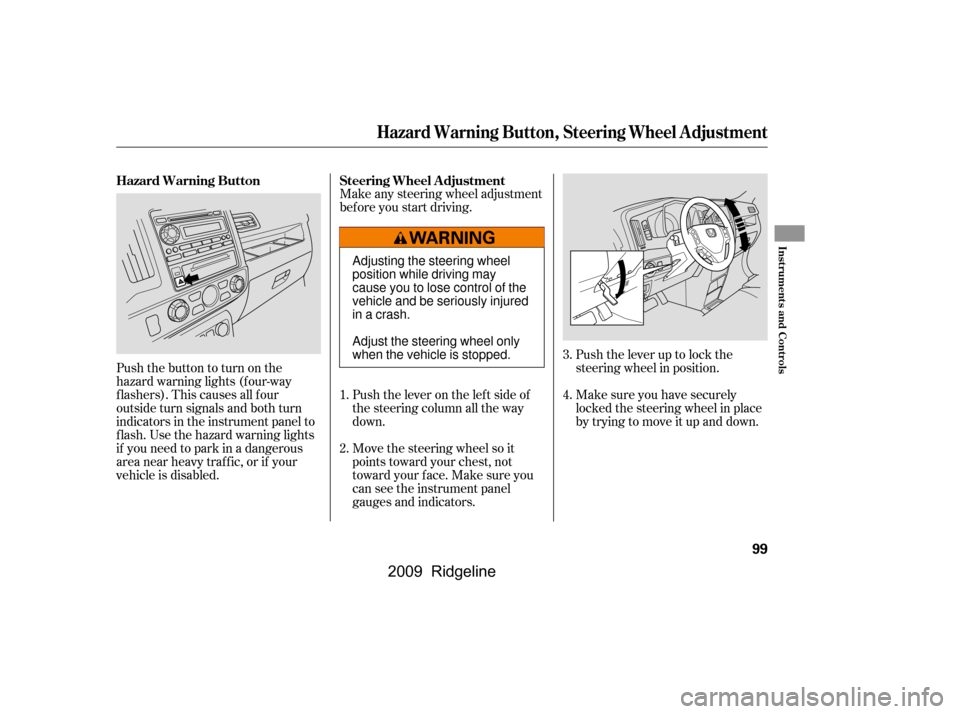
Make any steering wheel adjustment
bef ore you start driving.
Move the steering wheel so it
points toward your chest, not
toward your f ace. Make sure you
can see the instrument panel
gauges and indicators.
Push the lever on the lef t side of
the steering column all the way
down.
Pushthebuttontoturnonthe
hazard warning lights (f our-way
flashers). This causes all four
outside turn signals and both turn
indicators in the instrument panel to
f lash. Use the hazard warning lights
if you need to park in a dangerous
area near heavy traffic, or if your
vehicle is disabled.
3.
4.1.
2.
Steering Wheel A djustmentHazard Warning Button
Hazard Warning Button, Steering Wheel A djustment
Inst rument s and Cont rols
99
Adjusting the steering wheel
position while driving may
cause you to lose control of the
vehicle and be seriously injured
inacrash.
Adjust the steering wheel only
when the vehicle is stopped.
�����—�����—�����y�
�������������y���
�(�����������y���
�����y
2009 Ridgeline
Page 106 of 427
�µ�µ
�µ �µ
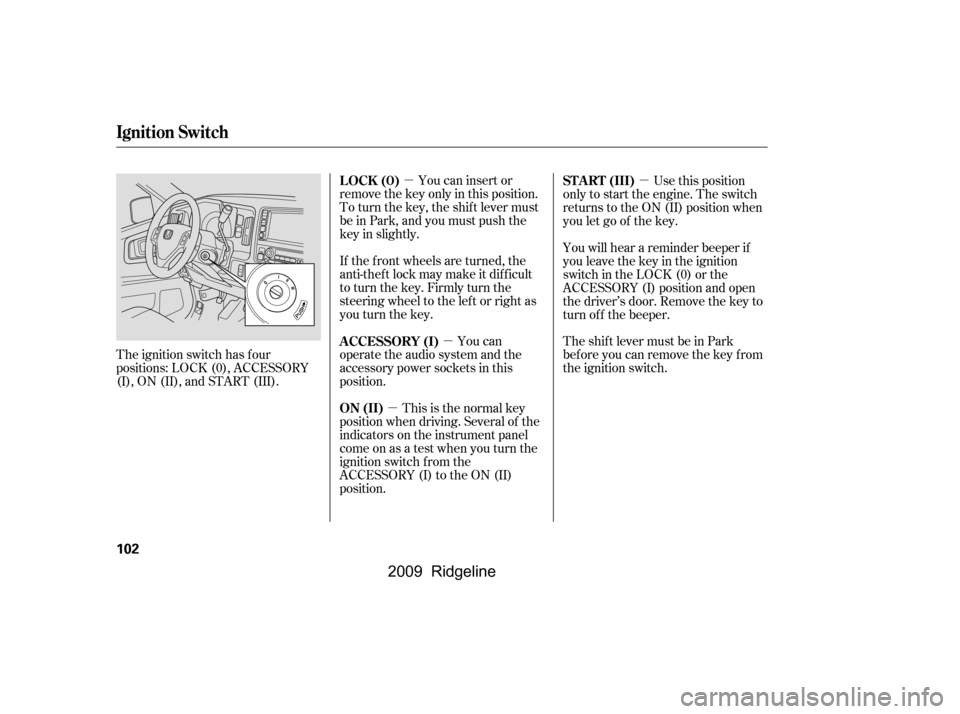
The ignition switch has f our
positions: LOCK (0), ACCESSORY
(I), ON (II), and START (III). You can insert or
remove the key only in this position.
To turn the key, the shift lever must
be in Park, and you must push the
key in slightly.
If the f ront wheels are turned, the
anti-theft lock may make it difficult
to turn the key. Firmly turn the
steering wheel to the lef t or right as
you turn the key.
You can
operate the audio system and the
accessory power sockets in this
position.
This is the normal key
position when driving. Several of the
indicators on the instrument panel
come on as a test when you turn the
ignition switch f rom the
ACCESSORY (I) to the ON (II)
position. Use this position
only to start the engine. The switch
returns to the ON (II) position when
you let go of the key.
You will hear a reminder beeper if
you leave the key in the ignition
switch in the LOCK (0) or the
ACCESSORY (I) position and open
the driver’s door. Remove the key to
turn of f the beeper.
TheshiftlevermustbeinPark
bef ore you can remove the key f rom
the ignition switch.
LOCK (0)
A CCESSORY (I)
ON (II) ST A RT (III)
Ignition Switch
102
�\f���—�\f���—�\f���y�
�������������y���
�(���������\f�y�\f�
�\f���y
2009 Ridgeline
Page 162 of 427
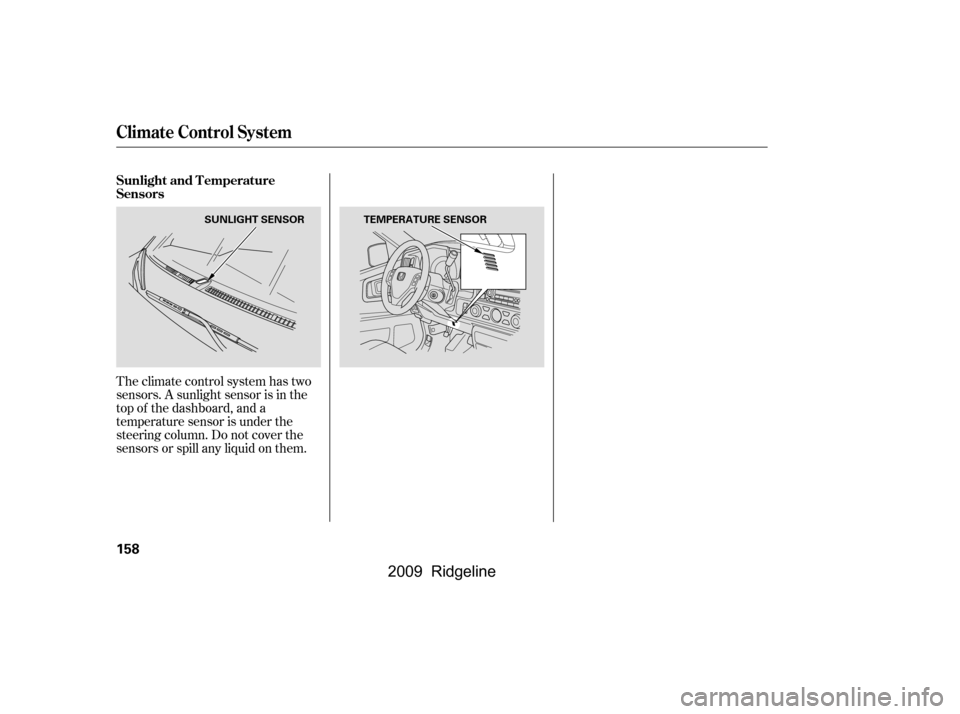
Theclimatecontrolsystemhastwo
sensors. A sunlight sensor is in the
top of the dashboard, and a
temperature sensor is under the
steering column. Do not cover the
sensors or spill any liquid on them.
Sunlight and T emperature
Sensors
Climate Control System
158
SUNLIGHT SENSORTEMPERATURE SENSOR
�\f���—�\f���—�\f���y���\f��\f����
���y���
�(���������\f�y�\f�
�����y
2009 Ridgeline
Page 206 of 427
�´�µ
�´
�µ
�´�µ
�Û�Ý �´
�µ
�´
�µ
If you are playing a disc, the system
skips to the beginning of the next
track each time you press the top
( ) of the CH button. Press the
bottom ( ) to return to the
beginning of the current track. Press
it again to return to the previous
track. You will see the disc and track
numbers in the upper display.
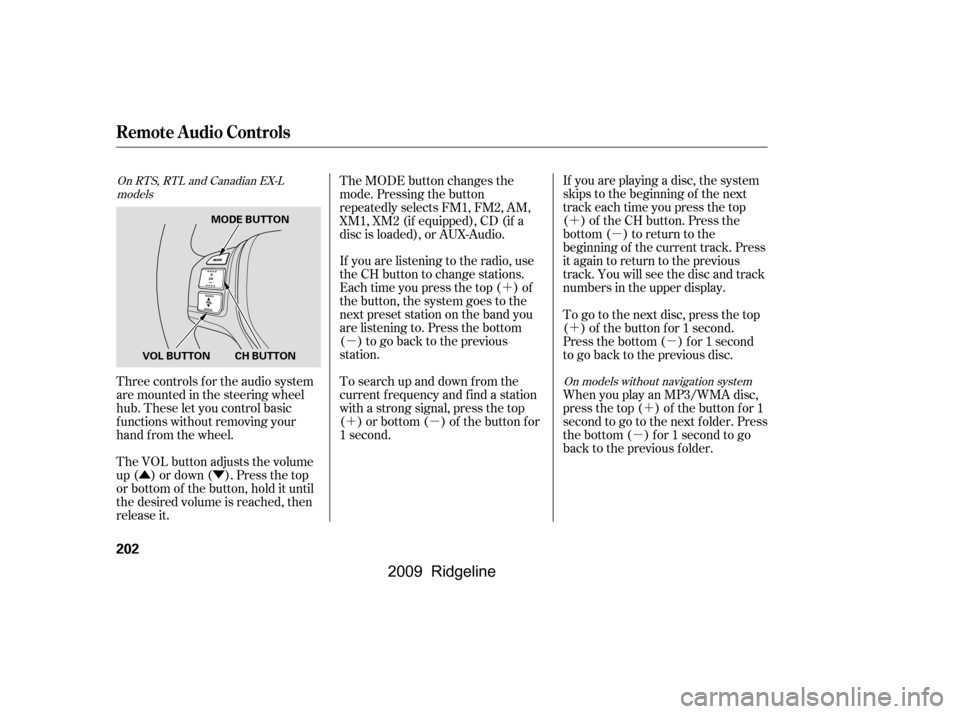
The MODE button changes the
mode. Pressing the button
repeatedly selects FM1, FM2, AM,
XM1, XM2 (if equipped), CD (if a
disc is loaded), or AUX-Audio.
If you are listening to the radio, use
the CH button to change stations.
Each time you press the top ( ) of
the button, the system goes to the
next preset station on the band you
are listening to. Press the bottom
( ) to go back to the previous
station.
To search up and down from the
current f requency and f ind a station
with a strong signal, press the top
( ) or bottom ( ) of the button for
1 second.
Three controls f or the audio system
are mounted in the steering wheel
hub. These let you control basic
f unctions without removing your
hand f rom the wheel.
The VOL button adjusts the volume
up ( ) or down ( ). Press the top
or bottom of the button, hold it until
the desired volume is reached, then
release it. To go to the next disc, press the top
( ) of the button for 1 second.
Press the bottom ( ) f or 1 second
to go back to the previous disc.
When you play an MP3/WMA disc,
press the top ( ) of the button for 1
second to go to the next folder. Press
the bottom ( ) for 1 second to go
back to the previous folder.
On RTS, RTL and Canadian EX-L
models
On models without navigation system
Remote Audio Controls
202
MODE BUTTONCH BUTTON
VOL BUTTON
�\f���—�\f���—�\f���y���\f��
�
������y���
�(���������\f�y�\f���\f���y
2009 Ridgeline
Page 211 of 427
Cruise control allows you to maintain
asetspeedabove25mph(40km/h)
without keeping your f oot on the
accelerator pedal. It should be used
f or cruising on straight, open
highways. It is not recommended f or
city driving, winding roads, slippery
roads, heavy rain, or bad weather.
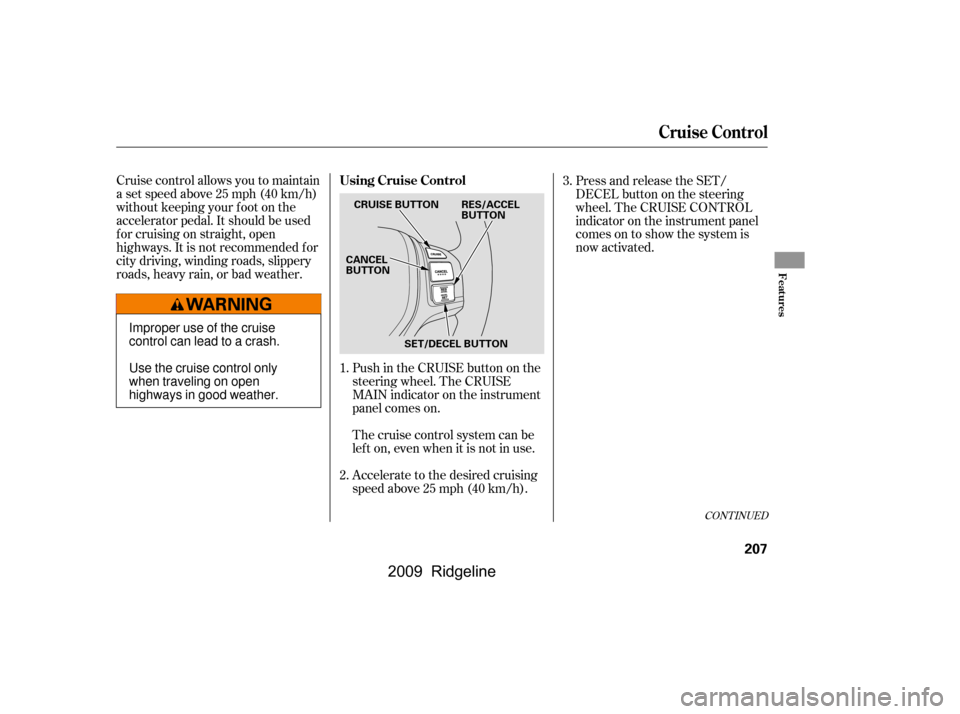
Push in the CRUISE button on the
steering wheel. The CRUISE
MAIN indicator on the instrument
panel comes on.
Press and release the SET/
DECELbuttononthesteering
wheel. The CRUISE CONTROL
indicator on the instrument panel
comes on to show the system is
now activated.
Accelerate to the desired cruising
speedabove25mph(40km/h).
Thecruisecontrolsystemcanbe
lefton,evenwhenitisnotinuse.
1.
2.
3.
CONT INUED
Using Cruise Control
Cruise Control
Features
207
CRUISE BUTTONRES/ACCEL BUTTON
CANCELBUTTON
SET/DECEL BUTTON
Improper use of the cruise
control can lead to a crash.
Use the cruise control only
when traveling on open
highways in good weather.
�����—�����—�����y������
��������y���
�(�����������y�����
���y
2009 Ridgeline
Page 213 of 427
Tap the brake pedal.
Push the CANCEL button on the
steering wheel.
Resting your f oot on the brake pedal
causes cruise control to cancel.
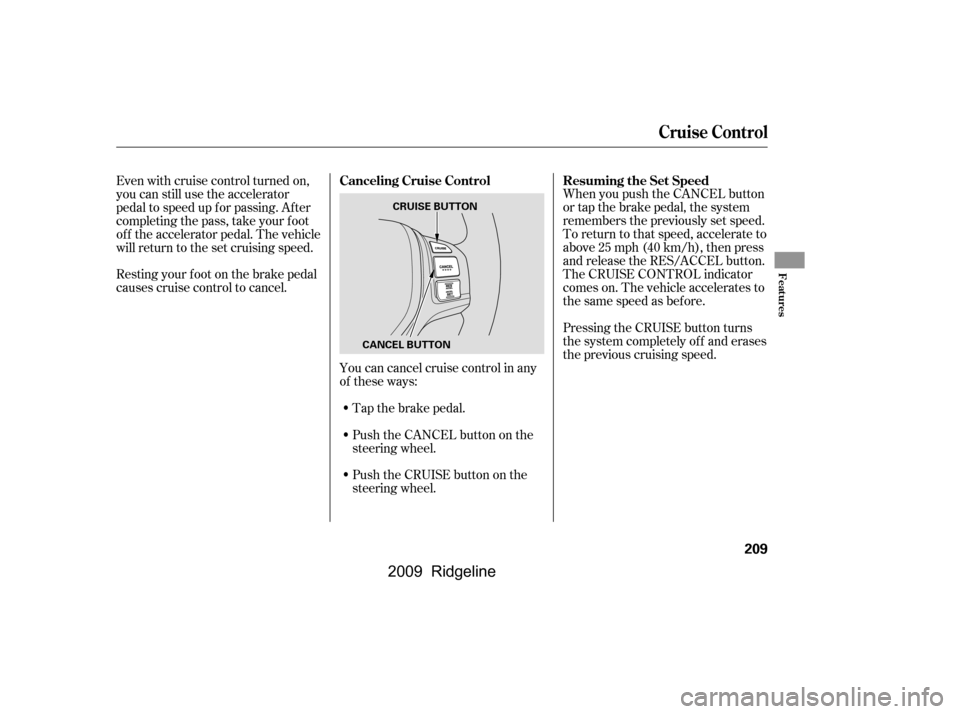
You can cancel cruise control in any
of these ways:
Push the CRUISE button on the
steering wheel. When you push the CANCEL button
or tap the brake pedal, the system
remembers the previously set speed.
To return to that speed, accelerate to
above25mph(40km/h),thenpress
and release the RES/ACCEL button.
The CRUISE CONTROL indicator
comes on. The vehicle accelerates to
thesamespeedasbefore.
Pressing the CRUISE button turns
the system completely of f and erases
the previous cruising speed.
Even with cruise control turned on,
you can still use the accelerator
pedal to speed up f or passing. Af ter
completing the pass, take your foot
of f the accelerator pedal. The vehicle
will return to the set cruising speed.
Resuming the Set Speed
Canceling Cruise Control
Cruise Control
Features
209
CRUISE BUTTON
CANCEL BUTTON
�\f���—�\f���—�\f���y���\f��
����
���y���
�(���������\f�y�\f���
���y
2009 Ridgeline