Page 120 of 427
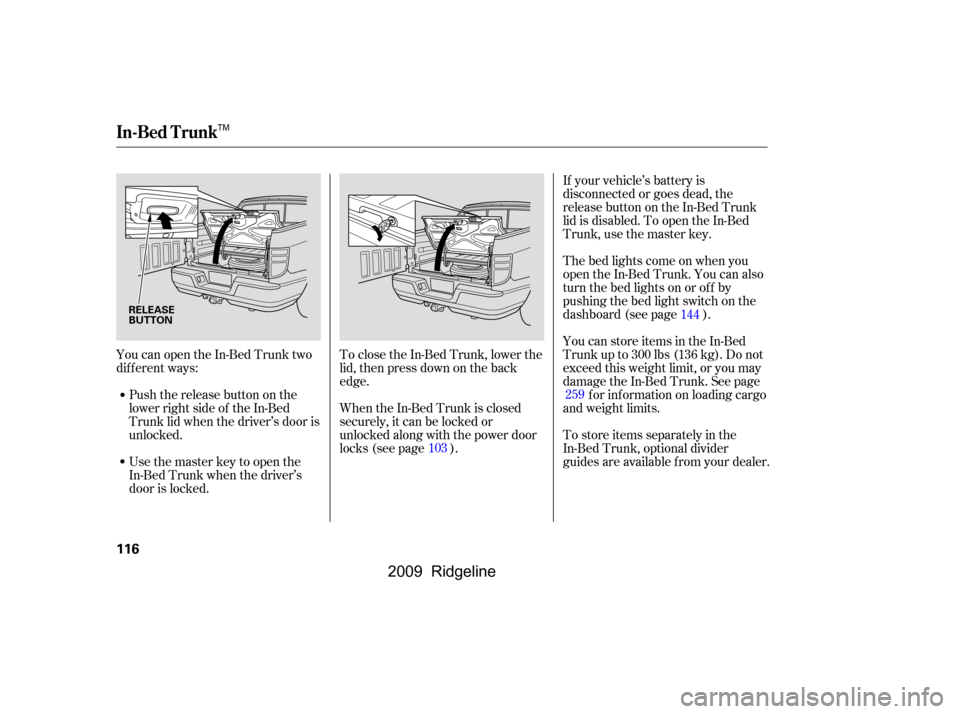
YoucanopentheIn-BedTrunktwo
dif f erent ways:Push the release button on the
lower right side of the In-Bed
Trunk lid when the driver’s door is
unlocked. To close the In-Bed Trunk, lower the
lid, then press down on the back
edge. If your vehicle’s battery is
disconnected or goes dead, the
release button on the In-Bed Trunk
lid is disabled. To open the In-Bed
Trunk, use the master key.
Usethemasterkeytoopenthe
In-Bed Trunk when the driver’s
door is locked. Thebedlightscomeonwhenyou
open the In-Bed Trunk. You can also
turn the bed lights on or off by
pushing the bed light switch on the
dashboard (see page ).
You can store items in the In-Bed
Trunk up to 300 lbs (136 kg). Do not
exceed this weight limit, or you may
damage the In-Bed Trunk. See page
f or inf ormation on loading cargo
and weight limits.
To store items separately in the
In-Bed Trunk, optional divider
guides are available f rom your dealer.
When the In-Bed Trunk is closed
securely, it can be locked or
unlocked along with the power door
locks (see page ). 144
259
103
In-Bed Trunk
116
RELEASE
BUTTON
TM
�\f���—�\f���—�\f���y�
�������������y���
�(���������\f�y�\f�
���
�y
2009 Ridgeline
Page 131 of 427
Follow these precautions when using
the seat heaters:Use the HI setting only to heat the
seats quickly, because it draws
large amounts of current f rom the
battery.
If the engine is lef t idling f or an
extended period, do not use the
seat heaters, even on the LO
setting. It can weaken the battery,
causing hard starting.
In the HI setting, the heater turns off
when the seat gets warm, and turns
back on after the seat’s temperature
drops.
In the LO setting, the heater runs
continuously. It does not cycle with
temperature changes.
Push the top of the switch, HI, to
rapidly heat up the seat. Af ter the
seat reaches a comfortable
temperature, select LO by pushing
the bottom of the switch. This will
keep the seat warm.
Seat Heaters
Inst rument s and Cont rols
127
SEAT HEATER SWITCHES
�\f���—�\f���—�\f���y���\f��\f�
��\f�
�y���
�(���������\f�y�\f�
�����y
2009 Ridgeline
Page 133 of 427

�µIf the driver’s
window senses any obstacle while it
is closing automatically, it will
reverse direction, and then stop. To
close the window, remove the
obstacle, then use the window switch
again.
Auto reverse stops sensing when the
window is almost closed. You should
always check that all passengers and
objects are away from the window
bef ore closing it. Your vehicle has a power back
window.
This indicator comes on when you
turn the ignition switch from the ON
(II) position to the ACCESSORY (I)
or LOCK (0) position without closing
the back window. With the ignition
switch in the ACCESSORY (I)
position, the indicator goes off after
about 30 seconds. With the ignition
switch in the LOCK (0) position, the
indicator goes of f af ter about 3
minutes.
If your vehicle’s battery is
disconnected or goes dead, or the
driver’s window f use is removed, the
AUTO f unction may be disabled. If
the AUTO f unction is disabled, the
power window system will need to be
reset af ter reconnecting the battery
or installing the f use.
If the power windows do not operate
properly af ter resetting, have your
vehicle checked by your dealer.
Pull and hold the driver’s window
switch to close the window
completely, then hold the switch
f or about 2 seconds.
Start the engine. Push down and
hold the driver’s window switch
until the window is f ully open.
1.
2.
CONT INUED
AUTO REVERSE
Back Window
Back Window Open
Indicator
Power Windows
Inst rument s and Cont rols
129
�\f���—�\f���—�\f���y���\f��\f�
��
���y���
�(���������\f�y�\f�
�����y
2009 Ridgeline
Page 208 of 427

Your vehicle’s audio system will
disable itself if it is disconnected
f rom electrical power f or any reason.
To make it work again, you must
enter a specific code with the preset
bars. Because there are hundreds of
number combinations possible f rom
the f ive digits, making the system
work without knowing the exact
code is nearly impossible.
If you lose the card, you must obtain
the code number f rom your dealer.
To do this, you will need the audio
system’s serial number.
You should have received a radio
code card that lists your audio
system’s code and serial numbers. It
is best to store this card in a saf e
place at home. In addition, you
should write the audio system’s
serial number in this owner’s manual.If your vehicle’s battery is
disconnected or goes dead, or the
radio f use is removed, the audio
system will disable itself . If this
happens, you will see
‘‘ENTER CODE’’ in the f requency
display the next time you turn on the
system. Use the preset bars to enter
the code. The code is located on the
radio code card included in your
owner’s manual kit. When it is
entered correctly, the radio will start
playing.
If you make a mistake entering the
code, do not start over; complete the
sequence, then enter the correct
code. You have ten tries to enter the
correct code. If you are unsuccessf ul
in ten attempts, you must then leave
the system on f or 1 hour bef ore
trying again.
Radio T hef t Protection
204
�\f���—�\f���—�\f���y���\f��
�
������y���
�(���������\f�y�\f���\f���y
2009 Ridgeline
Page 209 of 427
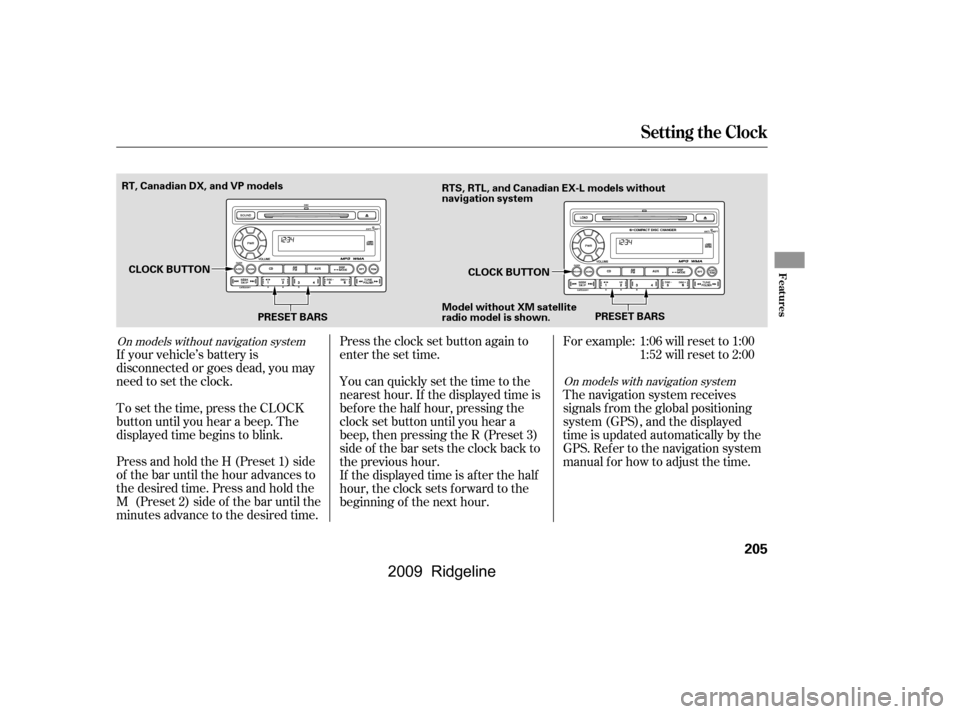
Press and hold the H (Preset 1) side
of the bar until the hour advances to
the desired time. Press and hold the
M (Preset 2) side of the bar until the
minutes advance to the desired time.
To set the time, press the CLOCK
button until you hear a beep. The
displayed time begins to blink.
If your vehicle’s battery is
disconnected or goes dead, you may
need to set the clock.You can quickly set the time to the
nearest hour. If the displayed time is
bef ore the half hour, pressing the
clock set button until you hear a
beep, then pressing the R (Preset 3)
side of the bar sets the clock back to
the previous hour.
If the displayed time is after the half
hour, the clock sets f orward to the
beginning of the next hour.
Press the clock set button again to
enter the set time.For example:
The navigation system receives
signals f rom the global positioning
system (GPS), and the displayed
time is updated automatically by the
GPS. Ref er to the navigation system
manual f or how to adjust the time.1:06 will reset to 1:00
1:52 will reset to 2:00
On models with navigation system
On models without navigation system
Setting the Clock
Features
205
PRESET BARS
PRESET BARS
CLOCK BUTTON
CLOCK BUTTON
RT, Canadian DX, and VP models
RTS, RTL, and Canadian EX-L models without
navigation system
Model without XM satellite
radio model is shown.
�\f���—�\f���—�\f���y���
�����������y���
�(���������\f�y�\f���
�\f�y
2009 Ridgeline
Page 224 of 427
�Î
�Î �Î�µ
�µ �µ
�µ �µ
�Î
When you are operating the HFL, or
when you manually select HFL on
the multi-information display, you
will see this inf ormation on the
screen: Signal Strength Indicates the
network signal strength of the
current phone. Five bars equals
f ull strength.
ROAM Status Indicates your
phone is roaming.
Battery Level Status Indicates
the power currently remaining in
your phone’s battery. Five bars
equals f ull battery strength.
HFL Mode Indicates when you
are dialing and receiving calls.
Phone Dialing Indicates the
number you entered or the
number of the incoming call.
Some phones do not send this
inf ormation to the HFL.
:
Multi-Inf ormation Display
BluetoothHandsFreeL ink
220
SIGNAL
STRENGTH
BATTERY
LEVEL STATUS
HFL
MODE
ROAM STATUS PHONE DIALING
�\f���—�\f���—�\f���y���\f��
��������y���
�(���������\f�y�\f�������y
2009 Ridgeline
Page 231 of 427

Press and release the Talk button.
If you say ‘‘OK’’ af ter the beep, the
HFL response is ‘‘The phone has
been deleted. Returning to the
main menu.’’ If you say ‘‘Go back,’’
or ‘‘Cancel,’’ the phone will not be
deleted.
Press and release the Talk button.
Af ter the beep, say ‘‘Phone setup.’’
The HFL response is, ‘‘Phone
setup options are status, pair, edit,
delete, and list.’’
Press and release the Talk button.
Af ter the beep, say ‘‘List.’’ The
HFL responds by listing the name
of each paired phone. When allphones paired to the system have
been read, the HFL response is
‘‘The entire list has been read.
Returning to the main menu.’’
Press and release the Talk button.
After the beep, say ‘‘Status.’’ An
example of the HFL response is,
‘‘Eric’s phone is linked. Battery
strength is three bars. Signal
strength is f ive bars, and the
phone is roaming. Returning to the
main menu.’’
Press and release the Talk button.
Af ter the beep, say ‘‘Phone setup.’’
The HFL response is ‘‘Phone
setup options are status, pair, edit,
delete, and list.’’
Press and release the Talk button.
Af ter the beep, say ‘‘Next phone.’’
The HFL response is ‘‘Searching
f or the next phone.’’ The HFL
then disconnects the linked phone
and searches for another paired
phone. If no other phones are
f ound, the f irst phone remains
linked.
Press and release the Talk button.
Af ter the beep, say ‘‘Yes.’’ The
HFL response is ‘‘Preparing to
delete Eric’s phone. Say OK to
continue, otherwise, say Go back,
or Cancel.’’
1.
2.
1.
4.
5.
1.
2.
To list all paired phones, do this: To change f rom the currently linked
phone to another paired phone, do this:
To f ind out the status of the phone being used, do this:
BluetoothHandsFreeL ink
Features
227
�\f���—�\f���—�\f���y���\f��
������\f�y���
�(���������\f�y�\f�������y
2009 Ridgeline
Page 232 of 427

You can make calls using any phone
number, or by using a name in the
HFL phonebook. You can also redial
the last number called. During a call,
theHFLallowsyoutotalkupto30
minutes af ter you remove the key
f rom the ignition switch. Continuing
a call without running the engine
may discharge and weaken the
vehicle’s battery.Press and release the Talk button.
Af ter the beep, say the number
you want to call. For example, say
‘‘123 456 7891.’’ The HFL response
is ‘‘123 456 7891. Say call, dial, or
continue to add numbers.’’
Press and release the Talk button.
Af ter the beep, say ‘‘Call’’ or ‘‘Dial.’’
The HFL response is ‘‘Calling’’ or
‘‘Dialing.’’ Once connected, you
will hear the person you called
through the audio speakers. To
change the volume, use the audio
system volume knob, or the
steering wheel volume controls.
To end the call, press the Back
button.
With your phone on and the
ignition in the ACCESSORY (I) or
ON (II) position, press and release
the Talk button. After the beep,
say ‘‘Call’’ or ‘‘Dial.’’ The HFL
response is, ‘‘What name or
number would you like to call/
dial?’’ You can also make a call directly
f rom the list shown on the
navigation display.
For more inf ormation on how to
make a call, see page .
2.
4.
1. 3.
231
To make a call using a phone number, do this:
Making a Call
BluetoothHandsFreeL ink
228
�\f���—�\f���—�\f���y���\f��
��������y���
�(���������\f�y�\f�������y
2009 Ridgeline