Page 203 of 578

When you press a f an control button,
the fan is taken out of AUTO mode. When you set the temperature to its
lower limit ( ) or its upper limit
( ), the system runs at f ull
cooling or heating only. It does not
regulate the interior temperature.In the Auto mode, the vehicle’s
interior temperature is
independently regulated f or the
driver, f ront passenger, and rear
passengers according to each
adjusted temperature. The system
also regulates each temperature
basedontheinformationof thesun
light sensor and the sun position
which is updated automatically by
the navigation’s global positioning
system (GPS). For example, if the
driver’s side of the vehicle getting
too much sun, the system will adjust
to a lower temperature.When you turn the ignition switch to
the ON (II) position, the temperature
of the rear passenger compartment
is synchronized to the driver’s side
set temperature. You will see SYNC
on the system display of the rear
control panel. Changing the
temperature of the rear passenger
compartment takes the system out
of synchronized mode. This causes
thewordSYNCinthedisplaytogo
out and displays the rear
temperature in the f ront display.
When you turn the ignition switch to
the ON (II) position and see LOCK
on the system display of the f ront
and rear control panels, the
temperature of the rear passenger
compartment is not synchronized to
the driver’s side set temperature.
On vehicles with navigation system
RR (Rear) L ock But t on
Climate Control System
Features
199
�����—�����—�
���y�
�������������y���
�(�/���������y���������y
2009 Pilot
Page 273 of 578
�µ
�µ �µ
�µ
�µ
�µ The signal is
currently too
weak. Move the
vehicle to an area
away from tall
buildings, and
with an
unobstructed view
of the southern
horizon.
The selected channel
number does not exist, or
isnotpartofyour
subscription, or this
channel has no artist or
title information at this
time.
There is a problem
with the XM
antenna. Please
consult your dealer.
XM is loading the
audio or program
inf ormation.
The channel currently selected is
no longer
broadcasting.
The encryption
code is being
updated. Wait
until the
encryption code is
f ully updated.
Channels 0 and 1
should still work
normally.
CONT INUED
XM Satellite Radio Display
Messages ‘‘NO SIGNA L ’’
‘‘----’’
‘‘A NT ENNA ’’
‘‘L OA DING’’
‘‘OFF A IR’’
‘‘UPDA T ING’’
Playing the XMSatellite Radio (Models with navigation system)
Features
269
�����—�����—�
���y�
�������������y���
�(�/���������y���������y
2009 Pilot
Page 316 of 578
You can quickly set the time to the
nearest hour. If the displayed time is
bef ore the half hour, press and hold
the CLOCK button, then press the R
(reset) button to set the time back to
the previous hour. If the displayed
time is af ter the half hour, the same
procedure sets the time f orward to
the beginning of the next hour.
For example: 1:06 will reset to 1:001:52 will reset to 2:00
The navigation system receives
signals f rom the global positioning
system (GPS), and the displayed
time is updated automatically by the
GPS. Ref er to the navigation system
manual f or how to adjust the time.
If your vehicle’s battery is
disconnected or goes dead, you may
need to set the clock.
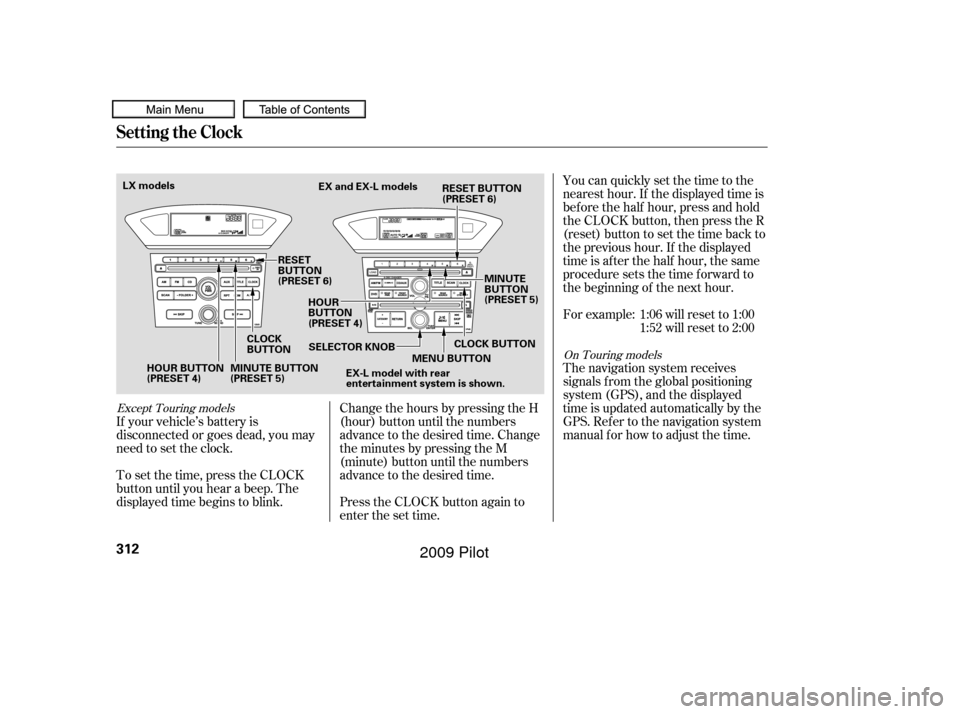
To set the time, press the CLOCK
button until you hear a beep. The
displayed time begins to blink. Change the hours by pressing the H
(hour) button until the numbers
advance to the desired time. Change
the minutes by pressing the M
(minute) button until the numbers
advance to the desired time.
Press the CLOCK button again to
enter the set time.
Except Touring models
On Touring models
Setting the Clock
312
HOUR BUTTON
(PRESET 4)
CLOCK
BUTTONEX and EX-L models
RESET
BUTTON
(PRESET 6) HOUR
BUTTON
(PRESET 4) MINUTE
BUTTON
(PRESET 5)
MINUTE BUTTON
(PRESET 5) SELECTOR KNOB
MENU BUTTON
EX-L model with rear
entertainment system is shown.
LX models
CLOCK BUTTON
RESET BUTTON
(PRESET 6)
�����—�����—�
���y�
�������������y���
�(�/���������y�����
���y
2009 Pilot