Page 104 of 532

With the ignition switch in the ON
(II) position, press and hold the
INFO button for more than 3
seconds. ‘‘CUSTOMIZE ENTRY’’
appears on the multi-inf ormation
display.
You can customize some vehicle
control settings f or ‘‘DRIVER 1’’ and
‘‘DRIVER 2’’ separately.
To have the driver’s ID detected,
make sure you use your transmitter
to unlock the driver’s door.
If you use the key to unlock the
driver’s door, the system cannot
recognize either ‘‘DRIVER 1’’ or
‘‘DRIVER 2.’’ In this case, when you
try to enter the customizing mode,
‘‘DRIVER UNKNOWN
CUSTOMIZE IMPOSSIBLE’’ will be
displayed, and you cannot customize
the settings.Ref er to the table on the f ollowing
pages about the settings you want to
customize.
UsetheINFObuttononthesteering
wheel to see the settings, and the
SEL/RESET button to enter your
selections.
If you want the settings as they were
when the vehicle lef t the f actory,
select ‘‘DEFAULT ALL,’’ as
described on page.
If you want to change any vehicle
control settings, select ‘‘CHANGE
SETTING,’’ and f ollow the
instructions on page .
The f irst customizing menu is:
CHANGE SETTING
DEFAULT ALL
You cannot customize the settings
under these conditions:
If you turn the ignition switch to
the ACCESSORY (I) or the LOCK
(0) position.
If you move the shif t lever out of
Park.
You can cancel each custom setting
(Driver 1, Driver 2). Press and hold
the LOCK and SLIDING DOOR
button (passenger’s side) at the
same time until the LED in the
remote transmitter blinks twice. At
this time, the custom setting is
changed to the def ault setting. To
activate each custom setting (Driver
1, Driver 2), repeat this procedure.
The LED will blink f or 1 second to
indicate the custom setting has been
activated. 106
104
CONT INUED
Customized Settings
Multi-Inf ormation Display
Inst rument s and Cont rols
101
�\f���—�\f���—���
�y�
�
�����������y���
�(���������\f�y�\f�
�\f���y
2009 Odyssey
Page 106 of 532

�Î
�Î
�Î �Î �Î
�ΠMenu Item
AUTO DOOR LOCK
AUTO DOOR UNLOCK
KEYLESS LOCK
SECURITY RELOCK
TIMER
FRONT WIPER
ACTION Setting Option
SHIFT FROM P
WIT H VEHICLE SPEED
OFF
DRIVER’S DOOR WITH
SHIFT TO P
ALL DOORS WITH SHIFT
TO P
DRIVER’S DOOR WITH
IGN OFF
ALL DOORS WITH IGN
OFF
OFF
ON
OFF
30 sec
60 sec
90 sec
WITH VEH SPD
INTERMITTENT
OK
CANCEL Page
123
125
127
129
131
104
Group Setup
DOOR · WINDOW
SETUP
(P.122)
WIPER SETUP
(P.131)
DEFAULT ALL Description
Changes when the doors automatically lock.
Changes when the doors automatically unlock.
The exterior lights flash each time you press the
LOCK or UNLOCK button. A beeper will also sound
when you press the LOCK button twice.
Changes how long it takes (in seconds) for the doors
to relock and the security system to set af ter you
unlock and do not open the door.
Changes the wiper operation between two settings
when the wiper switch is in the INT position.
Changes all the customized settings as they were
when the vehicle left the factory.
Default setting
:
ACKNOWLEDGEMENT
Multi-Inf ormation Display
Inst rument s and Cont rols
103
�����—�����—���
�y�
�
�����������y���
�(�����������y���
�����y
2009 Odyssey
Page 125 of 532
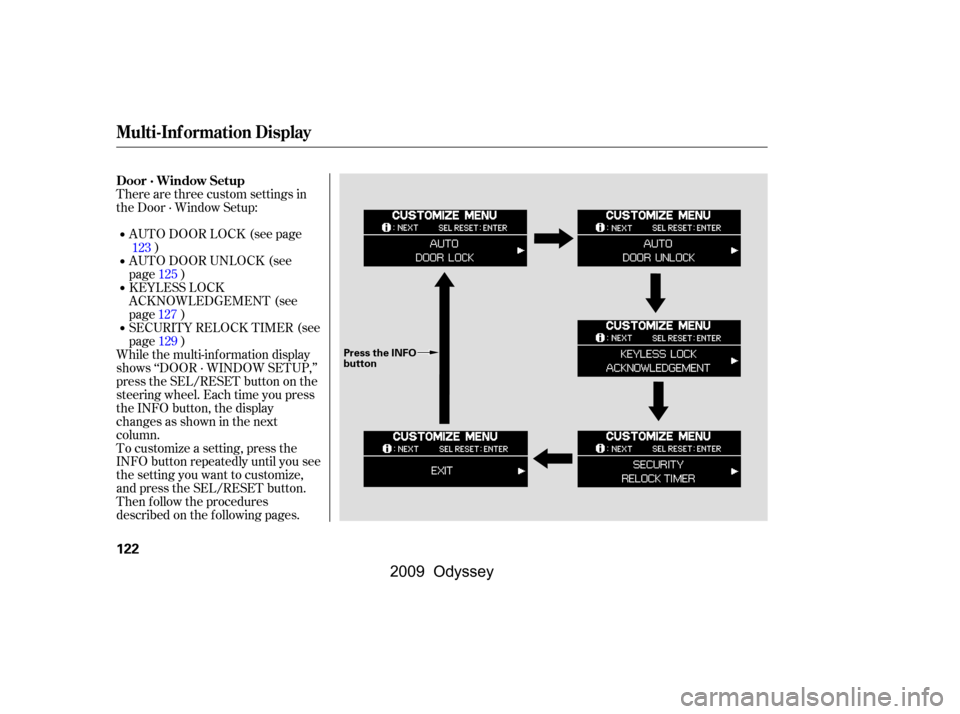
To customize a setting, press the
INFO button repeatedly until you see
the setting you want to customize,
and press the SEL/RESET button.
Then f ollow the procedures
described on the f ollowing pages.AUTO DOOR LOCK (see page
)
SECURITY RELOCK TIMER (see
page ) KEYLESS LOCK
ACKNOWLEDGEMENT (see
page ) AUTO DOOR UNLOCK (see
page )
There are three custom settings in
the Door · Window Setup:
While the multi-information display
shows ‘‘DOOR · WINDOW SETUP,’’
press the SEL/RESET button on the
steering wheel. Each time you press
the INFO button, the display
changesasshowninthenext
column. 123
125
127 129
Door · Window Setup
Multi-Inf ormation Display
122
Press the INFO
button
�����—�����—���
�y�
�
�����������y���
�(�����������y���
�����y
2009 Odyssey
Page 126 of 532
�µ�µ�µ
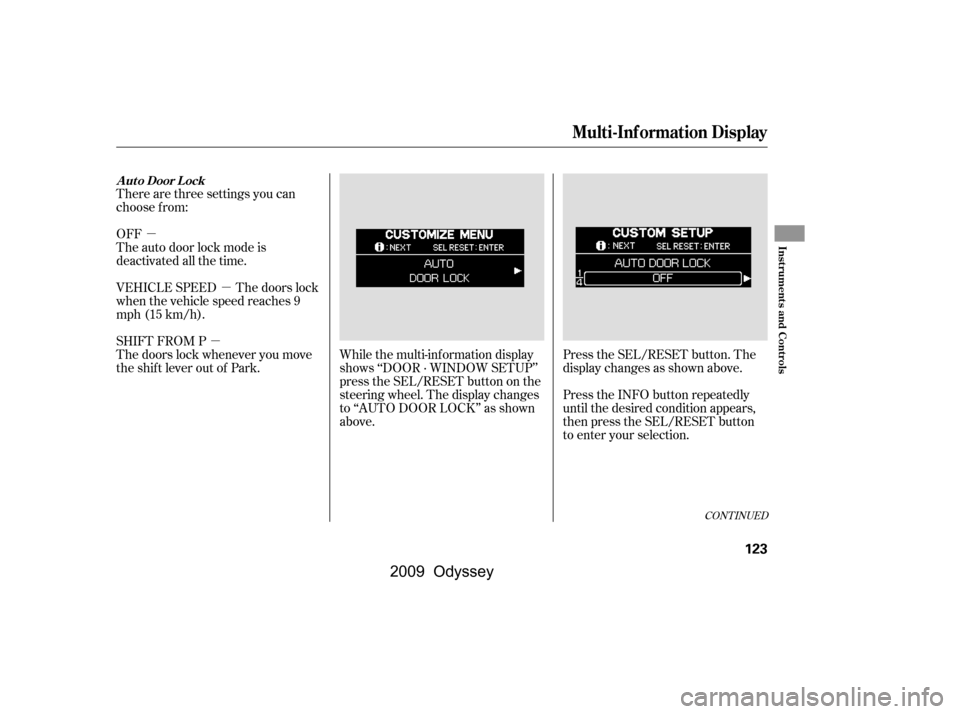
There are three settings you can
choose f rom:
OFF
The auto door lock mode is
deactivated all the time.
Press the SEL/RESET button. The
display changes as shown above.
Press the INFO button repeatedly
until the desired condition appears,
then press the SEL/RESET button
to enter your selection.
SHIFT FROM P
The doors lock whenever you move
the shift lever out of Park.
VEHICLE SPEED The doors lock
when the vehicle speed reaches 9
mph (15 km/h).
While the multi-information display
shows ‘‘DOOR · WINDOW SETUP’’
press the SEL/RESET button on the
steering wheel. The display changes
to ‘‘AUTO DOOR LOCK’’ as shown
above.
CONT INUED
A ut o Door L ock
Multi-Inf ormation Display
Inst rument s and Cont rols
123
�\f���—�\f���—���
�y�
�
����\f������y���
�(���������\f�y�\f�
�����y
2009 Odyssey
Page 127 of 532
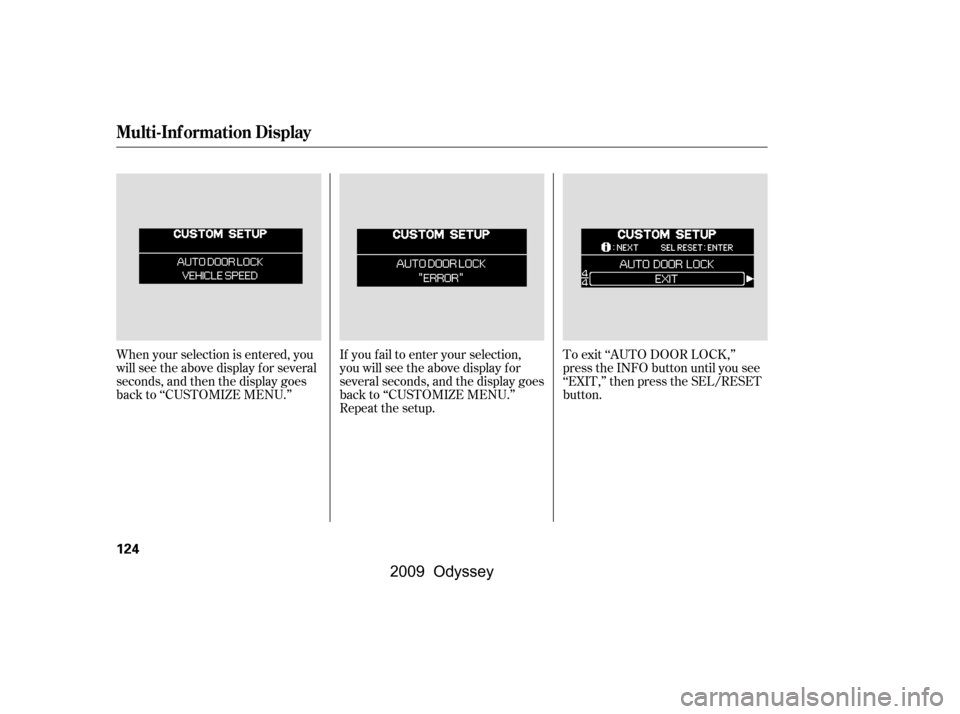
If you f ail to enter your selection,
you will see the above display f or
several seconds, and the display goes
back to ‘‘CUSTOMIZE MENU.’’
Repeat the setup.To exit ‘‘AUTO DOOR LOCK,’’
press the INFO button until you see
‘‘EXIT,’’ then press the SEL/RESET
button.
When your selection is entered, you
will see the above display for several
seconds, and then the display goes
back to ‘‘CUSTOMIZE MENU.’’
Multi-Inf ormation Display
124
�\f���—�\f���—���
�y�
�
����\f������y���
�(���������\f�y�\f�
�����y
2009 Odyssey
Page 128 of 532
�µ
�µ
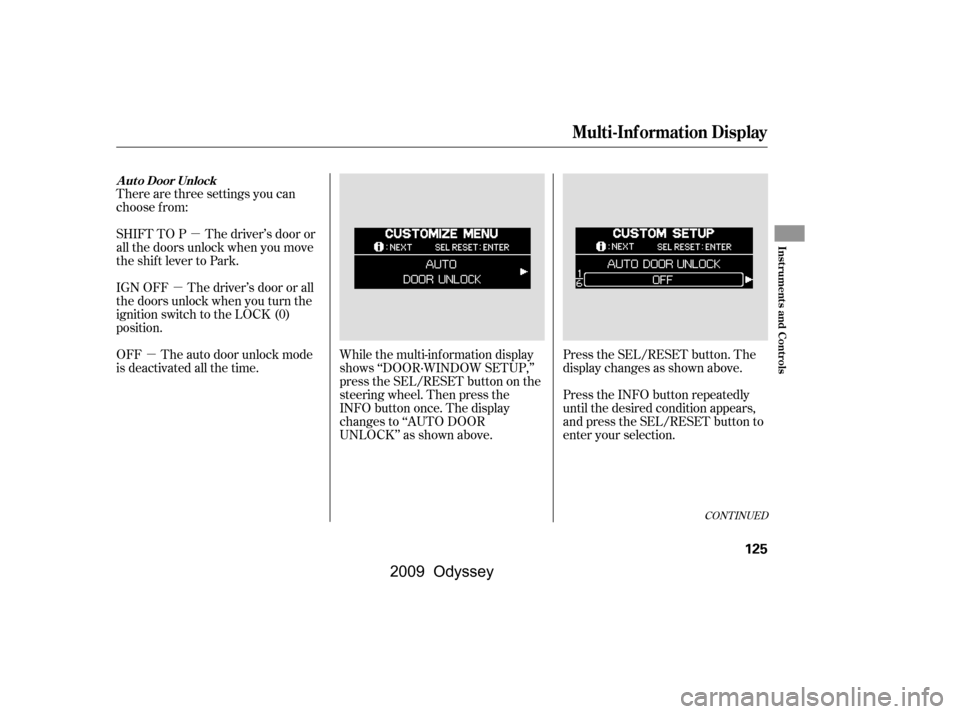
�µ While the multi-information display
shows ‘‘DOOR·WINDOW SETUP,’’
press the SEL/RESET button on the
steering wheel. Then press the
INFO button once. The display
changes to ‘‘AUTO DOOR
UNLOCK’’ as shown above.
There are three settings you can
choose f rom:
SHIFT TO P The driver’s door or
all the doors unlock when you move
the shift lever to Park.
IGN OFF The driver’s door or all
the doors unlock when you turn the
ignition switch to the LOCK (0)
position.
OFF The auto door unlock mode
is deactivated all the time.
Press the SEL/RESET button. The
display changes as shown above.
Press the INFO button repeatedly
until the desired condition appears,
and press the SEL/RESET button to
enter your selection.
CONT INUED
A ut o Door Unlock
Multi-Inf ormation Display
Inst rument s and Cont rols
125
�\f���—�\f���—���
�y�
�
����\f����\f�y���
�(���������\f�y�\f�
���\f�y
2009 Odyssey
Page 129 of 532
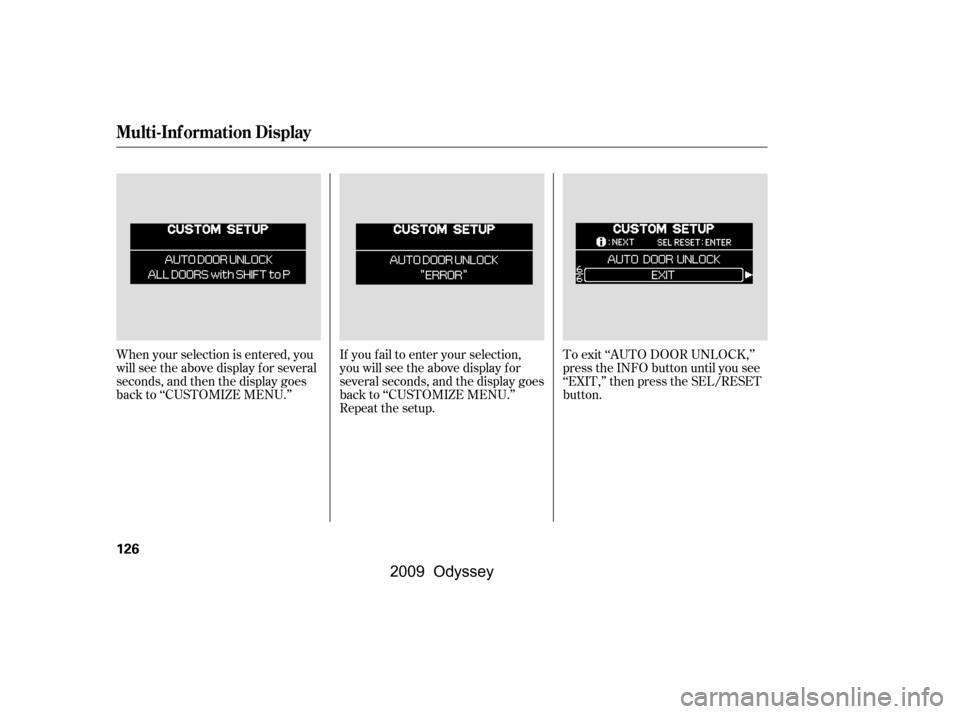
When your selection is entered, you
will see the above display for several
seconds, and then the display goes
back to ‘‘CUSTOMIZE MENU.’’If you f ail to enter your selection,
you will see the above display f or
several seconds, and the display goes
back to ‘‘CUSTOMIZE MENU.’’
Repeat the setup.To exit ‘‘AUTO DOOR UNLOCK,’’
press the INFO button until you see
‘‘EXIT,’’ then press the SEL/RESET
button.
Multi-Inf ormation Display
126
�\f���—�\f���—���
�y�
�
����\f������y���
�(���������\f�y�\f�
���
�y
2009 Odyssey
Page 130 of 532
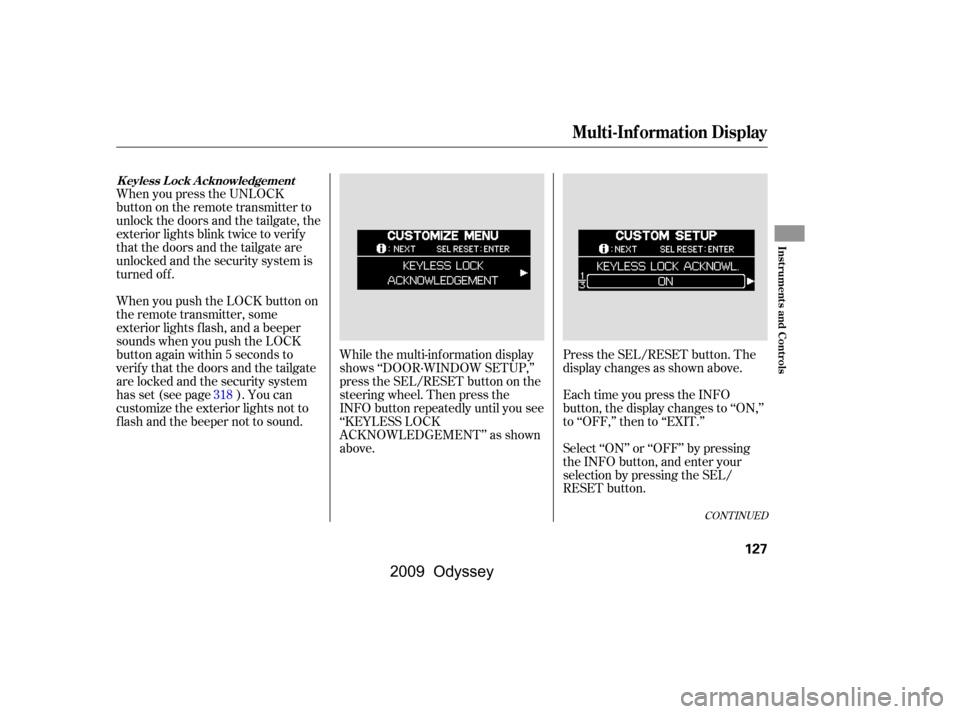
Each time you press the INFO
button, the display changes to ‘‘ON,’’
to ‘‘OFF,’’ then to ‘‘EXIT.’’
Select ‘‘ON’’ or ‘‘OFF’’ by pressing
the INFO button, and enter your
selection by pressing the SEL/
RESET button.
When you press the UNLOCK
button on the remote transmitter to
unlock the doors and the tailgate, the
exterior lights blink twice to verif y
that the doors and the tailgate are
unlocked and the security system is
turned off.
When you push the LOCK button on
the remote transmitter, some
exterior lights f lash, and a beeper
sounds when you push the LOCK
button again within 5 seconds to
verify that the doors and the tailgate
arelockedandthesecuritysystem
has set (see page ). You can
customize the exterior lights not to
f lash and the beeper not to sound.
While the multi-information display
shows ‘‘DOOR·WINDOW SETUP,’’
press the SEL/RESET button on the
steering wheel. Then press the
INFO button repeatedly until you see
‘‘KEYLESS LOCK
ACKNOWLEDGEMENT’’ as shown
above.Press the SEL/RESET button. The
display changes as shown above.
318
CONT INUED
K eyless L ock A cknowledgement
Multi-Inf ormation Display
Inst rument s and Cont rols
127
�\f���—�\f���—���
�y�
�
����
��\f���y���
�(���������\f�y�\f�
�����y
2009 Odyssey