Page 357 of 532
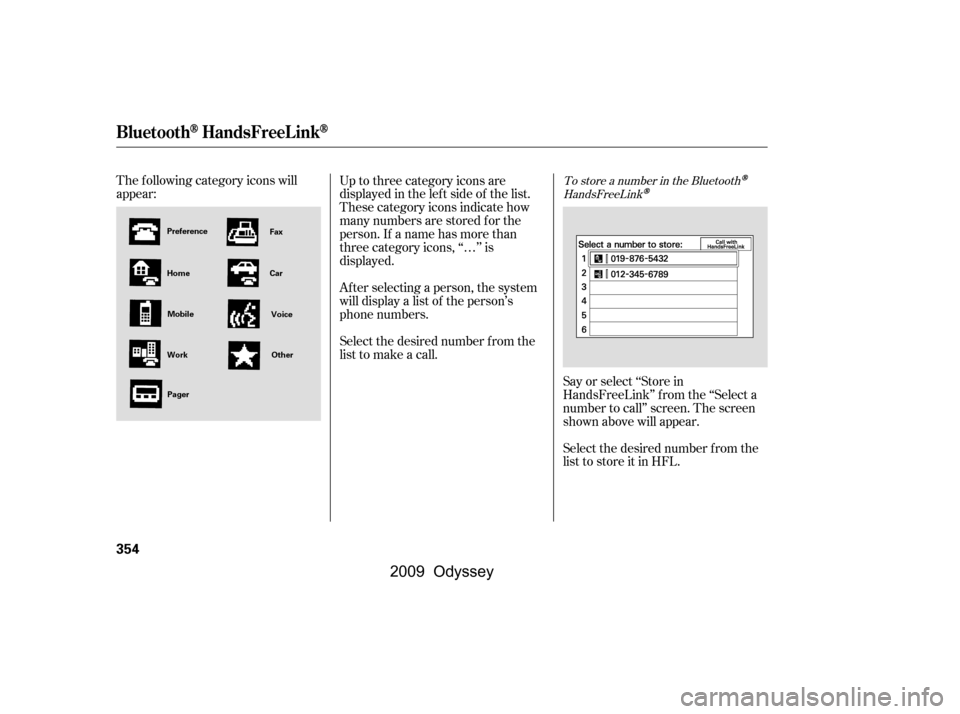
Select the desired number f rom the
list to store it in HFL.
The f ollowing category icons will
appear:
Say or select ‘‘Store in
HandsFreeLink’’ f rom the ‘‘Select a
number to call’’ screen. The screen
shown above will appear.
Up to three category icons are
displayed in the lef t side of the list.
These category icons indicate how
many numbers are stored f or the
person. If a name has more than
three category icons, ‘‘…’’ is
displayed.
Af ter selecting a person, the system
will display a list of the person’s
phone numbers.
Select the desired number f rom the
list to make a call.
To store a number in the Bluetooth
HandsFreeLink
BluetoothHandsFreeL ink
354
Work
Home
Preference
Mobile
Pager Fax
Car VoiceOther
�\f���—�\f���—���
�y�
����\f��������y���
�(���������\f�y�\f�������y
2009 Odyssey
Page 358 of 532
CONT INUED
To delete the imported phonebook
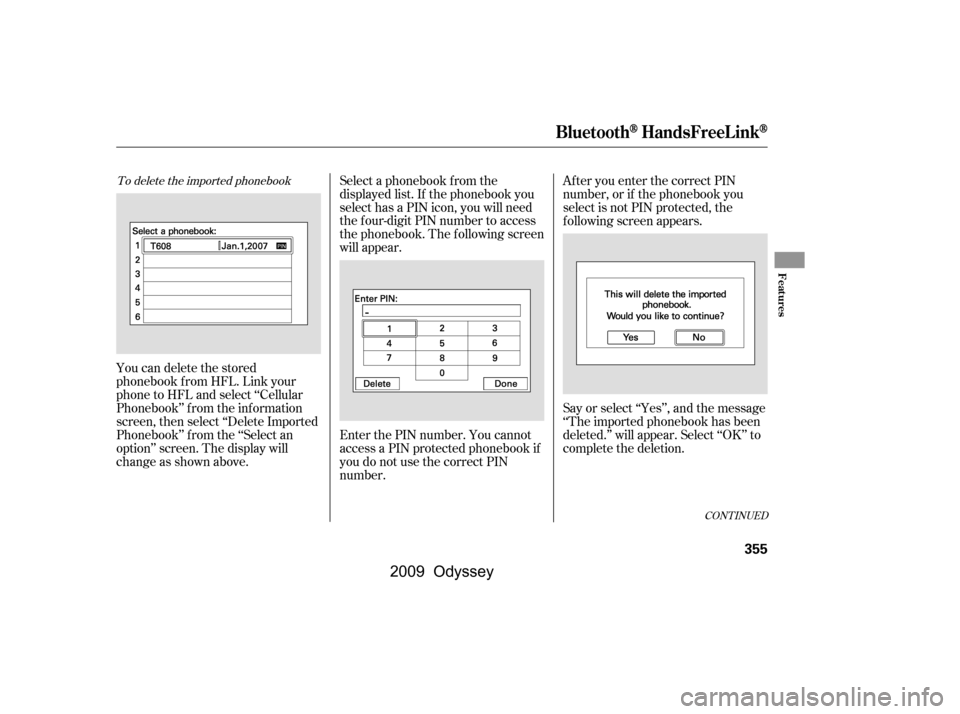
You can delete the stored
phonebook f rom HFL. Link your
phone to HFL and select ‘‘Cellular
Phonebook’’ f rom the inf ormation
screen, then select ‘‘Delete Imported
Phonebook’’ f rom the ‘‘Select an
option’’ screen. The display will
change as shown above.Select a phonebook f rom the
displayed list. If the phonebook you
select has a PIN icon, you will need
the f our-digit PIN number to access
the phonebook. The f ollowing screen
will appear.
Enter the PIN number. You cannot
access a PIN protected phonebook if
you do not use the correct PIN
number.After you enter the correct PIN
number, or if the phonebook you
select is not PIN protected, the
f ollowing screen appears.
Say or select ‘‘Yes’’, and the message
‘‘The imported phonebook has been
deleted.’’ will appear. Select ‘‘OK’’ to
complete the deletion.
BluetoothHandsFreeL ink
Features
355
�\f���—�\f���—���
�y�
����\f��������y���
�(���������\f�y�\f�����\f�y
2009 Odyssey
Page 359 of 532
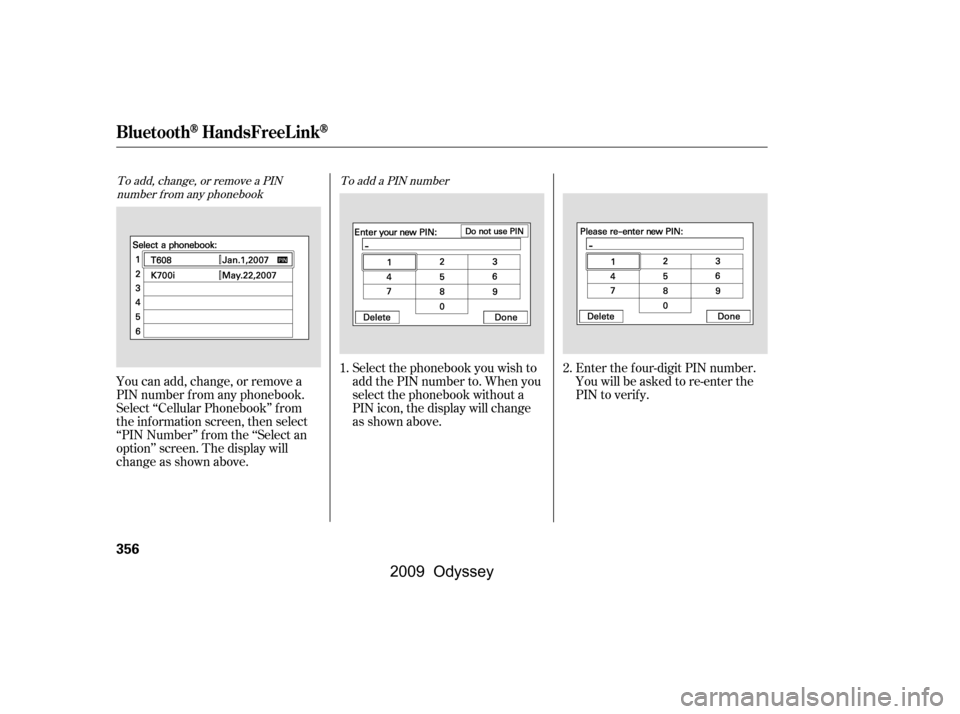
To add, change, or remove a PINnumber f rom any phonebook To add a PIN number
You can add, change, or remove a
PIN number f rom any phonebook.
Select ‘‘Cellular Phonebook’’ f rom
the inf ormation screen, then select
‘‘PIN Number’’ f rom the ‘‘Select an
option’’ screen. The display will
change as shown above.Select the phonebook you wish to
add the PIN number to. When you
select the phonebook without a
PIN icon, the display will change
as shown above.
Enter the f our-digit PIN number.
Youwillbeaskedtore-enterthe
PIN to verif y.
1.
2.
BluetoothHandsFreeL ink
356
�\f���—�\f���—���
�y�
����\f��������y���
�(���������\f�y�\f�����
�y
2009 Odyssey
Page 360 of 532
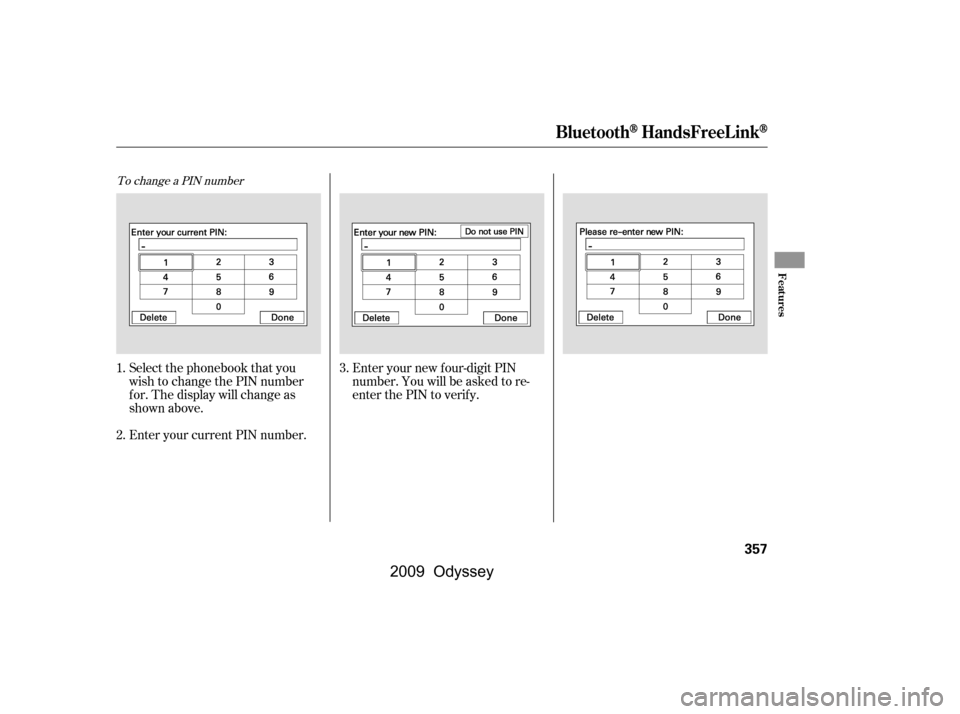
To change a PIN number
Enteryournewfour-digitPIN
number. You will be asked to re-
enter the PIN to verif y.
Select the phonebook that you
wish to change the PIN number
f or. The display will change as
shown above.
Enter your current PIN number.
1.
2. 3.
BluetoothHandsFreeL ink
Features
357
�\f���—�\f���—���
�y�
����\f��������y���
�(���������\f�y�\f�������y
2009 Odyssey
Page 364 of 532

All obstacles may not always be
sensed. Even when the system is on,
you should look f or obstacles near
yourvehicletomakesureitissafeto
park.
Your vehicle has a parking sensor
system. The system lets you know
theapproximatedistancebetween
your vehicle and most obstacles
while you are parking. When the
system is on and your vehicle is
nearinganobstacle,youwillheara
beeper and see system messages on
the multi-information display.
To activate the system, push the
switch on the dashboard with the
ignition in the ON (II) position. The
indicator in the switch comes on
when the system is on. To turn the
system of f , push the switch again.The system has two front corner
sensors, two rear corner sensors,
and a rear center sensor.
The rear center sensors work when
the shif t lever is in reverse (R), and
the vehicle speed is less than 5 mph
(8 km/h).
The corner sensors work only when
the shif t lever is in any position other
than P and the vehicle speed is less
than 5 mph (8 km/h).
On Touring models
Parking Sensor System
Features
361
PARKING SENSOR SYSTEM SWITCH
�\f���—�\f���—���
�y�
����\f������
�y���
�(���������\f�y�\f�������y
2009 Odyssey
Page 365 of 532
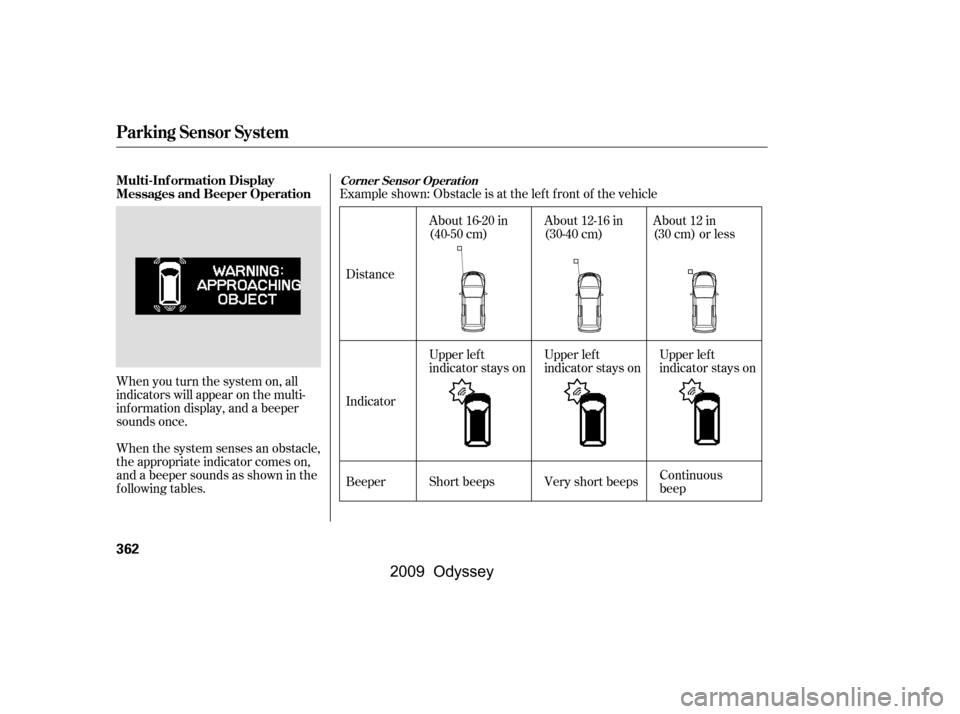
Example shown: Obstacle is at the lef t f ront of the vehicle
When you turn the system on, all
indicators will appear on the multi-
inf ormation display, and a beeper
sounds once.
When the system senses an obstacle,
the appropriate indicator comes on,
and a beeper sounds as shown in the
f ollowing tables. Distance
BeeperAbout 16-20 in
(40-50 cm)
About 12-16 in
(30-40 cm)
Upper lef t
indicator stays on
Short beeps Continuous
beep
Very short beeps About 12 in
(30 cm) or less
Upper lef t
indicator stays on Upper lef t
indicator stays on
Indicator
Corner Sensor Operat ionMulti-Inf ormation Display
Messages and Beeper Operation
Parking Sensor System
362
�\f���—�\f���—���
�y�
����\f��������y���
�(���������\f�y�\f�������y
2009 Odyssey
Page 366 of 532
If the system develops a problem,
you will see a ‘‘CHECK PARKING
SENSOR SYSTEM’’ message on the
multi-inf ormation display, and a
beeper sounds continuously. Very
of ten, a sensor covered with mud, ice,
snow,etc.isthecauseof this
message. Check the sensors f irst. If
the message stays on or the beeper
does not stop, have the system
checked by your dealer.
Distance
Beeper Short beeps
Continuous
beeps
Very short beeps
Bottom
indicator stays on
About 40-70 in
(1-1.8 m)
About 24-40 in
(0.6-1 m)
About 24 in
(0.6 m) or less
Bottom
indicator stays on Bottom
indicator stays on
Indicator
CONT INUED
Rear Cent er Sensor Operat ion
Parking Sensor System
Features
363
�\f���—�\f���—���
�y�
����\f������
�y���
�(���������\f�y�\f�������y
2009 Odyssey
Page 368 of 532

�Ý
�Û
When in reverse, the touch screen
and navigation system ‘‘hard’’
buttons are locked out, except the
‘‘ZOOM’’ button. Touching the ‘‘ ’’
or ‘‘ ’’ button allows you to adjust
the brightness of the rearview
camera image.
For the best picture, always keep the
rearview camera clean, and do not
cover the camera lens. To avoid
scratching the lens when you clean it,
use a moist, sof t cloth.
Since the rearview camera display
area is limited, you should always
back up slowly and caref ully, and
look behind you f or obstacles.
Whenever you shif t to reverse (R)
with the ignition switch in the ON
(II) position, the rear view is shown
on the navigation system screen. On
vehicle without navigation system,
the rear view is shown on the lef t
side of the inside mirror.
On EX-L and Touring models On U.S. EX-L with navigation system
and Touring models
Rearview Camera and Monitor
Features
365
ZOOM BUTTON
The camera brightness cannot be
adjusted by voice control.
�\f���—�\f���—���
�y�
����\f����\f�\f�y���
�(���������\f�y�\f�����\f�y
2009 Odyssey