Page 96 of 352
Front Seat AdjustmentsSee pages11 -12for important safety
information and warnings about how to properly position the seats and seat-
backs.Make all seat adjustments before you
start driving.
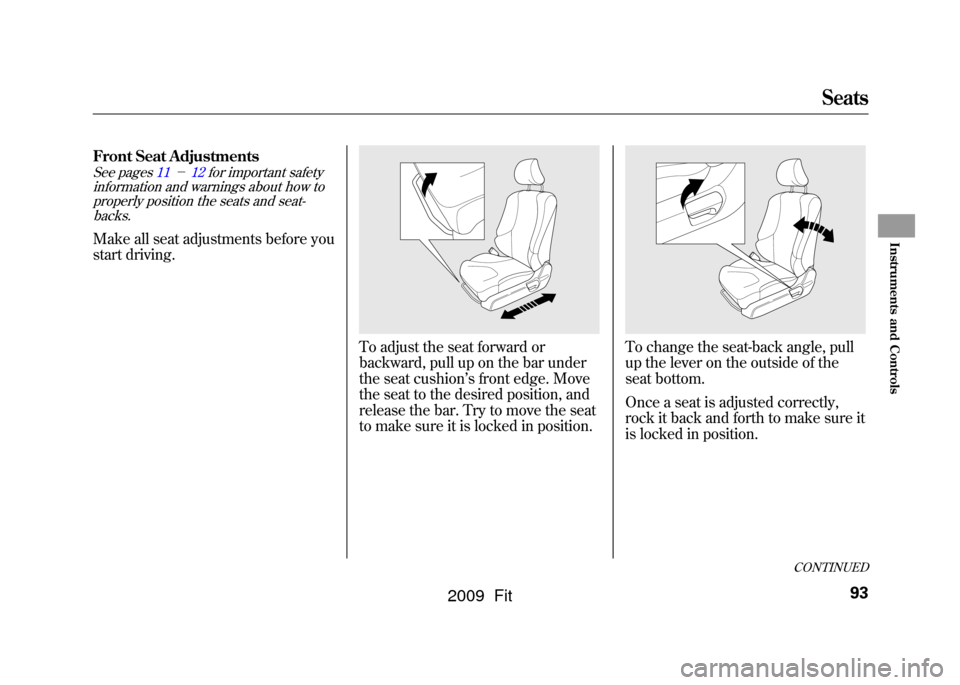
To adjust the seat forward or
backward, pull up on the bar under
the seat cushion ’s front edge. Move
the seat to the desired position, and
release the bar. Try to move the seat
to make sure it is locked in position.
To change the seat-back angle, pull
up the lever on the outside of the
seat bottom.
Once a seat is adjusted correctly,
rock it back and forth to make sure it
is locked in position.
CONTINUED
Seats
93
Instruments and Controls
2009 Fit
Page 98 of 352
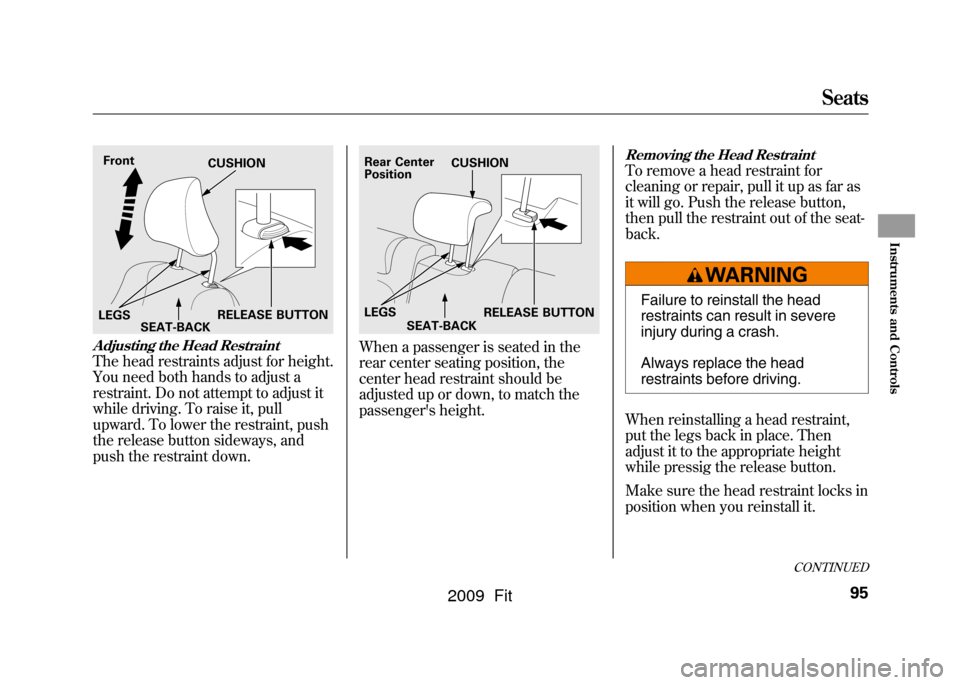
Adjusting the Head RestraintThe head restraints adjust for height.
You need both hands to adjust a
restraint. Do not attempt to adjust it
while driving. To raise it, pull
upward. To lower the restraint, push
the release button sideways, and
push the restraint down.
When a passenger is seated in the
rear center seating position, the
center head restraint should be
adjusted up or down, to match the
passenger's height.
Removing the Head RestraintTo remove a head restraint for
cleaning or repair, pull it up as far as
it will go. Push the release button,
then pull the restraint out of the seat-
back.
Failure to reinstall the head
restraints can result in severe
injury during a crash.
Always replace the head
restraints before driving.
When reinstalling a head restraint,
put the legs back in place. Then
adjust it to the appropriate height
while pressig the release button.
Make sure the head restraint locks in
position when you reinstall it.
Front
RELEASE BUTTON
CUSHION
LEGS SEAT-BACK
Rear Center
Position
RELEASE BUTTON
CUSHION
LEGS SEAT-BACK
CONTINUED
Seats
95
Instruments and Controls
2009 Fit
Page 100 of 352
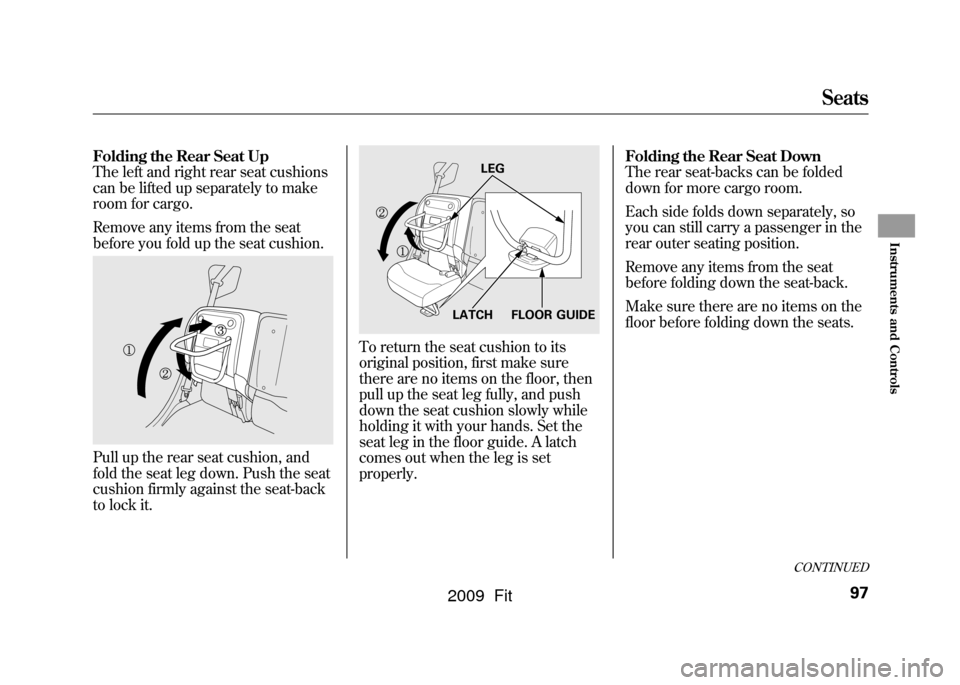
Folding the Rear Seat Up
The left and right rear seat cushions
can be lifted up separately to make
room for cargo.
Remove any items from the seat
before you fold up the seat cushion.Pull up the rear seat cushion, and
fold the seat leg down. Push the seat
cushion firmly against the seat-back
to lock it.
To return the seat cushion to its
original position, first make sure
there are no items on the floor, then
pull up the seat leg fully, and push
down the seat cushion slowly while
holding it with your hands. Set the
seat leg in the floor guide. A latch
comes out when the leg is set
properly.Folding the Rear Seat Down
The rear seat-backs can be folded
down for more cargo room.
Each side folds down separately, so
you can still carry a passenger in the
rear outer seating position.
Remove any items from the seat
before folding down the seat-back.
Make sure there are no items on the
floor before folding down the seats.
FLOOR GUIDE
LEG
LATCH
CONTINUED
Seats
97
Instruments and Controls
2009 Fit
Page 101 of 352
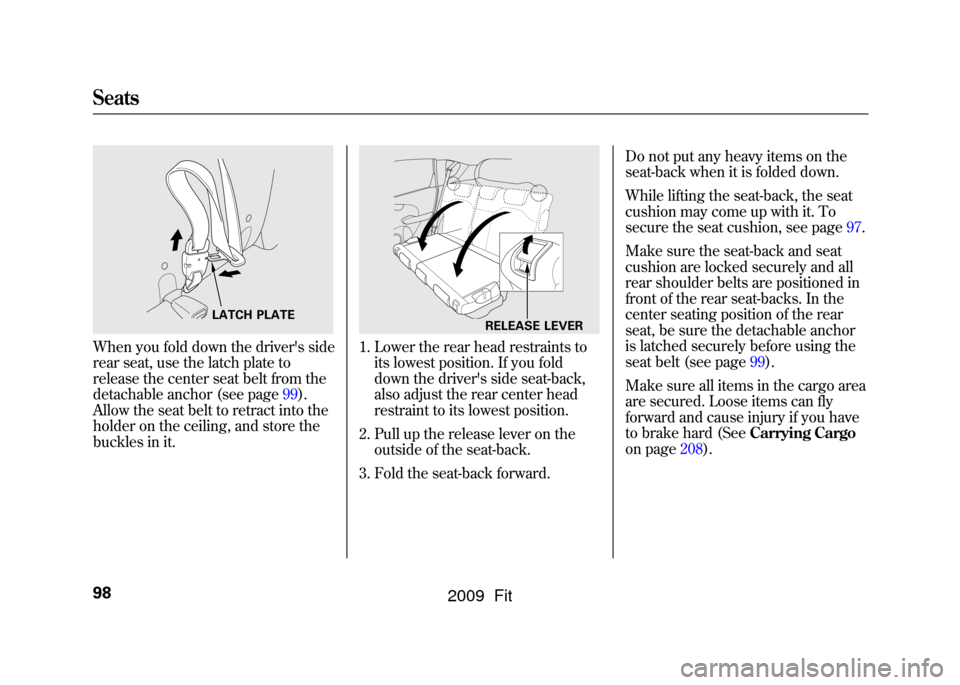
When you fold down the driver's side
rear seat, use the latch plate to
release the center seat belt from the
detachable anchor (see page99).
Allow the seat belt to retract into the
holder on the ceiling, and store the
buckles in it.
1. Lower the rear head restraints toits lowest position. If you fold
down the driver's side seat-back,
also adjust the rear center head
restraint to its lowest position.
2. Pull up the release lever on the outside of the seat-back.
3. Fold the seat-back forward. Do not put any heavy items on the
seat-back when it is folded down.
While lifting the seat-back, the seat
cushion may come up with it. To
secure the seat cushion, see page97.
Make sure the seat-back and seat
cushion are locked securely and all
rear shoulder belts are positioned in
front of the rear seat-backs. In the
center seating position of the rear
seat, be sure the detachable anchor
is latched securely before using the
seat belt (see page99).
Make sure all items in the cargo area
are secured. Loose items can fly
forward and cause injury if you have
to brake hard (See
Carrying Cargo
on page208).
LATCH PLATE
RELEASE LEVER
Seats98
2009 Fit
Page 110 of 352
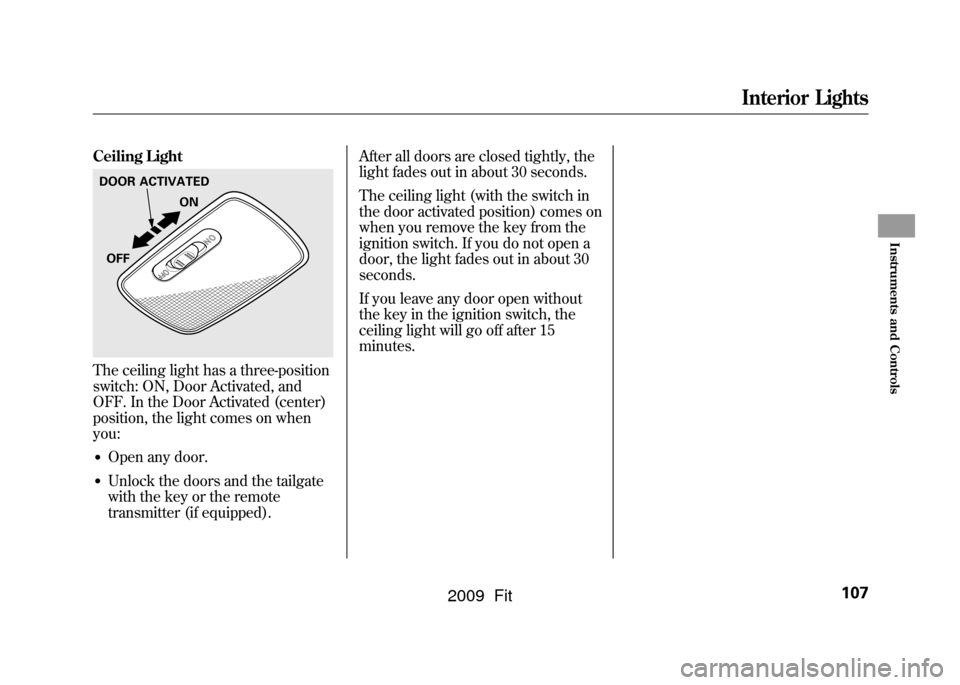
Ceiling LightThe ceiling light has a three-position
switch: ON, Door Activated, and
OFF. In the Door Activated (center)
position, the light comes on when
you:●Open any door.●Unlock the doors and the tailgate
with the key or the remote
transmitter (if equipped).After all doors are closed tightly, the
light fades out in about 30 seconds.
The ceiling light (with the switch in
the door activated position) comes on
when you remove the key from the
ignition switch. If you do not open a
door, the light fades out in about 30
seconds.
If you leave any door open without
the key in the ignition switch, the
ceiling light will go off after 15
minutes.DOOR ACTIVATED
ON
OFF
Interior Lights
107
Instruments and Controls
2009 Fit
Page 112 of 352

The heating and air conditioning
system in your vehicle provides a
comfortable driving environment in
all weather conditions.
The standard audio system has many
features. This section describes
those features and how to use them.
Your vehicle has an anti-theft audio
system that requires a code number
to enable it.
The security system helps to
discourage vandalism and theft of
your vehicle.Vents, Heating, and A/C
.............
110
Playing the FM/AM Radio (Models without navigationsystem)
...............................
115
Playing a Disc (Models without navigation system)
..................
122
Disc Player Error Messages (Models without navigationsystem)
...............................
128
Playing an iPod
®(Models without
navigation system)
..................
129
iPod
®Error Messages (Models
without navigation system)
.....
135
Playing a USB Flash Memory Device (Models without
navigation system)
..............
136
USB Flash Memory Device Error
Messages (Models withoutnavigation system)
..............
142
Playing the AM/FM Radio
(Models with navigationsystem)
...............................
143
Playing a Disc (Models with
navigation system)
..................
149 Disc Player Error Messages
(Models with navigationsystem)
...............................
157
Playing a PC card (Models with
navigation system)
..................
158
Playing an iPod
®(Models with
navigation system)
..................
170
iPod
®Error Messages (Models
with navigation system)
..........
176
Playing a USB Flash Memory Device (Models withnavigation system)
..............
177
USB Flash Memory Device Error Messages (Models withnavigation system)
..............
183
FM/AM Radio Reception
............
184
Protecting Your Discs
.................
186
Remote Audio Controls
...............
189
Auxiliary Input Jack
....................
190
Radio Theft Protection
................
191
Setting the Clock
.........................
192
Security System
..........................
193
Cruise Control
............................
194
Features
109
Features
2009 Fit
Page 114 of 352

Airflow Controls
Fan Control Dial
Turn this dial to increase or decrease
the fan speed and airflow.
Temperature Control Dial
Turning this dial clockwise increases
the temperature of the airflow.
Air Conditioning (A/C) ButtonIf equippedThis button turns the air
conditioning on and off. The
indicator in the button is on when the
A/C is on.
Fresh Air/Recirculation Lever
This lever controls the source of the
air going into the system. When you
slide the lever to the
side, air is
brought in from outside the vehicle
(fresh air mode). When you select
the
side, air from the vehicle's
interior is sent through the system
again (recirculation mode). The outside air intakes for the
heating and cooling system are at the
base of the windshield. Keep this
area clear of leaves and other debris.
The system should be left in fresh air
mode under almost all conditions.
Keeping the system in recirculation
mode, particularly with the A/C off,
can cause the windows to fog up.
Switch to recirculation mode when
driving through dusty or smoky
conditions, then return to fresh air
mode.
Rear Window Defogger Button
/
This button turns the rear window
defogger on and off (see page76).
On some models, this button also
operates the heated outside mirrors
(see page102).
Mode Control Dial
Use the mode control dial to select
the vents the air flows from. Some air
will flow from the dashboard corner
vents in all modes.
Air flows from the center and
corner vents in the dashboard.Airflow is divided between the
vents in the dashboard and the floor
vents.Air flows from the floor vents.Airflow is divided between the
floor vents and defroster vents at the
base of the windshield.Air flows from the defroster
vents at the base of the windshield.
CONTINUED
Vents, Heating, and A/C
111
Features
2009 Fit
Page 140 of 352

To Play a USB Flash Memory
Device
This audio system can operate the
audio files on a USB flash memory
device with the same controls used
for the in-dash disc player. To play a
USB flash memory device, connect it
to the USB adapter cable in the
upper glove box, then press the AUX
button. The ignition switch must be
in the ACCESSORY (I) or ON (II)
position.
The audio system reads and plays
the audio files on the USB flash
memory device in MP3, WMA or
AAC
ꭧformats. Depending on the
format, the display shows MP3,
WMA or AAC when a USB flash
memory device is playing. The USB
flash memory device limit is up to
700 folders or up to 65535 files.
ꭧ : Only AAC format files recorded
with iTunes are playable on this
audio unit. The recommended USB flash
memory devices are 256 Mbyte or
higher. Some digital audio players
may be compatible as well.
Some USB flash memory device
(such as devices with security
lockout features, etc.) will not work
in this audio unit.
NOTE:
●Do not use a device such as a card
reader or hard drive as the device
or your files may be damaged.●Do not connect your USB flash
memory device using a HUB.●Do not use an extension cable to
the USB adapter cable equipped
with your vehicle.●Do not keep the USB flash
memory device in the vehicle.
Direct sunlight and high heat will
damage it.
●We recommend backing up your
data before playing a USB flash
memory device.●Depending on the type and
number of files, it may take some
time before they begin to play.●Depending on the software the
files were made with, it may not be
possible to play some files, or
display some text data.
The specifications for compatible
MP3 files are: – Sampling frequency:
32/44.1/48 kHz (MPEG1)
16/22.05/24 kHz (MPEG2)
– Bit rate:
32/40/48/56/64/80/96/112/128/
160/192/224/256/320/VBR kbps
(MPEG1)
8/16/24/32/40/48/56/64/80/96/
112/128/144/160/VBR kbps
(MPEG2)
CONTINUED
Playing a USB Flash Memory Device (Models without navigation system)
137
Features
2009 Fit