Page 105 of 352
3. Push the appropriate edge of theadjustment switch to move the
mirror right, left, up, or down.
4. When you finish, move the selector switch to the center (off)
position. This turns the adjustment
switch off to keep your settings.
Heated MirrorsOn Canadian Sport and LX modelsThe outside mirrors are heated to
remove fog and frost. With the
ignition switch in the ON (II)
position, turn on the heaters by
pressing the button. The indicator in
the button comes on as a reminder.
Press the button again to turn the
heaters off. Pressing this button also
turns the rear window defogger on
and off. Parking Brake
To apply the parking brake, pull the
lever up fully. To release it, pull up
slightly, push the button, and lower
the lever. The parking brake
indicator on the instrument panel
should go out when the parking
brake is fully released (see page60).
HEATED MIRROR BUTTON
PARKING BRAKE LEVER
Mirrors, Parking Brake102
2009 Fit
Page 109 of 352
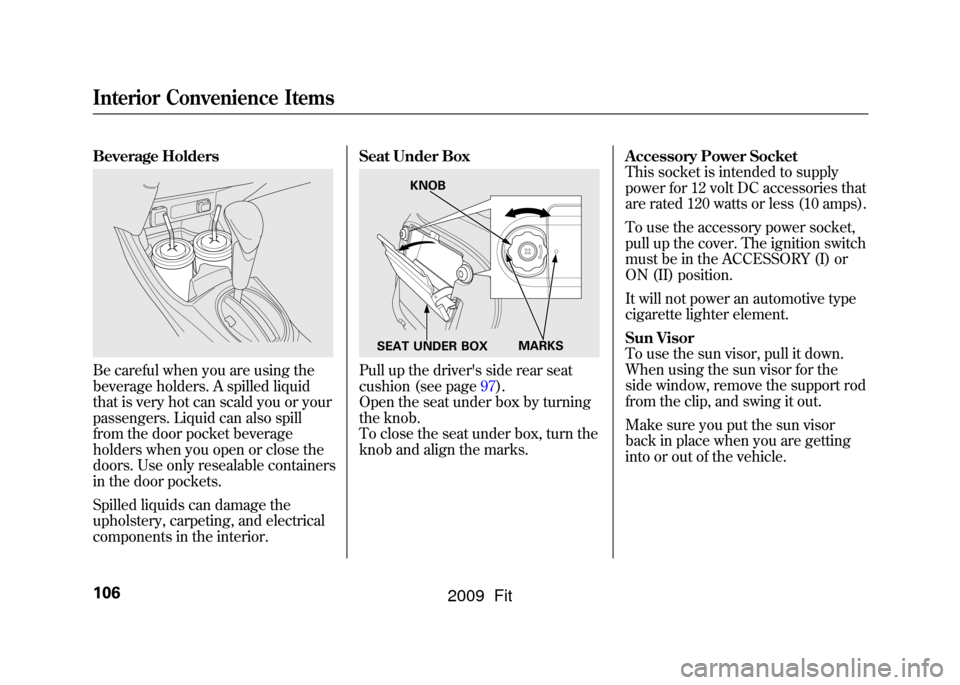
Beverage HoldersBe careful when you are using the
beverage holders. A spilled liquid
that is very hot can scald you or your
passengers. Liquid can also spill
from the door pocket beverage
holders when you open or close the
doors. Use only resealable containers
in the door pockets.
Spilled liquids can damage the
upholstery, carpeting, and electrical
components in the interior.Seat Under Box
Pull up the driver's side rear seat
cushion (see page97).
Open the seat under box by turning
the knob.
To close the seat under box, turn the
knob and align the marks.
Accessory Power Socket
This socket is intended to supply
power for 12 volt DC accessories that
are rated 120 watts or less (10 amps).
To use the accessory power socket,
pull up the cover. The ignition switch
must be in the ACCESSORY (I) or
ON (II) position.
It will not power an automotive type
cigarette lighter element.
Sun Visor
To use the sun visor, pull it down.
When using the sun visor for the
side window, remove the support rod
from the clip, and swing it out.
Make sure you put the sun visor
back in place when you are getting
into or out of the vehicle.
KNOB
MARKS
SEAT UNDER BOX
Interior Convenience Items106
2009 Fit
Page 110 of 352
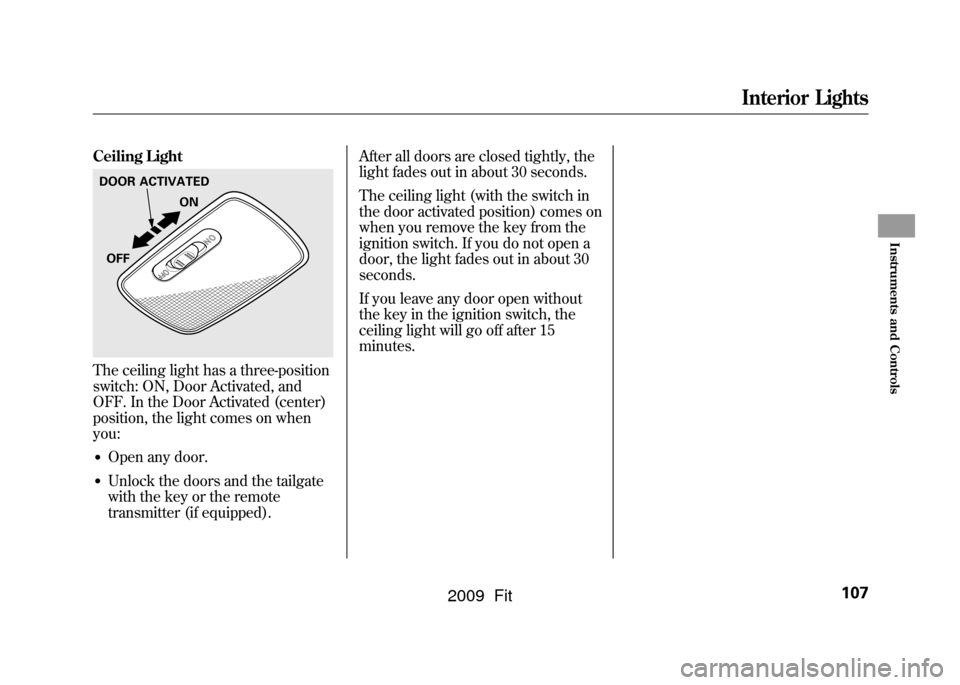
Ceiling LightThe ceiling light has a three-position
switch: ON, Door Activated, and
OFF. In the Door Activated (center)
position, the light comes on when
you:●Open any door.●Unlock the doors and the tailgate
with the key or the remote
transmitter (if equipped).After all doors are closed tightly, the
light fades out in about 30 seconds.
The ceiling light (with the switch in
the door activated position) comes on
when you remove the key from the
ignition switch. If you do not open a
door, the light fades out in about 30
seconds.
If you leave any door open without
the key in the ignition switch, the
ceiling light will go off after 15
minutes.DOOR ACTIVATED
ON
OFF
Interior Lights
107
Instruments and Controls
2009 Fit
Page 124 of 352

Adjusting the Sound
Press the SOUND (
) button to
select an appropriate setting: bass,
treble, fader, balance, and SVC
(speed-sensitive volume
compensation). Turn the VOL/
SELECT knob to adjust the setting.
BASS -Adjusts the bass.
TREBLE -Adjusts the treble.
FADER -Adjusts the front-to-back
strength of the sound.
BALANCE -Adjusts the side-to-
side strength of the sound.
Each mode is shown in the display as
it changes. Turn the VOL/SELECT
knob to adjust the setting to your
liking. When the level reaches the
center, you will see ‘‘C ’’in the
display. SVC
-Adjusts the volume level
based on the vehicle speed.
The system will return to the audio
display about 10 seconds after you
stop adjusting a mode.
Speed-sensitive Volume
Compensation (SVC)The SVC mode controls the volume
based on vehicle speed. The faster
you go, the louder the audio volume
becomes. As you slow down, the
audio volume decreases.
The SVC has four modes; SVC OFF,
SVC LOW, SVC MID, and SVC
HIGH. Turn the VOL/SELECT knob
to adjust the setting to your liking. If
you feel the sound is too loud,
choose low. If you feel the sound is
too quiet, choose high.
This function is set to MID as the
default setting when the vehicle
leaves the factory. Audio System Lighting
You can use the instrument panel
brightness control knob to adjust the
illumination of the audio system (see
page76).The audio system
illuminates when the parking lights
are on, even if the system is turned
off.
Playing the FM/AM Radio (Models without navigation system)
121
Features
2009 Fit
Page 133 of 352

To Play an iPod
ꭂ
This audio system can operate the
audio files on the iPod
ꭂwith the
same controls used for the in-dash
disc player. To play an iPod, connect
it to the USB adapter cable in the
upper glove box by using your dock
connector, then press the AUX
button. The ignition switch must be
in the ACCESSORY (I) or ON (II)
position. The iPod will also be
recharged with the ignition switch in
these positions.
The audio system reads and plays
sound files to be playable on the
iPod. The system cannot operate an
iPod as a mass storage device. The
system will only play songs stored on
the iPod with iTunes.
iPod and iTunes are registered
trademarks owned by Apple Inc.
iPods that are compatible with your
audio system are listed below.
Model Firmware
ꭧ
iPod 5G Ver. 1.2 or more
iPod classic Ver. 1.0 or more
iPod nano Ver. 1.2 or more
iPod nano 2nd
generation Ver. 1.1.2 or more
iPod nano 3rd
generation Ver. 1.0 or more
iPod touch Ver. 1.1.1 or more
iPhone Ver. 1.1.1 or moreꭧ: Use the latest firmware.
Use only compatible iPods with the
latest firmware. iPods that are not
compatible will not work in this audio
unit.
NOTE:●Do not connect your iPod using a
HUB.●Do not keep the iPod in the
vehicle. Direct sunlight and high
heat will damage it.
●Do not use an extension cable
between the USB adapter cable
equipped with your vehicle and
your dock connector.●We recommend backing up your
data before playing it.
In AAC format, DRM (digital rights
management) files cannot be played.
If the system finds a DRM file, the
audio unit displays UNPLAYABLE,
and then skips to the next file.
Playing an iPod
®
(Models without navigation system)
130
2009 Fit
Page 140 of 352

To Play a USB Flash Memory
Device
This audio system can operate the
audio files on a USB flash memory
device with the same controls used
for the in-dash disc player. To play a
USB flash memory device, connect it
to the USB adapter cable in the
upper glove box, then press the AUX
button. The ignition switch must be
in the ACCESSORY (I) or ON (II)
position.
The audio system reads and plays
the audio files on the USB flash
memory device in MP3, WMA or
AAC
ꭧformats. Depending on the
format, the display shows MP3,
WMA or AAC when a USB flash
memory device is playing. The USB
flash memory device limit is up to
700 folders or up to 65535 files.
ꭧ : Only AAC format files recorded
with iTunes are playable on this
audio unit. The recommended USB flash
memory devices are 256 Mbyte or
higher. Some digital audio players
may be compatible as well.
Some USB flash memory device
(such as devices with security
lockout features, etc.) will not work
in this audio unit.
NOTE:
●Do not use a device such as a card
reader or hard drive as the device
or your files may be damaged.●Do not connect your USB flash
memory device using a HUB.●Do not use an extension cable to
the USB adapter cable equipped
with your vehicle.●Do not keep the USB flash
memory device in the vehicle.
Direct sunlight and high heat will
damage it.
●We recommend backing up your
data before playing a USB flash
memory device.●Depending on the type and
number of files, it may take some
time before they begin to play.●Depending on the software the
files were made with, it may not be
possible to play some files, or
display some text data.
The specifications for compatible
MP3 files are: – Sampling frequency:
32/44.1/48 kHz (MPEG1)
16/22.05/24 kHz (MPEG2)
– Bit rate:
32/40/48/56/64/80/96/112/128/
160/192/224/256/320/VBR kbps
(MPEG1)
8/16/24/32/40/48/56/64/80/96/
112/128/144/160/VBR kbps
(MPEG2)
CONTINUED
Playing a USB Flash Memory Device (Models without navigation system)
137
Features
2009 Fit
Page 150 of 352
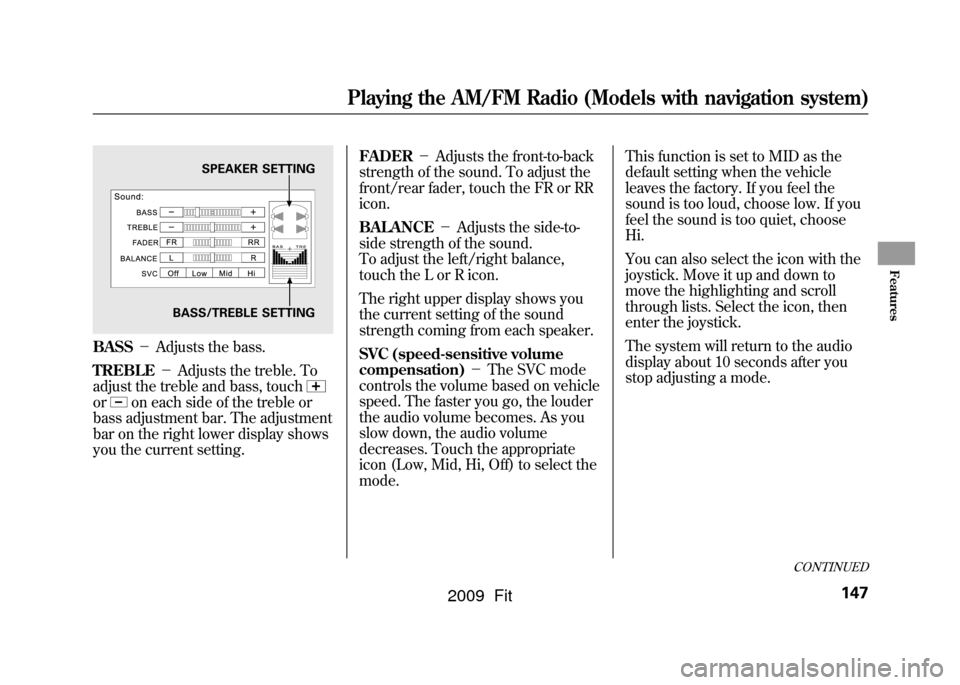
BASS-Adjusts the bass.
TREBLE -Adjusts the treble. To
adjust the treble and bass, touchor
on each side of the treble or
bass adjustment bar. The adjustment
bar on the right lower display shows
you the current setting. FADER
-Adjusts the front-to-back
strength of the sound. To adjust the
front/rear fader, touch the FR or RR
icon.
BALANCE -Adjusts the side-to-
side strength of the sound.
To adjust the left/right balance,
touch the L or R icon.
The right upper display shows you
the current setting of the sound
strength coming from each speaker.
SVC (speed-sensitive volume
compensation) -The SVC mode
controls the volume based on vehicle
speed. The faster you go, the louder
the audio volume becomes. As you
slow down, the audio volume
decreases. Touch the appropriate
icon (Low, Mid, Hi, Off) to select the
mode. This function is set to MID as the
default setting when the vehicle
leaves the factory. If you feel the
sound is too loud, choose low. If you
feel the sound is too quiet, choose
Hi.
You can also select the icon with the
joystick. Move it up and down to
move the highlighting and scroll
through lists. Select the icon, then
enter the joystick.
The system will return to the audio
display about 10 seconds after you
stop adjusting a mode.
SPEAKER SETTING
BASS/TREBLE SETTING
CONTINUED
Playing the AM/FM Radio (Models with navigation system)
147
Features
2009 Fit
Page 151 of 352
Screen ModeYou can select the background
screen to display the sound level.
There are three screen modes: level
(the sound level is shown with the
vertical bars), spectrum analysis (the
sound level appears as ripples of
water), and off. Each time you touch
the background icon, the display
changes.Audio System Lighting
You can use the instrument panel
brightness control knob to adjust the
illumination of the control panel (see
page76).The audio system
illuminates when the parking lights
are on, even if the radio is turned off.Playing the AM/FM Radio (Models with navigation system)148
2009 Fit