Page 192 of 373

�Û�Ý�Î
�Î
�Î
When playing a CD recorded with
text data, each track name is shown
on the audio display. With a disc
recorded in MP3 or WMA, the f older
number and the location are also
displayed.
If the disc was not recorded with text
data, only the track number is shown.
To scroll through the display, touch
the or icononthesideof the
screen.Togobacktotheprevious
display, touch the Return icon on the
screen. To play the radio when a disc is
playing, press the AM/FM button or
touch the FM1, FM2, AM, XM1 , or
XM2 icon.If aPCcardisinthe
audio unit, touch the CARD icon to
play the PC card. If a CD or CDs are
loaded in the CD changer, touch the
CDC icon to play the CD changer.
Press the CD button again or touch
the CD icon to switch back to the
disc player.
If you turn the system of f while a
disc is playing, either with the
power/volume knob or by turning
of f the ignition switch, the disc will
stay in the drive. When you turn the
system back on, the disc will begin
playing where it lef t of f .
Select the desired track/f ile by
touching the icon on the display. The
selected icon will be highlighted in
blue. The system begins to play the
selected track/f ile. With a disc in
MP3 or WMA, touch the f older icon
on the upper lef t of the screen to
move to the parent folder. The
current f older is highlighted in blue.
:U.S.modelonly
To Stop Playing a Disc
Playing a disc (EX-L model with navigation system)
188
�\f���—�\f���—�����y�
����\f��������y���
�(�,�������\f�y�\f�
�����y
2009 CR- V
Page 205 of 373
Therearethreeplaymodes:Folder,
Artist, and Album. Touch the PLAY
MODE icon, then choose one of the
modes by touching its icon. When a
mode is selected, it is highlighted in
blue.Foldermodeplaystracksinthe
order they were added to the card.
Artistmodeplaystracksin
alphabetical order, by artist and
song title.
Album mode plays albums
(f olders) in alphabetical order.
If play mode information was not
included in the tracks/f iles when
they were added to the card, it will
not be displayed on the screen.
CONT INUED
T o Select a Play Mode
Playing a PC card (EX-L model with navigation system)
Features
201
FOLDER MODE
MODE INDICATOR
PLAY MODE ICON
PLAY MODE ICON PLAY MODE ICON
MODE INDICATOR
ARTIST MODE
ALBUM MODE
U.S. model is shown MODE INDICATOR
�\f���—�\f���—�����y�
����
�\f����
�y���
�(�,�������\f�y�\f���\f���y
2009 CR- V
Page 210 of 373
�Û�Ý
You can also select a f ile directly
f rom a track list on the audio display.
Press the AUDIO button to show the
audio display, then touch the Track
List icon. The track list menu
appears on the display. To scroll through the display, touch
the or icononthesideof the
screen.Togobacktotheprevious
display, touch the Return icon.
To play a f ile, touch its icon on the
screen. In f older mode, touch the
f older icon on the upper lef t of the
screen to move to the parent folder.
The current f older is highlighted in
blue.In artist mode, the artist name is also
displayed on the right side of each
selectable icon. Select the desired
f ile.
Using a T rack L ist
Playing a PC card (EX-L model with navigation system)
206
RETURN ICON
FOLDER ICON
ARTIST NAME
U.S. EX-L model is shown TRACK LIST ICON
�\f���—�\f���—�����y�
����
�
��\f���y���
�(�,�������\f�y�\f���
�
�y
2009 CR- V
Page 284 of 373
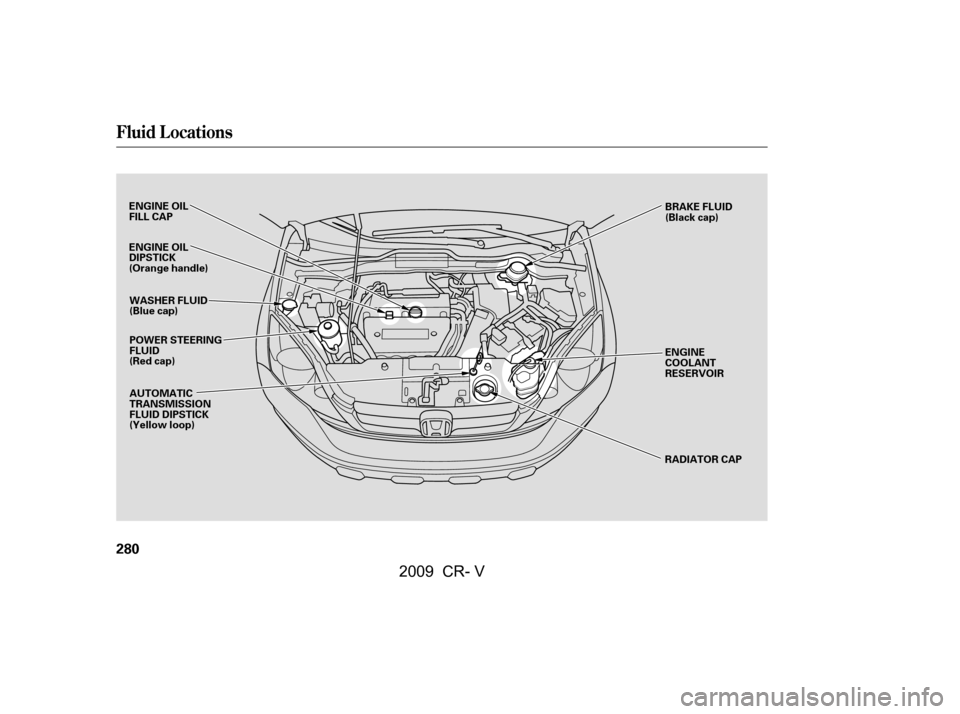
Fluid Locations
280
ENGINE OIL
FILL CAPPOWER STEERING
FLUID
(Red cap) ENGINE
COOLANT
RESERVOIR
RADIATOR CAP
WASHER FLUID
(Blue cap)
AUTOMATIC
TRANSMISSION
FLUID DIPSTICK
(Yellow loop)
ENGINE OIL
DIPSTICK
(Orange handle)
BRAKE FLUID
(Black cap)
�\f���—�\f���—�����y�
������
��
���y���
�(�,�������\f�y�\f�������y
2009 CR- V