Page 238 of 373

Modif ying your vehicle, or installing
some non-Honda accessories, can
make it unsaf e. Bef ore you make any
modif ications or add any accessories,
be sure to read the f ollowing
inf ormation.Bef ore installing any accessory:
Make sure the accessory does not
obscure any lights, or interf ere
with proper vehicle operation or
perf ormance.
Bef ore installing any electronic
accessory, have the installer
contact your dealer for assistance.
If possible, have your dealer
inspect the f inal installation.
Do not install accessories on the
side pillars or across the rear
windows. Accessories installed in
theseareasmayinterferewith
proper operation of the side
curtain airbags.
Your dealer has Honda accessories
that allow you to personalize your
vehicle. These accessories have
been designed and approved f or your
vehicle, and are covered by warranty.
Although non-Honda accessories
may f it on your vehicle, they may not
meet f actory specif ications, and
could adversely af f ect your vehicle’s
handling and stability.
Be sure electronic accessories do
not overload electrical circuits
(see page ) or interf ere with
proper operation of your vehicle.
When properly installed, cellular
phones, alarms, two-way radios, and
low-powered audio systems should
not interf ere with your vehicle’s
computer controlled systems, such
as your airbags, anti-lock brakes, and
tire pressure monitoring system. 327
A ccessories and Modif ications
A ccessories
234
Improper accessories or
modifications can affect your
vehicle’s handling, stability, and
performance, and cause a
crash in which you can be hurt
or killed.
Follow all instructions in this
owner’s manual regarding
accessories and modifications.
�\f���—�\f���—�����y�
����
����\f���y���
�(�,�������\f�y�\f�������y
2009 CR- V
Page 239 of 373

Raising your vehicle with a
non-Honda suspension kit can
af f ect the handling and stability.
Removing parts f rom your vehicle,
or replacing components, with
non-Honda components could
seriously af f ect your vehicle’s
handling, stability, and reliability.
Herearesomeexamples:
Lowering the vehicle with a non-
Honda suspension kit that
signif icantly reduces ground
clearance can allow the
undercarriage to hit speed bumps
or other raised objects, which
could cause the airbags to deploy. Non-Honda wheels, because they
are a universal design, can cause
excessive stress on suspension
components, and are not
compatible with the tire pressure
monitoring system (TPMS).
Larger or smaller wheels and tires
can interf ere with the operation of
your vehicle’s anti-lock brakes and
other systems.
Modif ying your steering wheel or
any other part of your vehicle’s
safety features can make the
systems inef f ective.
If you plan to modif y your vehicle,
consult your dealer.
A ccessories and Modif ications
Modif ying Your Vehicle
Bef ore Driving
235
�\f���—�\f���—�����y�
����
����
�\f�y���
�(�,�������\f�y�\f�����\f�y
2009 CR- V
Page 243 of 373

Store or secure all items that could
be thrown around and hurt
someone during a crash.
Be sure items placed on the f loor
behind the f ront seats cannot roll
underneath and interf ere with the
proper operation of the seats, the
sensors under the seats, or the
driver’s ability to operate the
pedals.
Keep the lower glove box closed
while driving. If it is open, a
passenger could injure their knees
during a crash or sudden stop.If you carry large items that
prevent you f rom closing the
tailgate, exhaust gas can enter the
passenger area. To avoid the
possibility of
, f ollow the instructions
on page .
Distribute cargo evenly on the
f loor of the cargo area, placing the
heaviest items on the bottom and
as far forward as possible. Tie
down items that could be thrown
about the vehicle during a crash or
sudden stop.
Do not stack items higher than the
back of the rear seats. They can
block your view and be thrown
around the vehicle during a crash.
If youfoldtherearseatsupor
down, tie down items that could be
thrown about the vehicle during a
crash or sudden stop. Also, keep
all cargo below the bottom of the
windows. If it is higher, it could
interf ere with the proper operation
of thesidecurtainairbags.
Do not use the dual deck cargo shelf
with any rear seat f olded up or down.
54
CONT INUED
On all models except LX
Carrying Cargo in the Passenger
Compartment
carbon monoxide
poisoning
Carrying Cargo in the Cargo A rea
or on a Roof Rack
Carrying Cargo
Bef ore Driving
239
�\f���—�\f���—�����y�
����
��������y���
�(�,�������\f�y�\f�������y
2009 CR- V
Page 244 of 373
If you carry any items on a roof
rack,besurethetotalweightof
the rack and the items does not
exceed 165 lbs (75 kg).
If you use an accessory roof rack,
the roof rack weight limit may be
lower. Ref er to the inf ormation that
came with your roof rack.
Do not exceed the dual deck cargo
shelf load limit of 20 lbs on U.S.
models, and 10 kg on Canadian
models.
Do not use the dual deck cargo shelf
if the rear seats are f olded down.
Do not put any items on the dual
deck cargo shelf that could block
your view or be thrown around the
vehicle during a crash.
On all models except LXOn U.S. model is shown
Carrying Cargo on the Dual Deck
Cargo Shelf
Carrying Cargo
240
�\f���—�\f���—�����y�
����
��������y���
�(�,�������\f�y�\f�������y
2009 CR- V
Page 247 of 373

This section gives you tips on
starting the engine under various
conditions, and how to operate the
automatic transmission. It also
includes important inf ormation on
parking your vehicle, the braking
system, the vehicle stability assist
(VSA
) system, the tire pressure
monitoring system (TPMS), and
f acts you need if you are planning to
tow a trailer or drive off-highway. ........................
Driving Guidelines .244
....................
Preparing to Drive .245
.......................
Starting the Engine .246
..............
Automatic Transmission .247
...........................................
Parking .252
.............................
Braking System .253
...............
Anti-lock Brakes (ABS) .254
Vehicle Stability Assist (VSA),
aka Electronic Stability ........
Control (ESC), System .256
Tire Pressure Monitoring System ......................................
(TPMS) .258
...........................
Towing a Trailer .261
Towing Your Vehicle Behind a ................................
Motorhome .266
Of f -Highway Driving ..................................
Guidelines .268
Driving
Driving
243
�\f���—�\f���—�����y�
����
����\f���y���
�(�,�������\f�y�\f�������y
2009 CR- V
Page 249 of 373

Make sure all windows, mirrors,
and outside lights are clean and
unobstructed. Remove f rost, snow,
or ice.
Check that the hood is f ully closed.Check the seat adjustment (see
page ).
Check the adjustment of the
inside and outside mirrors (see
page ).
Check the steering wheel
adjustment (see page ).
Fasten your seat belt. Check that
your passengers have f astened
their seat belts (see page ).
When you start the engine, check
the gauges and indicators in the
instrument panel (see page ).
Check that any items you may be
carrying are stored properly or
f astened down securely.
Visually check the tires. If a tire
looks low, use a gauge to check its
pressure (see page ).
Youshoulddothefollowingchecks
and adjustments bef ore you drive
your vehicle.
Make sure the doors and the
tailgate are securely closed and
locked.
1.
2.
10.14
3.
4. 5.
6.
7.
8.
9.
79
59
302 111
95
Driving Guidelines
Preparing to Drive
Driving
245
�\f���—�\f���—�����y�
����
��������y���
�(�,�������\f�y�\f�����\f�y
2009 CR- V
Page 251 of 373
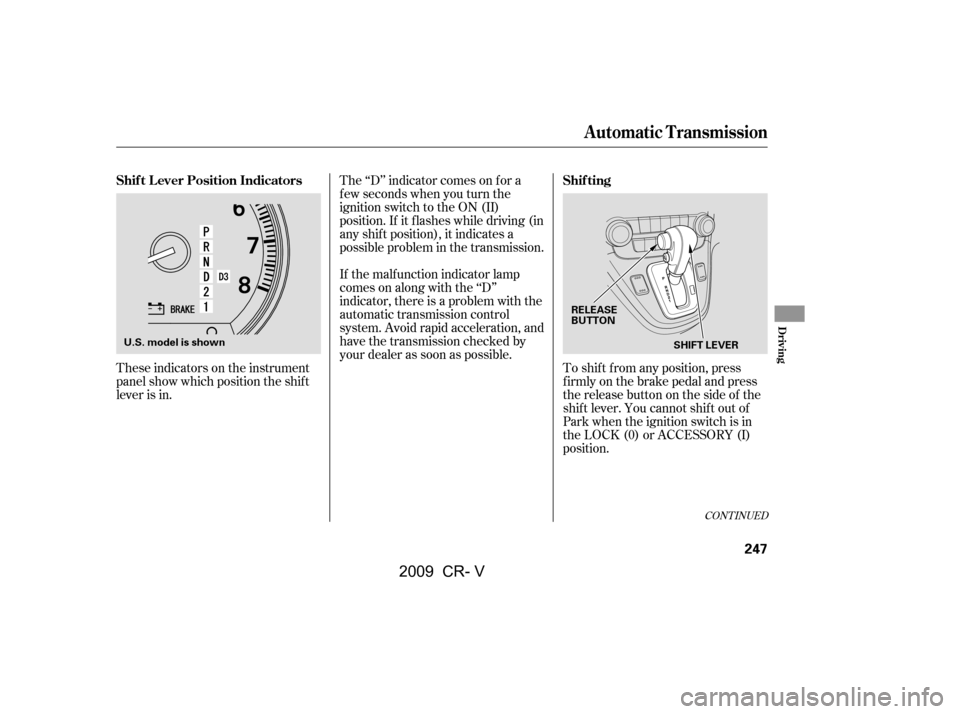
These indicators on the instrument
panel show which position the shif t
lever is in.The ‘‘D’’ indicator comes on f or a
f ew seconds when you turn the
ignition switch to the ON (II)
position. If it f lashes while driving (in
any shif t position), it indicates a
possible problem in the transmission.
If the malf unction indicator lamp
comes on along with the ‘‘D’’
indicator, there is a problem with the
automatic transmission control
system. Avoid rapid acceleration, and
have the transmission checked by
your dealer as soon as possible.
To shif t f rom any position, press
f irmly on the brake pedal and press
the release button on the side of the
shiftlever.Youcannotshiftoutof
Park when the ignition switch is in
the LOCK (0) or ACCESSORY (I)
position.
CONT INUED
Shif t L ever Position Indicators Shif ting
Automatic Transmission
Driving
247
SHIFT LEVER
U.S. model is shown RELEASE
BUTTON
�\f���—�\f���—�����y�
����
��������y���
�(�,�������\f�y�\f�������y
2009 CR- V
Page 252 of 373

�µ�µ
If you have done all of the above and
still cannot move the lever out of
Park, see on
page . This position mechani-
cally locks the transmission. Use
Park whenever you are turning of f or
starting the engine. To shif t out of
Park, you must press on the brake
pedal and have your f oot of f the
accelerator pedal. Press the release
button on the side of the shift lever
to move it.
To avoid transmission damage, come
to a complete stop bef ore shif ting
into Park. You must also press the
release button to shift into Park. The
shif t lever must be in Park bef ore
you can remove the key f rom the
ignition switch. Press the brake
pedal and press the release button
on the side of the shif t lever to shif t
f rom Park to reverse. To shif t f rom
reverse to neutral, come to a
completestopandthenshift.Press
the release button bef ore shif ting
into reverse f rom neutral.
251To shift from: PtoR
RtoP
NtoR Dto2 2to1
1to2
2toD
DtoN
NtoD RtoN
DtoD
DtoD Do this:
Press the brake pedal and
press the shift lever release
button.
Press the shift lever release
button.
Move the shift lever.
Press the D button.
3
3 3
Automatic Transmission
Shif t L ock Release
Park (P) Reverse (R)
248
�\f���—�\f���—�����y�
����
��������y���
�(�,�������\f�y�\f�������y
2009 CR- V