Page 168 of 373

Your vehicle’s in-dash disc changer
holdsuptosixdiscs.Press the LOAD button until you
hear a beep and see ‘‘LOAD’’ on
the display.
To load only one CD, press and
release the LOAD button.
The disc number f or an empty
position is highlighted and the red
disc load indicator starts blinking. Insert the disc into the disc slot
when the green disc load indicator
comes on. Insert it only about
half way; the drive will pull it in the
rest of the way. You will see
‘‘BUSY’’ in the display while the
disc load indicator turns red and
blinks as the disc is loaded.
You cannot load and play 3-inch
(8-cm)discsinthissystem.
When the disc load indicator turns
green and ‘‘LOAD’’ appears in the
display again, insert the next disc
in the slot. Do not try to insert a
disc until ‘‘LOAD’’ appears. You
could damage the audio unit.
Repeat this until all six positions
are loaded. If you are not loading
all six positions, the system begins
playing the last disc loaded.You can also load a disc into an
empty position while a disc is playing
by pressing the appropriate preset
button. The system stops playing the
current disc and starts the loading
sequence. It then plays the disc just
loaded.
1.
2.
1. 3.
4.
5.
L oading Discs in the In-dash Disc
Changer
Playing Discs (EX and EX-L models without navigation system)
164
�\f���—�\f���—�����y�
����\f��������y���
�(�,�������\f�y�\f�
�����y
2009 CR- V
Page 179 of 373

You can select the background
screen to display the sound level.
There are three screen modes: level
(the sound level is shown with the
vertical bars), spectrum analysis (the
sound level appears as ripples of
water), and off. Each time you touch
the background icon, the display
changes.
The system will return to the audio
display about 5 seconds af ter you
stop adjusting a mode.
You can also select the icon with the
joystick. Move it up and down to
move the highlighting and scroll
through lists. Select the icon, then
move the joystick to lef t or right to
change the setting.
This f unction is set to MID as the
def ault setting when the vehicle
leaves the f actory. If you f eel the
sound is too loud, choose low. If you
f eel the sound is too quiet, choose Hi. You can use the instrument panel
brightness control knob to adjust the
illumination of the control panel (see
page ). The audio system
illuminates when the parking lights
are on, even if the radio is turned of f .
76
A udio System L ighting
Screen Mode
Playing the AM/FM Radio (EX-L model with navigation system)
Features
175
�\f���—�\f���—�����y�
����\f����\f�
�y���
�(�,�������\f�y�\f�
���\f�y
2009 CR- V
Page 189 of 373

�µ�µ
Push the AUDIO button beside the
screen to show the audio display and
operate the disc player.
You can also operate the audio
system without using the control
icons on the audio screen. Press the
CD button. The status bar appears
on the bottom of the screen. On the
navigation screen, you can see the
audio inf ormation whenever you
touch the AUDIO INFO icon on the
lower portion of the screen.
When playing a CD recorded with
text data, the track, album, and artist
name are shown on the audio display.
When playing a disc in MP3 or WMA,
the f older number and name, the f ile
number and name, the artist name,
and the elapsed time are shown. The
system will continuously play a disc
until you change modes. If the disc
was not recorded with text data, it
will not be displayed. You can also select an icon with the
joystick. Move it to left, right, up, or
down to change the highlighting and
scroll through lists. Then press the
ENT on the top of the joystick to
select the icon.
Each time you press and
release (preset 6), the player
skips forward to the beginning of the
next track (f ile in MP3 or WMA
mode). Press and release (preset 5), to skip backward to
the beginning of the current track.
Press it again to skip to the
beginning of the previous track.
You can use the preset buttons while
a disc is playing to select passages
and change tracks (files in MP3 or
WMA mode). Each preset button’s
f unction is shown on the bottom of
the screen. To move rapidly within
a track/f ile, press and hold (preset 4) or (preset 3).
CONT INUED
T o Change or Select T racks/Files
SK IP
FF/REW
Playing a disc (EX-L model with navigation system)
Features
185
PRESET BUTTON’S FUNCTION
PRESET BUTTONS
U.S. model is shown
�\f���—�\f���—�����y�
����\f��������y���
�(�,�������\f�y�\f�
���\f�y
2009 CR- V
Page 192 of 373

�Û�Ý�Î
�Î
�Î
When playing a CD recorded with
text data, each track name is shown
on the audio display. With a disc
recorded in MP3 or WMA, the f older
number and the location are also
displayed.
If the disc was not recorded with text
data, only the track number is shown.
To scroll through the display, touch
the or icononthesideof the
screen.Togobacktotheprevious
display, touch the Return icon on the
screen. To play the radio when a disc is
playing, press the AM/FM button or
touch the FM1, FM2, AM, XM1 , or
XM2 icon.If aPCcardisinthe
audio unit, touch the CARD icon to
play the PC card. If a CD or CDs are
loaded in the CD changer, touch the
CDC icon to play the CD changer.
Press the CD button again or touch
the CD icon to switch back to the
disc player.
If you turn the system of f while a
disc is playing, either with the
power/volume knob or by turning
of f the ignition switch, the disc will
stay in the drive. When you turn the
system back on, the disc will begin
playing where it lef t of f .
Select the desired track/f ile by
touching the icon on the display. The
selected icon will be highlighted in
blue. The system begins to play the
selected track/f ile. With a disc in
MP3 or WMA, touch the f older icon
on the upper lef t of the screen to
move to the parent folder. The
current f older is highlighted in blue.
:U.S.modelonly
To Stop Playing a Disc
Playing a disc (EX-L model with navigation system)
188
�\f���—�\f���—�����y�
����\f��������y���
�(�,�������\f�y�\f�
�����y
2009 CR- V
Page 203 of 373

�µ
�µ
�µ
�µ
You operate the PC card player with
the same controls used f or the radio
and the disc player. To load or play a
card, the ignition switch must be in
the ACCESSORY (I) or ON (II)
position.
Based on PCMCIA 2.1/JEIDA 4.2,
the recommended PC cards f or the
PC card reader are: Always use the recommended
memory card with the appropriate
adapter (if an adapter is needed).
Some memory cards will not work in
this unit.
When you insert a PC card into
the slot, make sure you put it in
straight. If you cannot insert it,
remove it, and insert again.
Do not keep PC cards in the
vehicle. Direct sunlight and high
heat will damage them.
To avoid damaging the card
reader, do not insert hard disc
drive cards into the PC card slot.
You cannot close the screen
(move it to the upright position)
until the PC card is inserted all the
way into its slot or removed. Never insert f oreign objects into
the PC card slot.
The specif ications f or compatible
MP3 f iles are:
SD memory card
CompactFlash
Flash ATA
The PC card player reads and plays
cards in MP3 or WMA f ormats.
Depending on the f ormat, the screen
will indicate ‘‘MP3’’ or ‘‘WMA’’ when
a card is playing. The card limit of
the player is 255 f olders and 999
tracks. If the card has a complex
structure, it takes some time f or the
system to begin playing it. Sampling f requency:
32/44.1/48 kHz (MPEG1)
24/22.05/16 kHz (MPEG2)
Bitrate: 32/40/48/56/64/80/96/
112/128/160/192/224/256/320
kbps (MPEG1)
8/16/24/32/40/48/56/64/80/96/
112/128/160 kbps (MPEG2)
Compatible with variable bitrate
and multi-session
Maximum layers
(including ROOT): 8 layers
CONT INUED
To Play a PC Card
Playing a PC card (EX-L model with navigation system)
Features
199
NOTE:
�\f���—�\f���—�����y�
����
�\f��
�\f�y���
�(�,�������\f�y�\f���\f���y
2009 CR- V
Page 205 of 373
Therearethreeplaymodes:Folder,
Artist, and Album. Touch the PLAY
MODE icon, then choose one of the
modes by touching its icon. When a
mode is selected, it is highlighted in
blue.Foldermodeplaystracksinthe
order they were added to the card.
Artistmodeplaystracksin
alphabetical order, by artist and
song title.
Album mode plays albums
(f olders) in alphabetical order.
If play mode information was not
included in the tracks/f iles when
they were added to the card, it will
not be displayed on the screen.
CONT INUED
T o Select a Play Mode
Playing a PC card (EX-L model with navigation system)
Features
201
FOLDER MODE
MODE INDICATOR
PLAY MODE ICON
PLAY MODE ICON PLAY MODE ICON
MODE INDICATOR
ARTIST MODE
ALBUM MODE
U.S. model is shown MODE INDICATOR
�\f���—�\f���—�����y�
����
�\f����
�y���
�(�,�������\f�y�\f���\f���y
2009 CR- V
Page 207 of 373
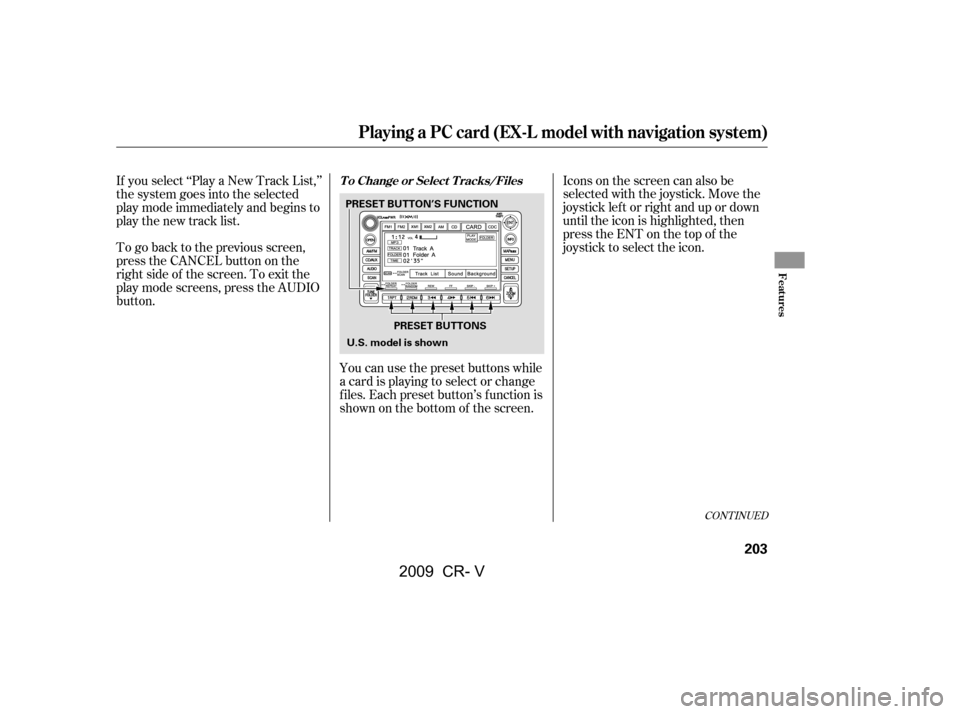
To go back to the previous screen,
presstheCANCELbuttononthe
rightsideofthescreen.Toexitthe
play mode screens, press the AUDIO
button.You can use the preset buttons while
a card is playing to select or change
f iles. Each preset button’s f unction is
shownonthebottomof thescreen.Iconsonthescreencanalsobe
selected with the joystick. Move the
joystick lef t or right and up or down
until the icon is highlighted, then
press the ENT on the top of the
joystick to select the icon.
If you select ‘‘Play a New Track List,’’
the system goes into the selected
play mode immediately and begins to
play the new track list.
CONT INUED
T o Change or Select T racks/Files
Playing a PC card (EX-L model with navigation system)
Features
203
PRESET BUTTONS
PRESET BUTTON’S FUNCTION
U.S. model is shown
�\f���—�\f���—�����y�
����
�\f������y���
�(�,�������\f�y�\f���\f���y
2009 CR- V
Page 210 of 373
�Û�Ý
You can also select a f ile directly
f rom a track list on the audio display.
Press the AUDIO button to show the
audio display, then touch the Track
List icon. The track list menu
appears on the display. To scroll through the display, touch
the or icononthesideof the
screen.Togobacktotheprevious
display, touch the Return icon.
To play a f ile, touch its icon on the
screen. In f older mode, touch the
f older icon on the upper lef t of the
screen to move to the parent folder.
The current f older is highlighted in
blue.In artist mode, the artist name is also
displayed on the right side of each
selectable icon. Select the desired
f ile.
Using a T rack L ist
Playing a PC card (EX-L model with navigation system)
206
RETURN ICON
FOLDER ICON
ARTIST NAME
U.S. EX-L model is shown TRACK LIST ICON
�\f���—�\f���—�����y�
����
�
��\f���y���
�(�,�������\f�y�\f���
�
�y
2009 CR- V