Page 73 of 373

The odometer shows the total
distance your vehicle has been
driven. It measures miles in U.S.
models and kilometers in Canadian
models. It is illegal under U.S.
federal law and Canadian provincial
regulations to disconnect, reset, or
alter the odometer with the intent to
change the number of miles or
kilometers indicated.This indicator displays the outside
temperature in Fahrenheit (U.S.
models) or Celsius (Canadian
models).
This shows how much f uel you have.
It may show slightly more or less
than the actual amount. This shows the temperature of the
engine’s coolant. During normal
operation, the reading should be in
the middle of the gauge. In severe
driving conditions, such as very hot
weather or a long period of uphill
driving, the reading may reach near
the red mark. If it reaches the red
(Hot) mark, pull saf ely to the side of
the road. See page f or
instructions and precautions on
checking the engine’s cooling
system.
322
If equipped
CONT INUED
Outside Temperature Indicator
Temperature Gauge
Odometer
Fuel Gauge
Gauges
Inst rument s and Cont rols
69
OUTSIDE TEMPERATURE INDICATOR
Avoid driving with an extremely low
f uel level. Running out of f uel could
cause the engine to misf ire, damaging
the catalytic converter.
�\f���—�\f���—�����y�
�����������\f�y���
�(�,�������\f�y�\f�\f�����y
2009 CR- V
Page 74 of 373

�¶�¶�µ�µ�µ�µ�µ�µ�µ�µ
The temperature sensor is in the
f ront bumper. Theref ore, the
temperature reading can be af f ected
by heat ref lection f rom the road
surf ace, engine heat, and the
exhaust f rom surrounding traf f ic.
This can cause an incorrect
temperature reading when your
speed is under 19 mph (30 km/h).
If the outside temperature is
incorrectly displayed, you can adjust
it up to 5°F in U.S. models ( 3°C
in Canadian models) warmer or
cooler.
The sensor delays the display update
until it reaches the correct outside
temperature. This may take several
minutes.
In certain weather conditions,
temperature readings near f reezing
(32°F, 0°C) could mean that ice is
f orming on the road surf ace.
To adjust the outside temperature
display, press and hold the select/
reset knob f or 10 seconds. The
display changes as shown above.
Select the outside temperature
indicator by turning the select/reset
knob. The display begins to blink.
Pushthesameknobtoenterthis
setting, then turn it to adjust the
temperature. The f ollowing
sequence will appear f or each: 0, 1, 2,
3, 4, 5, 5, 4, 3, 2, 1, 0 (U.S.)
or 0, 1, 2, 3, 3, 2, 1, 0 (Canada). When it reaches the desired value,
push the select/reset knob to enter
the setting. You should see the new
outside temperature displayed.
The temperature must be
stabilized bef ore doing this
procedure.
Gauges
70
NOTE:
�\f���—�\f���—�����y�
�������������y���
�(�,�������\f�y�\f�\f�����y
2009 CR- V
Page 75 of 373
If your f uel f ill cap is loose or
missing, a ‘‘CHECK FUEL CAP’’
message appears on the information
display af ter you start the engine.
For more inf ormation, see page .The inf ormation display in the
instrument panel shows you the
engine oil lif e and maintenance
service items when the ignition
switch is in the ON (II) position. This
inf ormation helps to keep you aware
of the periodic maintenance your
vehicle needs f or continued trouble-
f ree driving. Ref er to page f or
more inf ormation.
228
273
Gauges
Maintenance Minder
Check Fuel Cap Message
Inst rument s and Cont rols
71
�\f���—�\f���—�����y�
�������������y���
�(�,�������\f�y�\f�\f�����y
2009 CR- V
Page 83 of 373

Youshouldhavereceivedakey
number tag with your keys. You will
need this key number if you ever
have to get a lost key replaced. Use
only Honda-approved key blanks.
These keys contain electronic
circuits that are activated by the
immobilizer system. They will not
work to start the engine if the
circuits are damaged.Protect the keys f rom direct
sunlight, high temperature, and
high humidity.
Donotdropthekeysorsetheavy
objects on them.
Keep the keys away f rom liquids.
If they get wet, dry them
immediately with a sof t cloth.
Push the lever up to lock the
steering wheel in position.
Make sure you have securely
locked the steering wheel in place
by trying to move it up, down, in,
and out.
The master key fits all the locks on
your vehicle. The valet key works
only in the ignition and the driver’s
door lock. You can keep the glove
boxlockedwhenyouleaveyour
vehicle and the valet key at a parking
f acility.
The valet key does not contain a
battery. Do not try to take it apart.
3.
4. Keys and Locks
Steering Wheel A djustment, K eys and L ocks
Inst rument s and Cont rols
79
LEVER
KEY
NUMBER
TAG
MASTER KEY
WITH REMOTE
TRANSMITTER VALET
KEY
(Gray)
�\f���—�\f���—�����y�
�������������y���
�(�,�������\f�y�\f�\f�����y
2009 CR- V
Page 84 of 373

If the system repeatedly does not
recognize the coding of your key,
contact your dealer.
Do not attempt to alter this system
or add other devices to it. Electrical
problems could result that may make
your vehicle inoperable.
If you have lost your key and cannot
start your engine, contact your
dealer.
When you turn the ignition switch to
the ON (II) position, the immobilizer
system indicator should come on
brief ly, then go of f . If the indicator
starts to blink, it means the system
does not recognize the coding of the
key. Turn the ignition switch to the
LOCK (0) position, remove the key,
reinsert it, and turn the ignition
switch to the ON (II) position again.
The system may not recognize your
key’s coding if another immobilizer
key or other metal object (i.e. key
f ob) is near the ignition switch when
you insert the key.
The immobilizer system protects
your vehicle f rom thef t. If an
improperly coded key (or other
device) is used, the engine’s f uel
system is disabled.As required by the FCC:
This device complies with Part 15 of theFCC rules. Operation is subject to thef ollowing two conditions: (1) This devicemay not cause harmf ul interf erence, and(2) this device must accept anyinterf erence received, includinginterf erence that may cause undesiredoperation.
Changes or modif ications not expresslyapproved by the party responsible f orcompliance could void the user’sauthority to operate the equipment.
This device complies with IndustryCanada Standard RSS-210.Operation is subject to the f ollowing twoconditions: (1) this device may not causeinterf erence, and (2) this device mustaccept any interf erence that may causeundesired operation of the device.
Immobilizer System
80
Always take the ignition key with you
whenever you leave the vehicle alone.
�\f���—�\f���—�����y�
���������\f�\f�y���
�(�,�������\f�y�\f�\f�����y
2009 CR- V
Page 85 of 373
�µ�µ
�µ
�µ
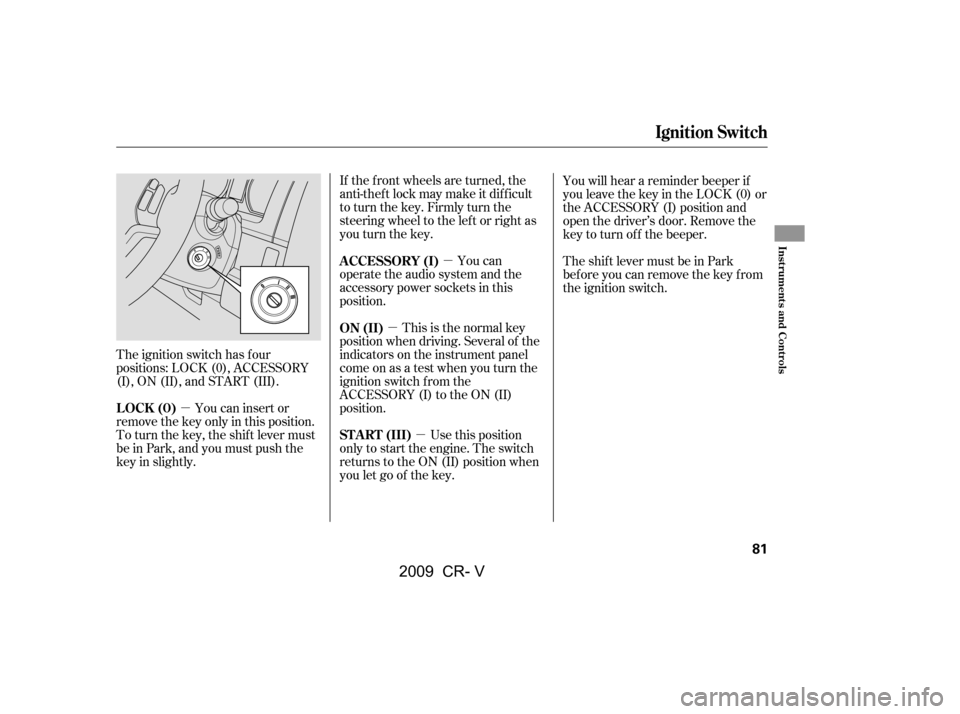
The ignition switch has f our
positions: LOCK (0), ACCESSORY
(I), ON (II), and START (III). If the f ront wheels are turned, the
anti-theft lock may make it difficult
to turn the key. Firmly turn the
steering wheel to the lef t or right as
you turn the key.
This is the normal key
position when driving. Several of the
indicators on the instrument panel
come on as a test when you turn the
ignition switch f rom the
ACCESSORY (I) to the ON (II)
position. You can
operate the audio system and the
accessory power sockets in this
position.
Use this position
only to start the engine. The switch
returns to the ON (II) position when
you let go of the key. You will hear a reminder beeper if
you leave the key in the LOCK (0) or
the ACCESSORY (I) position and
open the driver’s door. Remove the
key to turn of f the beeper.
TheshiftlevermustbeinPark
bef ore you can remove the key f rom
the ignition switch.
You can insert or
remove the key only in this position.
To turn the key, the shift lever must
be in Park, and you must push the
key in slightly. ON (II)
A CCESSORY (I)
ST A RT (III)
LOCK (0)
Ignition Switch
Inst rument s and Cont rols
81
�\f���—�\f���—�����y�
���������\f���y���
�(�,�������\f�y�\f�\f�����y
2009 CR- V
Page 87 of 373

With any door and the tailgate open
and the key in the ignition, locking
with master door lock switches is
disabled. The lock tab on the driver’s
door is not disabled if the driver’s
door is closed. Pulling the driver’s
lock tab rearward will lock all doors
and the tailgate. If you try to lock an
open driver’s door by pulling the lock
tab rearward, the lock tab on the
driver’s door pops out and unlocks
the driver’s door.When you customize the setting,
make sure your vehicle is parked
saf ely, the engine is of f , and the
parking brake is applied. Make all
settings bef ore you start driving.The auto door locking f eature has
three possible settings:
The auto door locking is
deactivated all the time.
The doors and tailgate lock when
the vehicle speed reaches 9 mph
(15 km/h).
Your vehicle has customizable
settings f or the doors and tailgate to
automatically lock and unlock. There
are default settings for each of these
f eatures. You can turn of f or change
the settings for these features as
described on the f ollowing pages. The doors and tailgate lock
whenever you move the shif t lever
out of the Park (P) position.
This is the def ault setting.
L ockout Prevent ionA uto Door L ocking/Unlocking A uto Door L ocking
Door L ocks
Inst rument s and Cont rols
83
�\f���—�\f���—�����y�
�������������y���
�(�,�������\f�y�\f�\f�����y
2009 CR- V
Page 112 of 373
If equipped
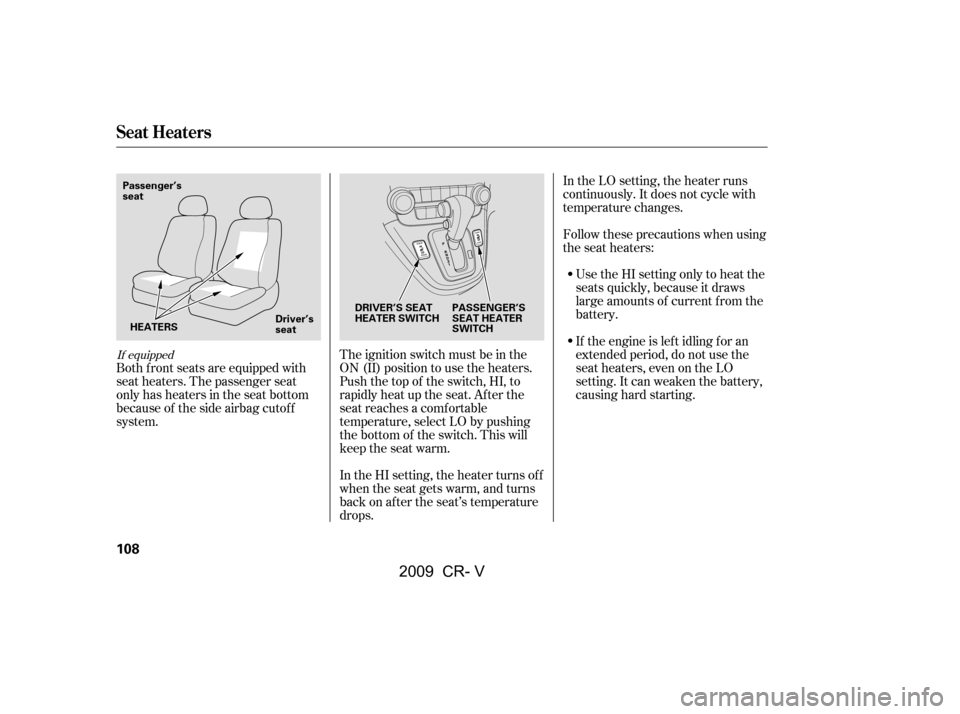
Both f ront seats are equipped with
seat heaters. The passenger seat
only has heaters in the seat bottom
because of the side airbag cutof f
system.The ignition switch must be in the
ON (II) position to use the heaters.
Push the top of the switch, HI, to
rapidly heat up the seat. Af ter the
seat reaches a comfortable
temperature, select LO by pushing
the bottom of the switch. This will
keep the seat warm.
In the HI setting, the heater turns off
when the seat gets warm, and turns
back on after the seat’s temperature
drops.In the LO setting, the heater runs
continuously. It does not cycle with
temperature changes.
Follow these precautions when using
the seat heaters:
Use the HI setting only to heat the
seats quickly, because it draws
large amounts of current f rom the
battery.
If the engine is lef t idling f or an
extended period, do not use the
seat heaters, even on the LO
setting. It can weaken the battery,
causing hard starting.
Seat Heaters
108
DRIVER’S SEAT
HEATER SWITCH PASSENGER’S
SEAT HEATER
SWITCH
Passenger’s
seat
HEATERS Driver’s
seat
�\f���—�\f���—�����y�
�����������
�y���
�(�,�������\f�y�\f�
�
���y
2009 CR- V
