Page 235 of 384

You can make calls using any phone
number, or by using a name in the
HFL phonebook. You can also redial
the last number called. During a call,
HFLallowsyoutotalkupto30
minutes af ter you remove the key
f rom the ignition switch. Continuing
a call without running the engine
may discharge and weaken the
vehicle’s battery.Press and release the Talk button.
Af ter the beep, say ‘‘Call’’ or ‘‘Dial.’’
HFL responds ‘‘Calling’’ or
‘‘Dialing.’’
Once connected, you will hear the
person you called through the
audio speakers. To change the
volume, use the audio system
volume knob or the steering wheel
volume controls.
To end the call, press the Back
button.
With your phone on and the
ignition switch in the
ACCESSORY (I) or ON (II)
position, press and release the
Talk button. After the beep, say
‘‘Call’’ or ‘‘Dial.’’
HFL responds ‘‘What name or
number would you like to call/
dial? Press the Talk button and say
a name, a number, or say list to
hear the phonebook entries.’’
Press and release the Talk button.
Af ter the beep, say the number
you want to call. For example, say
‘‘123 456 7891.’’
HFL responds ‘‘123 456 7891.
Press the Talk button and
continue to add numbers, or say
Call or Dial to place a call.’’ 4.
2.
1. 3.
To make a call using a phone number,
do this:
BluetoothHandsFreeL ink
Making a Call
232
�\f���—�\f���—�
���y�\f�������������y���
�(�#�������\f�y�\f�������y
2009 Civic Hybrid
Page 239 of 384

If you receive a call when you are not
on the phone, HFL interrupts the
audio system (if it is on), and plays
the incoming call notif ication, if
activated. To answer the call, press
the Talk button and begin speaking.
If you don’t want to answer the call,
press the Back button.
If your phone has call waiting, and
you receive a call when you are on
the phone, press and release the
Talk button to answer it. When you
do this, the original call is placed on
hold. To return to the original call,
press the Talk button again. If you
don’t want to answer the new call,
disregard it, and continue with your
original call. If you want to hang up
the original call and answer the new
call, press the Back button.You can transfer a call from HFL to
your phone, or f rom your phone to
HFL.
To transfer a call from HFL to your
phone, or f rom your phone to HFL,
do this:
Press and release the Talk button.
Af ter the beep, say ‘‘Transf er.’’ The
audio switches between HFL and the
phone.
This f unction allows you to transf er a
call automatically to the HFL system.
If you get into the vehicle while you
are on the phone, a call will be
transferred automatically to the HFL
system when you turn the ignition
switch to the ACCESSORY (I)
position.
With this function activated, you can
also make a call by dialing with the
number keys on the phone which
has been paired to the HFL system.
The automatic transf erring f unction
can be set to on or of f .
BluetoothHandsFreeL ink
Receiving a Call
Transf erring a CallAutomatic Transf erring
236
�\f���—�\f���—�
���y�\f���������\f���y���
�(�#�������\f�y�\f�����
�y
2009 Civic Hybrid
Page 247 of 384
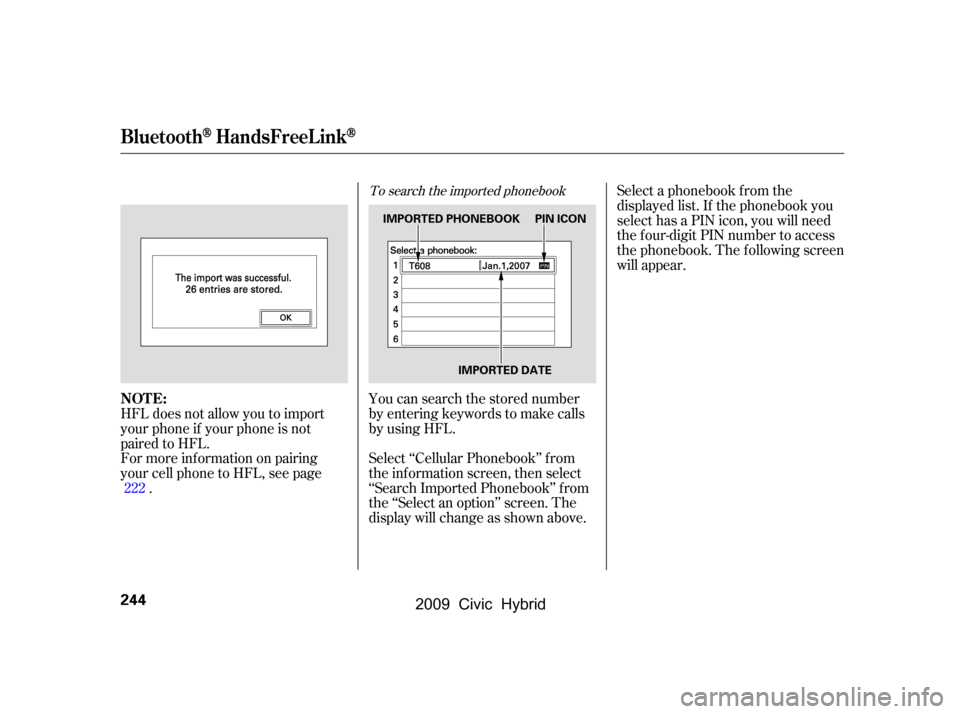
To search the imported phonebook
You can search the stored number
by entering keywords to make calls
by using HFL.
Select ‘‘Cellular Phonebook’’ f rom
the inf ormation screen, then select
‘‘Search Imported Phonebook’’ f rom
the ‘‘Select an option’’ screen. The
display will change as shown above.Select a phonebook f rom the
displayed list. If the phonebook you
select has a PIN icon, you will need
the f our-digit PIN number to access
the phonebook. The f ollowing screen
will appear.
HFL does not allow you to import
your phone if your phone is not
paired to HFL.
For more inf ormation on pairing
your cell phone to HFL, see page .222
BluetoothHandsFreeL ink
NOT E:
244
IMPORTED PHONEBOOK PIN ICON
IMPORTED DATE
�\f���—�\f���—�
���y�\f�����������
�y���
�(�#�������\f�y�\f�������y
2009 Civic Hybrid
Page 248 of 384
CONT INUED
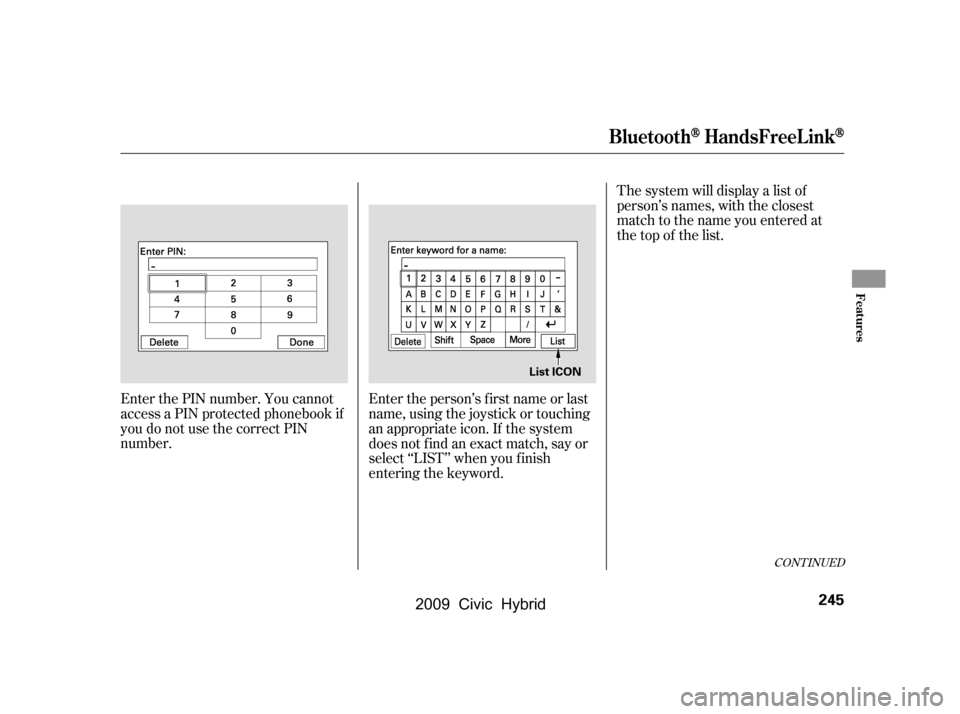
The system will display a list of
person’s names, with the closest
match to the name you entered at
the top of the list.
Enter the PIN number. You cannot
access a PIN protected phonebook if
you do not use the correct PIN
number. Enter the person’s f irst name or last
name, using the joystick or touching
an appropriate icon. If the system
does not f ind an exact match, say or
select ‘‘LIST’’ when you f inish
entering the keyword.
BluetoothHandsFreeL ink
Features
245
List ICON
�\f���—�\f���—�
���y�\f�������������y���
�(�#�������\f�y�\f�����\f�y
2009 Civic Hybrid
Page 274 of 384

Apply the parking brake.
In cold weather, turn of f all
electrical accessories to reduce
the drain on the battery.If the engine does not start within
15 seconds, or starts but stalls
right away, repeat step 4 with the
accelerator pedal pressed halfway
down. If the engine starts, release
pressure on the accelerator pedal
so the engine does not race.
If the engine fails to start, press
the accelerator pedal all the way
down, and hold it there while
starting to clear flooding. If the
engine still does not start, return
to step 5.In cold weather, the conventional
starter is used instead of the IMA
system starter. This is normal.
Make sure the shif t lever is in
Park. Press on the brake pedal.
Without touching the accelerator
pedal, turn the ignition key to the
START (III) position. Do not hold
the key in the START (III)
position f or more than 15 seconds
at a time. If the engine does not
start right away, pause for at least
10 seconds bef ore trying again.
1.
2.
3.
4.
5.
6.
Starting the Engine
Starting in Cold Weather
Driving
271
The engine is harder to start in cold
weather. Also, the thinner air f ound at
altitudes above 8,000 f eet (2,400
meters) adds to this problem.
T he immobilizer system protects your
vehicle f rom thef t. If an improperly
coded key (or other device) is used, the
engine’s f uel system is disabled. For
more inf ormation, see page .
79
�\f���—�\f���—�
���y�
�\f��\f������\f�y���
�(�#�������\f�y�\f�������y
2009 Civic Hybrid
Page 276 of 384
�µ
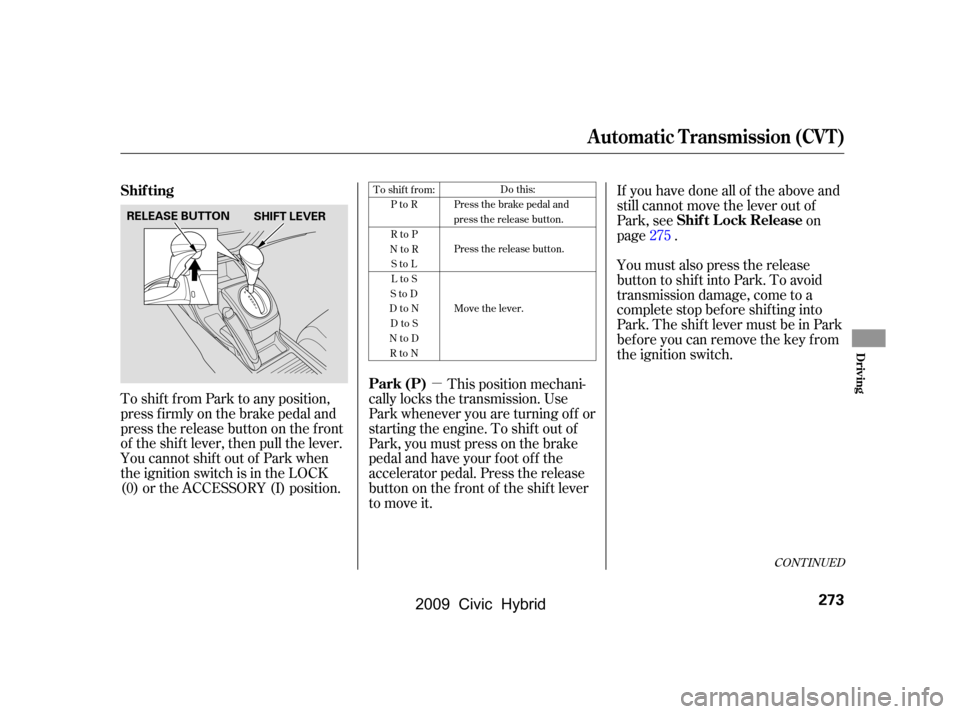
To shif t f rom Park to any position,
press firmly on the brake pedal and
pressthereleasebuttononthefront
of the shif t lever, then pull the lever.
YoucannotshiftoutofParkwhen
the ignition switch is in the LOCK
(0) or the ACCESSORY (I) position. This position mechani-
cally locks the transmission. Use
Park whenever you are turning of f or
starting the engine. To shif t out of
Park, you must press on the brake
pedal and have your f oot of f the
accelerator pedal. Press the release
buttononthefrontof theshiftlever
to move it. If you have done all of the above and
still cannot move the lever out of
Park, see
on
page .
You must also press the release
button to shift into Park. To avoid
transmission damage, come to a
complete stop bef ore shif ting into
Park. The shif t lever must be in Park
bef ore you can remove the key f rom
the ignition switch. 275
To shift from:
PtoR
RtoP
NtoR StoL
LtoS
StoD
DtoN DtoS
NtoD RtoN Do this:
Press the brake pedal and
press the release button.
Press the release button.
Move the lever.
CONT INUED
Park (P) Shif t L ock Release
Shif ting
Automatic Transmission (CVT)
Driving
273
SHIFT LEVER
RELEASE BUTTON
�\f���—�\f���—�
���y�
�\f��\f��������y���
�(�#�������\f�y�\f�������y
2009 Civic Hybrid
Page 278 of 384
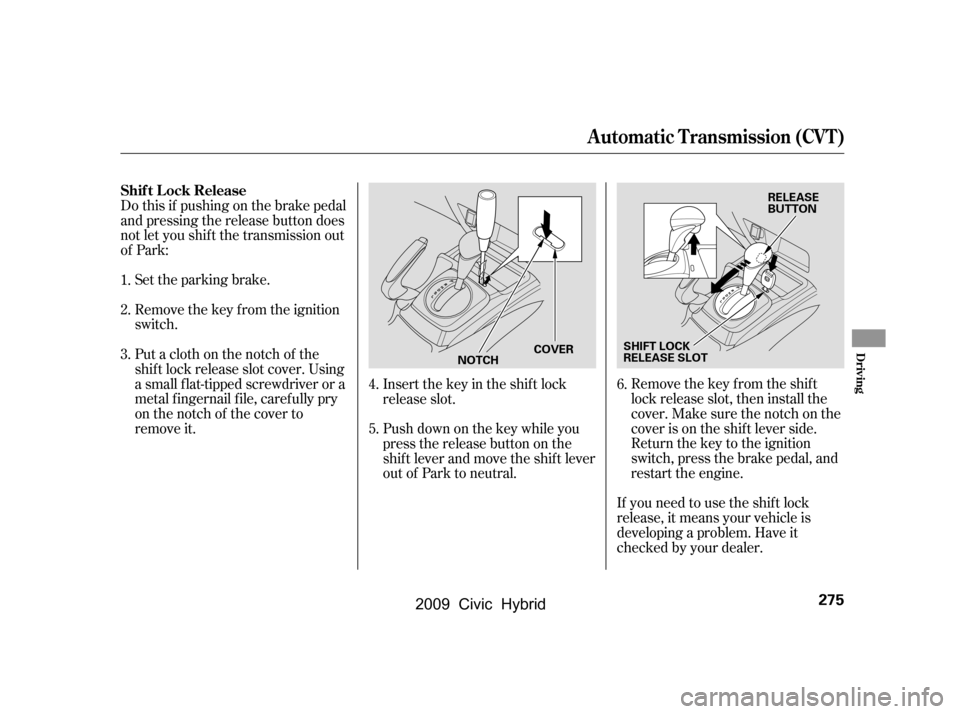
Remove the key from the ignition
switch.
Set the parking brake.Remove the key from the shift
lock release slot, then install the
cover. Make sure the notch on the
cover is on the shif t lever side.
Return the key to the ignition
switch, press the brake pedal, and
restart the engine.
If you need to use the shif t lock
release, it means your vehicle is
developing a problem. Have it
checked by your dealer.
Putaclothonthenotchof the
shif t lock release slot cover. Using
a small f lat-tipped screwdriver or a
metal f ingernail f ile, caref ully pry
on the notch of the cover to
remove it.
Do this if pushing on the brake pedal
and pressing the release button does
not let you shif t the transmission out
of Park:
Push down on the key while you
pressthereleasebuttononthe
shif t lever and move the shif t lever
out of Park to neutral.
Insert the key in the shift lock
release slot.
1.
2.
3.
4.
5.6.
Shif t L ock Release
Automatic Transmission (CVT)
Driving
275
SHIFT LOCK
RELEASE SLOT RELEASE
BUTTON
NOTCH COVER
�\f���—�\f���—�
���y�
�\f��\f������
�y���
�(�#�������\f�y�\f�����\f�y
2009 Civic Hybrid
Page 280 of 384
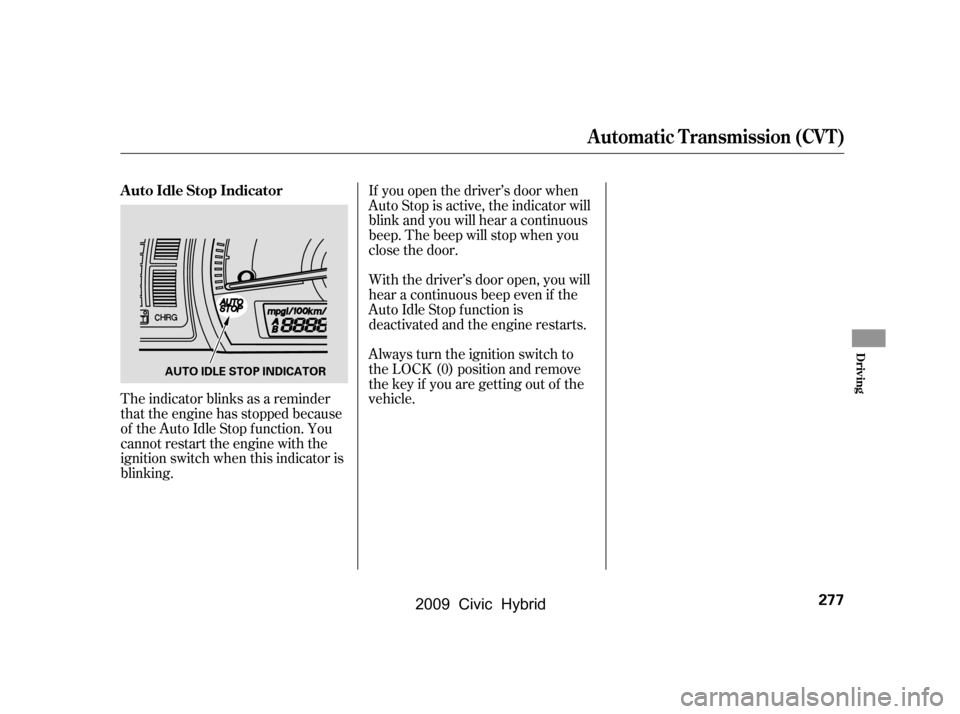
If you open the driver’s door when
Auto Stop is active, the indicator will
blink and you will hear a continuous
beep. The beep will stop when you
close the door.
With the driver’s door open, you will
hear a continuous beep even if the
Auto Idle Stop f unction is
deactivated and the engine restarts.
Always turn the ignition switch to
the LOCK (0) position and remove
the key if you are getting out of the
vehicle.
The indicator blinks as a reminder
that the engine has stopped because
of the Auto Idle Stop f unction. You
cannot restart the engine with the
ignition switch when this indicator is
blinking.
A uto Idle Stop Indicator
Automatic Transmission (CVT)
Driving
277
AUTO IDLE STOP INDICATOR
�\f���—�\f���—�
���y�
�\f��\f����\f���y���
�(�#�������\f�y�\f�������y
2009 Civic Hybrid