Page 116 of 412
Af ter both doors are closed tightly,
the light dims slightly, then f ades out
in about 30 seconds.
The ceiling light (with the switch in
the center position) comes on when
you remove the key f rom the ignition
switch. If you do not open a door, the
light stays on, then f ades out in
about 30 seconds.
If you leave either door open without
the key in the ignition switch, the
ceiling light goes of f af ter 3 minutes.
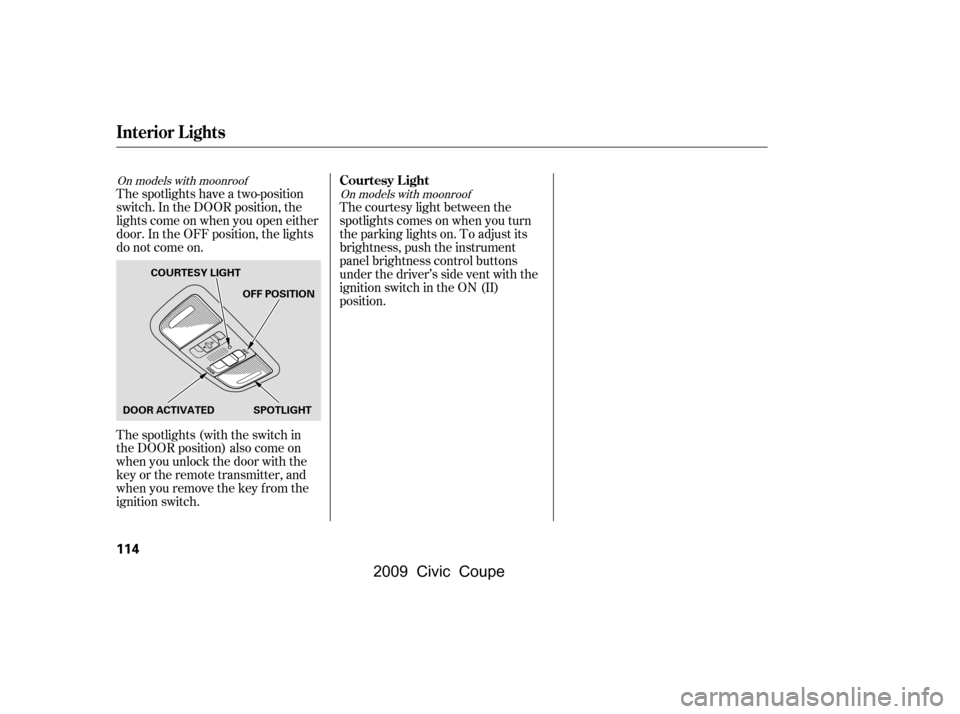
The ceiling light has a three-position
switch: ON, Door Activated, and
OFF. In the Door Activated (center)
position, the light comes on when
you:
Open either door.
Unlock the doors with the key or
the remote transmitter. Turn on a spotlight by pushing the
lens. Push the lens again to turn it
of f . You can use the spotlights at all
times.
CONT INUED
If equipped
Spotlights
Ceiling L ight
Interior Lights
Inst rument s and Cont rols
113
DOOR ACTIVATED
ON
OFF
On models without moonroof
�\f���—�\f���—�\f���y�
�\f�����������y���
�(�+�������\f�y�\f�
�
���y
2009 Civic Coupe
Page 117 of 412
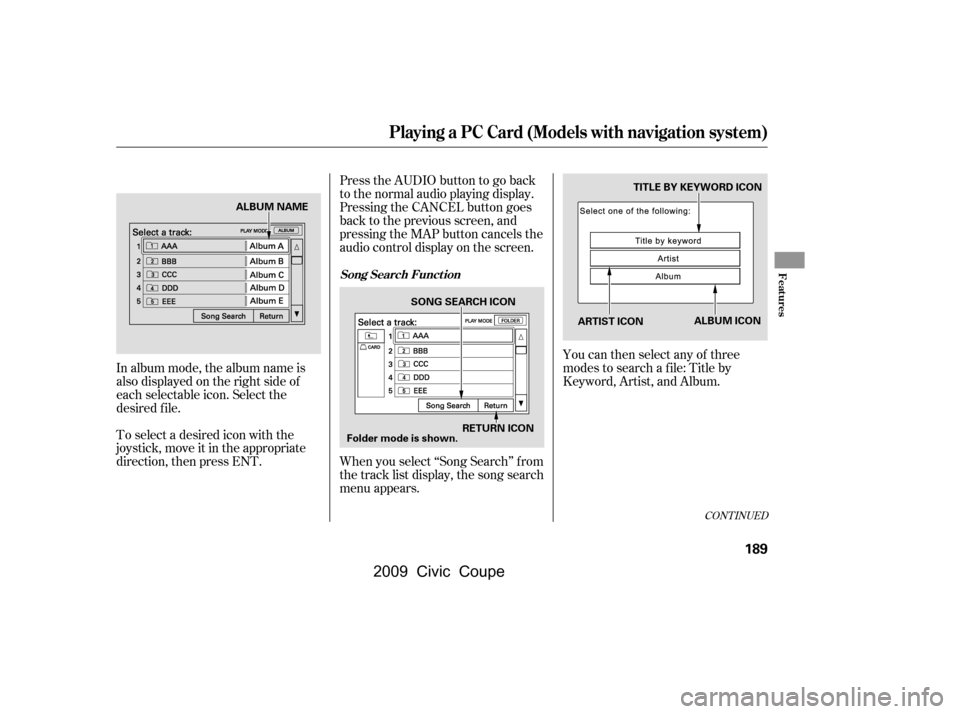
The spotlights have a two-position
switch. In the DOOR position, the
lights come on when you open either
door. In the OFF position, the lights
do not come on.
The spotlights (with the switch in
the DOOR position) also come on
when you unlock the door with the
key or the remote transmitter, and
when you remove the key f rom the
ignition switch.The courtesy light between the
spotlights comes on when you turn
the parking lights on. To adjust its
brightness, push the instrument
panel brightness control buttons
under the driver’s side vent with the
ignition switch in the ON (II)
position.
On models with moonroof
On models with moonroofCourtesy L ight
Interior Lights
114
DOOR ACTIVATEDOFF POSITION
SPOTLIGHT
COURTESY LIGHT
�\f���—�\f���—�\f���y�
�\f�����������y���
�(�+�������\f�y�\f�
�
���y
2009 Civic Coupe
Page 192 of 412
CONT INUED
To select a desired icon with the
joystick, move it in the appropriate
direction, then press ENT.
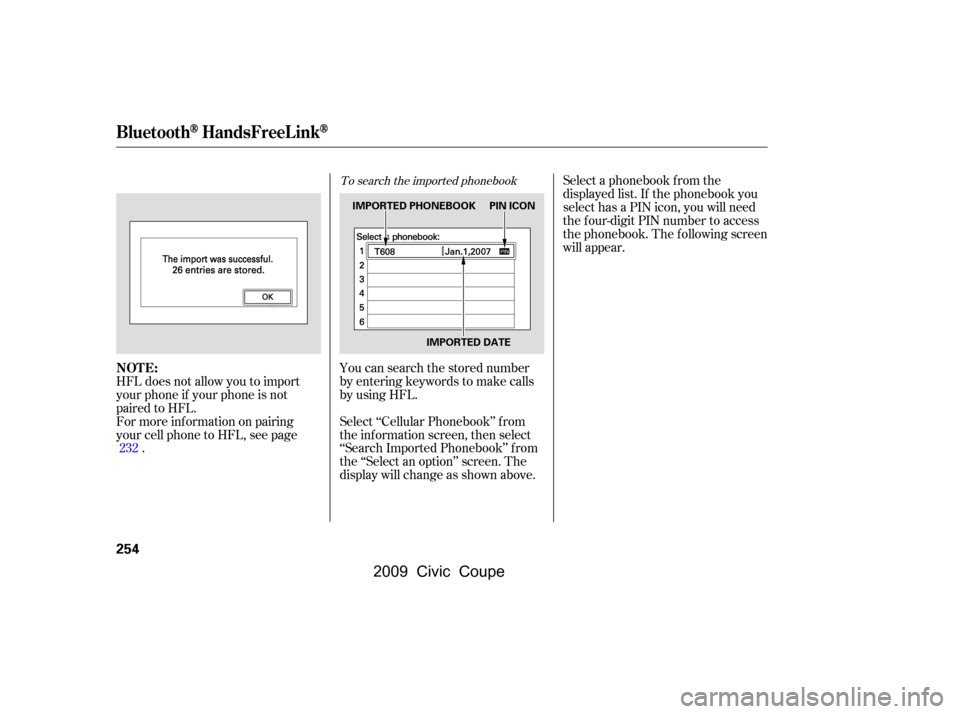
In album mode, the album name is
also displayed on the right side of
each selectable icon. Select the
desired f ile.You can then select any of three
modes to search a f ile: Title by
Keyword, Artist, and Album.
PresstheAUDIObuttontogoback
to the normal audio playing display.
Pressing the CANCEL button goes
back to the previous screen, and
pressing the MAP button cancels the
audio control display on the screen.
When you select ‘‘Song Search’’ f rom
the track list display, the song search
menu appears.
Playing a PC Card (Models with navigation system)
Song Search Funct ionFeatures
189
ARTIST ICON
TITLE BY KEYWORD ICON
RETURN ICON
SONG SEARCH ICON
ALBUM ICON
Folder mode is shown.
ALBUM NAME
�\f���—�\f���—�\f���y�
�
��\f����
���y���
�(�+�������\f�y�\f�
�����y
2009 Civic Coupe
Page 193 of 412
�Û�Ý
Searching f or a Song Title by Keyword Searching f or a Song by Artist Name
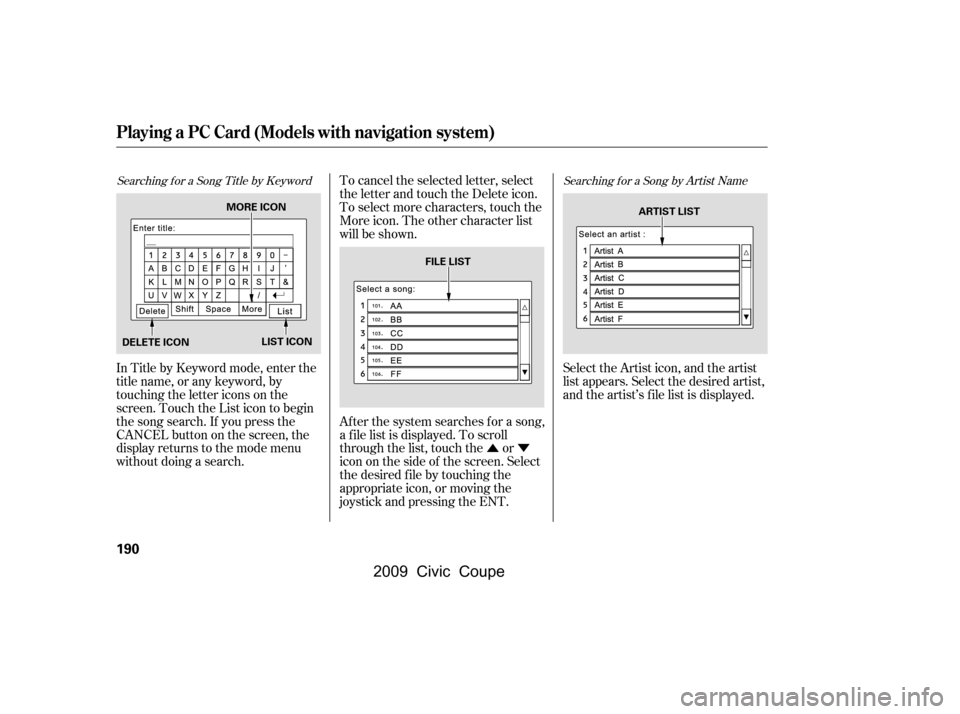
In Title by Keyword mode, enter the
title name, or any keyword, by
touching the letter icons on the
screen. Touch the List icon to begin
the song search. If you press the
CANCELbuttononthescreen,the
display returns to the mode menu
without doing a search.To cancel the selected letter, select
the letter and touch the Delete icon.
To select more characters, touch the
More icon. The other character list
will be shown.
Af ter the system searches f or a song,
a f ile list is displayed. To scroll
through the list, touch the or
icon on the side of the screen. Select
the desired f ile by touching the
appropriate icon, or moving the
joystick and pressing the ENT.
Select the Artist icon, and the artist
list appears. Select the desired artist,
and the artist’s f ile list is displayed.
Playing a PC Card (Models with navigation system)
190
MORE ICON
DELETE ICON LIST ICON FILE LIST
ARTIST LIST
�\f���—�\f���—�\f���y�
�
��\f��������y���
�(�+�������\f�y�\f�
�����y
2009 Civic Coupe
Page 226 of 412
Once the security system is set,
opening either door without using
the key or the remote transmitter,
the hood, or the trunk will cause the
system to alarm. It also alarms if the
audio unit is removed f rom the
dashboard or the wiring is cut.
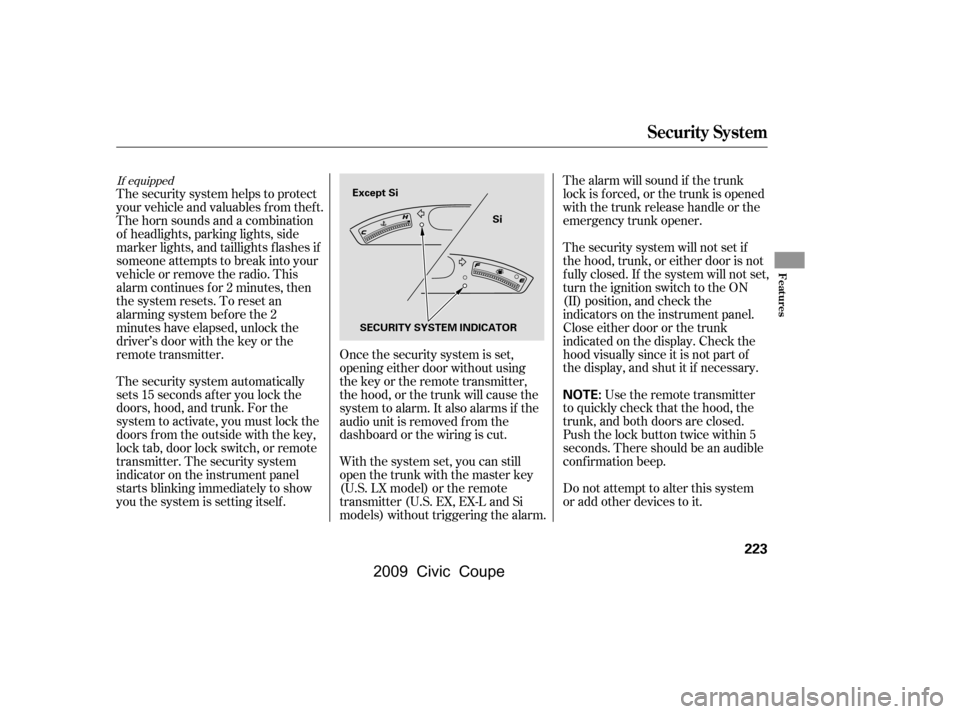
The security system helps to protect
your vehicle and valuables f rom thef t.
The horn sounds and a combination
of headlights, parking lights, side
marker lights, and taillights f lashes if
someone attempts to break into your
vehicleorremovetheradio.This
alarm continues f or 2 minutes, then
the system resets. To reset an
alarming system before the 2
minutes have elapsed, unlock the
driver’s door with the key or the
remote transmitter.
The security system automatically
sets 15 seconds after you lock the
doors, hood, and trunk. For the
system to activate, you must lock the
doors f rom the outside with the key,
lock tab, door lock switch, or remote
transmitter. The security system
indicator on the instrument panel
starts blinking immediately to show
you the system is setting itself . The security system will not set if
the hood, trunk, or either door is not
f ully closed. If the system will not set,
turn the ignition switch to the ON
(II) position, and check the
indicators on the instrument panel.
Close either door or the trunk
indicated on the display. Check the
hood visually since it is not part of
the display, and shut it if necessary.
With the system set, you can still
open the trunk with the master key
(U.S. LX model) or the remote
transmitter (U.S. EX, EX-L and Si
models) without triggering the alarm. The alarm will sound if the trunk
lock is f orced, or the trunk is opened
with the trunk release handle or the
emergency trunk opener.
Use the remote transmitter
to quickly check that the hood, the
trunk, and both doors are closed.
Push the lock button twice within 5
seconds. There should be an audible
conf irmation beep.
Do not attempt to alter this system
or add other devices to it.
If equipped
Security System
Features
223
NOTE:
SECURITY SYSTEM INDICATOR
Except Si
Si
�\f���—�\f���—�\f���y�
�
��
��������y���
�(�+�������\f�y�\f�������y
2009 Civic Coupe
Page 245 of 412

You can make calls using any phone
number, or by using a name in the
HFL phonebook. You can also redial
the last number called. During a call,
HFLallowsyoutotalkupto30
minutes af ter you remove the key
f rom the ignition switch. Continuing
a call without running the engine
may discharge and weaken the
vehicle’s battery.Press and release the Talk button.
Af ter the beep, say ‘‘Call’’ or ‘‘Dial.’’
HFL responds ‘‘Calling’’ or
‘‘Dialing.’’
Once connected, you will hear the
person you called through the
audio speakers. To change the
volume, use the audio system
volume knob, or the steering
wheel volume controls.
To end the call, press the Back
button.
With your phone on and the
ignition switch in the
ACCESSORY (I) or ON (II)
position, press and release the
Talk button. After the beep, say
‘‘Call’’ or ‘‘Dial.’’
HFL responds ‘‘What name or
number would you like to call/
dial? Press the Talk button and say
a name, a number, or say list to
hear the phonebook entries.’’
Press and release the Talk button.
Af ter the beep, say the number
you want to call. For example, say
‘‘123 456 7891.’’
HFL responds ‘‘123 456 7891.
Press the Talk button and
continue to add numbers, or say
Call or Dial to place a call.’’ 4.
2.
1. 3.
To make a call using a phone number,
do this:
BluetoothHandsFreeL ink
Making a Call
242
�\f���—�\f���—�\f���y�
�
��
������\f�y���
�(�+�������\f�y�\f�������y
2009 Civic Coupe
Page 249 of 412

If you receive a call when you are not
on the phone, HFL interrupts the
audio system (if it is on), and plays
the incoming call notif ication, if
activated. To answer the call, press
the Talk button and begin speaking.
If you don’t want to answer the call,
press the Back button.
If your phone has Call Waiting, and
you receive a call when you are on
the phone, press and release the
Talk button to answer it. When you
do this, the original call is placed on
hold. To return to the original call,
press the Talk button again. If you
don’t want to answer the new call,
disregard it, and continue with your
original call. If you want to hang up
the original call and answer the new
call, press the Back button.You can transfer a call from HFL to
your phone, or f rom your phone to
HFL.
To transfer a call from HFL to your
phone, or f rom your phone to HFL,
do this:
Press and release the Talk button.
Af ter the beep, say ‘‘Transf er.’’ The
audio switches between HFL and the
phone.
This f unction allows you to transf er a
call automatically to the HFL system.
If you get into the vehicle while you
are on the phone, a call will be
transferred automatically to the HFL
system when you turn the ignition
switch to the ACCESSORY (I)
position.
With this function activated, you can
also make a call by dialing with the
number keys on the phone which
has been paired to the HFL system.
The automatic transferring function
can be set to on or of f .
BluetoothHandsFreeL ink
Receiving a Call Transf erring a Call Automatic Transf erring
246
�\f���—�\f���—�\f���y�
�
��
������\f�y���
�(�+�������\f�y�\f�����
�y
2009 Civic Coupe
Page 257 of 412
To search the imported phonebook
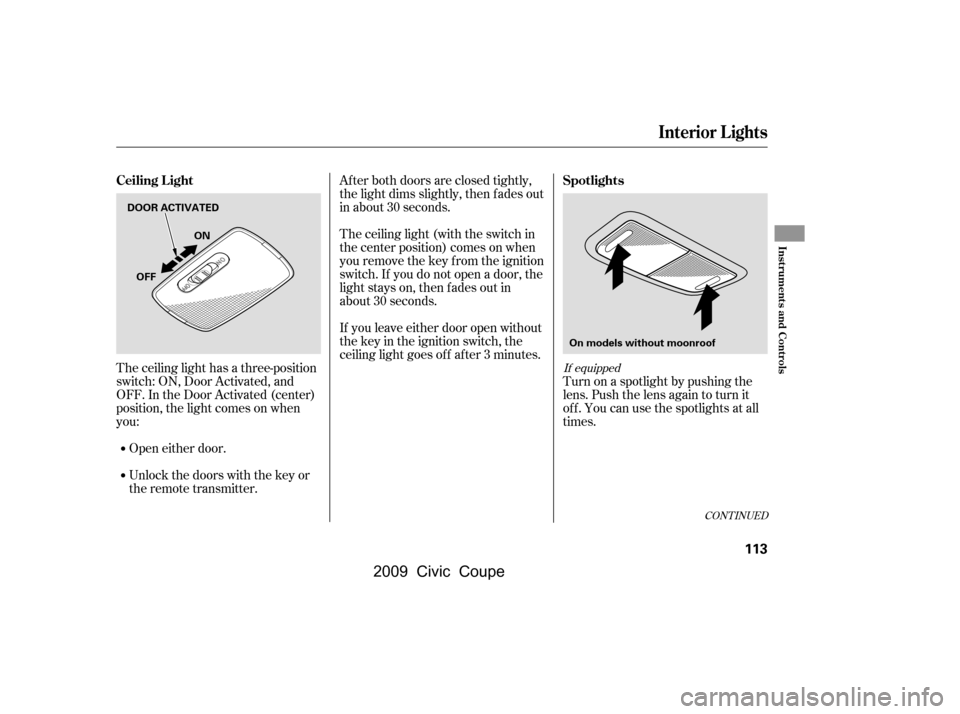
You can search the stored number
by entering keywords to make calls
by using HFL.
Select ‘‘Cellular Phonebook’’ f rom
the inf ormation screen, then select
‘‘Search Imported Phonebook’’ f rom
the ‘‘Select an option’’ screen. The
display will change as shown above.Select a phonebook f rom the
displayed list. If the phonebook you
select has a PIN icon, you will need
the f our-digit PIN number to access
the phonebook. The f ollowing screen
will appear.
HFL does not allow you to import
your phone if your phone is not
paired to HFL.
For more inf ormation on pairing
your cell phone to HFL, see page .
232
BluetoothHandsFreeL ink
NOT E:
254
IMPORTED PHONEBOOK PIN ICON
IMPORTED DATE
�\f���—�\f���—�\f���y�
�
��
��������y���
�(�+�������\f�y�\f�������y
2009 Civic Coupe