Page 79 of 412
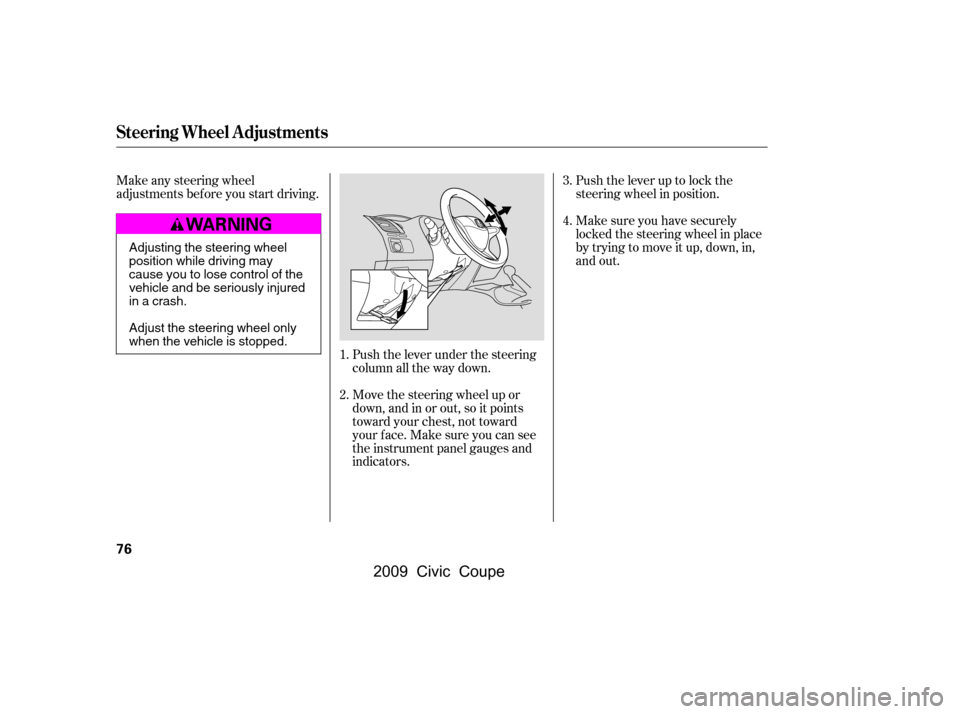
Push the lever under the steering
column all the way down.Push the lever up to lock the
steering wheel in position.
Make sure you have securely
locked the steering wheel in place
by trying to move it up, down, in,
and out.
Make any steering wheel
adjustments before you start driving.
Move the steering wheel up or
down, and in or out, so it points
toward your chest, not toward
your f ace. Make sure you can see
the instrument panel gauges and
indicators.
1. 4.
3.
2.
Steering Wheel A djustments
76
Adjusting the steering wheel
position while driving may
cause you to lose control of the
vehicle and be seriously injured
inacrash.
Adjust the steering wheel only
when the vehicle is stopped.
�\f���—�\f���—�\f���y�
�\f���������\f�y���
�(�+�������\f�y�\f�\f���
�y
2009 Civic Coupe
Page 90 of 412
�µ
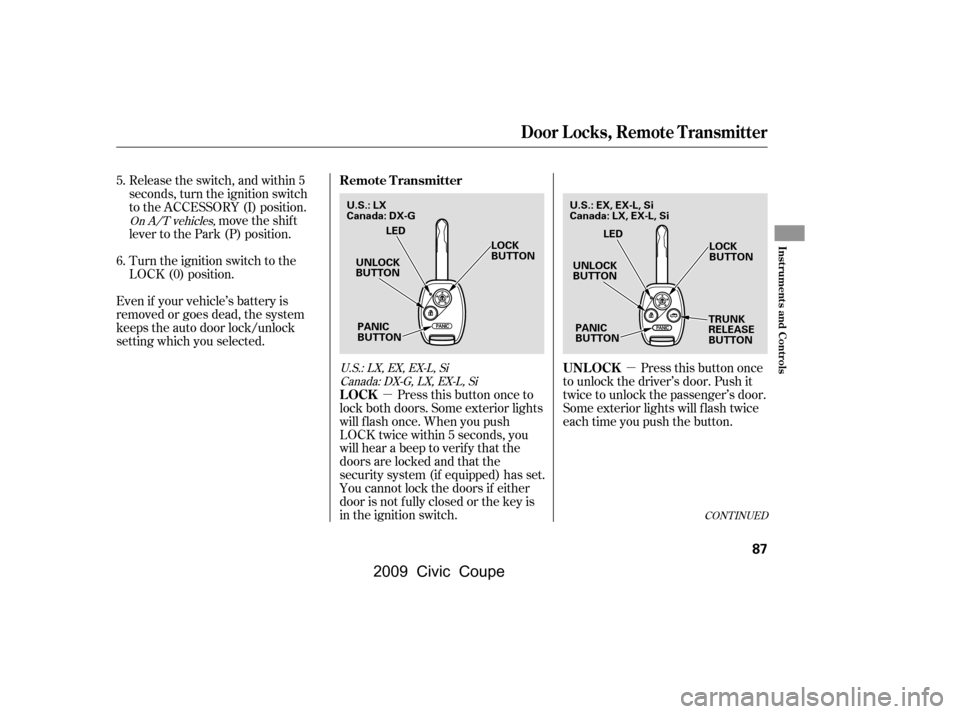
�µ Pressthisbuttononce
to unlock the driver’s door. Push it
twice to unlock the passenger’s door.
Some exterior lights will f lash twice
each time you push the button.
Release the switch, and within 5
seconds, turn the ignition switch
to the ACCESSORY (I) position.
move the shif t
lever to the Park (P) position.
Turn the ignition switch to the
LOCK (0) position.
Even if your vehicle’s battery is
removed or goes dead, the system
keeps the auto door lock/unlock
setting which you selected.
Press this button once to
lock both doors. Some exterior lights
will f lash once. When you push
LOCK twice within 5 seconds, you
will hear a beep to verify that the
doors are locked and that the
security system (if equipped) has set.
You cannot lock the doors if either
door is not f ully closed or the key is
in the ignition switch.
5.
6.
On A/T vehicles,
U.S.:LX,EX,EX-L,SiCanada: DX-G, LX, EX-L, Si
CONT INUED
UNL OCK
LOCK
Remote Transmitter
Door Locks, Remote Transmitter
Inst rument s and Cont rols
87
UNLOCK
BUTTON LOCK
BUTTON
TRUNK
RELEASE
BUTTON
PANIC
BUTTON LED
UNLOCK
BUTTON LOCK
BUTTON
PANIC
BUTTON LED
U.S.: LX
Canada: DX-G
U.S.: EX, EX-L, Si
Canada: LX, EX-L, Si
�\f���—�\f���—�\f���y�
�\f���������\f�y���
�(�+�������\f�y�\f�\f�����y
2009 Civic Coupe
Page 91 of 412

�µ
�µ Avoid dropping or throwing the
transmitter.
Protect the transmitter from
extreme temperature.
Do not immerse the transmitter in
any liquid.
If you lose a transmitter, the
replacement needs to be
reprogrammed by your dealer.
The ceiling light and the door
activated spotlights (if equipped)
come on when you press the
UNLOCK button if the lights are in
the door activated position. If you do
not open either door within 30
seconds, the light(s) will f ade out. If
you relock the doors with the remote
transmitter before 30 seconds have
elapsed, the light(s) will go of f
immediately.
If you do not open either door within
30 seconds, the doors automatically
relock, and the security system (if
equipped) sets. You cannot unlock it
if the key is in the ignition switch. Press this
button f or about 1 second to open
the trunk. You cannot open the trunk
if the key is in the ignition switch.
Press and hold this
button for about 2 seconds to attract
attention: the horn will sound and
the exterior lights will f lash f or about
30 seconds. To cancel panic mode,
press any other button on the remote
transmitter, or turn the ignition
switch to the ON (II) position.
EX, EX-L, Si and Canadian LX models Remote Transmitter Care
T RUNK REL EA SE
PA NIC
Remote Transmitter
88
�\f���—�\f���—�\f���y�
�\f�����������y���
�(�+�������\f�y�\f�\f�����y
2009 Civic Coupe
Page 101 of 412
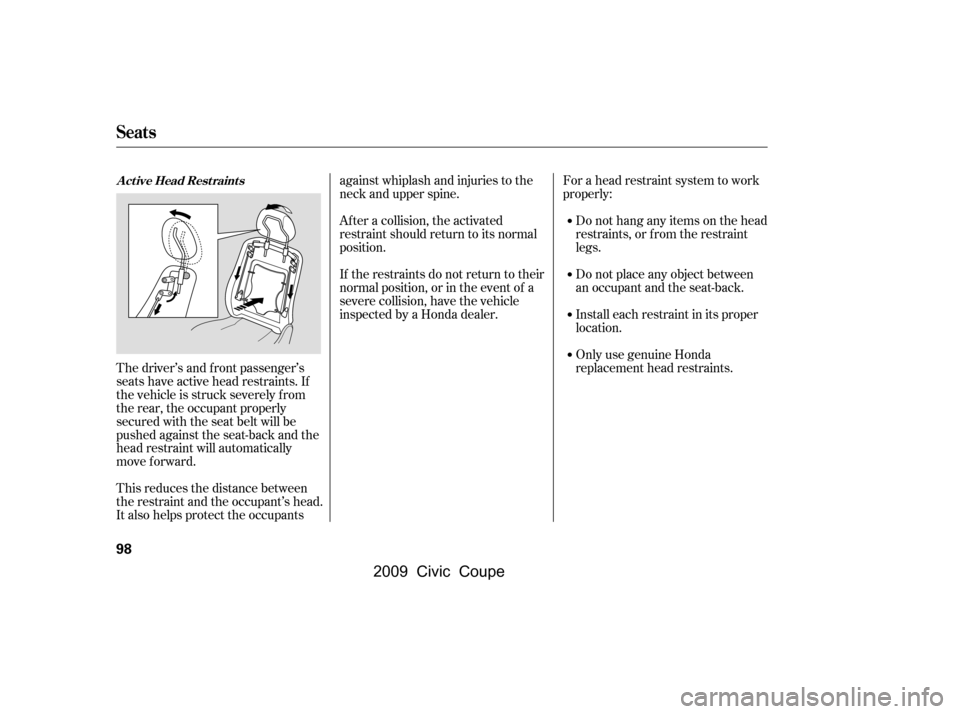
The driver’s and f ront passenger’s
seats have active head restraints. If
the vehicle is struck severely f rom
the rear, the occupant properly
secured with the seat belt will be
pushed against the seat-back and the
head restraint will automatically
move forward.
This reduces the distance between
the restraint and the occupant’s head.
It also helps protect the occupantsagainst whiplash and injuries to the
neck and upper spine.
Af ter a collision, the activated
restraint should return to its normal
position.
If the restraints do not return to their
normal position, or in the event of a
severe collision, have the vehicle
inspected by a Honda dealer.
For a head restraint system to work
properly:
Do not hang any items on the head
restraints, or f rom the restraint
legs.
Do not place any object between
an occupant and the seat-back.
Install each restraint in its proper
location.
Only use genuine Honda
replacement head restraints.
A ct ive Head Rest raint s
Seats
98
�\f���—�\f���—�\f���y�
�\f���������\f�y���
�(�+�������\f�y�\f�
�\f���y
2009 Civic Coupe
Page 103 of 412

Make sure that the folded seat-back
does not press against the f ront
passenger’s seat, as this could cause
the weight sensors to work
improperly.
If the rear head restraints get caught
on the f ront seat backs and you
cannot fold down the rear seat-back
f ully, you can remove the head
restraints (see page ).
Make sure the removed head
restraints are securely stored.
To lock the seat-back upright, push it
f irmly against the trunk panel. Make
sure it is latched in place by pulling
on the top of the seat.Make sure all rear shoulder belts are
positioned in f ront of the rear seat-
back, and the center shoulder belt is
re-positioned in the guide whenever
the seat-back is in its upright position.
Be sure there are no twists in any
shoulder belt.
Never drive with the seat-back
f olded down and the trunk lid open.
See on
page .
Make sure all items in the trunk, or
items extending through the opening
into the back seat, are secured.
Looseitemscanflyforwardand
cause injury if you have to brake
hard. See on page
.
Do not put any heavy items on the
seat-back when it is folded down.
50
97
275Carbon Monoxide Hazard Carrying Cargo
Seats
100
�\f���—�\f���—�\f���y�
�\f�������\f���y���
�(�+�������\f�y�\f�
�\f���y
2009 Civic Coupe
Page 118 of 412
�Î
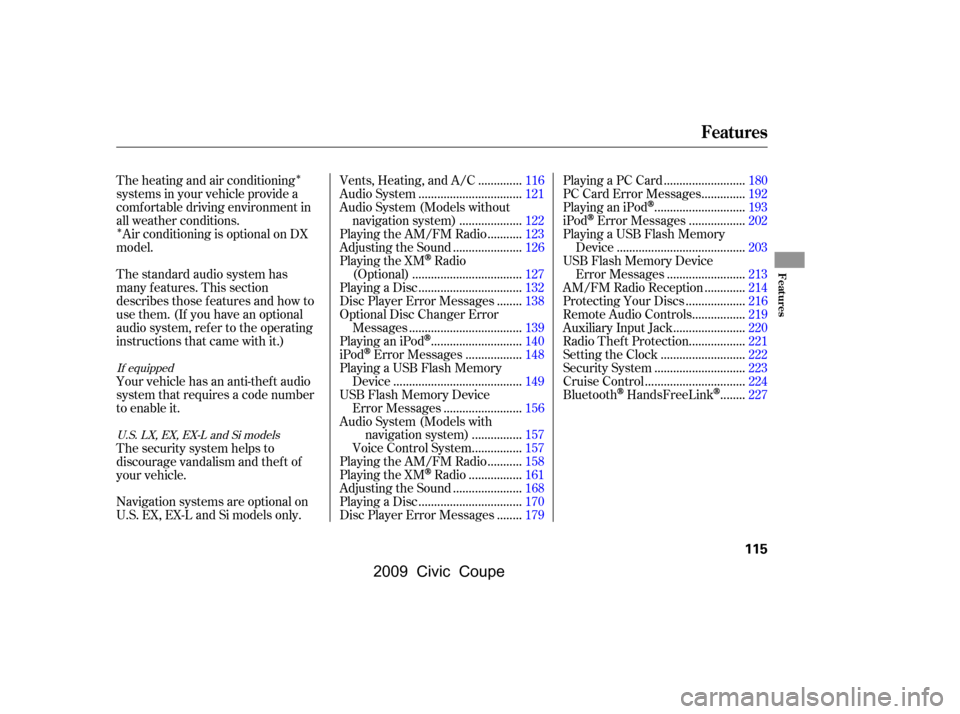
�ÎThe heating and air conditioning
systems in your vehicle provide a
comf ortable driving environment in
all weather conditions. Air conditioning is optional on DX
model.
The standard audio system has
many f eatures. This section
describes those f eatures and how to
use them. (If you have an optional
audio system, ref er to the operating
instructions that came with it.)
Your vehicle has an anti-theft audio
system that requires a code number
to enable it.
The security system helps to
discourage vandalism and thef t of
your vehicle. .............
Vents, Heating, and A/C .116
................................
Audio System .121
Audio System (Models without
...................
navigation system) .122
..........
Playing the AM/FM Radio .123
.....................
Adjusting the Sound .126
Playing the XM
Radio
..................................
(Optional) .127
................................
Playing a Disc .132
.......
Disc Player Error Messages .138
Optional Disc Changer Error
...................................
Messages .139
............................
PlayinganiPod
.140
.................
iPod
Error Messages .148
Playing a USB Flash Memory ........................................
Device .149
USB Flash Memory Device ........................
Error Messages .156
Audio System (Models with ...............
navigation system) .157
...............
Voice Control System .157
..........
Playing the AM/FM Radio .158
................
Playing the XM
Radio .161
.....................
Adjusting the Sound .168
................................
Playing a Disc .170
.......
Disc Player Error Messages .179 .........................
Playing a PC Card .180
.............
PC Card Error Messages .192
............................
PlayinganiPod
.193
.................
iPod
Error Messages .202
Playing a USB Flash Memory ........................................
Device .203
USB Flash Memory Device ........................
Error Messages .213
............
AM/FM Radio Reception .214
..................
Protecting Your Discs .216
................
Remote Audio Controls .219
......................
Auxiliary Input Jack .220
.................
Radio Thef t Protection .221
..........................
Setting the Clock .222
............................
Security System .223
...............................
Cruise Control .224
.......
Bluetooth
HandsFreeLink.227
Navigation systems are optional on
U.S. EX, EX-L and Si models only.
If equipped U.S. LX, EX, EX-L and Si models
Features
Features
115
�\f���—�\f���—�\f���y�
�\f���������
�y���
�(�+�������\f�y�\f�
���\f�y
2009 Civic Coupe
Page 145 of 412
Do not connect your iPod using a
hub.
DonotkeeptheiPodinthe
vehicle. Direct sunlight and high
heat will damage it.
Do not use an extension cable
between the USB adapter cable
equipped with your vehicle and
your dock connector.
We recommend backing up your
data bef ore playing it.
In AAC f ormat, DRM (digital rights
management) f iles cannot be played.
If the system finds a DRM file, the
audio unit displays UNPLAYABLE,
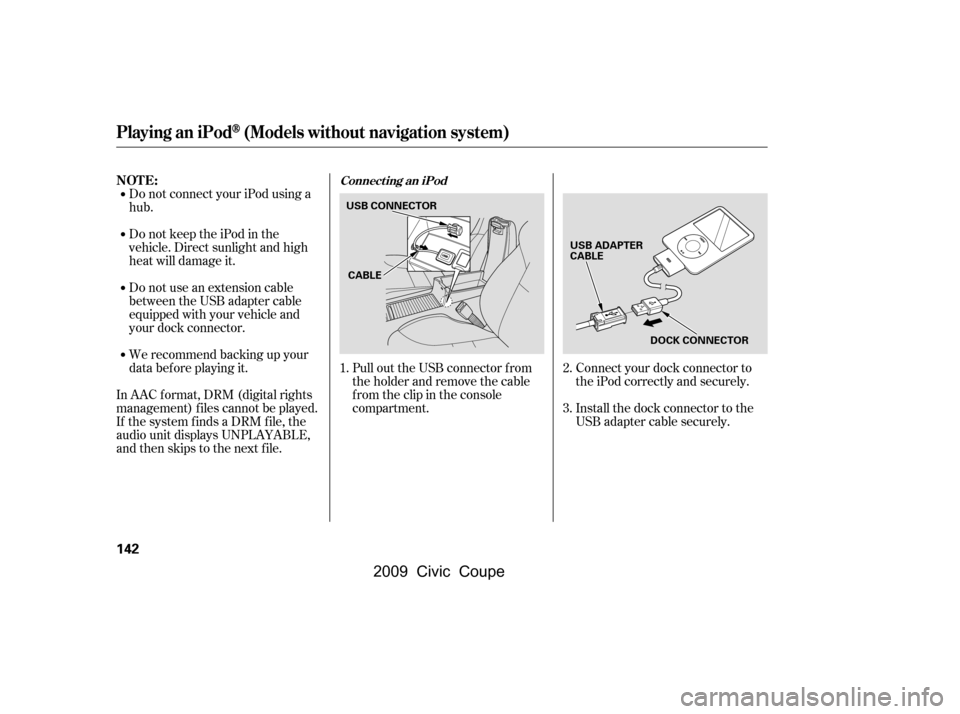
andthenskipstothenextfile. Install the dock connector to the
USB adapter cable securely.
Connect your dock connector to
the iPod correctly and securely.
Pull out the USB connector f rom
the holder and remove the cable
f rom the clip in the console
compartment.
1. 2.
3.
Playing an iPod(Models without navigation system)
NOT E:Connect ing an iPod
142
DOCK CONNECTOR
USB CONNECTOR
USB ADAPTER
CABLE
CABLE
�\f���—�\f���—�\f���y�
�
��\f����\f�\f�y���
�(�+�������\f�y�\f�
�����y
2009 Civic Coupe
Page 153 of 412

�Î
�ÎThe recommended USB f lash
memory devices are 256 Mbyte or
higher. Some digital audio players
maybecompatibleaswell.
Some USB f lash memory device
(such as devices with security lock-
out f eatures, etc.) will not work in
this audio unit.
Do not use a device such as a card
reader or hard drive as the device
or your f iles may be damaged.
Do not connect your USB f lash
memory device using a hub.
Do not use an extension cable to
the USB adapter cable equipped
with your vehicle. Do not keep the USB f lash
memory device in the vehicle.
Direct sunlight and high heat will
damage it.
We recommend backing up your
data bef ore playing a USB f lash
memory device.
Depending on the type and
number of f iles, it may take some
time bef ore they begin to play.
Depending on the sof tware the
f iles were made with, it may not be
possibletoplaysomefiles,or
display some text data.
This audio system can select and
play the audio f iles on a USB f lash
memory device with the same
controls used f or the disc player. To
play a USB f lash memory device,
connect it to the USB adapter cable
in the console compartment, then
press the AUX button. The ignition
switch must be in the ACCESSORY
(I) or ON (II) position.
The audio system reads and plays
the audio f iles on the USB f lash
memory device in MP3, WMA or
AAC formats. The USB flash
memory device limit is up to 700
f olders or up to 65535 f iles.
Only AAC f ormat f iles recorded
with iTunes are playable on this
audio unit.
Playing a USB Flash Memory Device (Models without navigation system)
To Play a USB Flash Memory
Device
NOT E:
150
�\f���—�\f���—�\f���y�
�
��\f��������y���
�(�+�������\f�y�\f�
�����y
2009 Civic Coupe