Page 77 of 412
�´�µ
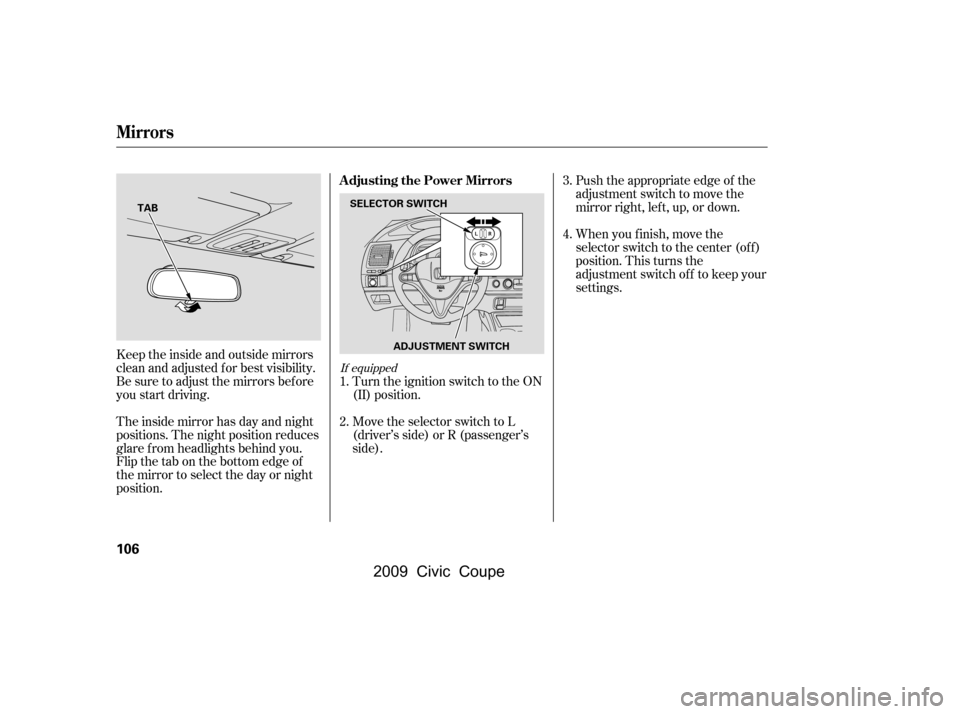
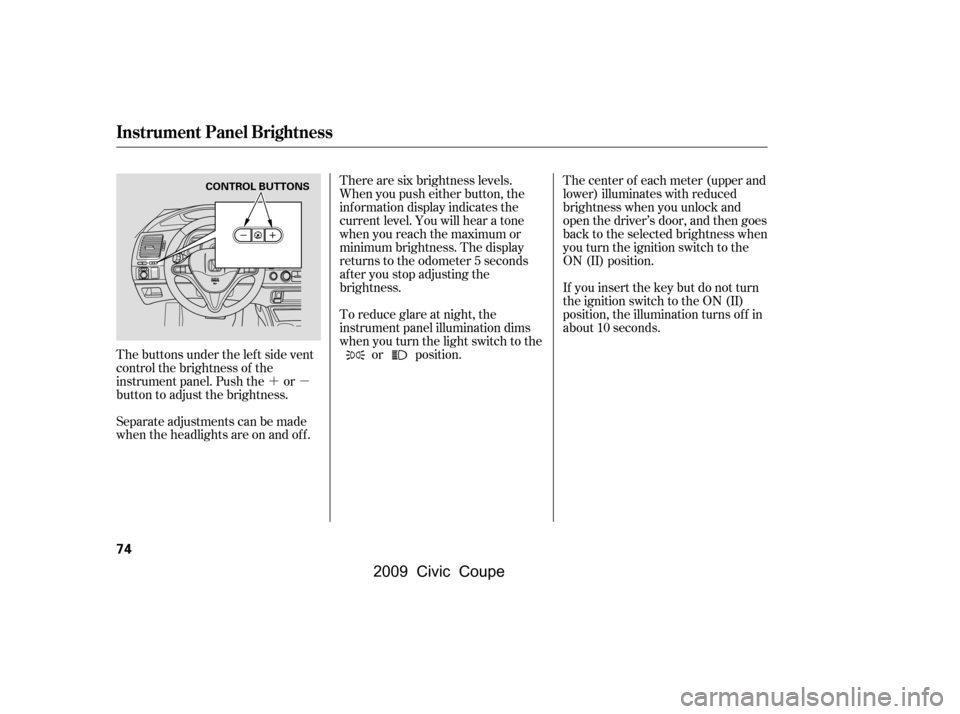
The buttons under the lef t side vent
control the brightness of the
instrument panel. Push the or
button to adjust the brightness.
Separate adjustments can be made
when the headlights are on and of f . There are six brightness levels.
When you push either button, the
inf ormation display indicates the
current level. You will hear a tone
when you reach the maximum or
minimum brightness. The display
returns to the odometer 5 seconds
af ter you stop adjusting the
brightness.
To reduce glare at night, the
instrument panel illumination dims
when you turn the light switch to the
or position. The center of each meter (upper and
lower) illuminates with reduced
brightness when you unlock and
open the driver’s door, and then goes
back to the selected brightness when
you turn the ignition switch to the
ON (II) position.
If you insert the key but do not turn
the ignition switch to the ON (II)
position, the illumination turns of f in
about 10 seconds.
Instrument Panel Brightness
74
CONTROL BUTTONS
�\f���—�\f���—�\f���y�
�\f�����������y���
�(�+�������\f�y�\f�\f�����y
2009 Civic Coupe
Page 78 of 412

Make sure the rear window is clear
and you have good visibility bef ore
starting to drive.
The rear window def ogger will clear
fog, frost, and thin ice from the
window. Push the def ogger button to
turn it on and off. The indicator in
the button comes on to show the
def ogger is on. If you do not turn it
of f , the def ogger will shut itself of f
af ter about 15 minutes. It also shuts
of f when you turn of f the ignition
switch. You have to turn the
def ogger on again when you restart
the vehicle. The def ogger and antenna wires on
the inside of the rear window can be
accidentally damaged. When
cleaning the glass, always wipe side-
to-side.
Pushthebuttontoturnonthe
hazard warning lights (f our-way
flashers). This causes all four
outside turn signals and both turn
indicators in the instrument panel to
f lash. Use the hazard warning lights
if you need to park in a dangerous
area near heavy traffic, or if your
vehicle is disabled. Pushing this button also turns the
mirror heaters on or of f . For more
inf ormation, see page .
107
On U.S. EX-L, Canadian LX, EX-L and
Si models
Rear Window Def ogger
Hazard Warning Button
Hazard Warning Button, Rear Window Def ogger
Inst rument s and Cont rols
75
U.S. EX-L, Canadian LX, EX, EX-L, Si
�\f���—�\f���—�\f���y�
�\f�����������y���
�(�+�������\f�y�\f�\f���\f�y
2009 Civic Coupe
Page 90 of 412
�µ
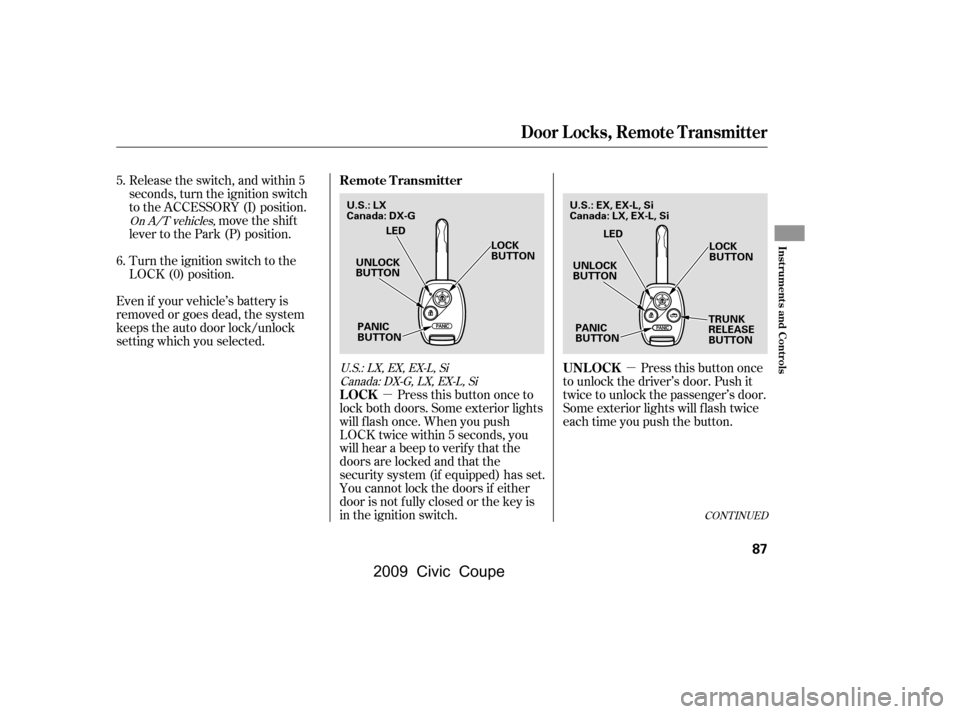
�µ Pressthisbuttononce
to unlock the driver’s door. Push it
twice to unlock the passenger’s door.
Some exterior lights will f lash twice
each time you push the button.
Release the switch, and within 5
seconds, turn the ignition switch
to the ACCESSORY (I) position.
move the shif t
lever to the Park (P) position.
Turn the ignition switch to the
LOCK (0) position.
Even if your vehicle’s battery is
removed or goes dead, the system
keeps the auto door lock/unlock
setting which you selected.
Press this button once to
lock both doors. Some exterior lights
will f lash once. When you push
LOCK twice within 5 seconds, you
will hear a beep to verify that the
doors are locked and that the
security system (if equipped) has set.
You cannot lock the doors if either
door is not f ully closed or the key is
in the ignition switch.
5.
6.
On A/T vehicles,
U.S.:LX,EX,EX-L,SiCanada: DX-G, LX, EX-L, Si
CONT INUED
UNL OCK
LOCK
Remote Transmitter
Door Locks, Remote Transmitter
Inst rument s and Cont rols
87
UNLOCK
BUTTON LOCK
BUTTON
TRUNK
RELEASE
BUTTON
PANIC
BUTTON LED
UNLOCK
BUTTON LOCK
BUTTON
PANIC
BUTTON LED
U.S.: LX
Canada: DX-G
U.S.: EX, EX-L, Si
Canada: LX, EX-L, Si
�\f���—�\f���—�\f���y�
�\f���������\f�y���
�(�+�������\f�y�\f�\f�����y
2009 Civic Coupe
Page 91 of 412

�µ
�µ Avoid dropping or throwing the
transmitter.
Protect the transmitter from
extreme temperature.
Do not immerse the transmitter in
any liquid.
If you lose a transmitter, the
replacement needs to be
reprogrammed by your dealer.
The ceiling light and the door
activated spotlights (if equipped)
come on when you press the
UNLOCK button if the lights are in
the door activated position. If you do
not open either door within 30
seconds, the light(s) will f ade out. If
you relock the doors with the remote
transmitter before 30 seconds have
elapsed, the light(s) will go of f
immediately.
If you do not open either door within
30 seconds, the doors automatically
relock, and the security system (if
equipped) sets. You cannot unlock it
if the key is in the ignition switch. Press this
button f or about 1 second to open
the trunk. You cannot open the trunk
if the key is in the ignition switch.
Press and hold this
button for about 2 seconds to attract
attention: the horn will sound and
the exterior lights will f lash f or about
30 seconds. To cancel panic mode,
press any other button on the remote
transmitter, or turn the ignition
switch to the ON (II) position.
EX, EX-L, Si and Canadian LX models Remote Transmitter Care
T RUNK REL EA SE
PA NIC
Remote Transmitter
88
�\f���—�\f���—�\f���y�
�\f�����������y���
�(�+�������\f�y�\f�\f�����y
2009 Civic Coupe
Page 109 of 412
Push the appropriate edge of the
adjustment switch to move the
mirrorright,left,up,ordown.
The inside mirror has day and night
positions. The night position reduces
glare f rom headlights behind you.
Flip the tab on the bottom edge of
the mirror to select the day or night
position.
Keeptheinsideandoutsidemirrors
clean and adjusted f or best visibility.
Be sure to adjust the mirrors bef ore
you start driving. When you f inish, move the
selector switch to the center (off)
position. This turns the
adjustment switch of f to keep your
settings.
Turn the ignition switch to the ON
(II) position.
Move the selector switch to L
(driver’s side) or R (passenger’s
side).
1.
2. 3.
4.
If equipped
A djusting the Power Mirrors
Mirrors
106
SELECTOR SWITCH
ADJUSTMENT SWITCH
TAB
�\f���—�\f���—�\f���y�
�\f�����������y���
�(�+�������\f�y�\f�
�
�
�y
2009 Civic Coupe
Page 116 of 412
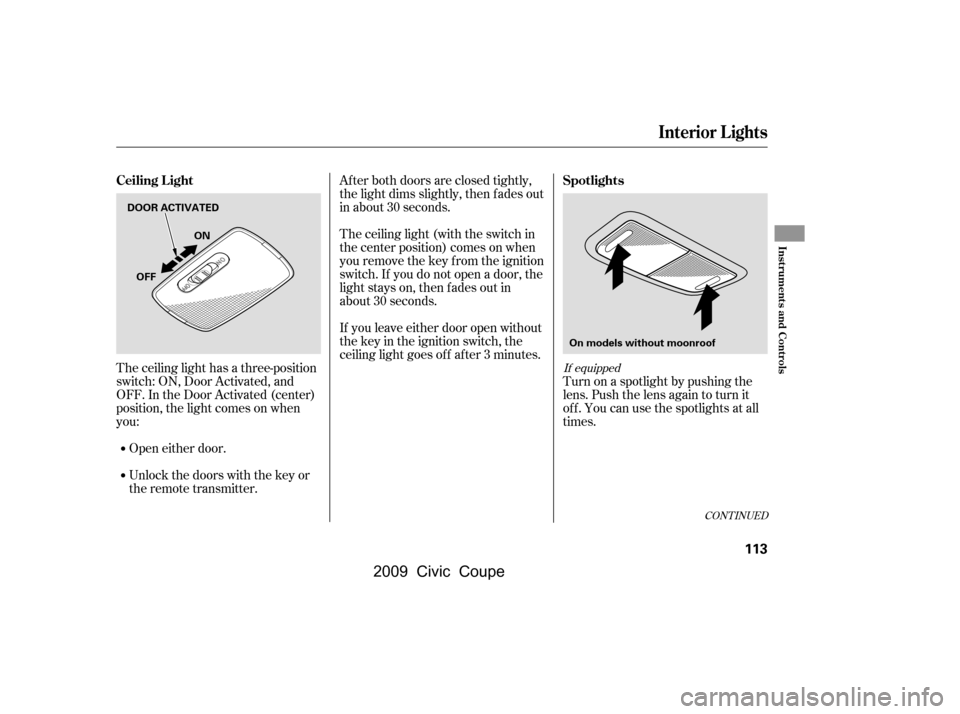
Af ter both doors are closed tightly,
the light dims slightly, then f ades out
in about 30 seconds.
The ceiling light (with the switch in
the center position) comes on when
you remove the key f rom the ignition
switch. If you do not open a door, the
light stays on, then f ades out in
about 30 seconds.
If you leave either door open without
the key in the ignition switch, the
ceiling light goes of f af ter 3 minutes.
The ceiling light has a three-position
switch: ON, Door Activated, and
OFF. In the Door Activated (center)
position, the light comes on when
you:
Open either door.
Unlock the doors with the key or
the remote transmitter. Turn on a spotlight by pushing the
lens. Push the lens again to turn it
of f . You can use the spotlights at all
times.
CONT INUED
If equipped
Spotlights
Ceiling L ight
Interior Lights
Inst rument s and Cont rols
113
DOOR ACTIVATED
ON
OFF
On models without moonroof
�\f���—�\f���—�\f���y�
�\f�����������y���
�(�+�������\f�y�\f�
�
���y
2009 Civic Coupe
Page 117 of 412
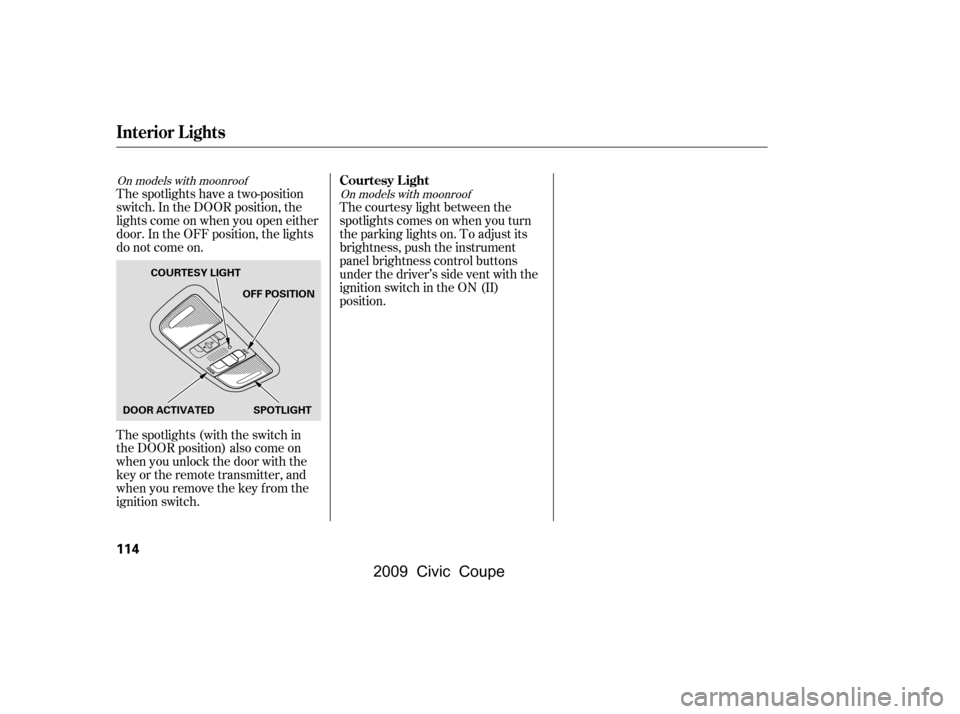
The spotlights have a two-position
switch. In the DOOR position, the
lights come on when you open either
door. In the OFF position, the lights
do not come on.
The spotlights (with the switch in
the DOOR position) also come on
when you unlock the door with the
key or the remote transmitter, and
when you remove the key f rom the
ignition switch.The courtesy light between the
spotlights comes on when you turn
the parking lights on. To adjust its
brightness, push the instrument
panel brightness control buttons
under the driver’s side vent with the
ignition switch in the ON (II)
position.
On models with moonroof
On models with moonroofCourtesy L ight
Interior Lights
114
DOOR ACTIVATEDOFF POSITION
SPOTLIGHT
COURTESY LIGHT
�\f���—�\f���—�\f���y�
�\f�����������y���
�(�+�������\f�y�\f�
�
���y
2009 Civic Coupe
Page 129 of 412

�µ
�µ
�µ �µ
�µ
�µ The SVC mode controls the volume
based on vehicle speed. The f aster
you go, the louder the audio volume
becomes. As you slow down, the
audio volume decreases.
The SVC has f our modes: SVC OFF,
SVC LOW, SVC MID, and SVC
HIGH. Turn the TUNE knob to
adjust the setting to your liking. If
you f eel the sound is too loud, choose low. If you f eel the sound is
too quiet, choose high.
Eachmodeisshowninthedisplayas
it changes. Turn the TUNE knob to
adjust the setting to your liking.
When the level reaches the center,
you will see ‘‘C’’ in the display. Adjusts the volume level
basedonthevehiclespeed.
This f unction is set to MID as the
def ault setting when the vehicle
leaves the factory.
You can use the instrument panel
brightness control buttons to adjust
the illumination of the audio system
(see page ). The audio system
illuminates when the parking lights
are on, even if the radio is of f .
The system will return to the audio
display about 5 seconds af ter you
stop adjusting a mode.
Press the TUNE (SOUND) knob
repeatedly to display the SUBW (if
equipped), BASS, TREBLE, FADER,
BALANCE, and SVC (speed-
sensitive volume compensation)
settings.
Adjusts the strength of
sound f rom the subwoof er speaker.
Adjusts the bass.Adjusts the treble.
Adjusts the front-to-back
strength of the sound.
Adjusts the side-to-
side strength of the sound. 74
If equipped
Speed-sensit ive VolumeCompensat ion (SVC)
SVC
A udio System L ighting
SUBW
BASS
TREBLE
FADER
BAL ANCE
A djusting the Sound (Models without navigation system)
126
�\f���—�\f���—�\f���y�
�
��\f�\f������y���
�(�+�������\f�y�\f�
���
�y
2009 Civic Coupe