Page 223 of 436

This f eature, when activated, plays
all f iles in the current f older in
random order. To activate f older
random play, select FOLDER
RANDOM by interf ace knob, and
press ENTER on the interf ace
selector. You will see RANDOM
next to FOLDER on the screen. To
turn this f eature of f , highlight
FOLDER RANDOM (if not already
highlighted), and press ENTER on
the interf ace selector again.
This f eature, when activated, replays
all f iles in the selected f older. To
activate f older repeat mode, select
FOLDER REPEAT by interface
knob, and press ENTER on the
interf ace selector. You will see
REPEAT next to FOLDER on the
screen. To turn this f eature of f ,
highlight FOLDER REPEAT (if not
already highlighted), and press
ENTER on the interf ace selector
again.
This feature, when activated,
samples the f irst f ile in each f older
f or 10 seconds. To scan a f older,
press the SCAN side of the SCAN/
A. SEL bar repeatedly. You will see
SCAN next to FOLDER and the
f older number blinking.
Toselectanytypeof therepeat
modes, use the interf ace dial. For
more inf ormation, see page .Toselectanytypeof therandom
modes, use the interf ace dial. For
more inf ormation, see page .
To listen to the rest of the folder,
press and hold the SCAN side of the
bar until you hear a beep. If you do
nothing, the system advances to the
next f older, plays 10 seconds of it,
and continues throughout the rest of
the f older in the same way. When
the system samples the f irst f ile in all
f olders, f older scan is canceled, and
the last f ile played continues to play.
199 199Folder Random
Folder Repeat
Folder Scan
Playing Discs (Models with navigat ion syst em)
Features
203
�����—�����—�����y�
����
����
�
�y���
�)�������
���y���������y
Page 226 of 436
When using CD-R or CD-RW discs,
use only high quality discs labeled
f or audio use.
When recording a CD-R or
CD-RW, the recording must be
closedforittobeusedbythedisc
changer.When a disc is not being played,
store it in its case to protect it f rom
dust and other contamination. To
prevent warpage, keep discs out of
direct sunlight and extreme heat.
A new disc may be rough on the
inner and outer edges. The small
plastic pieces causing this roughness
can f lake of f and f all on the
recording surf ace of the disc,
causing skipping or other problems.
Remove these pieces by rubbing the
inner and outer edges with the side
of a pencil or pen.
Never try to insert f oreign objects in
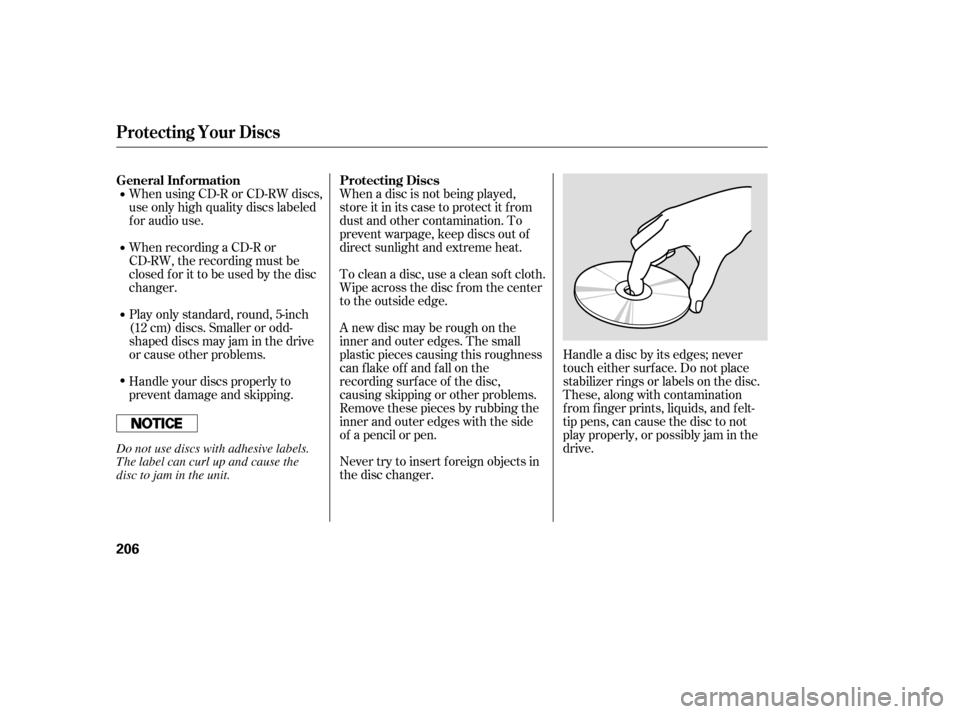
the disc changer. Handle a disc by its edges; never
touch either surf ace. Do not place
stabilizer rings or labels on the disc.
These, along with contamination
f rom f inger prints, liquids, and f elt-
tip pens, can cause the disc to not
play properly, or possibly jam in the
drive.
To clean a disc, use a clean sof t cloth.
Wipe across the disc f rom the center
to the outside edge.
Play only standard, round, 5-inch
(12 cm) discs. Smaller or odd-
shaped discs may jam in the drive
or cause other problems.
Handle your discs properly to
prevent damage and skipping.
General Inf ormation Protecting Discs
Protecting Your Discs
206
Do not use discs with adhesive labels.
The label can curl up and cause the
disc to jam in the unit.
�����—�����—�����y�
����
��������y���
�)�������
���y�����
�
�y
Page 238 of 436

With the system set, you can still
open the trunk with the remote
transmitter without triggering the
alarm. The alarm will sound if the
trunk lock is f orced, or the trunk is
opened with the trunk release lever
or the emergency trunk opener.
The security system helps to protect
your vehicle and valuables f rom thef t.
The horn sounds and a combination
of headlights, parking lights, side
marker lights and taillights f lashes if
someone attempts to break into your
vehicle or remove the audio unit.
This alarm continues for two
minutes, then the system resets. To
reset an alarming system bef ore the
two minutes have elapsed, unlock
the driver’s door with the key or the
remote transmitter.
The security system automatically
sets 15 seconds after you lock the
doors, hood, and trunk. For the
system to activate, you must lock the
doors f rom the outside with the key,
driver’s lock tab, door lock master
switch, or remote transmitter. The
security system indicator on the
instrument panel starts blinking
immediately to show you the system
is setting itself . Once the security system is set,
opening any door (without using the
key or the remote transmitter), the
hood, or the trunk will cause the
system to alarm. It also alarms if the
audio unit is removed f rom the
dashboard or the wiring is cut.
The security system will not set if
the hood, trunk, or any door is not
f ully closed. If the system will not set,
check the door and trunk open
indicators on the instrument panel
(see page ) to see if the doors and
trunk are f ully closed. Since it is not
part of the monitor display, manually
check the hood.
60
CONT INUED
Except LX
Security System
Features
217
SECURITY SYSTEM INDICATOR
�����—�����—�����y�
����
��������y���
�)�������
���y���������y
Page 245 of 436

You can decrease the set cruising
speed in any of these ways:If you need to decrease your
speed quickly, use the brakes as you
normally would.
Press and hold the SET/DECEL
button. Release the button when
you reach the desired speed.
To slow down in very small
amounts, tap the SET/DECEL
button repeatedly. Each time you
do this, your vehicle will slow
down about 1 mph (1.6 km/h).
Tap the brake or clutch pedal
lightly with your f oot. The
CRUISE CONTROL indicator on
the instrument panel will go out.
When the vehicle slows to the
desired speed, press the SET/
DECEL button.
You can increase the set cruising
speed in any of these ways:
Press and hold the RES/ACCEL
button. When you reach the
desired cruising speed, release the
button.
Push on the accelerator pedal.
Accelerate to the desired cruising
speed, then press the SET/
DECEL button.
To increase the speed in very
small amounts, tap the RES/
ACCEL button. Each time you do
this, your vehicle will speed up
about 1 mph (1.6 km/h).
Cruise control may not hold the set
speed when you are going up and
down hills. If your speed increases
going down a hill, use the brakes to
slow down to the desired speed. This
will cancel cruise control. To resume
the set speed, press the RES/
ACCEL button. The CRUISE
CONTROL indicator on the
instrument panel comes on.
When climbing a steep hill, the
automatic transmission may
downshif t to hold the set speed.
Cruise Control
Changing the Set Speed
224
NOTE:
�����—�����—�����y�
����
��������y���
�)�������
���y���������y
Page 247 of 436

�·
The HomeLink
universal
transceiver built into your vehicle
canbeprogrammedtooperateupto
three remotely controlled devices
around your home, such as garage
doors, lighting, or home security
systems.
Bef ore programming your
HomeLink to operate a garage door
opener, conf irm that the opener has
an external entrapment protection
system, such as an ‘‘electronic eye,’’
or other saf ety and reverse stop
f eatures. Units manuf actured between April 1,
1982 and January 1, 1993 may be
equipped with saf ety stop and
reverse f eatures. If your unit does
not have an external entrapment
protection system, an easy test to
conf irm the f unction and
perf ormance of the saf ety stop and
reverse f eature is to lay a 2 4
under the closing door. The door
should stop and reverse upon
contacting the piece of wood.
As an additional safety feature,
garage door openers manuf actured
af ter January 1, 1993 are required to
have external entrapment protection
systems, such as an electronic eye,
which detect an object obstructing
the door.
If your garage door was
manuf actured bef ore April 1, 1982,
you may not be able to program
HomeLink to operate it. These units
do not have safety features that
cause the motor to stop and reverse
it if an obstacle is detected during
closing, increasing the risk of injury.
Do not use HomeLink with any
garage door opener that lacks saf ety
stop and reverse f eatures.
EX-L V6
General Inf ormation
HomeL inkUniversal T ransceiver
226
�����—�����—�����y�
���������
���y���
�)�������
���y�������
�y
Page 253 of 436

To operate the HFL, use the HFL
Talk and Back buttons on the left
side of the steering wheel.
The HFL buttons are used as
f ollows:
HFLTalk:Thisbuttonisusedbefore
you give a command, to answer
incoming calls, and to conf irm
system inf ormation.
The HFL microphone is on the
ceiling, between the f ront spotlights.
The microphone is shared with the
navigation system.
When the HFL is in use, the sound
comes through the vehicle’s f ront
audio system speakers. If the audio
system is in use while operating
either of the HFL buttons or making
a call, the HFL over-rides the audio
system. To change the volume level,
use the audio system volume knob,
or the steering wheel volume
controls.
You can also store the desired
number to the HFL directly f rom
your cell phone using the receive
contact f unction in the HFL.
Your vehicle’s HFL system has the
cellular phonebook import f unction.
This allows you to import your
cellular phonebook to the HFL.
Using the navigation system, you can
makeacalldirectlyandstorea
desired number in the HFL f rom the
list shown on the navigation display.
For more inf ormation on how to
import the phonebook or to make a
call, see page .
The HFL can store up to 50 names
and phone numbers in its phonebook.
Withalinkedphone,youcanthen
automatically dial any name or
number in the phonebook.
241 HFL Buttons
Microphone
Audio System
Phonebook
Bluet oot hHandsFreeL ink
232
HFL TALK BUTTON
HFL BACK BUTTON
�����—�����—�����y�
�������������y���
�)�������
���y���������y
Page 286 of 436
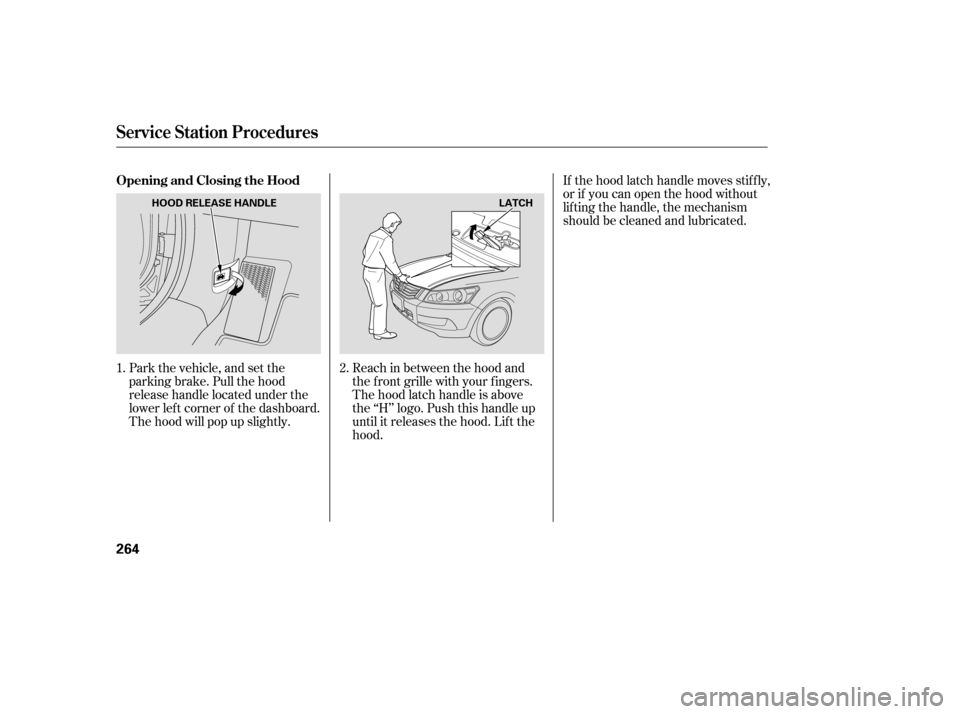
Park the vehicle, and set the
parking brake. Pull the hood
release handle located under the
lower lef t corner of the dashboard.
The hood will pop up slightly.Reach in between the hood and
the f ront grille with your f ingers.
The hood latch handle is above
the ‘‘H’’ logo. Push this handle up
until it releases the hood. Lif t thehood.If the hood latch handle moves stif f ly,
or if you can open the hood without
lifting the handle, the mechanism
should be cleaned and lubricated.
1. 2.
Opening and Closing the Hood
Service Station Procedures
264
LATCH
HOOD RELEASE HANDLE
�����—�����—�����y�
�������������y���
�)�������
���y���������y
Page 287 of 436
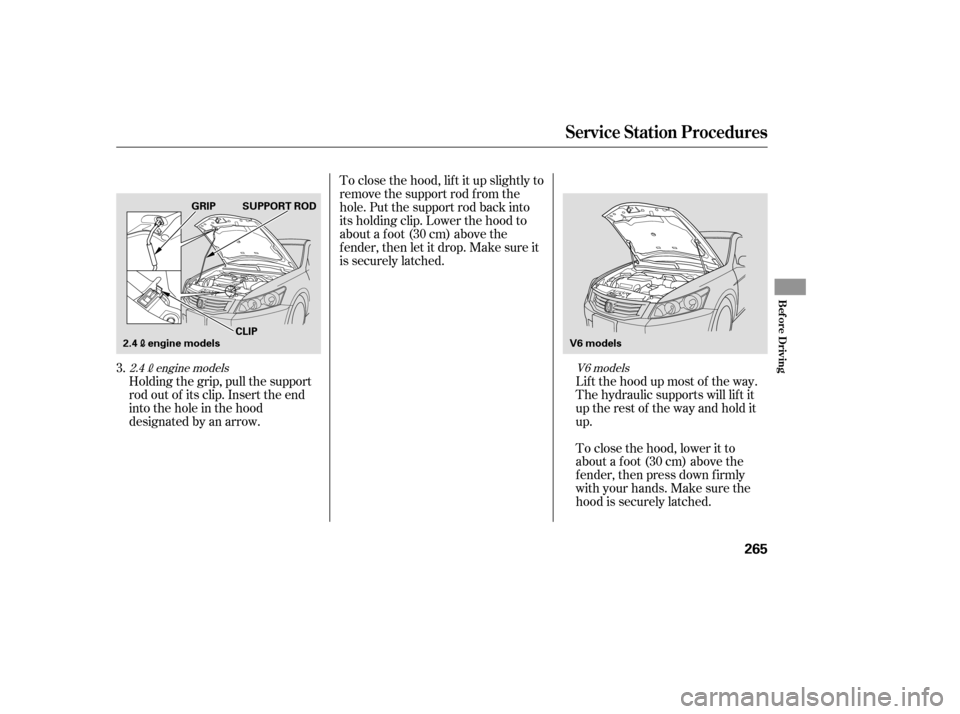
Holding the grip, pull the support
rod out of its clip. Insert the end
into the hole in the hood
designated by an arrow.Lif t the hood up most of the way.
The hydraulic supports will lif t it
uptherestof thewayandholditup.
To close the hood, lif t it up slightly to
remove the support rod f rom the
hole. Put the support rod back into
its holding clip. Lower the hood to
about a f oot (30 cm) above the
f ender, then let it drop. Make sure it
is securely latched.
To close the hood, lower it to
about a f oot (30 cm) above the
f ender, then press down f irmly
with your hands. Make sure the
hood is securely latched.
3.
V6 models
2.4engine models
Service Station Procedures
Bef ore Driving
265
V6 models
SUPPORT ROD
GRIP
2.4engine models CLIP
�����—�����—�����y�
�������������y���
�)�������
���y���������y