Page 238 of 436

With the system set, you can still
open the trunk with the remote
transmitter without triggering the
alarm. The alarm will sound if the
trunk lock is f orced, or the trunk is
opened with the trunk release lever
or the emergency trunk opener.
The security system helps to protect
your vehicle and valuables f rom thef t.
The horn sounds and a combination
of headlights, parking lights, side
marker lights and taillights f lashes if
someone attempts to break into your
vehicle or remove the audio unit.
This alarm continues for two
minutes, then the system resets. To
reset an alarming system bef ore the
two minutes have elapsed, unlock
the driver’s door with the key or the
remote transmitter.
The security system automatically
sets 15 seconds after you lock the
doors, hood, and trunk. For the
system to activate, you must lock the
doors f rom the outside with the key,
driver’s lock tab, door lock master
switch, or remote transmitter. The
security system indicator on the
instrument panel starts blinking
immediately to show you the system
is setting itself . Once the security system is set,
opening any door (without using the
key or the remote transmitter), the
hood, or the trunk will cause the
system to alarm. It also alarms if the
audio unit is removed f rom the
dashboard or the wiring is cut.
The security system will not set if
the hood, trunk, or any door is not
f ully closed. If the system will not set,
check the door and trunk open
indicators on the instrument panel
(see page ) to see if the doors and
trunk are f ully closed. Since it is not
part of the monitor display, manually
check the hood.
60
CONT INUED
Except LX
Security System
Features
217
SECURITY SYSTEM INDICATOR
�����—�����—�����y�
����
��������y���
�)�������
���y���������y
Page 239 of 436
Use the remote transmitter
to quickly check that the hood, the
trunk, and all doors are closed. Push
the lock button twice within 5
seconds. There should be an audible
conf irmation beep.
Do not attempt to alter this system
or add other devices to it.
Security System
218
NOTE:
�����—�����—�����y�
����
����
���y���
�)�������
���y���������y
Page 247 of 436

�·
The HomeLink
universal
transceiver built into your vehicle
canbeprogrammedtooperateupto
three remotely controlled devices
around your home, such as garage
doors, lighting, or home security
systems.
Bef ore programming your
HomeLink to operate a garage door
opener, conf irm that the opener has
an external entrapment protection
system, such as an ‘‘electronic eye,’’
or other saf ety and reverse stop
f eatures. Units manuf actured between April 1,
1982 and January 1, 1993 may be
equipped with saf ety stop and
reverse f eatures. If your unit does
not have an external entrapment
protection system, an easy test to
conf irm the f unction and
perf ormance of the saf ety stop and
reverse f eature is to lay a 2 4
under the closing door. The door
should stop and reverse upon
contacting the piece of wood.
As an additional safety feature,
garage door openers manuf actured
af ter January 1, 1993 are required to
have external entrapment protection
systems, such as an electronic eye,
which detect an object obstructing
the door.
If your garage door was
manuf actured bef ore April 1, 1982,
you may not be able to program
HomeLink to operate it. These units
do not have safety features that
cause the motor to stop and reverse
it if an obstacle is detected during
closing, increasing the risk of injury.
Do not use HomeLink with any
garage door opener that lacks saf ety
stop and reverse f eatures.
EX-L V6
General Inf ormation
HomeL inkUniversal T ransceiver
226
�����—�����—�����y�
���������
���y���
�)�������
���y�������
�y
Page 257 of 436

Thevoiceof theHFLcanbesetto
male or f emale (U.S. models only).
Also, the incoming notif ication can
be set to a ring tone, a prompt, or no
notification.Press and release the Talk button.
Af ter the beep, say ‘‘System.’’ The
HFL response is, ‘‘System options
are setup and clear.’’
Press and release the Talk button.
Af ter the beep, say ‘‘Setup.’’ The
HFL response is ‘‘Would you like
male or f emale prompts?’’ Press and release the Talk button.
Af ter the beep, say ‘‘Male’’ or
‘‘Female,’’ depending on the
system voice you want. The HFL
response is, ‘‘Male (Female)
prompts have been selected.
Would you like an audible
notif ication of an incoming call?’’
Press and release the Talk button.
If you say ‘‘Yes’’ af ter the beep, the
HFL response is, ‘‘Would you like
the notif ication to be a ring tone or
prompt?’’ If you say ‘‘No’’ af ter the
beep, the HFL returns to its main
menu. Saying ‘‘No’’ will result in no
ring tone or prompt playback
during an incoming call. The audio
system will still mute, and a
message will be displayed.Press and release the Talk button.
Af ter the beep, say ‘‘Ring tone’’ or
‘‘Prompt.’’ The HFL response is ‘‘A
ring tone will be used’’ or ‘‘An
incoming call prompt will be used.’’
If you choose ‘‘Ring tone,’’ you will
hear a ring tone through the audio
speakers to announce an incoming
call. If you choose ‘‘Prompt,’’ you
will hear this message to
announce an incoming call: ‘‘You
have an incoming call.’’
The HFL response continues ‘‘A
security option is available to lock
the HFL system. Each time the
vehicle is turned on, a passcode
would be required to use this
system. Would you like this
security option turned on?’’ If you
say ‘‘Yes,’’ you can set your
passcode. Ref er to the setting
procedure in the next column.
4.
5.
3.
2.
1.
6.
To set up the system, do this:
Setting Up the System
Bluet oot hHandsFreeL ink
236
�����—�����—�����y�
������
������y���
�)�������
���y�������
�y
Page 258 of 436

The HFL will accept a numeric, f our-
digit passcode that you can use f or
security purposes.Follow the system setup
procedure as described previously.
Press and release the Talk button.
Af ter the beep, say ‘‘Yes.’’
The HFL response is ‘‘What is the
f our-digit number you would like
to set as your passcode?’’
Press and release the Talk button.
Af ter the beep, say the f our-digit
passcode you want to use. For
example,say‘‘1,2,3,4.’’TheHFL
responseis‘‘1,2,3,4.Isthis
correct?’’ Press and release the Talk button.
If you say ‘‘No.’’ af ter the beep, the
HFL response is ‘‘Security will not
be used. The system setup is
complete.’’
Once a passcode is set, you can lock
the HFL so it only operates after the
passcode is entered. The HFL will prompt you f or your
passcode each time the ignition
switch is turned to the ON (II)
position and you press the Talk
button. You will only be asked f or
thepasscodeonceperignition cycle. If the passcode is set, its
response is ‘‘The system is locked.
What is the f our-digit passcode?’’
Press and release the Talk button.
Af ter the beep, say your f our-digit
passcode.Forexample,say‘‘1,2,3,4.’’
If the passcode is correct, the HFL
response is ‘‘Main menu.’’ If the
passcode is not correct, the HFL
responseis‘‘1,2,3,4isincorrect.
Pleasetryagain.’’Gobacktothe
step 2.
If you f orget your passcode and you
cannot activate the HFL, consult
your dealer to cancel the passcode.
Press and release the Talk button.
Af ter the beep, say ‘‘Yes.’’ The
HFL response is ‘‘Security is on.
Each time the vehicle is turned on,
the passcode will be required to
use the system. The system setup
is complete. Returning to the main
menu.’’
1. 4. 5. 6.
2. 3.
1.2. 3.
To set your passcode, do this:
To enter your passcode, do this;
Setting Your Passcode
Bluet oot hHandsFreeL ink
Features
237
�����—�����—�����y�
������
������y���
�)�������
���y���������y
Page 287 of 436
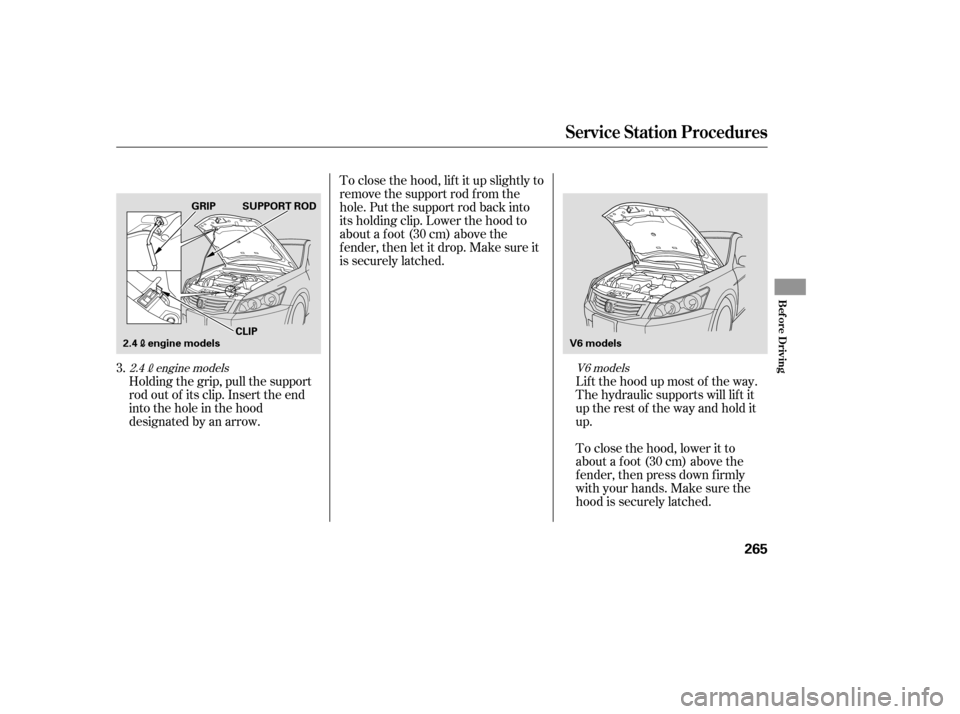
Holding the grip, pull the support
rod out of its clip. Insert the end
into the hole in the hood
designated by an arrow.Lif t the hood up most of the way.
The hydraulic supports will lif t it
uptherestof thewayandholditup.
To close the hood, lif t it up slightly to
remove the support rod f rom the
hole. Put the support rod back into
its holding clip. Lower the hood to
about a f oot (30 cm) above the
f ender, then let it drop. Make sure it
is securely latched.
To close the hood, lower it to
about a f oot (30 cm) above the
f ender, then press down f irmly
with your hands. Make sure the
hood is securely latched.
3.
V6 models
2.4engine models
Service Station Procedures
Bef ore Driving
265
V6 models
SUPPORT ROD
GRIP
2.4engine models CLIP
�����—�����—�����y�
�������������y���
�)�������
���y���������y
Page 299 of 436

Store or secure all items that could
be thrown around and hurt
someone during a crash.
Do not put any items on top of the
trunk panel. They can block your
view and be thrown around the
vehicle during a crash.Distribute cargo evenly on the
f loor of the trunk, placing the
heaviest items on the bottom and
as far forward as possible.
If youfolddownthebackseat,tie
down items that could be thrown
about the vehicle during a crash or
sudden stop.
If you carry large items that
prevent you f rom closing the trunk
lid, exhaust gas can enter the
passenger area. To avoid the
possibility of
, f ollow the instructions
on page .
Keep the glove box closed while
driving. If it is open, a passenger
could injure their knees during a
crash or sudden stop.
Be sure items placed on the f loor
behind the f ront seats cannot roll
under the seats and interf ere with
the driver’s ability to operate the
pedals, the proper operation of the
seats, or the proper operation of
the sensors under the seats.
Also, keep all cargo below the
bottom of the windows. If it is
higher, it could interf ere with the
proper operation of the side
curtain airbags. 51
Carrying Cargo
Carrying Items in the Passenger
Compartment
Carrying Cargo in the Trunk or on
a Roof Rack
carbon monoxide
poisoning
276
�����—�����—�����y�
���������
���y���
�)�������
���y�������
�y
Page 302 of 436

Youshoulddothefollowingchecks
and adjustments bef ore you drive
your vehicle.Make sure all windows, mirrors,
and outside lights are clean and
unobstructed. Remove f rost, snow,
or ice.
Check that the hood is f ully closed.
Check that the trunk is f ully
closed.
Visually check the tires. If a tire
looks low, use a gauge to check its
pressure.
Check that any items you may be
carrying are stored properly or
f astened down securely. When you start the engine, check
the gauges and indicators in the
instrument panel (see page ).
Fasten your seat belt. Check that
your passengers have f astened
their seat belts (see page ).
Make sure the doors are securely
closed and locked.
Check the steering wheel
adjustment (see page ).
Check the seat adjustment (see
page ).
Check the seat adjustment (see
page ).
Check the adjustment of the
inside and outside mirrors (see
pages and ).
3.
2. 1.
4. 5. 6. 7. 8. 9.
10. 92
93
7514 55
11.
101 102On models with power adjustable seats
On models with manual adjustableseats
Preparing to Drive
280
�����—�����—�����y�
�������������y���
�)�������
���y���������y