2009 GMC SIERRA warning
[x] Cancel search: warningPage 351 of 596
Driving at Night
Night driving is more dangerous than day driving
because some drivers are likely to be impaired — by
alcohol or drugs, with night vision problems, or by fatigue.
Night driving tips include:
Drive defensively.
Do not drink and drive.
Reduce headlamp glare by adjusting the inside
rearview mirror.
Slow down and keep more space between you and
other vehicles because headlamps can only light up
so much road ahead.
Watch for animals.
When tired, pull off the road.
Do not wear sunglasses.
Avoid staring directly into approaching headlamps.
Keep the windshield and all glass on your vehicle
clean — inside and out.
Keep your eyes moving, especially during turns or
curves.
No one can see as well at night as in the daytime.
But, as we get older, these differences increase.
A 50-year-old driver might need at least twice as much
light to see the same thing at night as a 20-year-old.
Driving in Rain and on Wet Roads
Rain and wet roads can reduce vehicle traction and
affect your ability to stop and accelerate. Always drive
slower in these types of driving conditions and avoid
driving through large puddles and deep-standing or
owing water.
{CAUTION:
Wet brakes can cause crashes. They might not
work as well in a quick stop and could cause
pulling to one side. You could lose control of
the vehicle.
After driving through a large puddle of water or a
car/vehicle wash, lightly apply the brake pedal until
the brakes work normally.
Flowing or rushing water creates strong forces.
Driving through owing water could cause your
vehicle to be carried away. If this happens, you
and other vehicle occupants could drown. Do not
ignore police warnings and be very cautious about
trying to drive through owing water.
4-25
Page 354 of 596
Winter Driving
Driving on Snow or Ice
Drive carefully when there is snow or ice between the
tires and the road, creating less traction or grip. Wet ice
can occur at about 32°F (0°C) when freezing rain begins
to fall, resulting in even less traction. Avoid driving on wet
ice or in freezing rain until roads can be treated with salt
or sand.
Drive with caution, whatever the condition. Accelerate
gently so traction is not lost. Accelerating too quickly
causes the wheels to spin and makes the surface
under the tires slick, so there is even less traction.
Try not to break the fragile traction. If you accelerate too
fast, the drive wheels will spin and polish the surface
under the tires even more.
TheStabiliTrak
®System on page 4-6improves the
ability to accelerate on slippery roads, but slow down
and adjust your driving to the road conditions. When
driving through deep snow, turn off the traction control
part of the StabiliTrak
®System to help maintain
vehicle motion at lower speeds.TheAntilock Brake System (ABS) on page 4-5improves
vehicle stability during hard stops on a slippery roads, but
apply the brakes sooner than when on dry pavement.
Allow greater following distance on any slippery road
and watch for slippery spots. Icy patches can occur on
otherwise clear roads in shaded areas. The surface
of a curve or an overpass can remain icy when the
surrounding roads are clear. Avoid sudden steering
maneuvers and braking while on ice.
Turn off cruise control, if equipped, on slippery surfaces.
Blizzard Conditions
Being stuck in snow can be in a serious situation. Stay
with the vehicle unless there is help nearby. If possible,
use theRoadside Assistance Program on page 7-7.
To get help and keep everyone in the vehicle safe:
Turn on theHazard Warning Flashers on page 3-8.
Tie a red cloth to an outside mirror.
4-28
Page 398 of 596
Trailer Brake Control Panel
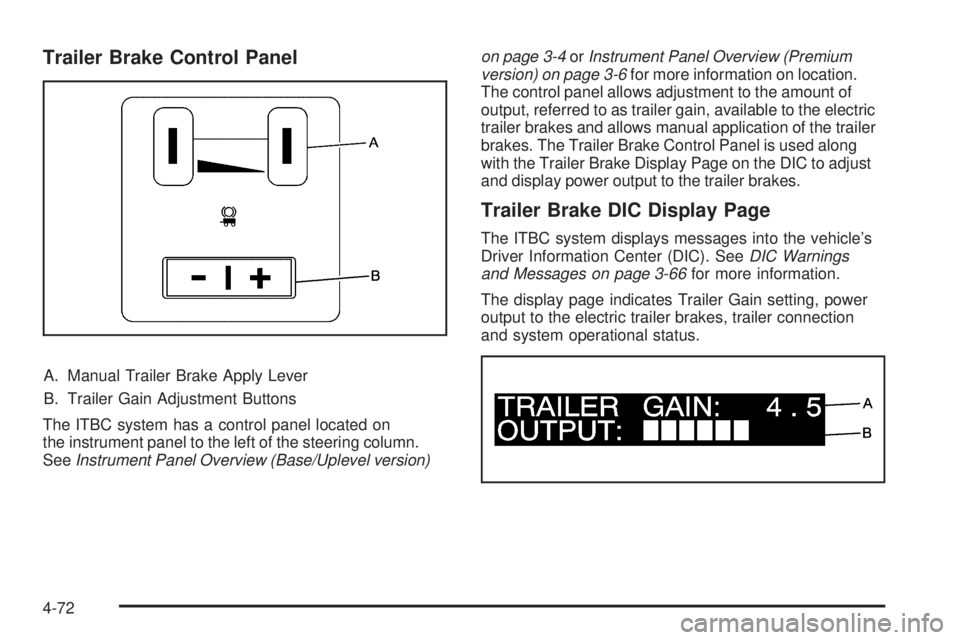
A. Manual Trailer Brake Apply Lever
B. Trailer Gain Adjustment Buttons
The ITBC system has a control panel located on
the instrument panel to the left of the steering column.
SeeInstrument Panel Overview (Base/Uplevel version)on page 3-4orInstrument Panel Overview (Premium
version) on page 3-6for more information on location.
The control panel allows adjustment to the amount of
output, referred to as trailer gain, available to the electric
trailer brakes and allows manual application of the trailer
brakes. The Trailer Brake Control Panel is used along
with the Trailer Brake Display Page on the DIC to adjust
and display power output to the trailer brakes.
Trailer Brake DIC Display Page
The ITBC system displays messages into the vehicle’s
Driver Information Center (DIC). SeeDIC Warnings
and Messages on page 3-66for more information.
The display page indicates Trailer Gain setting, power
output to the electric trailer brakes, trailer connection
and system operational status.
4-72
Page 399 of 596
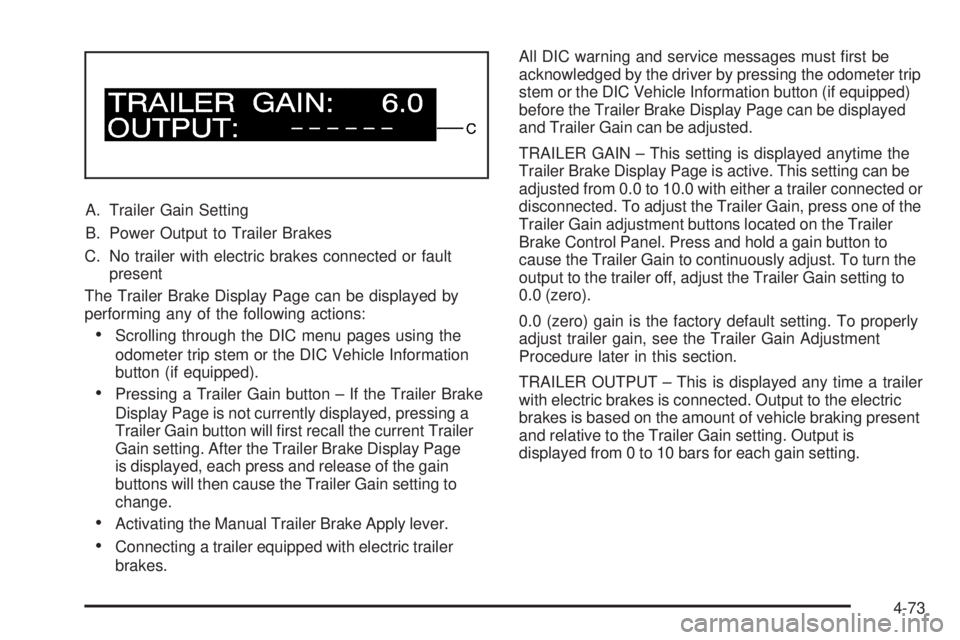
A. Trailer Gain Setting
B. Power Output to Trailer Brakes
C. No trailer with electric brakes connected or fault
present
The Trailer Brake Display Page can be displayed by
performing any of the following actions:
Scrolling through the DIC menu pages using the
odometer trip stem or the DIC Vehicle Information
button (if equipped).
Pressing a Trailer Gain button – If the Trailer Brake
Display Page is not currently displayed, pressing a
Trailer Gain button will rst recall the current Trailer
Gain setting. After the Trailer Brake Display Page
is displayed, each press and release of the gain
buttons will then cause the Trailer Gain setting to
change.
Activating the Manual Trailer Brake Apply lever.
Connecting a trailer equipped with electric trailer
brakes.All DIC warning and service messages must rst be
acknowledged by the driver by pressing the odometer trip
stem or the DIC Vehicle Information button (if equipped)
before the Trailer Brake Display Page can be displayed
and Trailer Gain can be adjusted.
TRAILER GAIN – This setting is displayed anytime the
Trailer Brake Display Page is active. This setting can be
adjusted from 0.0 to 10.0 with either a trailer connected or
disconnected. To adjust the Trailer Gain, press one of the
Trailer Gain adjustment buttons located on the Trailer
Brake Control Panel. Press and hold a gain button to
cause the Trailer Gain to continuously adjust. To turn the
output to the trailer off, adjust the Trailer Gain setting to
0.0 (zero).
0.0 (zero) gain is the factory default setting. To properly
adjust trailer gain, see the Trailer Gain Adjustment
Procedure later in this section.
TRAILER OUTPUT – This is displayed any time a trailer
with electric brakes is connected. Output to the electric
brakes is based on the amount of vehicle braking present
and relative to the Trailer Gain setting. Output is
displayed from 0 to 10 bars for each gain setting.
4-73
Page 405 of 596
Driving On Grades
Reduce speed and shift to a lower gearbeforestarting
down a long or steep downgrade. If the transmission is
not shifted down, the brakes might have to be used so
much that they would get hot and no longer work well.
Vehicles can tow in D (Drive). Shift the transmission to
a lower gear if the transmission shifts too often under
heavy loads and/or hilly conditions.
The tow/haul mode may be used if the transmission
shifts too often. SeeTow/Haul Mode Light on page 3-51.
When towing at high altitude on steep uphill grades,
consider the following: Engine coolant will boil at a lower
temperature than at normal altitudes. If the engine is
turned off immediately after towing at high altitude on
steep uphill grades, the vehicle may show signs similar to
engine overheating. To avoid this, let the engine run while
parked, preferably on level ground, with the automatic
transmission in P (Park) for a few minutes before turning
the engine off. If the overheat warning comes on, see
Engine Overheating on page 5-34.
Parking on Hills
{CAUTION:
Parking the vehicle on a hill with the trailer
attached can be dangerous. If something goes
wrong, the rig could start to move. People can
be injured, and both the vehicle and the trailer
can be damaged. When possible, always park
the rig on a at surface.
If parking the rig on a hill:
1. Press the brake pedal, but do not shift into P (Park)
yet. Turn the wheels into the curb if facing downhill
or into traffic if facing uphill.
2. Have someone place chocks under the trailer
wheels.
3. When the wheel chocks are in place, release the
regular brakes until the chocks absorb the load.
4-79
Page 411 of 596

Service............................................................5-4
Accessories and Modications..........................5-4
California Proposition 65 Warning.....................5-5
California Perchlorate Materials
Requirements.............................................5-5
Doing Your Own Service Work.........................5-5
Adding Equipment to the Outside of
the Vehicle.................................................5-6
Fuel................................................................5-6
Gasoline Octane............................................5-6
Gasoline Specications....................................5-7
California Fuel...............................................5-7
Additives.......................................................5-7
Fuel E85 (85% Ethanol)..................................5-8
Fuels in Foreign Countries...............................5-9
Filling the Tank............................................5-10
Filling a Portable Fuel Container.....................5-12
Checking Things Under the Hood....................5-12
Hood Release..............................................5-13
Engine Compartment Overview.......................5-14
Engine Oil...................................................5-15
Engine Oil Life System..................................5-18
Engine Air Cleaner/Filter................................5-19Automatic Transmission Fluid (4-Speed
Transmission)...........................................5-21
Automatic Transmission Fluid (6-Speed
Transmission)...........................................5-24
Cooling System............................................5-28
Engine Coolant.............................................5-29
Engine Overheating.......................................5-34
Overheated Engine Protection
Operating Mode........................................5-37
Engine Fan Noise.........................................5-37
Power Steering Fluid.....................................5-38
Windshield Washer Fluid................................5-39
Brakes........................................................5-40
Battery........................................................5-43
Jump Starting...............................................5-44
Rear Axle.......................................................5-49
Four-Wheel Drive............................................5-51
Front Axle......................................................5-53
Noise Control System.....................................5-54
Tampering with Noise Control System
Prohibited.................................................5-54
Headlamp Aiming...........................................5-55
Section 5 Service and Appearance Care
5-1
Page 415 of 596
California Proposition 65 Warning
Most motor vehicles, including this one, contain and/or
emit chemicals known to the State of California to
cause cancer and birth defects or other reproductive
harm. Engine exhaust, many parts and systems
(including some inside the vehicle), many uids, and
some component wear by-products contain and/or emit
these chemicals.
California Perchlorate Materials
Requirements
Certain types of automotive applications, such as airbag
initiators, seat belt pretensioners, and lithium batteries
contained in remote keyless transmitters, may contain
perchlorate materials. Special handling may be
necessary. For additional information, see
www.dtsc.ca.gov/hazardouswaste/perchlorate.
Doing Your Own Service Work
If this vehicle is a Two-mode Hybrid, see the Two-mode
Hybrid manual for more information.
{CAUTION:
You can be injured and the vehicle could be
damaged if you try to do service work on a vehicle
without knowing enough about it.
Be sure you have sufficient knowledge,
experience, the proper replacement parts, and
tools before attempting any vehicle
maintenance task.
Be sure to use the proper nuts, bolts, and
other fasteners. English and metric fasteners
can be easily confused. If the wrong fasteners
are used, parts can later break or fall off. You
could be hurt.
If doing some of your own service work, use the proper
service manual. It tells you much more about how to
service the vehicle than this manual can. To order
the proper service manual, seeService Publications
Ordering Information on page 7-15.
5-5
Page 421 of 596

{CAUTION:
Fuel can spray out on you if you open the fuel cap
too quickly. If you spill fuel and then something
ignites it, you could be badly burned. This spray
can happen if the tank is nearly full, and is more
likely in hot weather. Open the fuel cap slowly and
wait for any hiss noise to stop. Then unscrew the
cap all the way.
If the vehicle is a dual fuel tank chassis cab model, and
it runs out of fuel, refuel the front fuel tank rst to
ensure a quick restart.
Be careful not to spill fuel. Do not top off or overll the
tank and wait a few seconds after you have nished
pumping before removing the nozzle. Clean fuel
from painted surfaces as soon as possible.
SeeWashing Your Vehicle on page 5-117.
When replacing the fuel cap, turn it clockwise until it
clicks. It will require more effort to turn the fuel cap on
the last turn as you tighten it. Make sure the cap is
fully installed. The diagnostic system can determine ifthe fuel cap has been left off or improperly installed.
This would allow fuel to evaporate into the atmosphere.
SeeMalfunction Indicator Lamp on page 3-45.
The TIGHTEN GAS CAP message displays on the Driver
Information Center (DIC) if the fuel cap is not properly
installed. SeeDIC Warnings and Messages on page 3-66
for more information.
{CAUTION:
If a re starts while you are refueling, do not
remove the nozzle. Shut off the ow of fuel by
shutting off the pump or by notifying the station
attendant. Leave the area immediately.
Notice:If you need a new fuel cap, be sure to get
the right type. Your dealer/retailer can get one
for you. If you get the wrong type, it may not t
properly. This may cause the malfunction indicator
lamp to light and may damage the fuel tank and
emissions system. SeeMalfunction Indicator Lamp
on page 3-45.
5-11