2009 GMC SIERRA 1500 rear entertainment
[x] Cancel search: rear entertainmentPage 300 of 602

To change from playback by artist to playback by album,
press the pushbutton located below the Sort By label.
From the sort screen, push one of the buttons below the
album button. Press the pushbutton below the back label
to return to the main music navigator screen. Now the
album name displays on the second line between the
arrows and songs from the current album begin to play.
Once all songs from that album are played, the player
moves to the next album in alphabetical order on the
CD-R or CD-RW and begins playing MP3/WMA les from
that album.
To exit music navigator mode, press the pushbutton
below the Back label to return to normal MP3/WMA
playback.
BAND:Press this button to listen to the radio when a
CD or a DVD is playing. The CD or DVD remains inside
the radio for future listening or viewing entertainment.DVD/CD AUX (Auxiliary):Press this button to cycle
through DVD, CD, or Auxiliary when listening to the radio.
The DVD/CD text label and a message showing track or
chapter number displays when a disc is in either slot.
Press this button again and the system automatically
searches for an auxiliary input device, such as a portable
audio player. If a portable audio player is not connected,
“No Aux Input Device” displays. If a disc is in both the
DVD slot and the CD slot the DVD/CD AUX button cycles
between the two sources and not indicate “No Aux Input
Device”. If a front auxiliary device is connected, the
DVD/CD AUX button cycles through all available options,
such as: DVD slot, CD slot, Front Auxiliary, and Rear
Auxiliary (if available). See “Using the Auxiliary Input
Jack(s)” earlier in this section, or “Audio/Video (A/V)
Jacks” under,Rear Seat Entertainment (RSE) System on
page 3-129for more information.
If a MP3/WMA is inserted into top DVD slot, the rear seat
operator can turn on the video screen and use the remote
control to navigate the CD (tracks only) through the
remote control.
3-116
Page 313 of 602

This device complies with Part 15 of the FCC Rules.
Operation is subject to the following two conditions:
1. This device may not cause harmful interference.
2. This device must accept any interference received,
including interference that may cause undesired
operation.
This device complies with RSS-210 of Industry Canada.
Operation is subject to the following two conditions:
1. This device may not cause interference.
2. This device must accept any interference received,
including interference that may cause undesired
operation of the device.
Changes or modications to this system by other than
an authorized service facility could void authorization to
use this equipment.
Rear Seat Entertainment (RSE)
System
The vehicle may have a DVD Rear Seat Entertainment
(RSE) system. The RSE system works with the vehicle’s
audio system. The DVD player is part of the front radio.
The RSE system includes a radio with a DVD player, a
video display screen, audio/video jacks, two wireless
headphones, and a remote control. SeeRadio(s) on
page 3-87for more information on the vehicle’s audio/
DVD system.
Before Driving
The RSE is designed for rear seat passengers only.
The driver cannot safely view the video screen
while driving and should not try to do so.
In severe or extreme weather conditions the RSE system
might not work until the temperature is within the
operating range. The operating range for the RSE system
is above−4°F (−20°C) or below 140°F (60°C). If the
temperature of the vehicle is outside of this range, heat
or cool the vehicle until the temperature is within the
operating range of the RSE system.
Parental Control
The RSE system may have a Parental Control feature,
depending on which radio the vehicle has. To start
Parental Control, press and hold the radio power button
for more than two seconds to stop all system features
such as: radio, video screen, RSA, DVD and/or CD.
While Parental Control is on, a padlock icon displays.
The radio can be turned back on with a single press of the
power button, but the RSE system will remain under
Parental Control.
To turn Parental Control off, press and hold the radio
power button for more than two seconds. The RSE
returns from where it was previously left and the padlock
icon disappears from the radio display.
3-129
Page 315 of 602

Notice:Do not store the headphones in heat or
direct sunlight. This could damage the headphones
and repairs will not be covered by the warranty.
Storage in extreme cold can weaken the batteries.
Keep the headphones stored in a cool, dry place.
If the foam ear pads attached to the headphones
become worn or damaged, the pads can be replaced
separately from the headphone set. Refer to your
dealer/retailer for more information.
Battery Replacement
To change the batteries on the headphones, do the
following:
1. Turn the screw to loosen the battery door located on
the left side of the headphones. Slide the battery
door open.
2. Replace the two batteries in the compartment.
Make sure that they are installed correctly, using
the diagram on the inside of the battery
compartment.
3. Replace the battery door and tighten the door
screw.
If the headphones are to be stored for a long period of
time, remove the batteries and keep them in a cool,
dry place.
Audio/Video (A/V) Jacks
The A/V jacks, located on the rear of the oor console,
allow audio or video signals to be connected from an
auxiliary device such as a camcorder or a video game
unit to the RSE system. Adapter connectors or cables
(not included) may be required to connect the auxiliary
device to the A/V jacks. Refer to the manufacturer’s
instructions for proper usage.
The A/V jacks are color coded to match typical home
entertainment system equipment. The yellow jack (A) is
for the video input. The white jack (B) is for the left audio
input. The red jack (C) is for the right audio input.
Power for auxiliary devices is not supplied by the radio
system.
3-131
Page 535 of 602
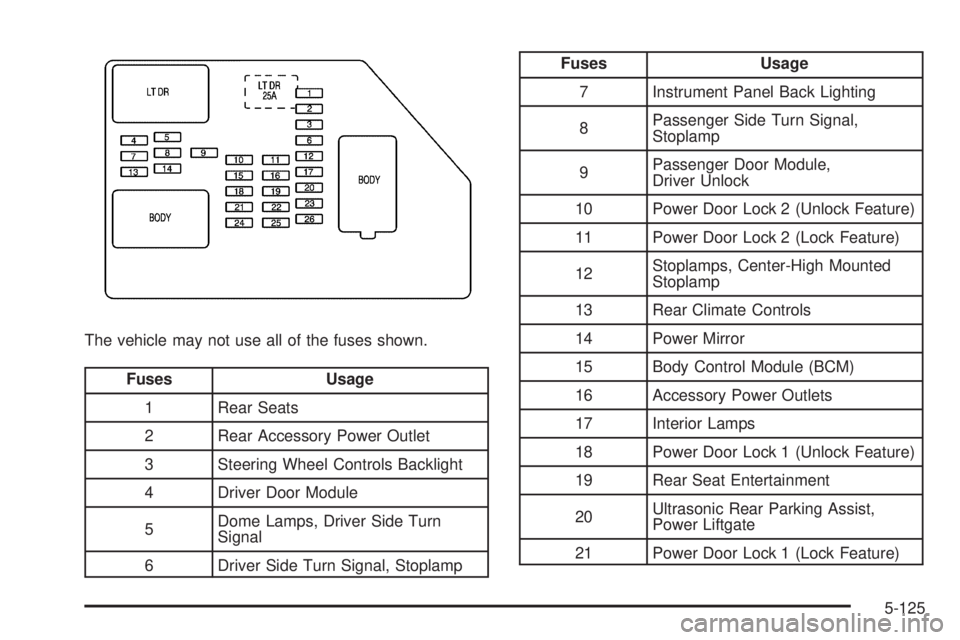
The vehicle may not use all of the fuses shown.
Fuses Usage
1 Rear Seats
2 Rear Accessory Power Outlet
3 Steering Wheel Controls Backlight
4 Driver Door Module
5Dome Lamps, Driver Side Turn
Signal
6 Driver Side Turn Signal, Stoplamp
Fuses Usage
7 Instrument Panel Back Lighting
8Passenger Side Turn Signal,
Stoplamp
9Passenger Door Module,
Driver Unlock
10 Power Door Lock 2 (Unlock Feature)
11 Power Door Lock 2 (Lock Feature)
12Stoplamps, Center-High Mounted
Stoplamp
13 Rear Climate Controls
14 Power Mirror
15 Body Control Module (BCM)
16 Accessory Power Outlets
17 Interior Lamps
18 Power Door Lock 1 (Unlock Feature)
19 Rear Seat Entertainment
20Ultrasonic Rear Parking Assist,
Power Liftgate
21 Power Door Lock 1 (Lock Feature)
5-125
Page 591 of 602

Door
Delayed Locking..........................................2-11
Locks........................................................2-10
Power Door Locks.......................................2-10
Programmable Automatic Door Locks.............2-11
Rear Door Security Locks.............................2-11
Rear Doors.................................................2-12
Driver Information Center (DIC).........................3-53
DIC Operation and Displays..................3-53, 3-59
DIC Vehicle Customization............................3-75
DIC Warnings and Messages........................3-66
Driving
At Night.....................................................4-26
Before a Long Trip......................................4-28
Defensive..................................................... 4-2
Drunk.......................................................... 4-3
Highway Hypnosis.......................................4-28
Hill and Mountain Roads..............................4-28
In Rain and on Wet Roads...........................4-27
Loss of Control...........................................4-11
Off-Road ....................................................4-13
Off-Road Recovery......................................4-10
Recovery Hooks..........................................4-33
Rocking Your Vehicle to Get it Out.................4-32
Winter........................................................4-30
Driving for Better Fuel Economy......................... 4-2Dual Automatic Climate Control System.............3-27
Dual Tire Operation.........................................5-78
DVD
Rear Seat Entertainment System..................3-129
E
E85 Fuel......................................................... 5-9
EDR .............................................................7-17
Electrical Equipment
Add-On Equipment.....................................5-123
Electrical System
Center Instrument Panel Fuse Block.............5-126
Fuses and Circuit Breakers.........................5-124
Instrument Panel Fuse Block.......................5-124
Power Windows and Other Power Options....5-123
Underhood Fuse Block...............................5-127
Windshield Wiper Fuses.............................5-123
Electronic Immobilizer
PASS-Key
®III+...........................................2-20
Electronic Immobilizer Operation
PASS-Key
®III+...........................................2-20
Engine
Air Cleaner/Filter.........................................5-22
Check and Service Engine Soon Lamp...........3-45
Compartment Overview................................5-16
5
Page 598 of 602

R
Radio Frequency Identication (RFID), Privacy....7-19
Radio(s)........................................................3-87
Radios
Navigation/Radio System, see Navigation
Manual.................................................3-118
Reception.................................................3-141
Setting the Clock.........................................3-85
Theft-Deterrent..........................................3-140
Rainsense™ II Wipers.....................................3-11
Reading Lamps..............................................3-21
Rear Axle......................................................5-51
Locking........................................................ 4-9
Rear Door Security Locks................................2-11
Rear Doors....................................................2-12
Rear Seat Armrest..........................................2-82
Rear Seat Audio (RSA) System.......................3-138
Rear Seat Entertainment System.....................3-129
Rear Seat Operation...............................1-14, 1-15
Rear Vision Camera (RVC)..............................2-64
Rearview Mirror, Automatic Dimming..................2-57
Rearview Mirrors.............................................2-57
Reclining Seatbacks........................................1-10
Recommended Fluids and Lubricants.................6-15
Recovery Hooks.............................................4-33Recreational Vehicle Towing.............................4-47
Reimbursement Program, GM Mobility................. 7-7
Remote Keyless Entry (RKE) System.................. 2-4
Remote Keyless Entry (RKE) System, Operation . . . 2-5
Remote Vehicle Start........................................ 2-7
Removing the Flat Tire and Installing the
Spare Tire................................................5-100
Removing the Spare Tire and Tools...................5-95
Replacement Bulbs.........................................5-66
Replacement Parts, Maintenance......................6-17
Reporting Safety Defects to General Motors.......7-15
Reporting Safety Defects to the Canadian
Government................................................7-15
Reporting Safety Defects to the U.S.
Government................................................7-15
Restraint System Check
Checking the Restraint Systems....................1-91
Replacing Restraint System Parts After a
Crash.....................................................1-92
Retained Accessory Power (RAP)......................2-23
Roadside Assistance Program............................ 7-7
Rocking Your Vehicle to Get it Out....................4-32
Roof
Sunroof......................................................2-84
Running the Vehicle While Parked.....................2-56
12