2009 GMC CANYON audio
[x] Cancel search: audioPage 172 of 414
Radio(s)Radio Data System (RDS)
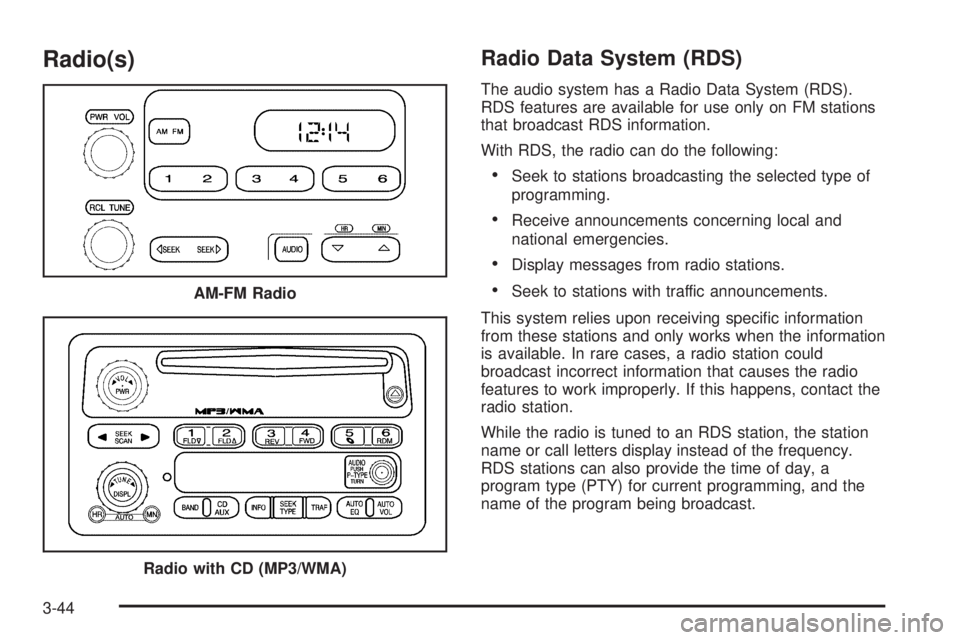
The audio system has a Radio Data System (RDS).
RDS features are available for use only on FM stations
that broadcast RDS information.
With RDS, the radio can do the following:
Seek to stations broadcasting the selected type of
programming.
Receive announcements concerning local and
national emergencies.
Display messages from radio stations.
Seek to stations with traffic announcements.
This system relies upon receiving specic information
from these stations and only works when the information
is available. In rare cases, a radio station could
broadcast incorrect information that causes the radio
features to work improperly. If this happens, contact the
radio station.
While the radio is tuned to an RDS station, the station
name or call letters display instead of the frequency.
RDS stations can also provide the time of day, a
program type (PTY) for current programming, and the
name of the program being broadcast. AM-FM Radio
Radio with CD (MP3/WMA)
3-44
Page 173 of 414

Playing the Radio
PWR (Power):Press to turn the system on and off.
opVOL/VOLUME:Turn to increase or to decrease
the volume.
RCL (Recall) (AM-FM Radio):Press to switch the
display between the radio station frequency, band, and
the time. When the ignition is off, press to display
the time.
DISPL (Display) (Radio with CD):When the ignition
is turned off, press to display the time.
For RDS, press the DISPL knob to change what
displays while using RDS. The display options are
station name, RDS station frequency, PTY (program
type), and the name of the program (if available).
For XM™ (if equipped), press the DISPL knob while
in XM mode to retrieve four different categories of
information related to the current song or channel:
Artist, Song Title, Category or PTY, Channel
Number/Channel Name.To change the default on the display, press the DISPL
knob until you see the desired display, then press
and hold this knob for two seconds. The radio produces
one beep. The selected display is now the default.
AUTO VOL (Automatic Volume):Automatic volume
automatically adjusts the audio system to make up
for road and wind noise while driving.
Set the volume at the desired level. Depending on the
radio and displays, press to select MIN, MED, MAX
AUTO VOL, or LOW, MEDIUM, and HIGH. AVOL
displays. Each higher setting allows for more volume
compensation at faster vehicle speeds. Then while
driving, automatic volume increases the volume, as
necessary, to overcome noise at any speed. The volume
level should always sound the same while driving.
For the Radio with CD, NONE displays if the radio cannot
determine the vehicle speed. To turn automatic volume
off, press until OFF or AUTO VOL OFF displays.
3-45
Page 175 of 414
4. Press and hold one of the six numbered pushbuttons
until the radio beeps once. When that numbered
pushbutton is pressed again, the station that was
stored, returns.
5. Repeat the steps for each pushbutton.
Setting the Tone (Bass/Treble)
AUDIO:Push and release until BASS/TREB, or
depending on the radio, BASS, MID, or TREB displays.
Turn to increase or to decrease. The tone display
shows the bass or the treble level. If a station is weak
or has static, decrease the treble.
For the AM-FM Radio, press and hold the
wxarrows to increase or to decrease the tone.
To adjust the bass/treble or bass/midrange/treble to the
middle position, press and hold the AUDIO knob.
The radio produces one beep and adjusts the display
level to the middle position.
For the AM-FM Radio, adjust bass or treble to the
middle position, select BAS (bass) or TRE (treble).
Then press and hold for more than two seconds
until a beep sounds. B (balance) and a zero
or T (treble) and a zero displays.To adjust all tone and speaker controls to the middle
position, push and hold the AUDIO knob when no tone
or speaker control displays. ALL CENTERED displays
and a beep sounds.
For the AM-FM Radio, adjust both tone controls
and both speaker controls to the middle position,
rst exit out of audio mode by pressing another
button, causing the radio to perform that function or
wait ve seconds for the display to return to time of
day. Then press and hold for more than two seconds
until a beep sounds. CEN (center) displays.
AUTO EQ (Automatic Equalization):Press to select
customized equalization settings designed for
country/western, jazz, talk, pop, rock, and classical.
To return to the manual mode, press the AUTO
EQ button until CUSTOM displays. Then manually
adjust the bass/treble, or bass/midrange/treble by using
the AUDIO knob.
3-47
Page 176 of 414
Adjusting the Speakers (Balance/Fade)
AUDIO:To adjust the balance between the right and
the left speakers, push and release until BAL (balance)
displays. Turn to move the sound toward the right or
the left speakers.
For the AM-FM Radio, press and hold the
wxarrows to move the sound toward the right
or the left speakers.
To adjust the fade between the front and the rear
speakers, push and release the AUDIO knob until FADE
or depending on the radio, FAD displays. Turn the
knob to move the sound toward the front or the rear
speakers.
For the AM-FM Radio, press and hold the
wxarrows to move the sound toward the right or
the left speakers.To adjust the balance or the fade to the middle position,
push the AUDIO knob to select BAL or FADE/FAD,
then push it again and hold it until one beep sounds.
For the AM-FM Radio, adjust balance or fade to the
middle position by selecting BAL or FAD. Press and
hold AUDIO for more than two seconds until a
beep sounds. B (balance) and a zero or F (fade)
and a zero displays.
To adjust all tone and speaker controls to the middle
position, push and hold the AUDIO knob when no tone
or speaker control is displayed. ALL CENTERED
displays and a beep sounds.
For the AM-FM Radio, adjust both tone controls
and both speaker controls to the middle position
by exiting out of audio mode. To do this, press any
button for the radio to perform that function or
wait ve seconds for the display to return to time
of day. Then press and hold AUDIO for more
than two seconds until a beep sounds. CEN (center)
displays.
Fade might not be available if the vehicle is a
regular cab model.
3-48
Page 179 of 414

Radio Messages
CAL ERR or CAL (Calibration Error):The audio
system has been calibrated for the vehicle from the
factory. If CAL or CAL ERR displays it means that the
radio has not been congured properly for the vehicle and
it must be returned to your dealer/retailer for service.
LOC or LOCKED:This message displays when the
THEFTLOCK
®system has locked up. Take the vehicle
to your dealer/retailer for service.
If any error occurs repeatedly or if an error cannot be
corrected, contact your dealer/retailer.
XM™ Satellite Radio Service
XM is a satellite radio service that is based in the
48 contiguous United States and 10 Canadian
provinces. XM Satellite Radio has a wide variety
of programming and commercial-free music,
coast-to-coast, and in digital-quality sound.
During your trial or when you subscribe, you will get
unlimited access to XM Radio Online for when you
are not in the vehicle. A service fee is required to
receive the XM service. For more information, contact
XM at xmradio.com or call 1-800-929-2100 in the
U.S. and xmradio.ca or call 1-877-438-9677 in Canada.
Radio Messages for XM Only
SeeXM Radio Messages on page 3-59later in this
section for further detail.
Playing a CD
(Radio with Single CD Player)
Insert a CD partway into the slot, label side up.
The player pulls it in, and READING displays. The CD
should begin playing. To insert a CD with the ignition off,
rst press the
Z(eject) button or the DISPL knob.
If the ignition or radio is turned off with a CD in
the player it stays in the player. When the ignition or
radio is turned on, the CD starts to play where it
stopped, if it was the last selected audio source.
When the CD is inserted, the CD symbol displays.
As each new track starts to play, the track number
displays.
The CD player can play the smaller 3 inch (8 cm) single
CDs with an adapter ring. Full-size CDs and the
smaller CDs are loaded in the same manner.
3-51
Page 183 of 414
The player is able to read and play a maximum of
253 folders, 50 playlists, 20 sessions, and 949 les.
Long le names, folder names, or playlist names
may use more disc memory space than necessary.
To conserve space on the disc, minimize the length of
the le, folder, or playlist names. An MP3/WMA CD-R
that was recorded using no le folders. The system can
support up to 11 folders in depth, though, keep the
depth of the folders to a minimum in order to keep down
the complexity and confusion in trying to locate a
particular folder during playback. If a CD contains
more than the maximum of 253 folders, 50 playlists,
20 sessions, and 949 les, the player lets you access
and navigate up to the maximum, but all items over
the maximum are played.
Root Directory
The root directory is treated as a folder. If the root
directory has compressed audio les, the directory
displays as F1 ROOT. All les contained directly under
the root directory are accessed prior to any root
directory folders. However, playlists (Px) are always
accessed before root folders or les.
Empty Directory or Folder
If a root directory or a folder exists somewhere in the
le structure that contains only folders/subfolders and no
compressed les directly beneath them, the player
advances to the next folder in the le structure that
contains compressed audio les. The empty folder
does not display.
No Folder
When the CD contains only compressed les, the les
are located under the root folder. The next and previous
folder functions have no function on a CD that was
recorded without folders or playlists. When displaying
the name of the folder the radio displays ROOT.
When the CD contains only playlists and compressed
audio les, but no folders, all les are located under the
root folder. The folder down and the folder up buttons
search playlists (Px) rst and then go to the root folder.
When the radio displays the name of the folder, the
radio displays ROOT.
3-55
Page 184 of 414
Order of Play
Tracks are played in the following order:
Play begins from the rst track in the rst playlist
and continues sequentially through all tracks in
each playlist. When the last track of the last playlist
has played, play continues from the rst track of
the rst playlist.
If the CD does not contain any playlists, then play
begins from the rst track under the root directory.
When all tracks from the root directory have
played, play continues from les according to their
numerical listing. After playing the last track
from the last folder, play begins again at the rst
track of the rst folder or root directory.
When play enters a new folder, the display does not
automatically show the new folder name unless
you have chosen the folder mode as the default display.
See DISPL (display) later in this section for more
information. The new track name displays.
File System and Naming
The song name that displays is the song name that is
contained in the ID3 tag. If the song name is not present
in the ID3 tag, then the radio displays the le name
without the extension (such as .mp3) as the track name.
Track names longer than 32 characters or four pages
are shortened. Parts of words on the last page of
text and the extension of the lename does not display.
Preprogrammed Playlists
Preprogrammed playlists which were created by
WinAmp™, MusicMatch™, or Real Jukebox™ software
can be accessed, however, they cannot be edited.
These playlists are treated as special folders containing
compressed audio song les.
Playing an MP3/WMA
Insert a CD partway into the slot, label side up.
The player pulls it in, and READING displays. The CD
should begin playing and the CD symbol displays. If you
want to insert a CD with the ignition off, rst press the
Zbutton or the DISPL knob.
3-56
Page 185 of 414

If the ignition or radio is turned off with a CD in the
player it stays in the player. When the ignition or radio
is turned on, the CD starts to play where it stopped, if it
was the last selected audio source.
As each new track starts to play, the track number
displays.
1 FLD
x(Previous Folder):Press this button to go to
the rst track in the previous folder. Pressing this button
while in folder random mode takes you to the previous
folder and plays the tracks in random order in that folder.
2 FLD
w(Next Folder):Press this button to go to the
rst track in the next folder. Pressing this button while in
folder random mode takes the CD to the next folder and
plays the tracks in random order in that folder.
3 REV (Reverse):Press and hold this button to reverse
quickly within a track. Press and hold this button for
less than two seconds to reverse at 10 times the
normal playing speed. Press and hold it for more than
two seconds to reverse at 20 times the normal playing
speed. Release this button to play the passage. REV and
the elapsed time of the track displays.4 FWD (Forward):Press and hold this button to
advance quickly within a track. Press and hold this
button for less than two seconds to advance at 10 times
the normal playing speed. Press and hold it for more
than two seconds to advance at 20 times the normal
playing speed. Release this button to play the passage.
FWD and the elapsed time of the track displays.
6 RDM (Random):To play the tracks in random order
in the current folder or playlist, press and release
this button. FLDR RDM (folder random) displays.
Once all of the tracks in the current folder or playlist
have played, the system moves to the next folder
or playlist and plays all of the tracks in random order.
To play all the tracks in random order on the CD, press
and hold this button for two seconds. A beep sounds
and DISC RDM (disc random) displays. This feature
does not work with playlists.
When in random, pressing and releasing either SEEK
arrow takes the CD to the previous or to the next
random track.
Press and release this button again to turn off random
play. NO RDM (no random) displays.
3-57