2009 GMC CANYON ECO mode
[x] Cancel search: ECO modePage 176 of 414
Adjusting the Speakers (Balance/Fade)
AUDIO:To adjust the balance between the right and
the left speakers, push and release until BAL (balance)
displays. Turn to move the sound toward the right or
the left speakers.
For the AM-FM Radio, press and hold the
wxarrows to move the sound toward the right
or the left speakers.
To adjust the fade between the front and the rear
speakers, push and release the AUDIO knob until FADE
or depending on the radio, FAD displays. Turn the
knob to move the sound toward the front or the rear
speakers.
For the AM-FM Radio, press and hold the
wxarrows to move the sound toward the right or
the left speakers.To adjust the balance or the fade to the middle position,
push the AUDIO knob to select BAL or FADE/FAD,
then push it again and hold it until one beep sounds.
For the AM-FM Radio, adjust balance or fade to the
middle position by selecting BAL or FAD. Press and
hold AUDIO for more than two seconds until a
beep sounds. B (balance) and a zero or F (fade)
and a zero displays.
To adjust all tone and speaker controls to the middle
position, push and hold the AUDIO knob when no tone
or speaker control is displayed. ALL CENTERED
displays and a beep sounds.
For the AM-FM Radio, adjust both tone controls
and both speaker controls to the middle position
by exiting out of audio mode. To do this, press any
button for the radio to perform that function or
wait ve seconds for the display to return to time
of day. Then press and hold AUDIO for more
than two seconds until a beep sounds. CEN (center)
displays.
Fade might not be available if the vehicle is a
regular cab model.
3-48
Page 177 of 414
Finding a Program Type (PTY) Station
(RDS and XM)
To select and nd a desired PTY perform the following:
1. Press the P-TYPE to activate program type
select mode. P-TYPE or TYPE and a PTY displays.
2. Turn the P-TYPE knob again, to select a PTY.
3. Once the desired PTY displays, press the
SEEK / TYPE button to select and to take you to
the PTY’s rst station.
4. Go to to another station within that PTY by
pressing the SEEK / TYPE button twice to display
the PTY and then go to another station.
To cancel the seek, press the SEEK / TYPE button.
This also exits the program type seek mode and returns
to the last tuned station.
If both PTY and TRAF (traffic) are on, the radio
searches for stations with the selected PTY and traffic
announcements.
If the radio cannot nd the desired program type, NONE
displays and the radio returns to the last tuned station.
SCAN:To scan PTYs, press and hold the SEEK / SCAN
until a beep sounds. The radio goes to a station, plays for
a few seconds, then goes to the next station.BAND (Alternate Frequency):Alternate frequency lets
the radio switch to a stronger station with the same
program type. To turn alternate frequency on, press and
hold BAND for two seconds. AF ON displays. The radio
could switch to stations with a stronger frequency.
To turn alternate frequency off, press and hold BAND
again for two seconds. AF OFF displays. The radio
does not switch to other stations.
This function does not apply for XM Satellite Radio
Service.
Setting Preset PTYs (RDS) Only
For the Radio with CD player, the six pushbuttons have
factory PTY presets. Up to 12 PTYs (six FM1 and
six FM2), can be programmed on the numbered
pushbuttons. To program PTYs:
1. Press BAND to select FM1 or FM2.
2. Turn the P-TYPE knob to activate program type
select mode. TYPE and the last selected PTY
displays.
3. Turn the P-TYPE knob to select a PTY.
4. Press and hold one of the six numbered pushbuttons
until a beep sounds. When that numbered
pushbutton is pressed, the PTY that was set, returns.
5. Repeat the steps for each pushbutton.
3-49
Page 185 of 414

If the ignition or radio is turned off with a CD in the
player it stays in the player. When the ignition or radio
is turned on, the CD starts to play where it stopped, if it
was the last selected audio source.
As each new track starts to play, the track number
displays.
1 FLD
x(Previous Folder):Press this button to go to
the rst track in the previous folder. Pressing this button
while in folder random mode takes you to the previous
folder and plays the tracks in random order in that folder.
2 FLD
w(Next Folder):Press this button to go to the
rst track in the next folder. Pressing this button while in
folder random mode takes the CD to the next folder and
plays the tracks in random order in that folder.
3 REV (Reverse):Press and hold this button to reverse
quickly within a track. Press and hold this button for
less than two seconds to reverse at 10 times the
normal playing speed. Press and hold it for more than
two seconds to reverse at 20 times the normal playing
speed. Release this button to play the passage. REV and
the elapsed time of the track displays.4 FWD (Forward):Press and hold this button to
advance quickly within a track. Press and hold this
button for less than two seconds to advance at 10 times
the normal playing speed. Press and hold it for more
than two seconds to advance at 20 times the normal
playing speed. Release this button to play the passage.
FWD and the elapsed time of the track displays.
6 RDM (Random):To play the tracks in random order
in the current folder or playlist, press and release
this button. FLDR RDM (folder random) displays.
Once all of the tracks in the current folder or playlist
have played, the system moves to the next folder
or playlist and plays all of the tracks in random order.
To play all the tracks in random order on the CD, press
and hold this button for two seconds. A beep sounds
and DISC RDM (disc random) displays. This feature
does not work with playlists.
When in random, pressing and releasing either SEEK
arrow takes the CD to the previous or to the next
random track.
Press and release this button again to turn off random
play. NO RDM (no random) displays.
3-57
Page 186 of 414

qSEEKr:Press the left SEEK arrow to go to the
start of the previous track. Press the right SEEK arrow to
go to the start of the next track. Pressing either SEEK
arrow for more than two seconds searches the previous
or next tracks at two tracks per second. Release the
button to stop searching and to play the track.
oTUNEp:Turning this knob fast tracks reverse or
advances through the tracks in all folders or playlists.
The track number and le name displays for each track.
Turning this knob while in random fast tracks reverse
or advances the tracks in sequential order.
DISPL (Display):Press this knob to switch between
track mode, folder/playlist mode, and time of day mode.
The display shows only eight characters, but there
can be up to four pages of text. If there are more than
eight characters in the song, folder, or playlist name,
pressing this knob within two seconds takes you to the
next page of text. If there are no other pages to be
shown, pressing this knob within two seconds takes you
to the next display mode.
Track mode displays the current track number and
the ID3 tag song name.
Folder/playlist mode displays the current folder or
playlist number and the folder/playlist name.
Time of day mode displays the time of day and the
ID3 tag song name.To change the default on the display, press the DISPL
knob until you see the desired display, then press
and hold this knob for two seconds. The radio produces
one beep and the selected display is now the default.
INFO (Information):INFO displays when a current
track has ID3 tag information. Press this button to
display the artist name and album contained in the tag.
INFO disappears from the display when the information
in the ID3 tag has nished being read.
BAND:Press this button to listen to the radio when a
CD is playing. The inactive CD remains inside the radio
for future listening.
CD AUX (Auxiliary):Press this button to play a CD
when listening to the radio. The CD symbol illuminates
on the display when a CD is loaded.
Z(Eject):Press this button to eject a CD. Eject
can activate while either the ignition or radio is
off. CDs can be loaded with the ignition and radio off
if this button is pressed rst.
3-58
Page 197 of 414
If there is a problem detected with StabiliTrak, a
SERVICE STAB SYS message displays on the Driver
Information Center (DIC). SeeDIC Warnings and
Messages on page 3-38for more information. When this
message is displayed, the system is not working.
Adjust your driving accordingly.
StabiliTrak and Traction Control (TCS) come on
automatically whenever the vehicle is started and the
systems are reset with each ignition cycle. However,
when the transfer case is placed in Four-Wheel-Low
mode, StabiliTrak is automatically disabled. See
Four-Wheel Drive on page 2-26for more information. It is
recommended to leave the system on for normal driving
conditions, but it may be necessary to turn the TCS
portion of the system off if the vehicle is stuck in sand,
mud, ice, or snow, and it is necessary to″rock″the
vehicle to attempt to free it. If traction control is turned off,
only the brake-traction control portion of traction control
will work. The engine speed management will be
disabled. In this mode, engine power is not reduced
automatically and the drive wheels can spin more freely.
This can cause the brake-traction control to activate
constantly. SeeIf Your Vehicle is Stuck in Sand, Mud,
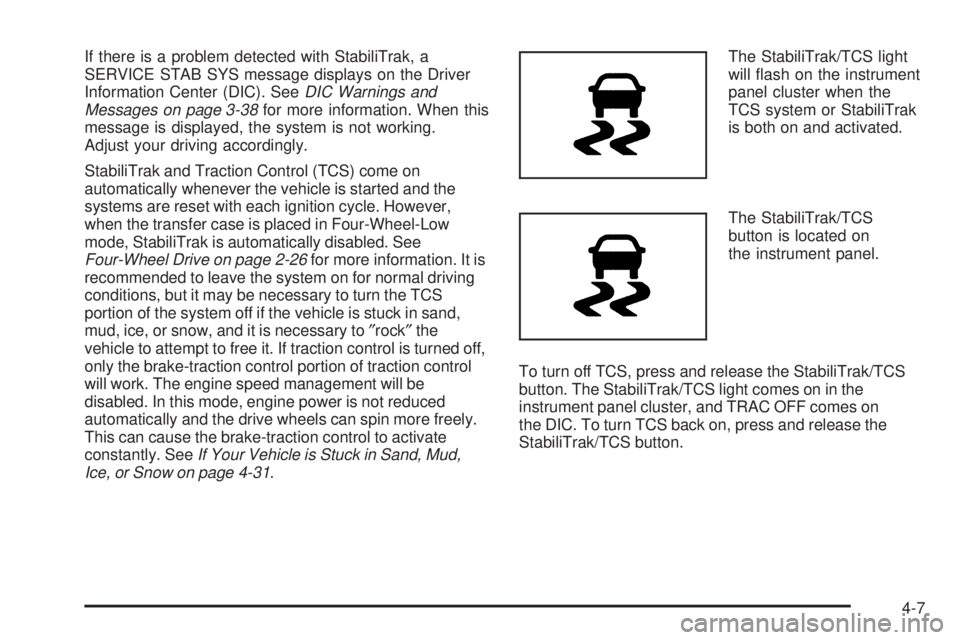
Ice, or Snow on page 4-31.The StabiliTrak/TCS light
will ash on the instrument
panel cluster when the
TCS system or StabiliTrak
is both on and activated.
The StabiliTrak/TCS
button is located on
the instrument panel.
To turn off TCS, press and release the StabiliTrak/TCS
button. The StabiliTrak/TCS light comes on in the
instrument panel cluster, and TRAC OFF comes on
the DIC. To turn TCS back on, press and release the
StabiliTrak/TCS button.
4-7
Page 224 of 414
Tire and Loading Information Label
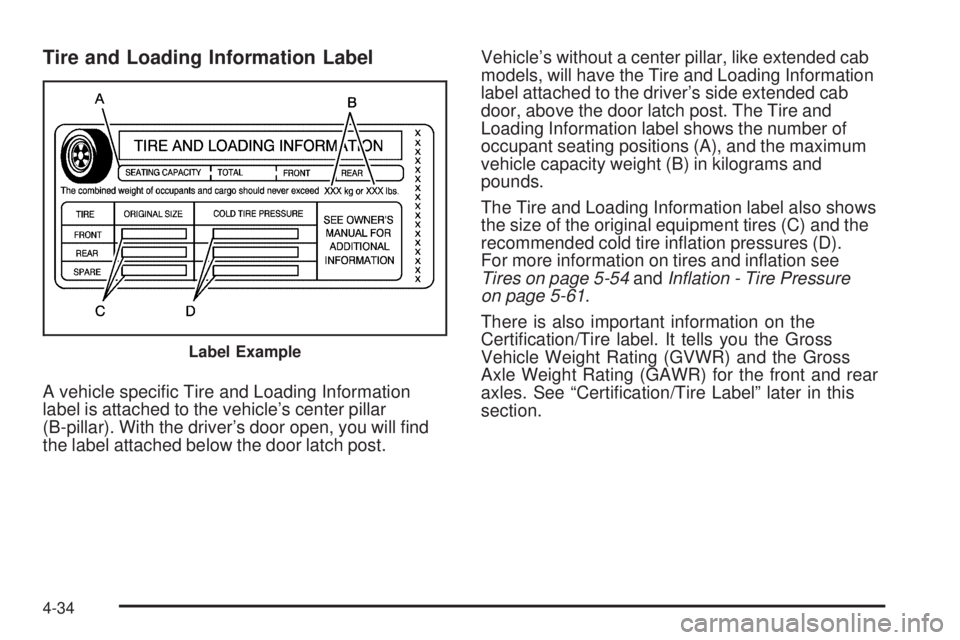
A vehicle specic Tire and Loading Information
label is attached to the vehicle’s center pillar
(B-pillar). With the driver’s door open, you will nd
the label attached below the door latch post.Vehicle’s without a center pillar, like extended cab
models, will have the Tire and Loading Information
label attached to the driver’s side extended cab
door, above the door latch post. The Tire and
Loading Information label shows the number of
occupant seating positions (A), and the maximum
vehicle capacity weight (B) in kilograms and
pounds.
The Tire and Loading Information label also shows
the size of the original equipment tires (C) and the
recommended cold tire ination pressures (D).
For more information on tires and ination see
Tires on page 5-54andInflation - Tire Pressure
on page 5-61.
There is also important information on the
Certication/Tire label. It tells you the Gross
Vehicle Weight Rating (GVWR) and the Gross
Axle Weight Rating (GAWR) for the front and rear
axles. See “Certication/Tire Label” later in this
section.
Label Example
4-34
Page 308 of 414
Outward Facing Sidewall:The side of an
asymmetrical tire that has a particular side that
faces outward when mounted on a vehicle. The
side of the tire that contains a whitewall, bears
white lettering, or bears manufacturer, brand,
and/or model name molding that is higher or deeper
than the same moldings on the other sidewall of
the tire.
Passenger (P-Metric) Tire
:A tire used on
passenger cars and some light duty trucks and
multipurpose vehicles.
Recommended Ination Pressure
:Vehicle
manufacturer’s recommended tire ination pressure
as shown on the tire placard. SeeInflation - Tire
Pressure on page 5-61andLoading the Vehicle on
page 4-33.
Radial Ply Tire
:A pneumatic tire in which the
ply cords that extend to the beads are laid at
90 degrees to the centerline of the tread.
Rim
:A metal support for a tire and upon which
the tire beads are seated.
Sidewall
:The portion of a tire between the tread
and the bead.
Speed Rating
:An alphanumeric code assigned to
a tire indicating the maximum speed at which a
tire can operate.Traction
:The friction between the tire and the
road surface. The amount of grip provided.
Tread
:The portion of a tire that comes into
contact with the road.
Treadwear Indicators
:Narrow bands, sometimes
called wear bars, that show across the tread of
a tire when only 1/16 inch (1.6 mm) of tread
remains. SeeWhen It Is Time for New Tires on
page 5-69.
UTQGS (Uniform Tire Quality Grading
Standards)
:A tire information system that
provides consumers with ratings for a tire’s
traction, temperature, and treadwear. Ratings
are determined by tire manufacturers using
government testing procedures. The ratings are
molded into the sidewall of the tire. SeeUniform
Tire Quality Grading on page 5-72.
Vehicle Capacity Weight
:The number of
designated seating positions multiplied by 150 lbs
(68 kg) plus the rated cargo load. SeeLoading
the Vehicle on page 4-33.
Vehicle Maximum Load on the Tire
:Load on an
individual tire due to curb weight, accessory weight,
occupant weight, and cargo weight.
5-60
Page 398 of 414

Current and Past Model Order Forms
Technical Service Bulletins and Manuals are available
for current and past model GM vehicles. To request
an order form, specify year and model name of
the vehicle.
ORDER TOLL FREE: 1-800-551-4123
Monday-Friday 8:00 AM - 6:00 PM
Eastern Time
For Credit Card Orders Only
(VISA-MasterCard-Discover), visit Helm, Inc.
on the World Wide Web at: helminc.com
Or you can write to:
Helm, Incorporated
P.O. Box 07130
Detroit, MI 48207
Prices are subject to change without notice and without
incurring obligation. Allow ample time for delivery.
Note to Canadian Customers: All listed prices are
quoted in U.S. funds. Canadian residents are to make
checks payable in U.S. funds.
Vehicle Data Recording and
Privacy
Your GM vehicle has a number of sophisticated
computers that record information about the vehicle’s
performance and how it is driven. For example,
your vehicle uses computer modules to monitor and
control engine and transmission performance, to monitor
the conditions for airbag deployment and deploy
airbags in a crash and, if so equipped, to provide
antilock braking to help the driver control the vehicle.
These modules may store data to help your
dealer/retailer technician service your vehicle. Some
modules may also store data about how you operate the
vehicle, such as rate of fuel consumption or average
speed. These modules may also retain the owner’s
personal preferences, such as radio pre-sets, seat
positions, and temperature settings.
7-16