2009 GMC ACADIA buttons
[x] Cancel search: buttonsPage 112 of 420

To program up to three devices:
1. From inside the vehicle, press
and hold down the two outside
buttons at the same time,
releasing only when the
Universal Home Remote indicator
light begins to ash, after
20 seconds. This step will erase
the factory settings or all
previously programmed buttons.
Do not hold down the buttons
for longer than 30 seconds
and do not repeat this step to
program the remaining two
Universal Home Remote buttons.2. Hold the end of your hand-held
transmitter about 1 to 3 inches
(3 to 8 cm) away from the
Universal Home Remote buttons
while keeping the indicator light in
view. The hand-held transmitter
was supplied by the manufacturer
of your garage door opener
receiver (motor head unit).
3. At the same time, press and hold
both the Universal Home Remote
button to be used to control
the garage door and the
hand-held transmitter button.
Do not release the Universal
Home Remote button or
the hand-held transmitter button
until Step 4 has been completed.
Some entry gates and garage
door openers may require
substitution of Step 3 with the
procedure noted in “Gate
Operator and Canadian
Programming” later in this
section.4. The indicator light on the
Universal Home Remote
will ash slowly at rst and then
rapidly after Universal Home
Remote successfully receives the
frequency signal from the
hand-held transmitter. Release
both buttons.
5. Press and hold the newly-trained
Universal Home Remote button
and observe the indicator light.
If the indicator light stays on
continuously, the programming is
complete and the garage door
should move when the Universal
Home Remote button is pressed
and released. There is no need
to continue programming
Steps 6 through 8.
If the Universal Home Remote
indicator light blinks rapidly
for two seconds and then turns
to a constant light, continue
with the programming
Steps 6 through 8.
2-46 Features and Controls
Page 113 of 420

It may be helpful to have another
person assist with the remaining
steps.
6. After Steps 1 through 5 have
been completed, locate inside
the garage the garage door
opener receiver (motor-head
unit). Locate the “Learn” or
“Smart” button. The name and
color of the button may vary
by manufacturer.
7. Firmly press and release the
“Learn” or “Smart” button.
After you press this button, you
will have 30 seconds to
complete Step 8.8. Immediately return to the vehicle.
Firmly press and hold the
Universal Home Remote button,
chosen in Step 3 to control the
garage door, for two seconds,
and then release it. If the garage
door does not move, press and
hold the same button a second
time for two seconds, and then
release it. Again, if the door does
not move, press and hold the
same button a third time for
two seconds, and then release.
The Universal Home Remote
should now activate the
garage door.
To program the remaining two
Universal Home Remote buttons,
begin with Step 2 of “Programming
the Universal Home Remote
System.” Do not repeat Step 1, as
this will erase all previous
programming from the Universal
Home Remote buttons.Gate Operator and Canadian
Programming
If you have questions or need help
programming the Universal
Home Remote System, call
1-800-355-3515 or go to
www.homelink.com.
Canadian radio-frequency laws
require transmitter signals to time
out or quit after several seconds of
transmission. This may not be
long enough for Universal Home
Remote to pick up the signal during
programming. Similarly, some
U.S. gate operators are
manufactured to time out in the
same manner.
Features and Controls 2-47
Page 114 of 420

If you live in Canada, or you are
having difficulty programming a gate
operator or garage door opener
by using the “Programming
Universal Home Remote”
procedures, regardless of where
you live, replace Step 3 under
“Programming Universal Home
Remote” with the following:
Continue to press and hold the
Universal Home Remote button
while you press and release every
two seconds (cycle) the hand-held
transmitter button until the frequency
signal has been successfully
accepted by the Universal Home
Remote. The Universal Home
Remote indicator light will ash
slowly at rst and then rapidly.
Proceed with Step 4 under
“Programming Universal Home
Remote” to complete.Using Universal Home Remote
Press and hold the appropriate
Universal Home Remote button for
at least half of a second. The
indicator light will come on while the
signal is being transmitted.
Erasing Universal Home
Remote Buttons
The programmed buttons should be
erased when the vehicle is sold
or the lease ends.To erase all programmed buttons on
the Universal Home Remote device:
1. Press and hold down the
two outside buttons until
the indicator light begins to
ash, after 20 seconds.
2. Release both buttons.
2-48 Features and Controls
Page 115 of 420

Reprogramming a Single
Universal Home Remote
Button
To reprogram any of the three
Universal Home Remote buttons,
repeat the programming instructions
earlier in this section, beginning
with Step 2.
For help or information on the
Universal Home Remote System,
call the customer assistance phone
number underCustomer Assistance
Offices on page 7-5.
Storage Areas
Glove Box
Lift the glovebox handle up to open
it. Use the key to lock and unlock
the glovebox.
Cupholders
There are two cupholders, with
removable liners, located in front of
the center console. There are
cupholders located in the second
row seat armrest. To access,
pull the armrest down. There are
additional cupholders located
on each side of the third row seat
and in each door. There are
cupholders located behind the
center console. To access,
pull down on the handle.
Instrument Panel Storage
This vehicle has an instrument
panel storage area located above
the radio. To open the cover,
press the button.
Center Console Storage
Pull up on the lever, located on the
front of the center console armrest,
to slide it forward and backward. To
open the armrest storage area, press
the button located on the front of the
armrest. There is additional storage
under the armrest, move the armrest
all the way to the rear position, slide
the cover back and remove the tray.
Features and Controls 2-49
Page 122 of 420

Brake System Warning
Light................................3-38
Antilock Brake System
(ABS) Warning Light.......3-39
StabiliTrak®Indicator
Light................................3-39
Engine Coolant
Temperature
Warning Light
..................3-40
Engine Coolant
Temperature Gage..........3-40
Tire Pressure Light...........3-41
Malfunction
Indicator Lamp................3-41
Oil Pressure Light.............3-44
Security Light....................3-44
Fog Lamp Light................3-44
Cruise Control Light..........3-44
Highbeam On Light...........3-45
Tow/Haul Mode Light........3-45
Fuel Gage........................3-45
Driver Information
Center (DIC)
Driver Information
Center (DIC)...................3-46
DIC Operation
and Displays
(With DIC Buttons)
..........3-46
DIC Operation
and Displays
(Without DIC Buttons)
.....3-51
DIC Compass...................3-54
DIC Warnings and
Messages........................3-56
DIC Vehicle
Customization
(With DIC Buttons)
..........3-64
Audio System(s)
Audio System(s)................3-72
Setting the Clock..............3-73
Radio(s)............................3-74
Using an MP3
(Radio with CD)..............3-89
Using an MP3
(Radio with CD and
DVD Player)
....................3-93
XM Radio Messages.........3-98
Navigation/Radio System. . .3-99
Bluetooth®........................3-99
Rear Seat Entertainment
(RSE) System................3-109
Rear Seat Audio (RSA). . .3-118
Rear Audio
Controller (RAC)............3-120
Theft-Deterrent Feature. . .3-120
Audio Steering Wheel
Controls.........................3-121
Radio Reception..............3-121
Multi-Band Antenna.........3-122
3-2 Instrument Panel
Page 130 of 420
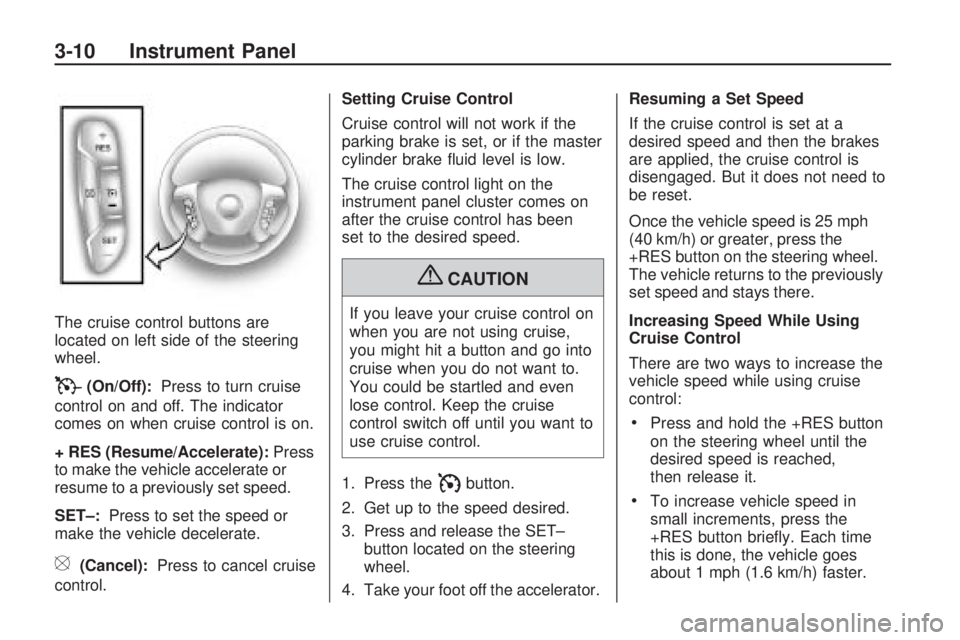
The cruise control buttons are
located on left side of the steering
wheel.
T(On/Off):Press to turn cruise
control on and off. The indicator
comes on when cruise control is on.
+ RES (Resume/Accelerate):Press
to make the vehicle accelerate or
resume to a previously set speed.
SET–:Press to set the speed or
make the vehicle decelerate.
[(Cancel):Press to cancel cruise
control.Setting Cruise Control
Cruise control will not work if the
parking brake is set, or if the master
cylinder brake uid level is low.
The cruise control light on the
instrument panel cluster comes on
after the cruise control has been
set to the desired speed.
{CAUTION
If you leave your cruise control on
when you are not using cruise,
you might hit a button and go into
cruise when you do not want to.
You could be startled and even
lose control. Keep the cruise
control switch off until you want to
use cruise control.
1. Press the
Ibutton.
2. Get up to the speed desired.
3. Press and release the SET–
button located on the steering
wheel.
4. Take your foot off the accelerator.Resuming a Set Speed
If the cruise control is set at a
desired speed and then the brakes
are applied, the cruise control is
disengaged. But it does not need to
be reset.
Once the vehicle speed is 25 mph
(40 km/h) or greater, press the
+RES button on the steering wheel.
The vehicle returns to the previously
set speed and stays there.
Increasing Speed While Using
Cruise Control
There are two ways to increase the
vehicle speed while using cruise
control:
Press and hold the +RES button
on the steering wheel until the
desired speed is reached,
then release it.
To increase vehicle speed in
small increments, press the
+RES button briey. Each time
this is done, the vehicle goes
about 1 mph (1.6 km/h) faster.
3-10 Instrument Panel
Page 132 of 420

The exterior lamps control has four
positions:
9(Off):Briey turn to this position
to turn the automatic light control off
or on again.
AUTO (Automatic):Turns the
headlamps on automatically at
normal brightness, together with
the following:
Parking Lamps
Taillamps
License Plate Lamps
Instrument Panel Lights
;(Parking Lamps):Turns the
parking lamps on together with the
following:
Taillamps
License Plate Lamps
Instrument Panel Lights
2(Headlamps):Turns the
headlamps on together with the
following lamps listed below.
A warning chime sounds if the
driver’s door is opened when the
ignition switch is off and the
headlamps are on.
Parking Lamps
Taillamps
License Plate Lamps
Instrument Panel Lights
#(Fog Lamps):Push the fog
lamps control in to turn on the
fog lamps.
SeeFog Lamps on page 3-13.
Delayed Headlamps
Delayed headlamps provide a period
of exterior lighting as you leave
the area around your vehicle.
This feature is activated when the
headlamps are on due to the
automatic headlamps control
feature, and when the ignition is
turned off. The headlamps remain
on until the exterior lamps control
is moved to the parking lamps
position or until the pre-selected
delayed headlamp lighting period
has ended.
If the ignition is turned off with the
headlamps switch in the parking
lamps or headlamps position,
the delayed headlamps cycle will
not occur.
To disable the delayed headlamps
feature or change the time of delay,
seeDIC Vehicle Customization
(With DIC Buttons) on page 3-64.
3-12 Instrument Panel
Page 137 of 420

Head-Up Display (HUD)
{CAUTION
If the HUD image is too bright or
too high in your eld of view, it
may take you more time to see
things you need to see when it is
dark outside. Be sure to keep the
HUD image dim and placed low in
your eld of view.
For vehicles with the Head-Up
Display (HUD), some information
concerning the operation of the
vehicle is projected onto the
windshield. This includes the
speedometer reading, RPM reading,
transmission position, outside air
temperature, the tap shift gear, and
a brief display of the current
radio station, including XM
information or CD track. It will also
display turn-by-turn navigationinformation if the vehicle has a
navigation radio. The images are
projected by the HUD lens located
on the driver’s side of the
instrument panel.
The tap shift gear will also appear
on the HUD if the vehicle has
tap shift and it is active.
The HUD information can be
displayed in one of three languages,
English, French, or Spanish.
The speedometer reading and other
numerical values can be displayed
in either English or metric units.
The language selection and
the units of measurement are
changed through the trip computer
in the Driver Information Center
(DIC). SeeDIC Vehicle
Customization (With DIC Buttons)
on page 3-64.The HUD information appears as an
image focused out toward the
front of the vehicle.
When the ignition key is turned to
ON/RUN, the HUD will display
an introductory message for a short
time, until the HUD is ready.
The following indicator lights come
on the instrument panel when
activated and also appear on
the HUD:
Turn Signal Indicators
High-Beam Indicator SymbolHUD Display on the Vehicle
Windshield
Instrument Panel 3-17