2009 FORD TAURUS X ECO mode
[x] Cancel search: ECO modePage 69 of 358
LOCKED (disabled). To change the level of control, press the memory
preset controls 3 and 5 simultaneously on the front audio controls. The
control level will cycle each time the buttons are pressed simultaneously.
The three states are described as:
FULL(enabled): The FES has control over the primary (speaker) and
secondary (headphone) audio sources.
LOCAL: The FES has control over the secondary source (headphones)
only. The radio will ignore button presses that affect the primary
(speaker) audio source.
LOCKED(disabled): The FES buttons are locked and all FES button
presses are ignored by the radio and the FES except for load and eject.
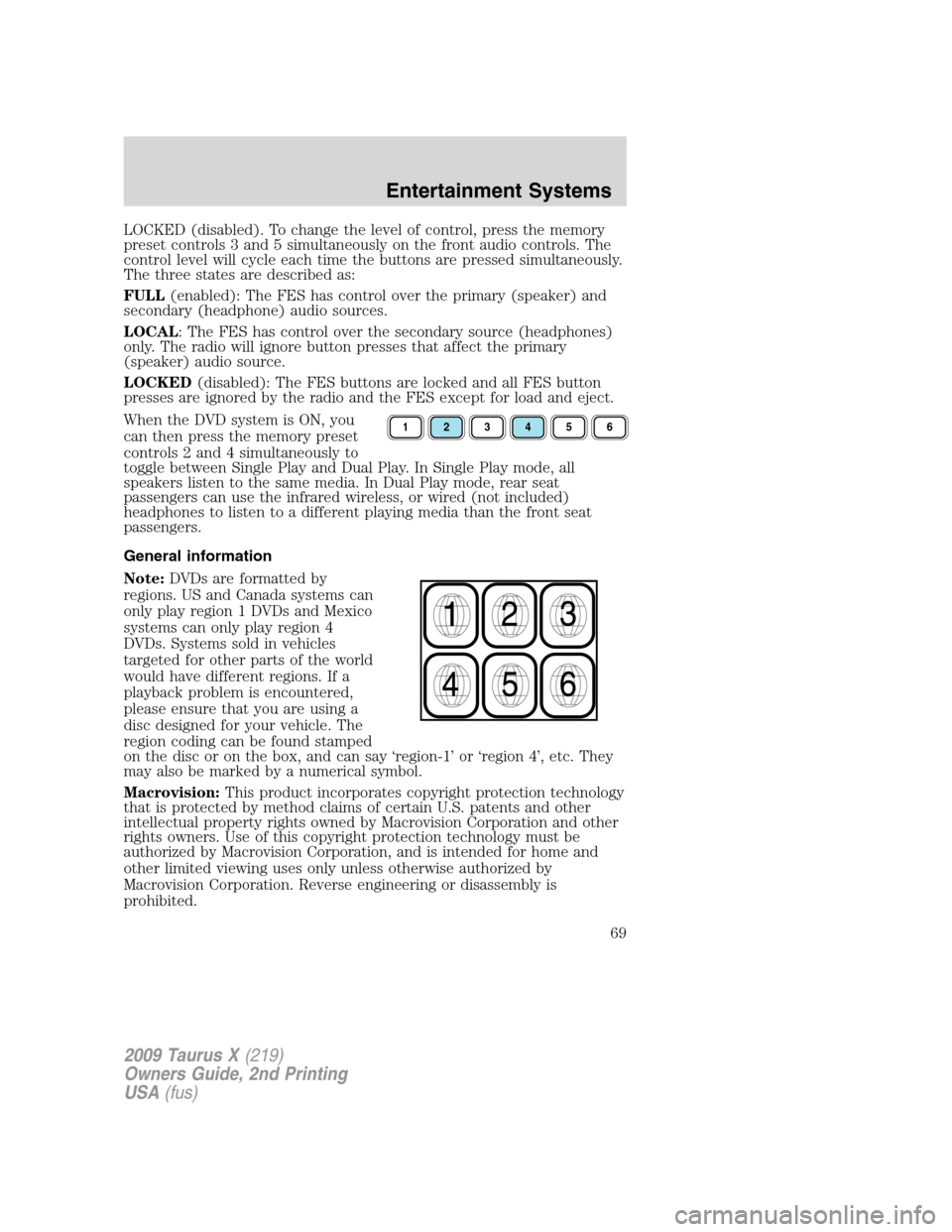
When the DVD system is ON, you
can then press the memory preset
controls 2 and 4 simultaneously to
toggle between Single Play and Dual Play. In Single Play mode, all
speakers listen to the same media. In Dual Play mode, rear seat
passengers can use the infrared wireless, or wired (not included)
headphones to listen to a different playing media than the front seat
passengers.
General information
Note:DVDs are formatted by
regions. US and Canada systems can
only play region 1 DVDs and Mexico
systems can only play region 4
DVDs. Systems sold in vehicles
targeted for other parts of the world
would have different regions. If a
playback problem is encountered,
please ensure that you are using a
disc designed for your vehicle. The
region coding can be found stamped
on the disc or on the box, and can say ‘region-1’ or ‘region 4’, etc. They
may also be marked by a numerical symbol.
Macrovision:This product incorporates copyright protection technology
that is protected by method claims of certain U.S. patents and other
intellectual property rights owned by Macrovision Corporation and other
rights owners. Use of this copyright protection technology must be
authorized by Macrovision Corporation, and is intended for home and
other limited viewing uses only unless otherwise authorized by
Macrovision Corporation. Reverse engineering or disassembly is
prohibited.
123456
2009 Taurus X(219)
Owners Guide, 2nd Printing
USA(fus)
Entertainment Systems
69
Page 74 of 358
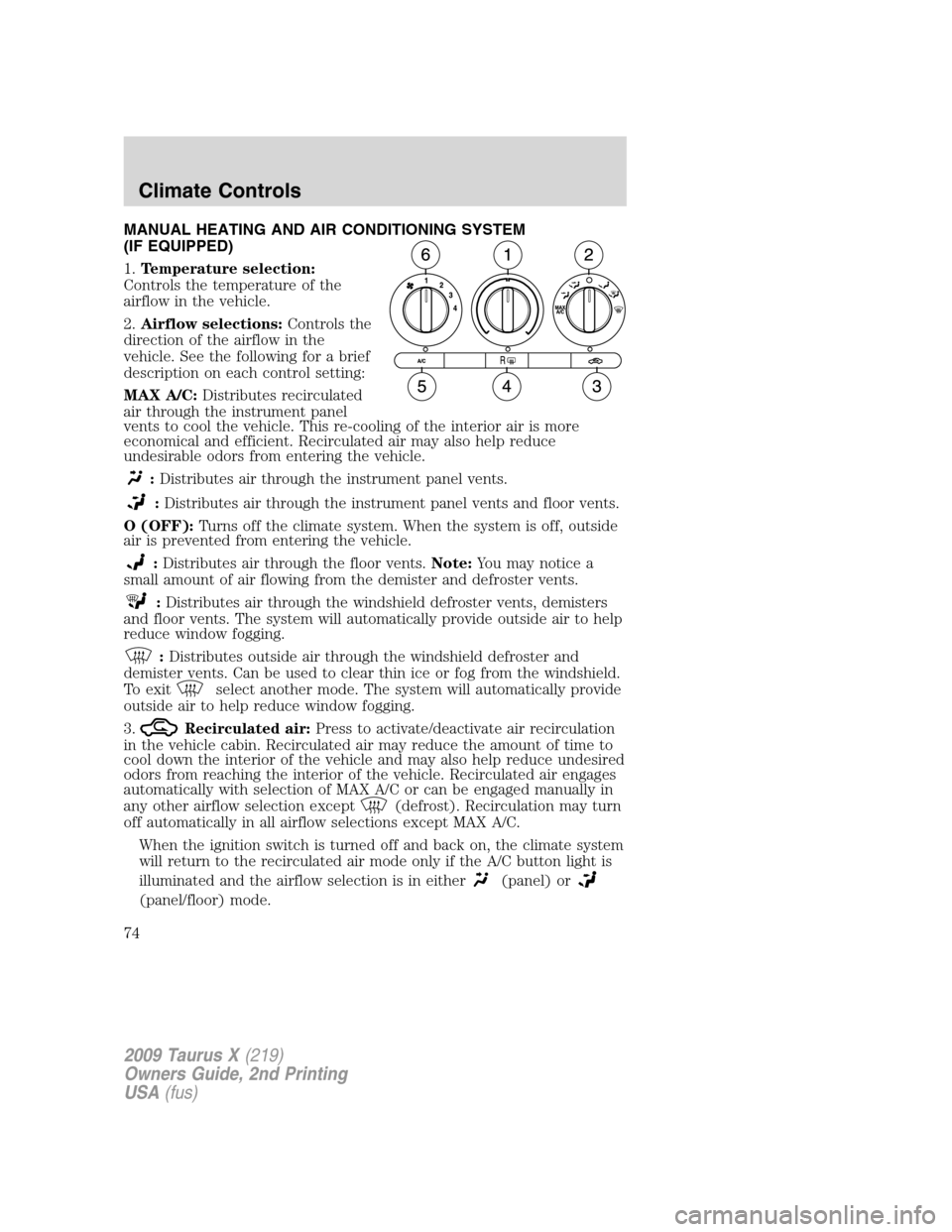
MANUAL HEATING AND AIR CONDITIONING SYSTEM
(IF EQUIPPED)
1.Temperature selection:
Controls the temperature of the
airflow in the vehicle.
2.Airflow selections:Controls the
direction of the airflow in the
vehicle. See the following for a brief
description on each control setting:
MAX A/C:Distributes recirculated
air through the instrument panel
vents to cool the vehicle. This re-cooling of the interior air is more
economical and efficient. Recirculated air may also help reduce
undesirable odors from entering the vehicle.
:Distributes air through the instrument panel vents.
:Distributes air through the instrument panel vents and floor vents.
O (OFF):Turns off the climate system. When the system is off, outside
air is prevented from entering the vehicle.
:Distributes air through the floor vents.Note:You may notice a
small amount of air flowing from the demister and defroster vents.
:Distributes air through the windshield defroster vents, demisters
and floor vents. The system will automatically provide outside air to help
reduce window fogging.
:Distributes outside air through the windshield defroster and
demister vents. Can be used to clear thin ice or fog from the windshield.
To exit
select another mode. The system will automatically provide
outside air to help reduce window fogging.
3.
Recirculated air:Press to activate/deactivate air recirculation
in the vehicle cabin. Recirculated air may reduce the amount of time to
cool down the interior of the vehicle and may also help reduce undesired
odors from reaching the interior of the vehicle. Recirculated air engages
automatically with selection of MAX A/C or can be engaged manually in
any other airflow selection except
(defrost). Recirculation may turn
off automatically in all airflow selections except MAX A/C.
When the ignition switch is turned off and back on, the climate system
will return to the recirculated air mode only if the A/C button light is
illuminated and the airflow selection is in either
(panel) or
(panel/floor) mode.
2009 Taurus X(219)
Owners Guide, 2nd Printing
USA(fus)
Climate Controls
74
Page 75 of 358
4.Rear defroster:Press to activate/deactivate rear window defroster.
Refer toRear window defrosterin this section for more information.
5.A/C:Press to activate/deactivate air conditioning. Use with
recirculated air to improve cooling performance and efficiency. Engages
automatically in MAX A/C,
(defrost) and(floor/defrost).
6.Fan speed adjustment:Turn to select the desired fan speed.
Operating tips
•To reduce fog build up on the windshield during humid weather, place
the air flow selector in the
position.
•To reduce humidity build up inside the vehicle: do not drive with the
system off or with recirculated air engaged.
•Do not put objects under the front seats that will interfere with the
airflow to the back seats.
•Remove any snow, ice or leaves from the air intake area at the base of
the windshield.
•For maximum cooling performance (MAX A/C):
During extreme high ambient temperatures when idling stationary for
extended periods of time in gear, it is recommended to run the A/C in
MAX A/C mode, turn off the rear A/C unit, reduce blower fan speed from
the highest setting and put the vehicle’s transmission into the PARK gear
position to continue to receive cool air from your A/C system.
In the MAX A/C mode:
•Adjust the temperature to the coldest setting.
•Set the fan to the highest speed initially, then adjust to maintain
passenger comfort.
In the
andmodes:
•Adjust the temperature to the coldest setting.
•Select A/C and recirculated air
to provide colder airflow.
•Set the fan to the highest speed initially, then adjust to maintain
passenger comfort.
In extremely cold temperatures, to maximize overall heater performance,
it is suggested to not operate the auxiliary system (if equipped) until the
engine temperature gauge crosses into the normal operating range.
2009 Taurus X(219)
Owners Guide, 2nd Printing
USA(fus)
Climate Controls
75
Page 77 of 358
odors from reaching the interior of the vehicle. Recirculated air engages
automatically with selection of MAX A/C or can be engaged manually in
any other airflow selection except
(defrost). Recirculation may turn
off automatically in all airflow selections except MAX A/C.
When the ignition switch is turned off and back on, the climate system
will return to the recirculated air mode only if the A/C button light is
illuminated and the airflow selection is in either
(panel) or
(panel/floor) mode.
5.A/C:Press to activate/deactivate air conditioning. Use with
recirculated air to improve cooling performance and efficiency. Engages
automatically in defrost and floor/defrost.
6.
:Distributes air through the windshield defroster, demister and
floor vents. The system will automatically provide outside air to help
reduce window fogging.
7.
:Distributes air through the floor vents.Note:You may notice a
small amount of air flowing from the demister and defroster vents.
8.
:Distributes air through the instrument panel and floor vents.
9.
:Distributes air through the instrument panel vents.
10.Manual override controls:Allows you to manually select where
airflow is directed. To return to full automatic mode, press AUTO.
11.
Front fan speed control:Press to manually increase or
decrease the fan speed.
12.EXT:Press to display outside temperature. Press again to display
cabin temperature settings.
13.°F/°C (Temperature conversions):Press to switch temperature
display between ° Fahrenheit and ° Celsius.
14.OFF:Outside air is shut out and the climate control system is turned
off.
15.Driver temperature control:Press to increase/decrease the
temperature on the side of the vehicle. Also adjusts the passenger side
temperature when dual zone operation is disengaged. The recommended
vehicle cabin setting is between 72°F (22°C) and 75°F (24°C).
Dual temperature control:Press and hold the AUTO button to
engage-disengage separate passenger side temperature control.
16.AUTO:Press to engage automatic temperature control. Select the
desired temperature using the temperature control. The system will
2009 Taurus X(219)
Owners Guide, 2nd Printing
USA(fus)
Climate Controls
77
Page 80 of 358
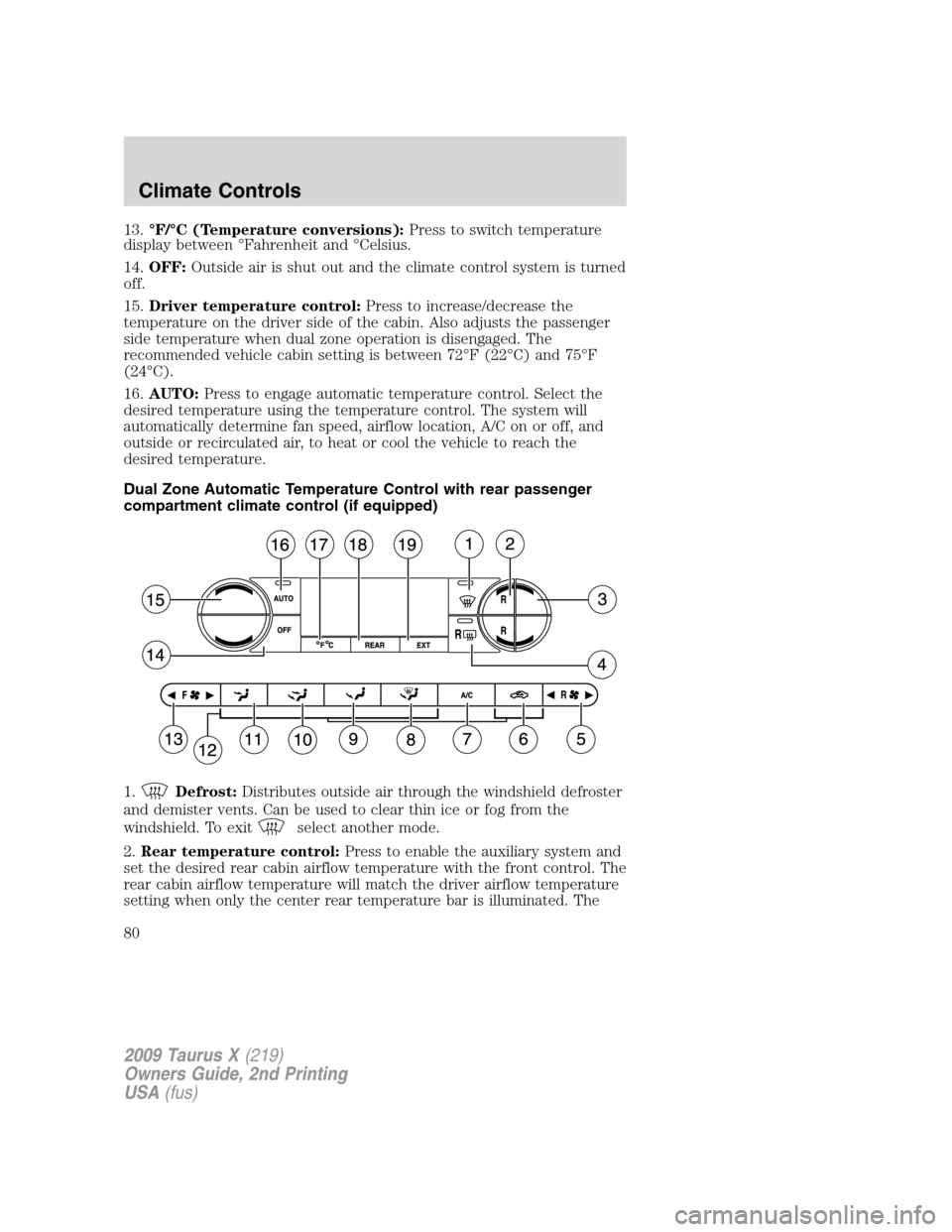
13.°F/°C (Temperature conversions):Press to switch temperature
display between °Fahrenheit and °Celsius.
14.OFF:Outside air is shut out and the climate control system is turned
off.
15.Driver temperature control:Press to increase/decrease the
temperature on the driver side of the cabin. Also adjusts the passenger
side temperature when dual zone operation is disengaged. The
recommended vehicle cabin setting is between 72°F (22°C) and 75°F
(24°C).
16.AUTO:Press to engage automatic temperature control. Select the
desired temperature using the temperature control. The system will
automatically determine fan speed, airflow location, A/C on or off, and
outside or recirculated air, to heat or cool the vehicle to reach the
desired temperature.
Dual Zone Automatic Temperature Control with rear passenger
compartment climate control (if equipped)
1.
Defrost:Distributes outside air through the windshield defroster
and demister vents. Can be used to clear thin ice or fog from the
windshield. To exit
select another mode.
2.Rear temperature control:Press to enable the auxiliary system and
set the desired rear cabin airflow temperature with the front control. The
rear cabin airflow temperature will match the driver airflow temperature
setting when only the center rear temperature bar is illuminated. The
2009 Taurus X(219)
Owners Guide, 2nd Printing
USA(fus)
Climate Controls
80
Page 84 of 358
10.Airflow direction control:Press to toggle through the air
distribution modes listed below. The selected mode will be shown in the
display.
:Distributes air through the instrument panel and center console
vents (if equipped).
:Distributes air through the instrument panel, floor and center
console vents (if equipped).
:Distributes air through the floor vents.Note:You may notice a
small amount of air flowing from the demister and defroster vents.
:Distributes air through the windshield defroster, demister and floor
vents.
11.Manual override controls:Allows you to manually select where
airflow is directed. To return to full automatic control, press AUTO.
12.
Driver heated seat control:Press to heat the driver seat. Press
once to activate high heat (two indicator lights). Press again to activate
low heat (one indicator light). Press again to deactivate the driver
heated seat.
13.
Front fan speed control:Press to manually increase or
decrease the fan speed. To return to automatic fan operation, press
AUTO.
14.EXT:Press to display outside temperature. Press again to display
cabin temperature settings.
15.°F/°C (Temperature conversions):Press to switch temperature
display between ° Fahrenheit and ° Celsius.
16.OFF:Outside air is shut out and the climate control system is turned
off.
17.Driver temperature control:Press to increase/decrease the
temperature on the driver side of the cabin. Sets the passenger side
temperature also when DUAL is disengaged. The recommended vehicle
cabin setting is between 72°F (22°C) and 75°F (24°C).
18.AUTO:Press to engage automatic temperature control. Select the
desired temperature using the temperature control. The system will
automatically determine fan speed, airflow location, A/C on or off, and
outside or recirculated air, to heat or cool the vehicle to reach the
desired temperature.
19.REAR:Press to enable the control located in the rear seat. Press
again to turn the auxiliary system OFF. When the REAR button is
2009 Taurus X(219)
Owners Guide, 2nd Printing
USA(fus)
Climate Controls
84
Page 85 of 358
pressed, the display will show only the rear cabin settings. After rear
setting changes are completed on the front control, the display will
automatically show all climate settings.
Operating tips
•To reduce fog build up on the windshield during humid weather, place
the air flow selector in the
position.
•To reduce humidity build up inside the vehicle: do not drive with the
system off or with recirculated air engaged.
•Do not put objects under the front seats that will interfere with the
airflow to the back seats.
•Remove any snow, ice or leaves from the air intake area at the base of
the windshield.
•For maximum cooling performance (MAX A/C):
During extreme high ambient temperatures when idling stationary for
extended periods of time in gear, it is recommended to run the A/C in
the MAX A/C position, turn off the rear A/C unit, reduce blower fan
speed from the highest setting and put the vehicle’s transmission into the
PARK gear position to continue to receive cool air from your A/C system.
In AUTO mode, press AUTO control and set to desired temperature.
In manual override mode, select
or, A/C and recirculated
air
and set the temperature to 60°F (16°C). Set the fan to the
highest speed initially, then adjust to maintain passenger comfort.
•To improve the A/C cool down, drive with the windows slightly open
for 2–3 minutes after starting the vehicle or until the vehicle has
“aired out.”
In extremely cold temperatures, to maximize overall heater performance
it is suggested to not operate the auxiliary system (if equipped) until the
engine temperature gauge crosses into the normal operating range.
To aid in side window defogging/demisting in cold weather:
1. Select
.
2. Select A/C.
3. Adjust the temperature control to maintain comfort.
4. Set the fan to the highest speed.
5. Direct the outer instrument panel vents toward the side windows.
2009 Taurus X(219)
Owners Guide, 2nd Printing
USA(fus)
Climate Controls
85
Page 112 of 358
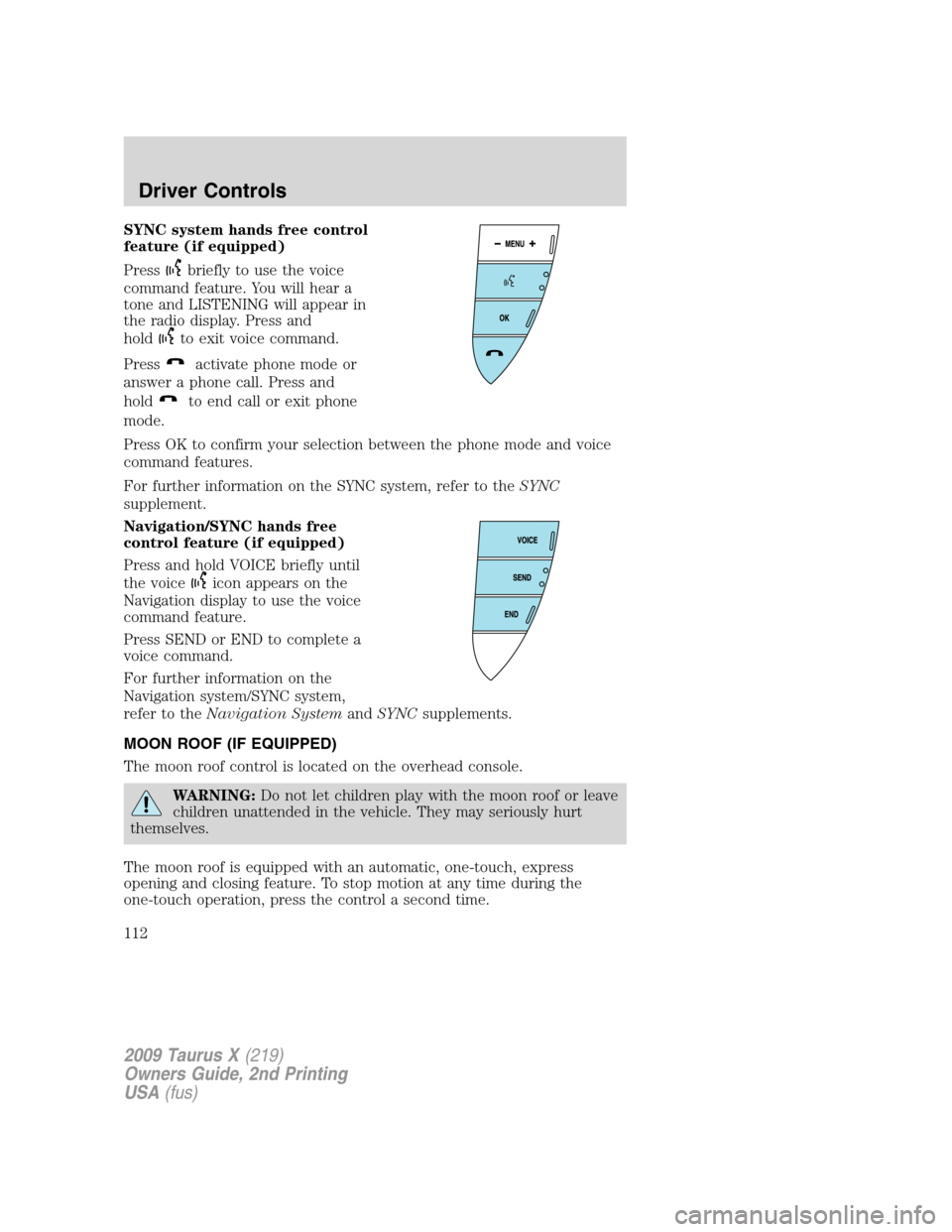
SYNC system hands free control
feature (if equipped)
Press
briefly to use the voice
command feature. You will hear a
tone and LISTENING will appear in
the radio display. Press and
hold
to exit voice command.
Press
activate phone mode or
answer a phone call. Press and
hold
to end call or exit phone
mode.
Press OK to confirm your selection between the phone mode and voice
command features.
For further information on the SYNC system, refer to theSYNC
supplement.
Navigation/SYNC hands free
control feature (if equipped)
Press and hold VOICE briefly until
the voice
icon appears on the
Navigation display to use the voice
command feature.
Press SEND or END to complete a
voice command.
For further information on the
Navigation system/SYNC system,
refer to theNavigation SystemandSYNCsupplements.
MOON ROOF (IF EQUIPPED)
The moon roof control is located on the overhead console.
WARNING:Do not let children play with the moon roof or leave
children unattended in the vehicle. They may seriously hurt
themselves.
The moon roof is equipped with an automatic, one-touch, express
opening and closing feature. To stop motion at any time during the
one-touch operation, press the control a second time.
2009 Taurus X(219)
Owners Guide, 2nd Printing
USA(fus)
Driver Controls
112