Page 120 of 418
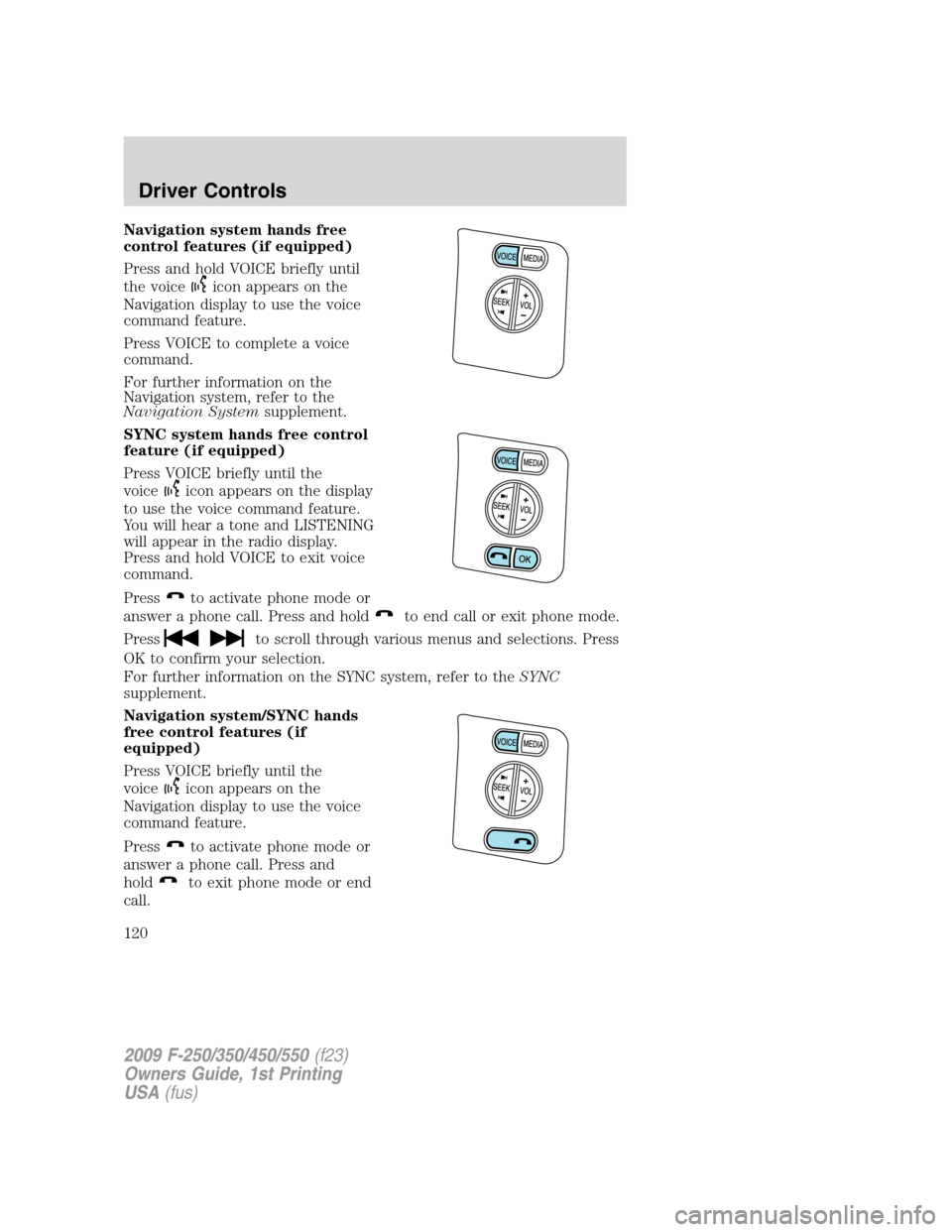
Navigation system hands free
control features (if equipped)
Press and hold VOICE briefly until
the voice
icon appears on the
Navigation display to use the voice
command feature.
Press VOICE to complete a voice
command.
For further information on the
Navigation system, refer to the
Navigation Systemsupplement.
SYNC system hands free control
feature (if equipped)
Press VOICE briefly until the
voice
icon appears on the display
to use the voice command feature.
You will hear a tone and LISTENING
will appear in the radio display.
Press and hold VOICE to exit voice
command.
Press
to activate phone mode or
answer a phone call. Press and hold
to end call or exit phone mode.
Press
to scroll through various menus and selections. Press
OK to confirm your selection.
For further information on the SYNC system, refer to theSYNC
supplement.
Navigation system/SYNC hands
free control features (if
equipped)
Press VOICE briefly until the
voice
icon appears on the
Navigation display to use the voice
command feature.
Press
to activate phone mode or
answer a phone call. Press and
hold
to exit phone mode or end
call.
2009 F-250/350/450/550(f23)
Owners Guide, 1st Printing
USA(fus)
Driver Controls
120
Page 121 of 418

For further information on the Navigation system/SYNC system, refer to
theNavigation SystemandSYNCsupplements.
UPFITTER CONTROLS (IF EQUIPPED)
Your vehicle may be equipped with
the Upfitter option package which
will provide four switches, mounted
in the center of the instrument
panel, labeled AUX 1, AUX 2, AUX 3
and AUX 4. These switches will only
operate while the ignition is in the
on position, whether the engine is
running or not. It is, however, recommended that the engine remain
running to maintain battery charge when using the Upfitter switches for
extended duration or higher current draws. (This is even more important
for vehicles with diesel engines since the glow plugs are also draining
battery power when the ignition key is in the on position.)
When switched on by the operator they provide 10 amps, 15 amps or
30 amps of electrical battery power for a variety of personal or
commercial uses.
If your vehicle is equipped with this option, there will also be a relay box
located on the driver side end of the instrument panel. See your
authorized dealer for service.
The relays are coded as shown in
the accompanying illustration.
RELAY
1 RELAY
2 RELAY
3 RELAY
4
2009 F-250/350/450/550(f23)
Owners Guide, 1st Printing
USA(fus)
Driver Controls
121
Page 292 of 418
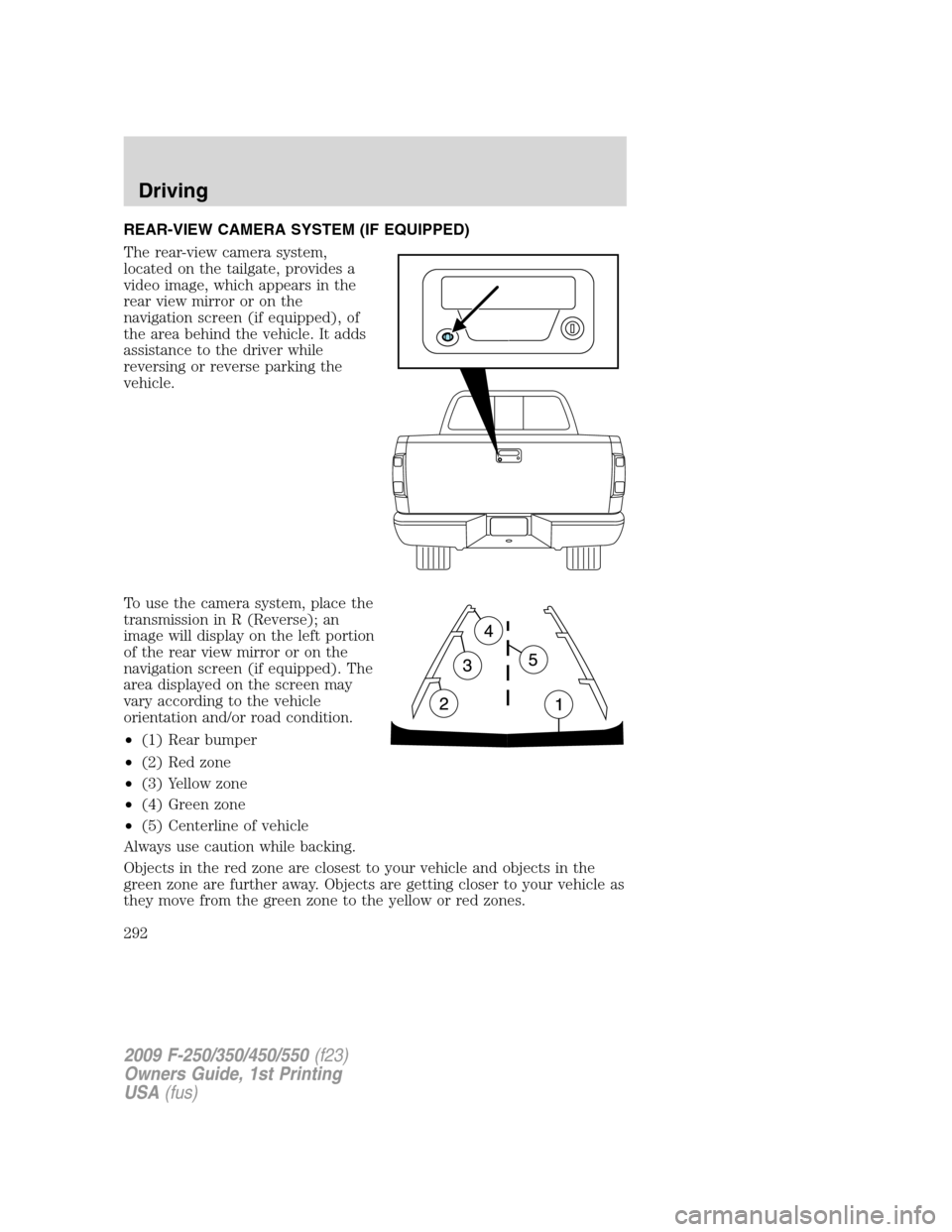
REAR-VIEW CAMERA SYSTEM (IF EQUIPPED)
The rear-view camera system,
located on the tailgate, provides a
video image, which appears in the
rear view mirror or on the
navigation screen (if equipped), of
the area behind the vehicle. It adds
assistance to the driver while
reversing or reverse parking the
vehicle.
To use the camera system, place the
transmission in R (Reverse); an
image will display on the left portion
of the rear view mirror or on the
navigation screen (if equipped). The
area displayed on the screen may
vary according to the vehicle
orientation and/or road condition.
•(1) Rear bumper
•(2) Red zone
•(3) Yellow zone
•(4) Green zone
•(5) Centerline of vehicle
Always use caution while backing.
Objects in the red zone are closest to your vehicle and objects in the
green zone are further away. Objects are getting closer to your vehicle as
they move from the green zone to the yellow or red zones.
2009 F-250/350/450/550(f23)
Owners Guide, 1st Printing
USA(fus)
Driving
292
Page 293 of 418
Use the side mirrors and rear view mirror to get better coverage on both
sides and rear of the vehicle.
When shifting out of R (Reverse) and into any other gear, the image will
remain on for a few seconds before it shuts off to assist in parking or
trailer hookup.
If equipped with the Navigation system, after shifting out of R (Reverse)
and into any gear other than P (Park), the image will remain until the
vehicle speed reaches 5 mph (8 km/h), only if the rear camera delay
feature is on, or until any navigation radio button is depressed.
Note:The default setting for the rear camera delay is off. Push the
“Settings” button found on the navigation screen (if equipped) to set the
rear camera delay feature to on or off.
When towing, the camera system will only see what is being towed
behind the vehicle; this might not provide adequate coverage as it
usually provides in normal operation and some objects might not be
seen.
The camera lens for the camera system is located on the tailgate, near
the tailgate handle. Keep the lens clean so the video image remains clear
and undistorted. Clean the lens with a soft, lint-free cloth and
non-abrasive cleaner.
Note:If the camera system image is not clear or seems distorted, it may
be covered with water droplets, snow, mud or any other substance. If
this occurs, clean the camera lens before using the camera system.
WARNING:The camera system is a reverse aid supplement
device that still requires the driver to use it in conjunction with
the rear view mirror and the side mirrors for maximum coverage.
WARNING:Objects that are close to either corner of the
bumper or under the bumper, might not be seen on the screen
due to the limited coverage of the camera system.
WARNING:Backup as slow as possible since higher speeds
might limit your reaction time to stop the vehicle.
WARNING:Do not use the camera system with the tailgate
open.
2009 F-250/350/450/550(f23)
Owners Guide, 1st Printing
USA(fus)
Driving
293
Page 320 of 418

Fuse/Relay
LocationFuse Amp
RatingProtected Circuits
31 10A Not used (spare)
32 10A Restraints Control Module (RCM),
Passenger Airbag Deactivation
Indicator
33 10A Trailer tow brake controller,
Trailer tow battery charge relay
coil
34 5A Not used (spare)
35 10A Reverse Sensing System (RSS),
4x4 module, 4x4 solenoid,
Traction control switch, Tow/Haul
switch (Diesel engine)
36 5A Passive Anti-Theft System (PATS)
transceiver, Cluster control
37 10A Dual automatic or Manual climate
control, PTC control
38 20A Subwoofer
39 20A Radio, Navigation radio and
amplifier
40 20A 4x4 module, Satellite radio
module, SYNC
41 15A Radio, Electrochromatic rear view
mirror, Lock switch illumination
42 10A Heated seat relay coil, Upfitter
switch relay coils, Heated mirror
relay coil
43 10A Fuel tank selector switch, 4x4
module
44 10A Run customer access feed (PTO)
45 5A Front wiper logic, Blower motor
relay coil
46 7.5A Not used (spare)
47 30A Circuit
BreakerPower windows, Moon roof,
Power Sliding Backlite
48 Relay Delayed accessory
2009 F-250/350/450/550(f23)
Owners Guide, 1st Printing
USA(fus)
Roadside Emergencies
320
Page 416 of 418

Instrument panel
cleaning ...........................361–362
cluster ........................................14
lighting up panel and
interior .......................................91
J
Jump-starting your vehicle ......342
K
Keyless entry system
autolock ...................................154
keypad .....................................164
locking and unlocking doors ..165
programming entry code .......164
Keys ...................................166–167
positions of the ignition .........272
L
Lamps
autolamp system .......................89
daytime running light ...............90
fog lamps ...................................89
headlamps .................................89
headlamps, flash to pass ..........90
instrument panel, dimming .....91
interior lamps ...........................95
replacing bulbs .................97–102
LATCH anchors .........................212
Lights, warning and indicator ....14
anti-lock brakes (ABS) ..........278
Limited-slip axle .......................281
Load limits .................................253
Loading instructions .................259
Locks
autolock ...................................154
childproof ................................157doors ........................................153
Lug nuts ....................................341
Lumbar support, seats .............173
M
Manual transmission .................287
fluid capacities ........................404
reverse .....................................289
Message center .................127, 136
english/metric button .............140
system check button ..............139
warning messages ...........130, 142
Mirrors ...............................110–111
automatic dimming rearview
mirror ......................................110
fold away .........................112, 114
side view mirrors (power) .....111
signal .......................................115
Moon roof ..................................122
Motorcraft parts ................383, 403
N
Navigation system .......................79
O
Octane rating ............................387
Oil (see Engine oil) ..................372
Overdrive ...................................104
P
Parking brake ............................278
Parts (see Motorcraft parts) ....403
Pedals (see Power adjustable
foot pedals) ...............................115
Power adjustable foot pedals ...115
2009 F-250/350/450/550(f23)
Owners Guide, 1st Printing
USA(fus)
Index
416