2009 FORD EXPEDITION light
[x] Cancel search: lightPage 171 of 416

The inside lights will not turn off if:
•they have been turned on using the dimmer control or
•any door is open.
The battery saver feature will turn off the interior lamps 10 minutes after
the ignition is turned to the off position.
Two stage unlocking may be disabled or re-enabled by simultaneously
pressing the
andcontrols on the IKT for four seconds (disabling
two stage unlock allows all vehicle doors to unlock simultaneously). The
turn lamps will flash twice to indicate that two-stage unlock was enabled
or disabled.
Locking the doors
1. Pressand release to lock all the doors. The turn lamps will flash.
2. Press
and release again within three seconds to confirm that all
the doors are closed.Note:The doors will lock again, the horn will chirp
and the turn lamps will flash once if all the doors and liftgate are closed.
Note:If any door or the liftgate is not closed, or if the hood is not
closed in vehicles equipped with the perimeter alarm feature, the horn
will chirp twice and the lamps will not flash.
Opening the power liftgate or manual liftgate window
(if equipped)
Presstwice within three seconds to open the power liftgate (if
equipped) or unlatch the manual liftgate window (if not equipped with a
power liftgate).
WARNING:Make sure all persons are clear of the power liftgate
area before using the control.
To close the power liftgate, press the control twice.
If the power liftgate stops mid travel, it may have detected an obstacle,
Check to ensure the power liftgate swing zone is free from obstruction
and reset the power assist by manually closing the power liftgate. Normal
operation can then be resumed.
WARNING:Make sure the power liftgate is closed to prevent
exhaust fumes from being drawn into the vehicle. This will also
prevent passengers and cargo from falling out. If you must drive with
the liftgate open, keep the vents open so outside air comes into the
vehicle.
2009 Expedition(exd)
Owners Guide, 1st Printing
USA(fus)
Locks and Security
171
Page 174 of 416

Note:Replacement of the battery willnotcause the IKT to become
deprogrammed from your vehicle. The IKT should operate normally after
battery replacement.
Replacing lost Integrated Keyhead Transmitters (IKTs)
If you would like to have your Integrated Keyhead Transmitters
reprogrammed because you lost one, or would like to buy additional
IKTs, you can either reprogram them yourself, or takeall IKTsto your
authorized dealer for reprogramming.
How to reprogram your Integrated Keyhead Transmitters (IKTs)
To program a new Integrated Keyhead Transmitter yourself, refer to
Programming spare keysin theSecuriLock™ passive anti-theft
systemsection of this chapter.Note:At least two IKTs are required to
perform this procedure yourself.
Illuminated entry
The interior lamps and puddle lamps (if equipped) illuminate when the
Integrated Keyhead Transmitter or the keyless entry system keypad is
used to unlock the door(s).
The illuminated entry system will turn off the interior lights if:
•the ignition is turned to the on position, or
•the Integrated Keyhead Transmitter lock control is pressed, or
•the vehicle is locked using the keyless entry keypad, or
•after 25 seconds of illumination.
The inside lights will not turn off if:
•they have been turned on with the dimmer control, or
•any door is open.
Perimeter lamps illuminated entry
The following items will illuminate when the
(unlock) control on the
remote entry transmitter is pressed:
•Head lamps
•Park lamps
•Tail lamps
2009 Expedition(exd)
Owners Guide, 1st Printing
USA(fus)
Locks and Security
174
Page 175 of 416
The lamps will automatically turn off:
•if the ignition switch is turned to the on position, or
•the
control is pressed, or
•after 25 seconds of illumination.
Note:On some vehicles, the perimeter lamps illuminated entry feature
will not activate in daylight conditions.
Deactivating/activating perimeter lamps illuminated entry
You may enable/disable this feature by having your vehicle serviced by
your authorized dealer.
You may also perform the following power door lock sequence to
enable/disable the perimeter lamps feature.Note:Before starting, ensure
the ignition is in the off position and all vehicle doors are closed. You
must complete Steps 1–5 within 30 seconds or the procedure will have
to be repeated. If the procedure needs to be repeated, wait a minimum
of 30 seconds before beginning again.
1. The ignition must be off to begin
the sequence.
2. Place the key in the ignition and
turn the ignition to the on position.
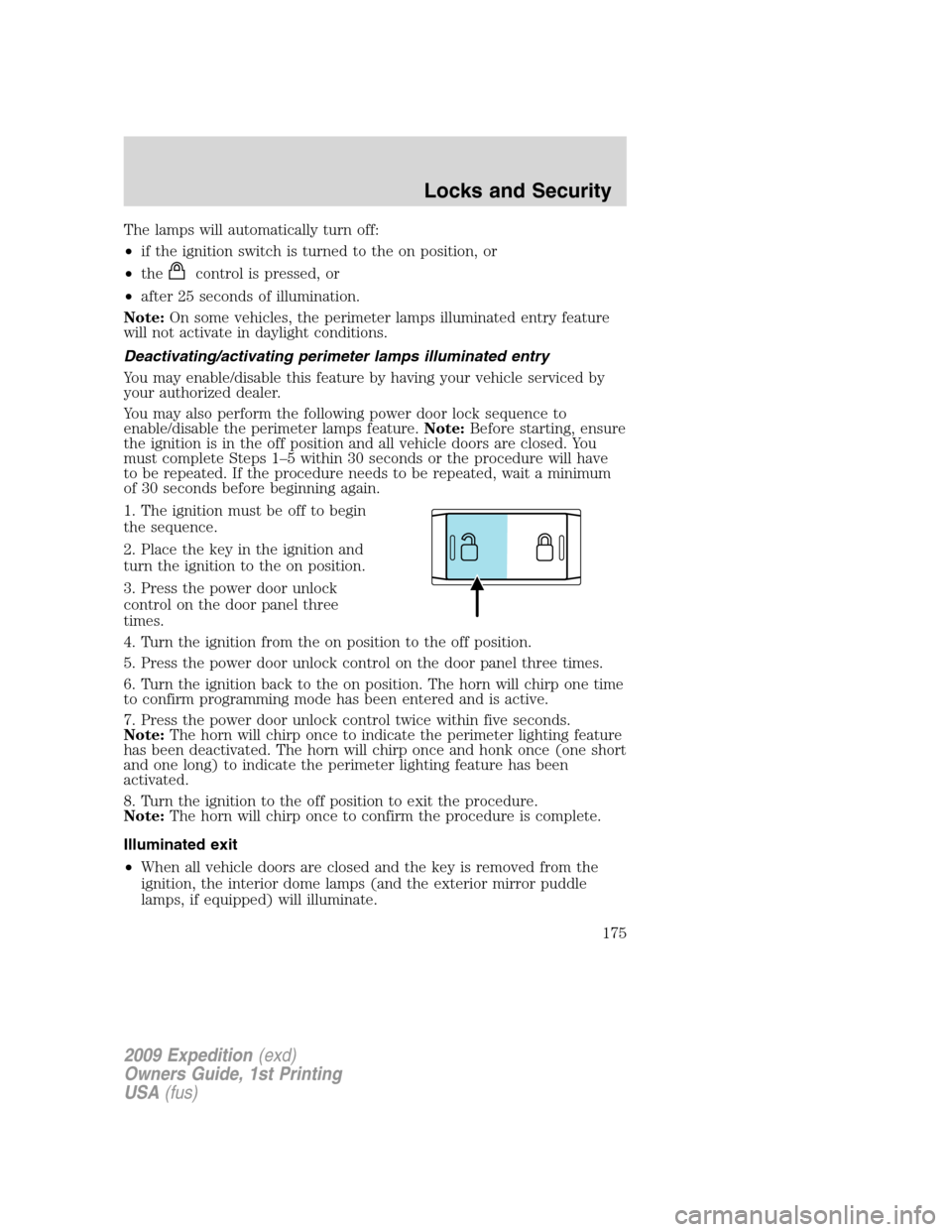
3. Press the power door unlock
control on the door panel three
times.
4. Turn the ignition from the on position to the off position.
5. Press the power door unlock control on the door panel three times.
6. Turn the ignition back to the on position. The horn will chirp one time
to confirm programming mode has been entered and is active.
7. Press the power door unlock control twice within five seconds.
Note:The horn will chirp once to indicate the perimeter lighting feature
has been deactivated. The horn will chirp once and honk once (one short
and one long) to indicate the perimeter lighting feature has been
activated.
8. Turn the ignition to the off position to exit the procedure.
Note:The horn will chirp once to confirm the procedure is complete.
Illuminated exit
•When all vehicle doors are closed and the key is removed from the
ignition, the interior dome lamps (and the exterior mirror puddle
lamps, if equipped) will illuminate.
2009 Expedition(exd)
Owners Guide, 1st Printing
USA(fus)
Locks and Security
175
Page 176 of 416

The lights will turn off if all the doors remain closed and
•25 seconds elapse, or
•the key is inserted in the ignition.
Battery saver
The battery saver will shut off the interior lamps 10 minutes after the
ignition has been turned to the off position.
•If the dome lamps were turned on using the panel dimmer control, the
battery saver will shut them off 10 minutes after the ignition has been
turned to the off position.
•If the courtesy lamps were turned on because one of the vehicle doors
or the liftgate was opened, the battery saver will shut them off
10 minutes after the ignition has been turned to the off position.
•The battery saver will shut off the headlamps 10 minutes after the
ignition has been turned to the off position.
KEYLESS ENTRY SYSTEM (IF EQUIPPED)
You can use the keyless entry keypad to:
•lock or unlock the doors without using a key,
•activate or deactivate the Autolock feature if equipped
•release the liftgate glass,
The keypad can be operated with the factory set 5–digit entry code; this
code is located on the owner’s wallet card in the glove box and is
available from your authorized dealer. You can also create your own
5–digit personal entry code.
When pressing the controls on the keyless entry keypad, press the
middle of the controls to ensure a good activation.
Programming your own personal entry code
To create your own personal entry code:
1. Enter the factory set code.
2. Within five seconds press the 1•2 on the keypad.
3. Enter your personal 5–digit code.
Each number must be entered
within five seconds of each other.
2009 Expedition(exd)
Owners Guide, 1st Printing
USA(fus)
Locks and Security
176
Page 181 of 416
Please read and understand the
entire procedure before you begin.
1. Insert the first previously
programmedcoded keyinto the
ignition.
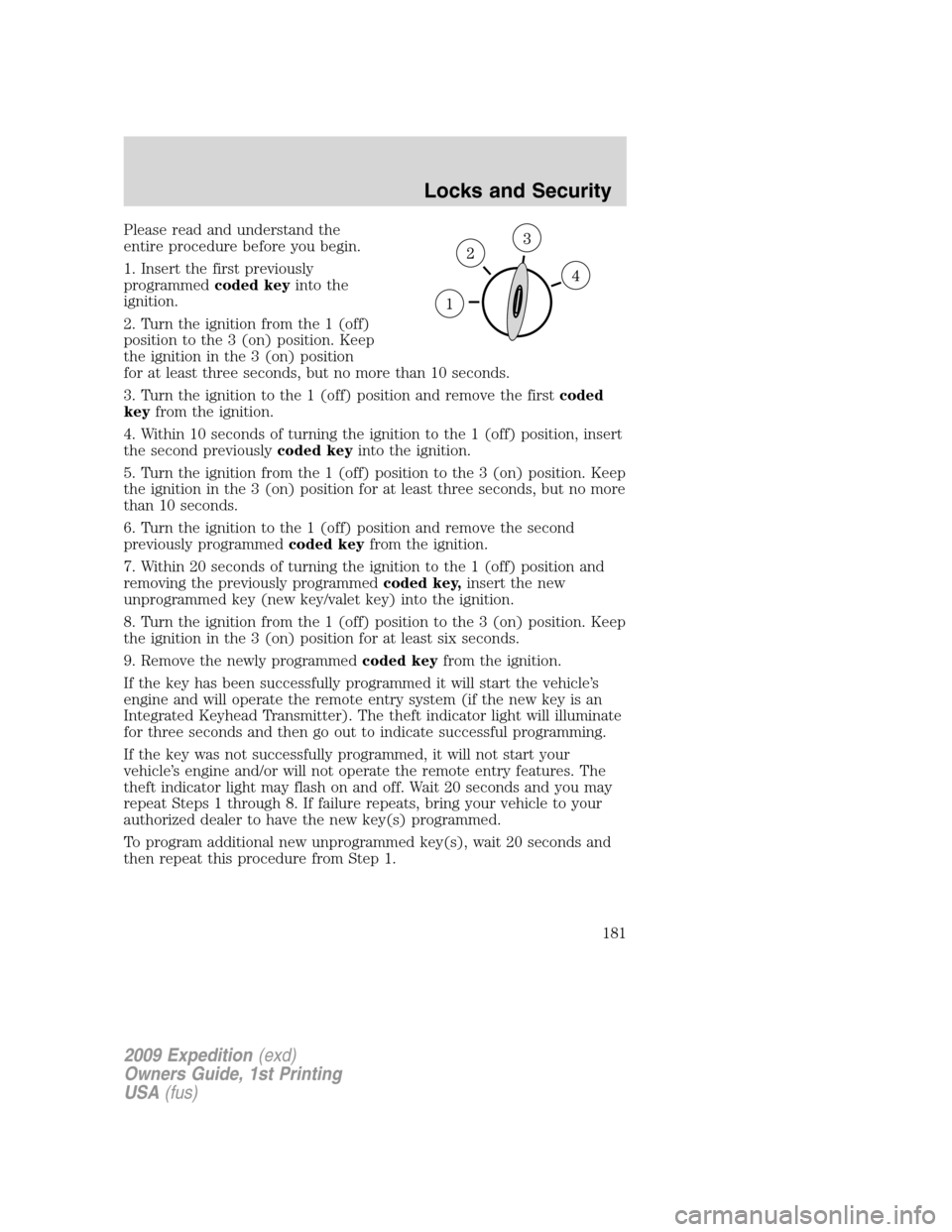
2. Turn the ignition from the 1 (off)
position to the 3 (on) position. Keep
the ignition in the 3 (on) position
for at least three seconds, but no more than 10 seconds.
3. Turn the ignition to the 1 (off) position and remove the firstcoded
keyfrom the ignition.
4. Within 10 seconds of turning the ignition to the 1 (off) position, insert
the second previouslycoded keyinto the ignition.
5. Turn the ignition from the 1 (off) position to the 3 (on) position. Keep
the ignition in the 3 (on) position for at least three seconds, but no more
than 10 seconds.
6. Turn the ignition to the 1 (off) position and remove the second
previously programmedcoded keyfrom the ignition.
7. Within 20 seconds of turning the ignition to the 1 (off) position and
removing the previously programmedcoded key,insert the new
unprogrammed key (new key/valet key) into the ignition.
8. Turn the ignition from the 1 (off) position to the 3 (on) position. Keep
the ignition in the 3 (on) position for at least six seconds.
9. Remove the newly programmedcoded keyfrom the ignition.
If the key has been successfully programmed it will start the vehicle’s
engine and will operate the remote entry system (if the new key is an
Integrated Keyhead Transmitter). The theft indicator light will illuminate
for three seconds and then go out to indicate successful programming.
If the key was not successfully programmed, it will not start your
vehicle’s engine and/or will not operate the remote entry features. The
theft indicator light may flash on and off. Wait 20 seconds and you may
repeat Steps 1 through 8. If failure repeats, bring your vehicle to your
authorized dealer to have the new key(s) programmed.
To program additional new unprogrammed key(s), wait 20 seconds and
then repeat this procedure from Step 1.
2009 Expedition(exd)
Owners Guide, 1st Printing
USA(fus)
Locks and Security
181
Page 190 of 416
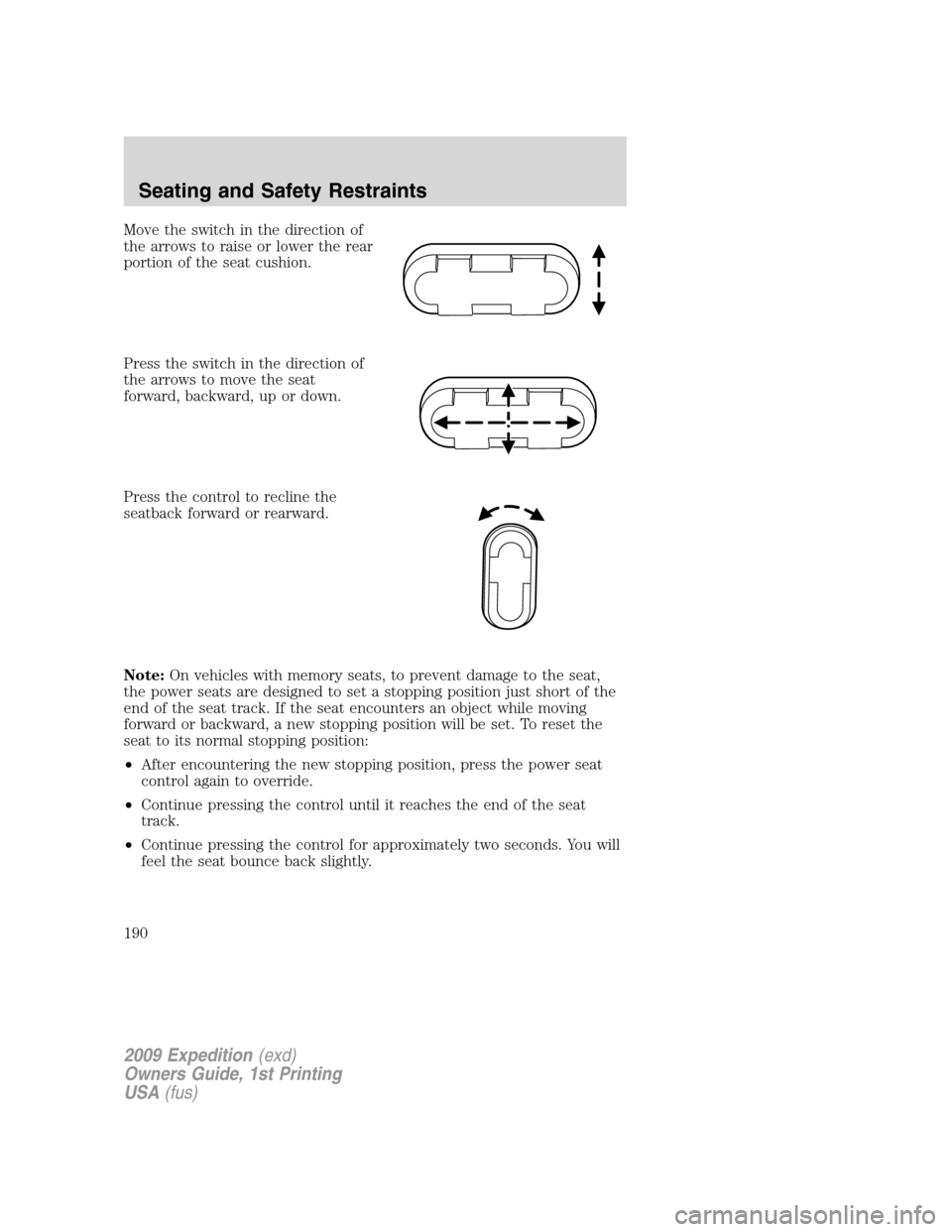
Move the switch in the direction of
the arrows to raise or lower the rear
portion of the seat cushion.
Press the switch in the direction of
the arrows to move the seat
forward, backward, up or down.
Press the control to recline the
seatback forward or rearward.
Note:On vehicles with memory seats, to prevent damage to the seat,
the power seats are designed to set a stopping position just short of the
end of the seat track. If the seat encounters an object while moving
forward or backward, a new stopping position will be set. To reset the
seat to its normal stopping position:
•After encountering the new stopping position, press the power seat
control again to override.
•Continue pressing the control until it reaches the end of the seat
track.
•Continue pressing the control for approximately two seconds. You will
feel the seat bounce back slightly.
2009 Expedition(exd)
Owners Guide, 1st Printing
USA(fus)
Seating and Safety Restraints
190
Page 191 of 416
Memory seat/power mirrors/adjustable pedals (if equipped)
This system allows automatic
positioning of the driver seat,
outside rearview mirrors and
adjustable pedals to two
programmable positions.
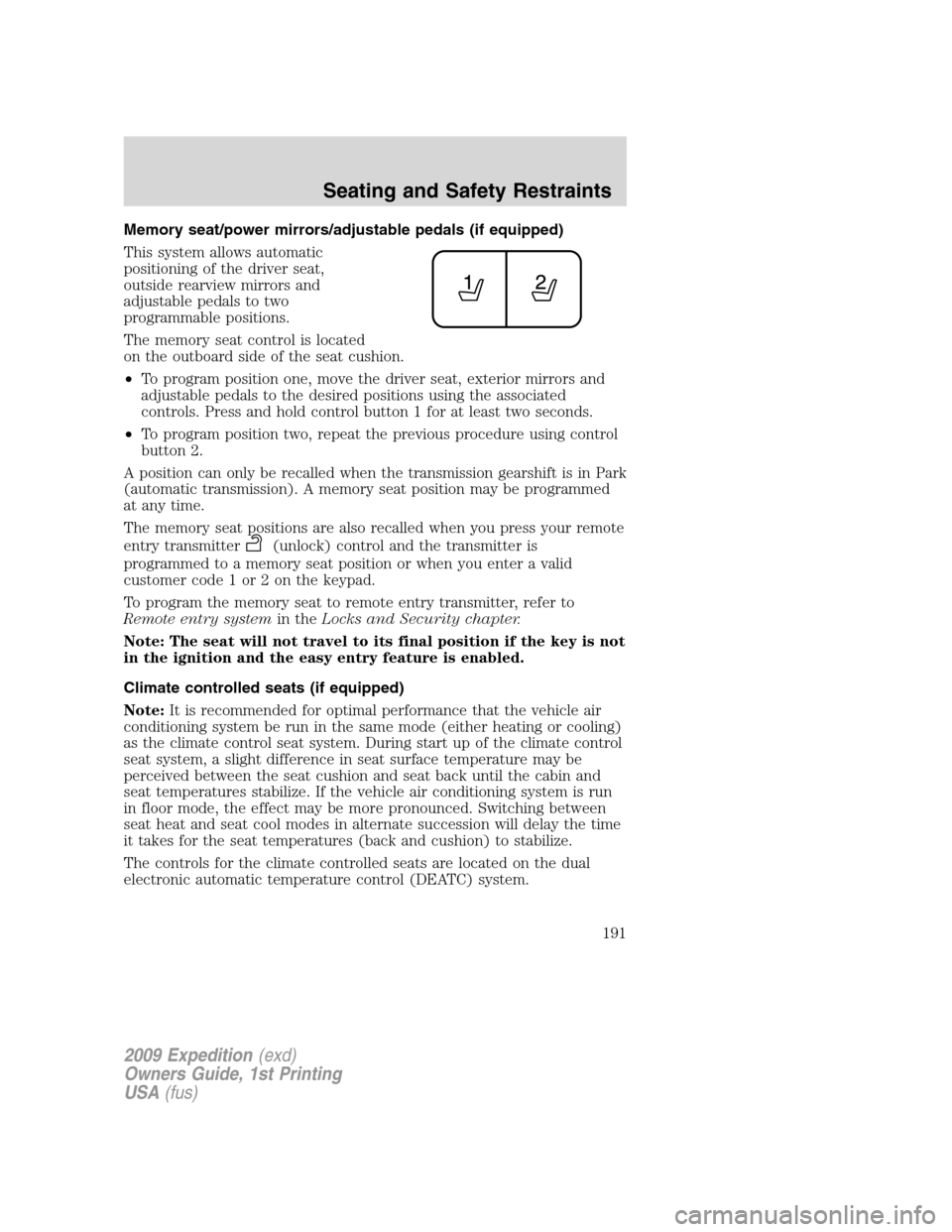
The memory seat control is located
on the outboard side of the seat cushion.
•To program position one, move the driver seat, exterior mirrors and
adjustable pedals to the desired positions using the associated
controls. Press and hold control button 1 for at least two seconds.
•To program position two, repeat the previous procedure using control
button 2.
A position can only be recalled when the transmission gearshift is in Park
(automatic transmission). A memory seat position may be programmed
at any time.
The memory seat positions are also recalled when you press your remote
entry transmitter
(unlock) control and the transmitter is
programmed to a memory seat position or when you enter a valid
customer code 1 or 2 on the keypad.
To program the memory seat to remote entry transmitter, refer to
Remote entry systemin theLocks and Security chapter.
Note: The seat will not travel to its final position if the key is not
in the ignition and the easy entry feature is enabled.
Climate controlled seats (if equipped)
Note:It is recommended for optimal performance that the vehicle air
conditioning system be run in the same mode (either heating or cooling)
as the climate control seat system. During start up of the climate control
seat system, a slight difference in seat surface temperature may be
perceived between the seat cushion and seat back until the cabin and
seat temperatures stabilize. If the vehicle air conditioning system is run
in floor mode, the effect may be more pronounced. Switching between
seat heat and seat cool modes in alternate succession will delay the time
it takes for the seat temperatures (back and cushion) to stabilize.
The controls for the climate controlled seats are located on the dual
electronic automatic temperature control (DEATC) system.
2009 Expedition(exd)
Owners Guide, 1st Printing
USA(fus)
Seating and Safety Restraints
191
Page 192 of 416

Heated seats
WARNING:Persons who are unable to feel pain to the skin
because of advanced age, chronic illness, diabetes, spinal cord
injury, medication, alcohol use, exhaustion, or other physical
conditions, must exercise care when using the seat heater. The seat
heater may cause burns even at low temperatures, especially if used
for long periods of time. Do not place anything on the seat that
insulates against heat, such as a blanket or cushion, because this may
cause the seat heater to overheat. Do not puncture the seat with pins,
needles, or other pointed objects because this may damage the heating
element which may cause the seat heater to overheat. An overheated
seat may cause serious personal injury.
Note:Do not do the following:
•Place heavy objects on the seat
•Operate the seat heater if water or any other liquid is spilled on the
seat. Allow the seat to dry thoroughly.
The heated seats will only function when the engine is running.
To operate the heated seats:
Press once to activate the high heat
setting (three indicator lights).
Continue pressing to scroll through
the other settings; medium heat
(two indicator lights), low heat (one indicator light) or off.
Cooled seats
The cooled seats will only function when the engine is running.
To operate the cooled seats:
Press once to activate the high cool
setting (three indicator lights).
Continue pressing to scroll through
the other settings; medium cool
(two indicator lights), low cool (one indicator light) or off.
If the engine falls below 350 RPMs while the cooled seats are on, the
feature will turn itself off and will need to be reactivated.
2009 Expedition(exd)
Owners Guide, 1st Printing
USA(fus)
Seating and Safety Restraints
192