Page 36 of 415

In Folder mode, pressing SEEK will scroll only through tracks
within the selected folder.
Press FOLDER, FOLDER to access the previous/next folder (if
available).
COMPRESS (Compression): Available only in CD/MP3 mode. Press
MENU until COMPRESS ON/OFF appears in the display.
Use / / SEEK, SEEK to toggle ON/OFF. When COMPRESS
is ON, the system will bring soft and loud CD passages together for a
more consistent listening level.
Single Play/Dual Play: If Single Play is ON, press / for Dual Play.
For further information on Single Play/Dual Play, refer to Rear seat
controls later in this chapter.
FES (FULL/LOCKED): Your vehicle is equipped with a Family
Entertainment DVD system. For further information on the DVD system,
refer to Family Entertainment DVD system later in this section.
4. AUX: Press repeatedly to cycle
through FES/DVD (if equipped)
LINE IN (Auxiliary audio) , SAT1,
SAT2, SAT3 (satellite radio modes, if equipped) and SYNC � (if
equipped).
For location and further information on the auxiliary audio mode, refer
to Auxiliary input jack later in this chapter.
Satellite radio is available only with a valid SIRIUS subscription.
Check with your authorized dealer for availability.
5. Seek: In radio mode, press
/ to access the previous/next
strong station.
In CD mode, press / to
access the previous/next CD track.
In satellite radio mode (if equipped) , press SEEK, SEEK to
seek to the previous/next channel.
In CATEGORY MODE, press / to select a specific category
(Jazz, Rock, News, etc.). Once the desired category is in the display,
press SEEK, SEEK to seek to the previous/next channel in the
selected category. Press and hold SCAN for a brief sampling of all
channels in the selected category.
2009 Expedition (exd)
Owners Guide, 2nd Printing
USA (fus)Entertainment Systems
36
Page 51 of 415

Radio Display Condition Action Required
NO TEXT Category information
not available. Category information not
available at this time on
this channel. The system
is working properly.
NO SIGNAL Loss of signal from
the SIRIUS satellite or
SIRIUS tower to the
vehicle antenna. You are in a location that
is blocking the SIRIUS
signal (i.e., tunnel, under
an overpass, dense
foliage, etc). The system
is working properly.
When you move into an
open area, the signal
should return.
UPDATING Update of channel
programming in
progress. No action required. The
process may take up to
three minutes.
CALL SIRIUS
1–888–539–7474 Satellite service has
been deactivated by
SIRIUS Satellite Radio. Call SIRIUS at
1–888–539–7474 to
re-activate or resolve
subscription issues.
FAMILY ENTERTAINMENT DVD SYSTEM (IF EQUIPPED)
WARNING: Driving while distracted can result in loss of vehicle
control, accident and injury. Ford strongly recommends that
drivers use extreme caution when using any device that may take their
focus off the road. The driver’s primary responsibility is the safe
operation of their vehicle. Only use cell phones and other devices not
essential to the driving task when it is safe to do so.
Your vehicle may be equipped with a Family Entertainment System
(FES) which allows you to listen to audio CDs, MP3 discs, watch DVDs
and to plug in and play a variety of standard video game systems. The
DVD player is capable of playing standard DVDs, CDs, MP3s and is
compatible with CD-R/W, CD-R and certain CD-ROM media.
Please review this material to become familiar with the FES features and
controls as well as the very important safety information.
2009 Expedition (exd)
Owners Guide, 2nd Printing
USA (fus) Entertainment Systems
51
Page 77 of 415

Audio displays
Your DVD system interacts closely with the front audio system. Status
messages will appear in the radio display showing the DVD status. Some
possible radio display messages:
• SINGLE PLAY or DUAL PLAY
• DVD LOAD
• DVD MENU
• DVD STOP
Audio interaction
You can then also use the front audio controls to advance, reverse, play
and pause a DVD. While a DVD is playing you may use the following
controls on the front radio:
• SEEK: Press to advance to the previous ( ) or next ( ) DVD
chapters.
• : Press to play a DVD or to pause the DVD.
When the radio displays “DVD MENU”, press PLAY on the radio
(memory preset #6), to play the disc.
Parental control for the DVD system
Your Family Entertainment System (FES) allows you to have control
over the rear seat controls in a few different ways. The DVD system is
automatically activated when the vehicle ignition is ON, which allows the
rear seat passengers to use the DVD system.
There are three levels of control of
the FES buttons. The states are
FULL (enabled), LOCAL or
LOCKED (disabled). To change the level of control, press the memory
preset controls 3 and 5 simultaneously on the front audio controls. The
control level will cycle each time the buttons are pressed simultaneously.
The three states are described as:
FULL (enabled): The FES has control over the primary (speaker) and
secondary (headphone) audio sources.
LOCAL : The FES has control over the secondary source (headphones)
only. The radio will ignore button presses that affect the primary
(speaker) audio source.
LOCKED (disabled): The FES buttons are locked and all FES button
presses are ignored by the radio and the FES except for load and eject.
2009 Expedition (exd)
Owners Guide, 2nd Printing
USA (fus) Entertainment Systems
77
Page 94 of 415
HEADLAMP CONTROL
Rotate the headlamp control to the
first position to turn on the
parking lamps.
Rotate to the second position to
turn on the headlamps.
Rotate back to to turn the
headlamps off.
Autolamp control
The autolamp system provides light
sensitive automatic on/off control of
the exterior lights normally
controlled by the headlamp control.
The autolamp system also keeps the
lights on for approximately
20 seconds or, if equipped with a
message center, you can select a
delay from 0–180 seconds after the
ignition switch is turned off. See
Message center in the Driver
Controls chapter.
• To turn autolamps on, rotate the control counterclockwise.
• To turn autolamps off, rotate the control to the off position.
2009 Expedition (exd)
Owners Guide, 2nd Printing
USA (fus)Lights
94
Page 97 of 415

1. Park the vehicle directly in front of a wall or screen on a level surface,
approximately 25 feet (7.6 meters)
away.
• (1) 8 feet (2.4 meters)
• (2) Center height of lamp to
ground
• (3) 25 feet (7.6 meters)
• (4) Horizontal reference line
2. Measure the height from the
center of your headlamp (indicated
by a 3.0 mm circle on the lens) to the ground and mark an 8 foot
(2.4 meter) horizontal reference line on the vertical wall or screen at this
height (a piece of masking tape works well).
3. Turn on the low beam headlamps to illuminate the wall or screen and
open the hood. Cover one of the headlamps so no light from that lamp
hits the wall.
4. On the wall or screen you will
observe a light pattern with a
distinct horizontal edge towards the
right. If this edge is not at the
horizontal reference line, the beam will need to be adjusted so the edge
is at the same height as the horizontal reference line.
5. Locate the vertical adjuster on
each headlamp, then use a Phillips
#2 screwdriver to turn the adjuster
either counterclockwise (to adjust
down) or clockwise (to adjust up)
aligning the upper edge of the light
pattern up to the horizontal line.
6. HORIZONTAL AIM IS NOT
REQUIRED FOR THIS VEHICLE
AND IS NON-ADJUSTABLE.
7. Repeat Steps 3–5 for the other headlamp.
8. Close the hood and turn off the lamps.
2009 Expedition (exd)
Owners Guide, 2nd Printing
USA (fus) Lights
97
Page 102 of 415

5. Disconnect the electrical
connector.
6. Remove the bulb by turning it
counterclockwise and then pulling it
straight out.
WARNING: Handle a halogen headlamp bulb carefully and keep
out of children’s reach. Grasp the bulb only by its plastic base
and do not touch the glass. The oil from your hand could cause the
bulb to break the next time the headlamps are operated.
7. Insert the glass end of the new bulb into the headlamp assembly.
When the grooves in the plastic base are aligned, turn the new bulb
clockwise to install.
8. Connect the electrical connector.
9. Install the headlamp assembly and secure with two retainer bolts.
Replacing front parking lamp/turn/sidemarker signal bulbs
1. Make sure that the headlamp control is in the off position.
2. Open the hood.
3. At the back of the headlamp,
remove the two headlamp assembly
retainer bolts.
4. Slide headlamp assembly forward
and off the retaining tab to expose
the back of the headlamp assembly.
2009 Expedition (exd)
Owners Guide, 2nd Printing
USA (fus)Lights
102
Page 103 of 415

5. Rotate the bulb socket
counterclockwise and remove from
the lamp assembly.
6. Carefully pull the bulb out of the
socket and push in the new bulb.
7. Install the bulb socket into the
lamp assembly and rotate clockwise.
8. Install the headlamp assembly
and secure with two retainer bolts.
Replacing tail/stop/turn/sidemarker/backup lamp bulbs
The tail/stop/turn/sidemarker/backup lamp bulbs are located in the same
portion of the tail lamp assembly, one just below the other. Follow the
same steps to replace either bulb:
1. Make sure the headlamp switch is
in the off position and then open
the liftgate to expose the lamp
assembly screws.
2. Remove the two torx screws from
the lamp assembly.
3. Carefully remove the lamp
assembly away from the vehicle by
pulling the assembly straight out to
expose the bulb socket. DO NOT
TIP THE LAMP ASSEMBLY SIDEWAYS.
4. Rotate the bulb socket counterclockwise and remove from lamp
assembly.
5. Pull bulb straight out of socket and snap in the new bulb.
6. Install the bulb socket into the lamp assembly and rotate clockwise.
7. Carefully install the tail lamp assembly on the vehicle by securing the
lamp assembly with two torx screws.
2009 Expedition (exd)
Owners Guide, 2nd Printing
USA (fus) Lights
103
Page 104 of 415
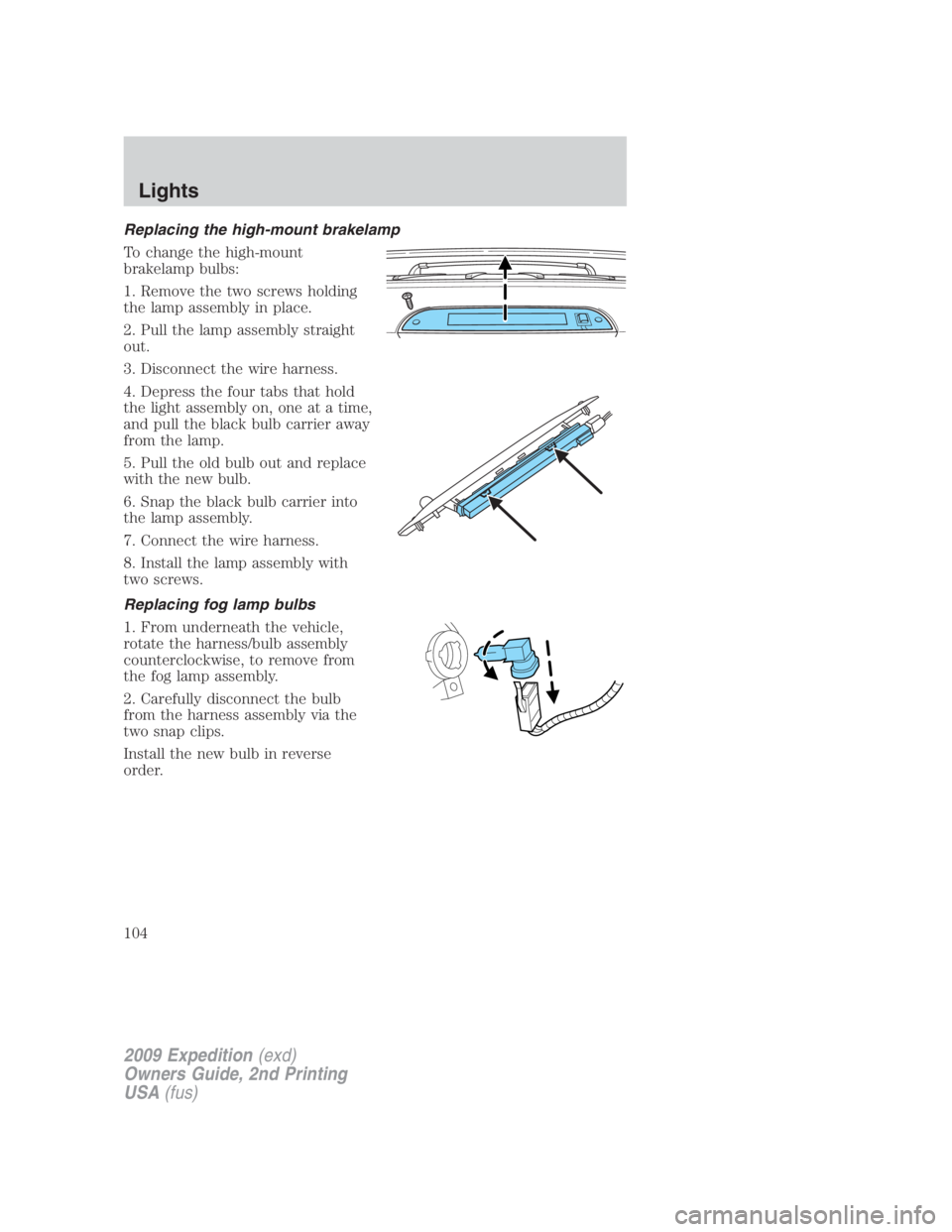
Replacing the high-mount brakelamp
To change the high-mount
brakelamp bulbs:
1. Remove the two screws holding
the lamp assembly in place.
2. Pull the lamp assembly straight
out.
3. Disconnect the wire harness.
4. Depress the four tabs that hold
the light assembly on, one at a time,
and pull the black bulb carrier away
from the lamp.
5. Pull the old bulb out and replace
with the new bulb.
6. Snap the black bulb carrier into
the lamp assembly.
7. Connect the wire harness.
8. Install the lamp assembly with
two screws.
Replacing fog lamp bulbs
1. From underneath the vehicle,
rotate the harness/bulb assembly
counterclockwise, to remove from
the fog lamp assembly.
2. Carefully disconnect the bulb
from the harness assembly via the
two snap clips.
Install the new bulb in reverse
order.
2009 Expedition (exd)
Owners Guide, 2nd Printing
USA (fus)Lights
104