2009 FORD E SERIES ECU
[x] Cancel search: ECUPage 79 of 321

The autolock feature repeats when:
•any door is opened then closed while the ignition is in the on position
and the vehicle speed is 9 mph (15 km/h) or lower, and
•the vehicle then attains a speed greater than 12 mph (20 km/h) for
greater than two seconds.
Deactivating/activating autolock feature
Your vehicle comes with the autolock feature disabled; there are two
methods to enable/disable this feature:
•Through your authorized dealer, or
•by using a power door unlock/lock procedure, or
•by using the instrument cluster message center (if equipped). Refer to
Message centerin theDriver Controlschapter,or by using the
instrument cluster message center (if equipped).
Power door lock switch autolock enable/disable procedure
Before starting, ensure the ignition is in the off position and all vehicle
doors are closed. You must complete Steps 1–5 within 30 seconds or the
procedure will have to be repeated. If the procedure needs to be
repeated, wait a minimum of 30 seconds before beginning again.
1. Place the key in the ignition and turn the ignition to the on position.
2. Press the power door unlock
control on the door panel three
times.
3. Turn the ignition from the on
position to the off position.
4. Press the power door unlock
control on the door panel three
times.
5. Turn the ignition back to the on position. The horn will chirp one time
to confirm programming mode has been entered and is active.
6. To enable/disable the autolock feature, press the unlock control, then
press the lock control. The horn will chirp once if autolock was
deactivated or twice (one short and one long chirp) if autolock was
activated.
7. Turn the ignition to the off position. The horn will chirp once to
confirm the procedure is complete.
2009 Econoline(eco)
Owners Guide, 1st Printing
USA(fus)
Locks and Security
79
Page 80 of 321

Back cargo door lock (if equipped)
The passenger side rear cargo door
has a power door lock control
mounted on the inside of the door.
When this lock is pressed, all doors
will lock/unlock.
E-Guard Cargo Protection System™ (if equipped)
The E-Guard Cargo Protection System™ insures that the side and cargo
doors are double locked for extra security.
E-Guard Cargo Protection System™ features
•The E-Guard Cargo Protection System™ is available with either power
or manual door locks.
•The E-Guard Cargo Protection System™ provides extra security via a
double-locked design.
•The cargo doors can only be unlocked from the outside by using the
keys.
•The power unlock feature (if equipped with power door locks) will
only unlock the front doors.
•The E-Guard Cargo Protection System™ is equipped with an
emergency unlock handle installed in the door inner panel.
E-Guard Cargo Protection System™ procedure
For vehicles equipped with power door locks:
•Lock the vehicle with the key, manual door lock, key fob or use the
power door lock on the front door trim panel. The front doors are
locked and the cargo doors are double-locked.
•Unlock the vehicle with the key fob or use the power door lock on the
front door. The front doors are unlocked and the cargo doors remain
double-locked.
•The only way to unlock the side or back cargo doors from
outside vehicle is with the key.
2009 Econoline(eco)
Owners Guide, 1st Printing
USA(fus)
Locks and Security
80
Page 81 of 321

For vehicles equipped with manual door locks:
•The front door locks can be locked by using either the key or the
manual door lock.
•In order to activate the E-Guard Cargo Protection System™, use the
key or the manual door lock to lock the side and back cargo doors.
•The cargo doors cannot be unlocked using the manual door
lock.
WARNING:If equipped with E-Guard Cargo Protection
System™ occupants may become trapped in the cargo area
unless the exit procedure is followed. The cargo doors cannot be
unlocked using manual or power door locks or key fob. In an
emergency, to exit the cargo area, locate the emergency handle in the
rear door or side door, pull the emergency handle to unlock the door,
then unlatch the door using the inside release handle.
Emergency lock release
The emergency handle in the door trim panel unlocks the E-Guard Cargo
Protection System™.
The emergency handles are located in the following areas:
•The side door emergency handle
is located on the door inner trim
panel in the speaker cup.
2009 Econoline(eco)
Owners Guide, 1st Printing
USA(fus)
Locks and Security
81
Page 82 of 321
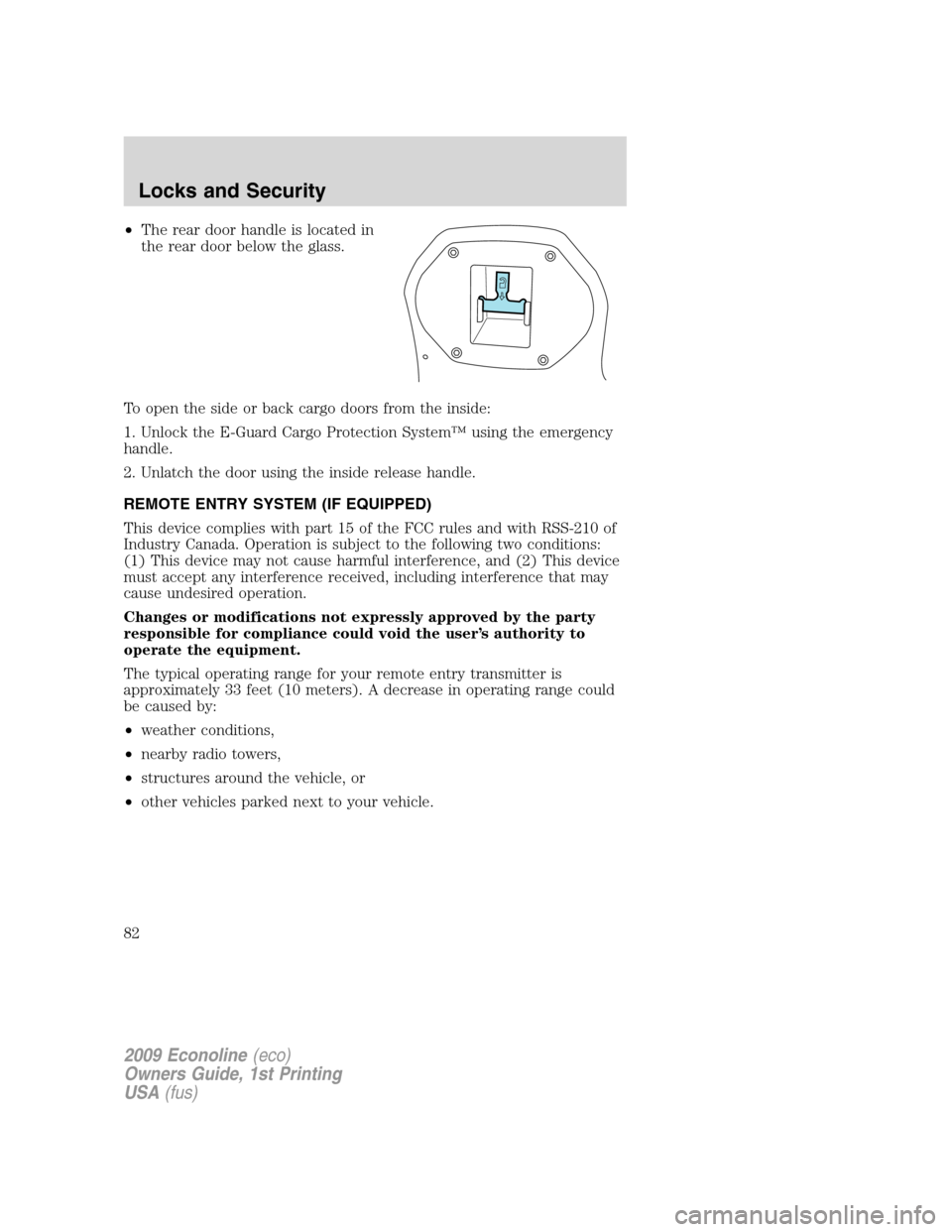
•The rear door handle is located in
the rear door below the glass.
To open the side or back cargo doors from the inside:
1. Unlock the E-Guard Cargo Protection System™ using the emergency
handle.
2. Unlatch the door using the inside release handle.
REMOTE ENTRY SYSTEM (IF EQUIPPED)
This device complies with part 15 of the FCC rules and with RSS-210 of
Industry Canada. Operation is subject to the following two conditions:
(1) This device may not cause harmful interference, and (2) This device
must accept any interference received, including interference that may
cause undesired operation.
Changes or modifications not expressly approved by the party
responsible for compliance could void the user’s authority to
operate the equipment.
The typical operating range for your remote entry transmitter is
approximately 33 feet (10 meters). A decrease in operating range could
be caused by:
•weather conditions,
•nearby radio towers,
•structures around the vehicle, or
•other vehicles parked next to your vehicle.
2009 Econoline(eco)
Owners Guide, 1st Printing
USA(fus)
Locks and Security
82
Page 83 of 321

The remote entry system allows you
to lock or unlock all vehicle doors
without a key.
Note:The lock and unlock features
work when the ignition is in any
position. The panic feature is active
when the ignition is in either the
accessory, off or on positions.
If there are problems with the
remote entry system, make sure to
takeALL remote entry transmitterswith you to the authorized dealer
in order to aid in troubleshooting the problem.
Note: If the vehicle is equipped with the E-Guard Cargo Protection
System™ the remote transmitter Unlock command will only unlock the
front doors; the only way to unlock the side or rear cargo doors from
outside the vehicle is with the key.
Two step door unlocking
1. Pressand release to unlock the driver’s door.Note:The interior
lamps will illuminate if the control on the overhead lamp isnotset to
theoffposition.
2. Press
and release again within three seconds to unlock the
passenger doors and the rear cargo doors.
The battery saver feature will turn off the interior lamps 30 minutes after
the ignition is turned to the off position.
One step door unlocking
If the one step door unlocking feature is activated, press
and release
once to unlock the passenger doors and the rear cargo doors.Note:The
interior lamps will illuminate (refer to theIlluminated entryfeature
later in this section), if the control on the overhead lamp isnotset to
theoffposition.
Switching from two step to one step door unlocking
Your vehicle comes with two step unlocking enabled. With the vehicle
locked, unlocking can be switched between two step and one step door
unlocking by pressing and holding both the
andbuttons
simultaneously on the remote entry transmitter for approximately four
seconds and release. The park lamps will flash twice to indicate that the
vehicle has switched to one step unlocking. Repeat the procedure to
switch back to two-step unlocking.
2009 Econoline(eco)
Owners Guide, 1st Printing
USA(fus)
Locks and Security
83
Page 84 of 321

Locking the doors
1. Pressand release to lock all the doors. If all doors are closed the
park lamps will flash once.
2. Press
and release again within three seconds to confirm that all
the doors are closed and locked.Note:The doors will lock again, the
park lamps will flash and the horn will chirp once. If any door is ajar the
park lamps will not flash and the horn will chirp twice.
Car finder
Press
twice within three seconds. The horn will chirp and the turn
lamps will flash. It is recommended that this method be used to locate
your vehicle, rather than using the panic alarm.
Sounding a panic alarm
Press
to activate the alarm. Press the control again, or turn the
ignition to the accessory or on position to deactivate the alarm.
Note:The panic alarm will only operate when the ignition is in the off
position.
Replacing the battery
The remote entry transmitter uses one coin type three-volt lithium
battery CR2032 or equivalent.
To replace the battery:
1. Twist a thin coin between the two
halves of the remote entry
transmitter near the key ring. DO
NOT TAKE THE RUBBER COVER
AND CIRCUIT BOARD OFF THE
FRONT HOUSING OF THE
REMOTE ENTRY TRANSMITTER.
2009 Econoline(eco)
Owners Guide, 1st Printing
USA(fus)
Locks and Security
84
Page 85 of 321

2. Do not wipe off any grease on the
battery terminals on the back
surface of the circuit board.
3. Remove the old battery.
Note:Please refer to local
regulations when disposing of
transmitter batteries.
4. Insert the new battery. Refer to
the diagram inside the remote entry
transmitter for the correct
orientation of the battery. Press the battery down to ensure that the
battery is fully seated in the battery housing cavity.
5. Snap the two halves back together.
Note:Replacement of the battery willnotcause the remote transmitter
to become deprogrammed from your vehicle. The remote transmitter
should operate normally after battery replacement.
Replacing lost remote entry transmitters
If you would like to have your remote entry transmitter reprogrammed
because you lost one, or would like to buy additional remote entry
transmitters, you can either reprogram them yourself, or takeall
remote entry transmittersto your authorized dealer for
reprogramming.
How to reprogram your remote entry transmitters
You must haveall remote entry transmitters(maximum of four)
available before beginning this procedure. If all remote entry transmitters
are not present during programming procedure, the ones missing during
programming will no longer operate the vehicle.
Note:Ensure the brake pedal is not
depressed during this sequence.
To reprogram the remote entry
transmitters:
1. Ensure the vehicle is
electronically unlocked.
2. Place the key in the ignition and
turn from the 2 (lock) position to 3
(off).
3
1
2
5
4
2009 Econoline(eco)
Owners Guide, 1st Printing
USA(fus)
Locks and Security
85
Page 86 of 321

3. Cycle eight times rapidly (within 10 seconds) between the 3 (off)
position and 4 (on).Note:The eighth turn must end in the 4 (on)
position.
4. The doors will lock, then unlock, to confirm that the programming
mode has been activated.
5. Within 20 seconds press any button on the remote entry transmitter.
Note:If more than 20 seconds have passed you will need to start the
procedure over again.
6. The doors will lock, then unlock, to confirm that this remote entry
transmitter has been programmed.
7. Repeat Steps 4 and 5 to program each additional remote entry
transmitter (up to four transmitters).
8. Turn the ignition to the 3 (off) position after you have finished
programming all of the remote entry transmitters.
9. The doors will lock, then unlock, to confirm that the programming
mode has been exited.
Illuminated entry
The interior lamps illuminate when the remote entry system is used to
unlock the door(s) or sound the personal alarm.
The illuminated entry system will turn off the interior lights if:
•the ignition switch is turned to the on or accessory position, or
•the remote transmitter lock control is pressed, or
•after 25 seconds of illumination.
The dome lamp control (if equipped) mustnotbe set to the off position
for the illuminated entry system to operate.
The inside lights will not turn off if:
•they have been turned on with the dimmer control, or
•any door is open.
SECURILOCK™ PASSIVE ANTI-THEFT SYSTEM (IF EQUIPPED)
SecuriLock™ passive anti-theft system is an engine immobilization
system. This system is designed to help prevent the engine from being
started unless acoded key programmed to your vehicleis used. The
use of the wrong type of coded key may lead to a “no-start” condition.
2009 Econoline(eco)
Owners Guide, 1st Printing
USA(fus)
Locks and Security
86