Page 23 of 299

2. Release both buttons at the same time.
3. Test the feature while outside of the vehicle, by
pressing the LOCK button on the RKE transmitter with
the ignition in the OFF/LOCK position, and the key
removed.
4. Repeat these steps if you want to return this feature to
its previous setting.
NOTE:Pressing the LOCK button on the RKE transmit-
ter while you are in the vehicle will activate the Vehicle
Security Alarm System. Opening a door with the Vehicle
Security Alarm System activated will cause the alarm to
sound. Press the UNLOCK button to deactivate the
Vehicle Security Alarm System.To Unlatch the Trunk/Liftgate
Press and hold the TRUNK/LIFTGATE button on the
RKE transmitter for at least one second to unlatch the
trunk/liftgate. The parking lights and turn signal lights
will flash three times to acknowledge the signal.
Using The Panic Alarm
The Panic Alarm unlocks the driver’s door, turns on the
interior lights, flashes the park lights and fog lights, and
sounds the horn. The Panic Alarm will not work when
driving the vehicle.
To turn the Panic Alarm on or off, press and hold the
PANIC button on the RKE transmitter for at least one
second and release. The alarm can also be turned off by
inserting the key into the ignition switch and turning it to
the ON/RUN position. If not deactivated through the
RKE transmitter or the ignition switch, the alarm will
turn off automatically after three minutes.
THINGS TO KNOW BEFORE STARTING YOUR VEHICLE 21
2
Page 27 of 299
DOOR LOCKS
WARNING!
•Do not touch the exhaust pipe sill covers when
entering or exiting your vehicle. They can be hot
enough to burn you. Observe the warning labels
on each door closure panel.
•For personal security and safety in the event of an
accident, lock the vehicle doors as you drive as
well as when you park and leave the vehicle.
•When leaving the vehicle, always remove the key
from the ignition lock, and lock your vehicle.
Unsupervised use of vehicle equipment may cause
severe personal injuries and death.
(Continued)
WARNING! (Continued)
•Never leave children alone in a vehicle. Leaving
unattended children in a vehicle is dangerous for a
number of reasons. A child or others could be
injured seriously or fatally. Don’t leave the key in
the ignition. A child could operate power win-
dows, other controls, or move the vehicle.
THINGS TO KNOW BEFORE STARTING YOUR VEHICLE 25
2
Page 28 of 299
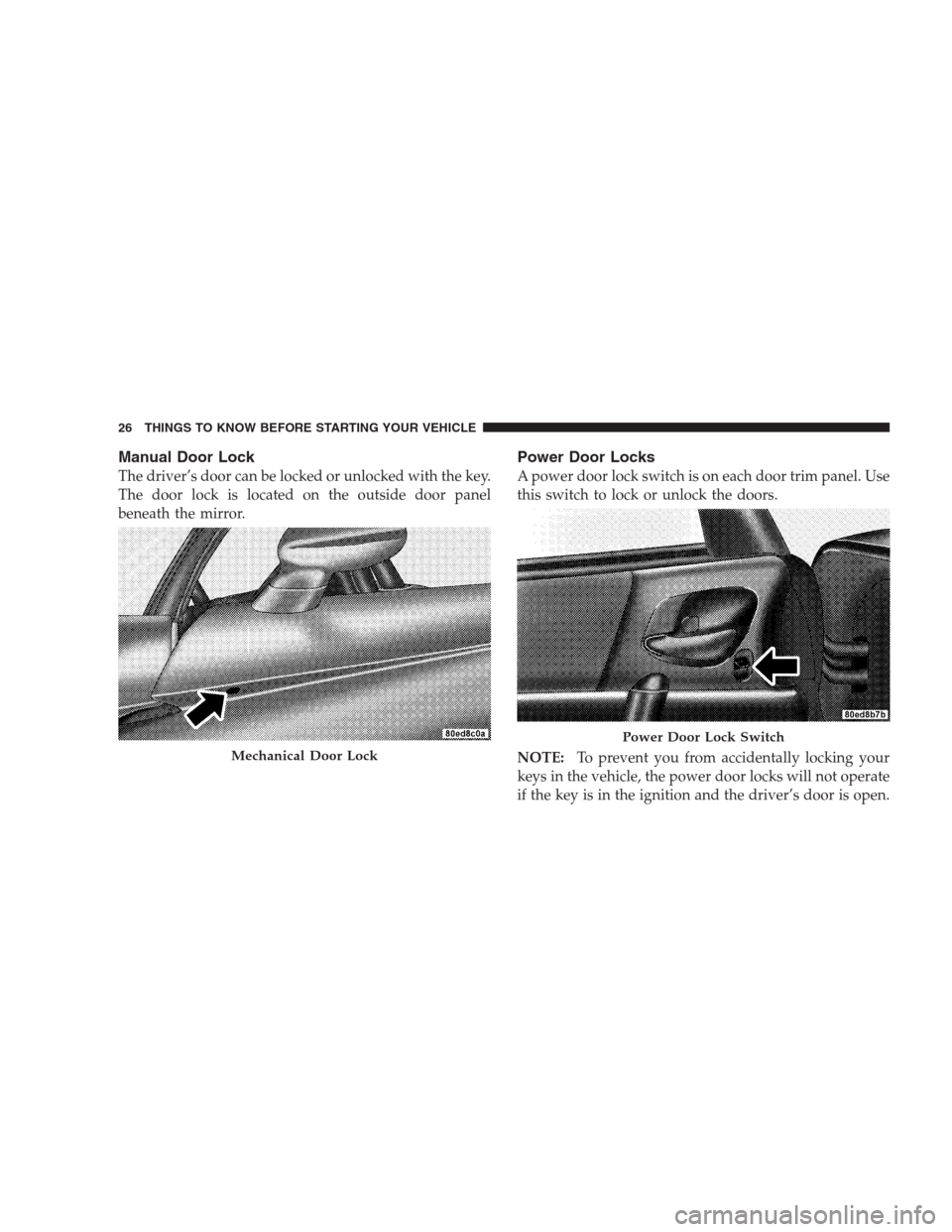
Manual Door Lock
The driver’s door can be locked or unlocked with the key.
The door lock is located on the outside door panel
beneath the mirror.
Power Door Locks
A power door lock switch is on each door trim panel. Use
this switch to lock or unlock the doors.
NOTE:To prevent you from accidentally locking your
keys in the vehicle, the power door locks will not operate
if the key is in the ignition and the driver’s door is open.
Mechanical Door Lock
Power Door Lock Switch
26 THINGS TO KNOW BEFORE STARTING YOUR VEHICLE
Page 29 of 299

Electronic Door Lock
This vehicle is equipped with a virtual lock system. Input
from the outside door handle is ignored if the vehicle is
virtually locked.
Door Lock Messaging
The words “DOOR UNLOCKED” will flash in the odom-
eter if one door is unlocked or will remain on steadily if
both doors are unlocked. A door is considered unlocked
if the inside door handle is pulled. With the key in the
ignition switch, this display will turn off approximately
40 seconds after switching OFF the ignition, or if the
Power Accessory Delay feature is active, it will turn off
approximately 40 seconds after the delay feature times
out.
Automatic Door Locks
This feature locks the doors automatically once vehicle
speed reaches 18 mph (29 km/h).NOTE:Input from the door handles is ignored once the
vehicle is moving faster than 5 mph (8 km/h).
Automatic Door Locks Programming
The Automatic Door Locks feature can be enabled or
disabled as follows:
1. Close all doors and place the key in the ignition.
2. Cycle the ignition switch between ON/RUN and
OFF/LOCK four times ending up in the OFF/LOCK
position.
3. Depress the power door LOCK switch to lock the
doors.
4. A single chime will indicate the completion of the
programming.
5. Repeat these steps if you want to return this feature to
its previous setting.
THINGS TO KNOW BEFORE STARTING YOUR VEHICLE 27
2
Page 30 of 299

This feature can also be disabled at an authorized deal-
ership if desired.
NOTE:Use the Automatic Door Locks feature in accor-
dance with local laws.
WINDOWS
Power Windows
The power window switches are located between the
driver and passenger seats on the center tunnel bezel, just
to the left of the parking brake. The switch on the left side
controls the driver’s window and the switch on the right
controls the passenger’s window. The power window
switches are active when the ignition is in ON/RUN or
ACC position.
NOTE:
•The Power Accessory Delay feature allows you to
operate the power windows for two minutes after
turning OFF the ignition switch. Removing the keyfrom the ignition switch and opening the driver’s door
will cancel this feature. Your authorized dealership can
enable or disable the Power Accessory Delay feature as
desired.
•Windows cannot be driven up during Power Acces-
sory Delay with a door open. Furthermore, opening
the door will stop the window movement immediately
if the window is in the process of going up.
•The window will lower slightly if it is closed com-
pletely when opening the door. The window will
return to its fully closed position after closing the door.
This action is necessary in order to clear the seal when
opening the door.
28 THINGS TO KNOW BEFORE STARTING YOUR VEHICLE
Page 32 of 299

Auto Down Feature
Both windows have an Auto Down feature. Press the
WINDOW switch to the second detent, release, and the
window will go down automatically. Press the switch a
second time in either direction to stop the window.
To open the window to a desired position, press and hold
the WINDOW switch in the first detent. Release the
switch when you want the window to stop.
Wind Buffeting
Wind buffeting can be described as the perception of
pressure on the ears or a helicopter-type sound in the
ears. Your vehicle may exhibit wind buffeting with the
windows down, or the top down (convertible models).
This is a normal occurrence and can be minimized by
adjusting one or both windows up or down slightly.
LIFTGATE — COUPE MODELS ONLY
The liftgate can be unlocked or locked by the Remote
Keyless Entry (RKE) transmitter or by activating either of
the power door lock switches located on the door trim
panels.
To unlock the liftgate with the RKE transmitter, press the
LIFTGATE button on the RKE transmitter for at least one
second. The parking lights and turn signal lights will
flash three times to acknowledge the signal.
NOTE:Pressing the UNLOCK button on the RKE
transmitter will also allow liftgate access.
Once unlocked, the liftgate can be opened or closed. To
open the liftgate, depress the LIFTGATE RELEASE
switch located in the exterior liftgate handle and pull the
liftgate open with one fluid motion.
30 THINGS TO KNOW BEFORE STARTING YOUR VEHICLE
Page 33 of 299

NOTE:The liftgate release switch will be ignored under
the following conditions:
•When the ignition is in RUN and the parking brake is
not set.
•When vehicle speed is not 0 mph (0 km/h).
•When all doors are locked (except for RKE transmitter
liftgate access). Refer to “Entering the liftgate with the
System Armed — Coupe” under “Security Alarm
System” in this section for additional information.
The word “DECK” will flash in the odometer when the
liftgate is open. With the key in the ignition switch, this
display will turn off approximately 40 seconds after
switching OFF the ignition, or if the Power Accessory
Delay feature is active, it will turn off approximately
40 seconds after the delay feature times out.
WARNING!
•Driving with the liftgate open can allow poison-
ous exhaust gases into your vehicle. You and your
passengers could be injured by these fumes. Keep
the liftgate closed when you are operating the
vehicle.
•If you are required to drive with the liftgate open,
make sure that all windows are closed, and the
climate control blower switch is set at high speed.
DO NOT use the recirculation mode.
Gas props support the liftgate in the open position.
However, because the gas pressure drops with tempera-
ture, it may be necessary to assist the props when
opening the liftgate in cold weather.
THINGS TO KNOW BEFORE STARTING YOUR VEHICLE 31
2
Page 41 of 299

Lap/Shoulder Belt Untwisting Procedure
Use the following procedure to untwist a twisted lap/
shoulder belt.
1. Position the latch plate as close as possible to the
anchor point.
2. At about 6 to 12 in (15 to 30 cm) above the latch plate,
grasp and twist the belt webbing 180 degrees to create a
fold that begins immediately above the latch plate.
3. Slide the latch plate upward over the folded webbing.
The folded webbing must enter the slot at the top of the
latch plate.
4. Continue to slide the latch plate up until it clears the
folded webbing.
Enhanced Seat Belt Reminder System (BeltAlert�)
If the driver does not buckle their seat belt and vehicle
speed exceeds 5 mph (8 km/h), or if the passenger does
not buckle their seat belt within 10 seconds of vehiclespeed exceeding 5 mph (8 km/h), the Enhanced Warning
System (BeltAlert�) will alert the occupant(s) to buckle
their seat belt(s). Once triggered, BeltAlert�will flash the
Seat Belt Reminder Light and chime for up to 96 seconds
to alert the occupant(s) to buckle their seat belt(s). If the
driver unbuckles their seat belt while vehicle speed is
greater than 5 mph (8 km/h), or if the passenger unbuck-
les their seat belt for more than 10 seconds while vehicle
speed is greater than 5 mph (8 km/h), BeltAlert�will
reactivate.
BeltAlert�Programming
BeltAlert�can be enabled or disabled by your authorized
dealer or by performing the following steps:
NOTE:Chrysler LLC does not recommend deactivating
BeltAlert�.
1. Close all doors.
2. Turn the ignition switch to the OFF/LOCK position.
THINGS TO KNOW BEFORE STARTING YOUR VEHICLE 39
2