Page 182 of 523
WARNING!
If containers of hot liquid are placed in the bottle
holder, they can spill when the door is closed, burn-
ing the occupants. Be careful when closing the doors
to avoid injury.
STORAGE
Beverage Cooler/Storage Compartment — If
Equipped
NOTE:The Beverage Cooler can keep chilled beverages
cool depending on ambient temperature and climate
control setting. The cooler is intended for non-perishable
beverages only.
The Beverage Cooler/Storage Compartment is located on
the passenger’s side of the instrument panel above the
glove compartment. The beverage retainer inside the cooler is designed to hold up to two 12 oz (0.35 l) cans
when placed horizontally in the retainer. The beverage
retainer is removable to allow for storage of other items
in the compartment when not in use as a cooler.
Beverage Cooler/Storage Compartment
180 UNDERSTANDING THE FEATURES OF YOUR VEHICLE
Page 184 of 523
NOTE:Whether operating a Manual Heating and A/C
system or operating an ATC system in a manual mode,
the A/C indicator must be ON to cool the compartment.
Instrument Panel Storage Compartment — If
Equipped
Press and release the button on the door to open it. The
door swings upward to allow easy access to the compart-
ment.
Instrument Panel Storage Compartment
182 UNDERSTANDING THE FEATURES OF YOUR VEHICLE
Page 201 of 523
UNDERSTANDING YOUR INSTRUMENT PANEL
CONTENTS
�Instrument Panel Features .................203
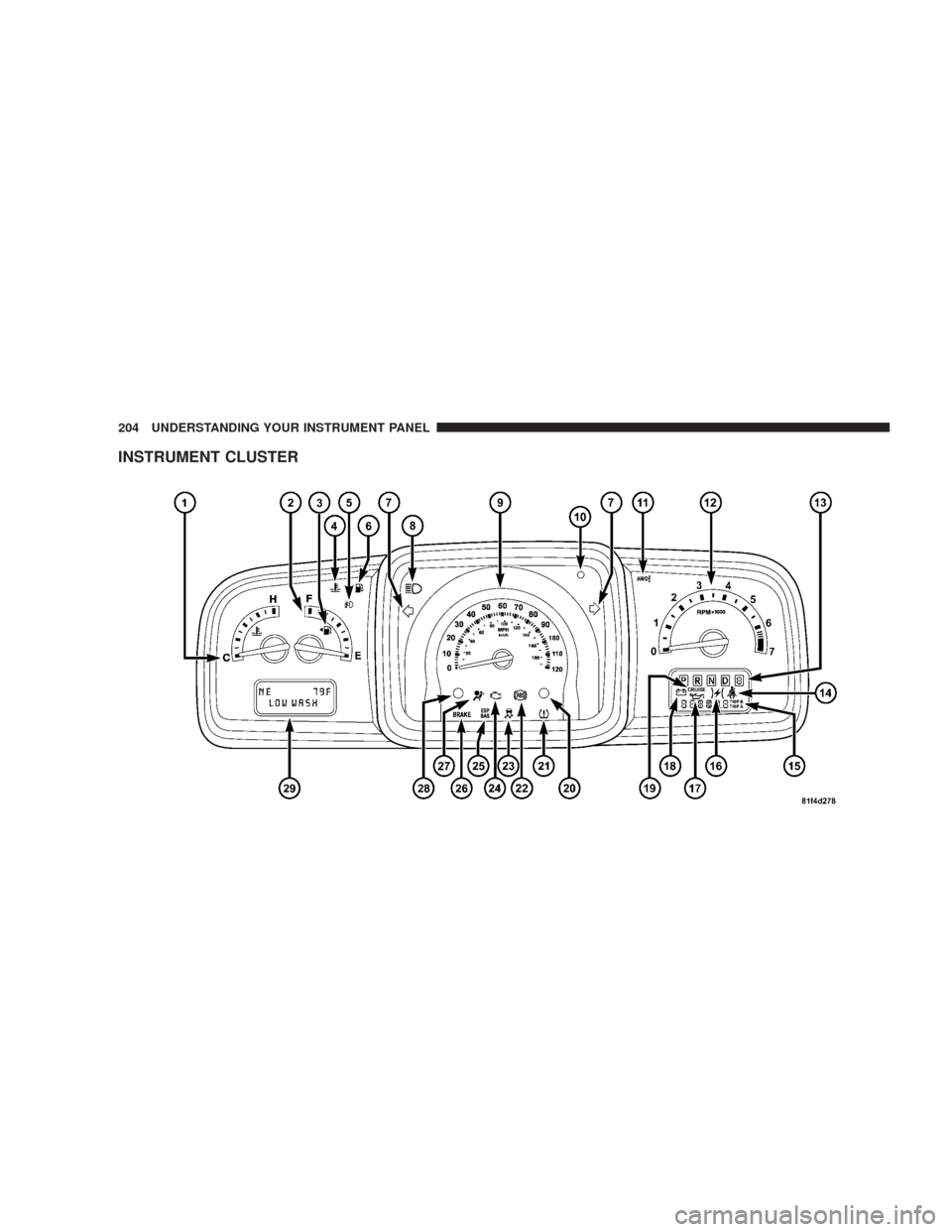
� Instrument Cluster ......................204
� Instrument Cluster Descriptions ............205
� Electronic Vehicle Information Center (EVIC) —
If Equipped ...........................221
▫ Electronic Vehicle Information Center (EVIC)
Displays ............................223
▫ Oil Change Required ...................225
▫ Trip Functions .......................226 ▫
Compass Display .....................227
▫ Personal Settings (Customer Programmable
Features) ...........................230
� Radio General Information ................233
▫ Radio Broadcast Signals .................233
▫ Two Types Of Signals ..................233
▫ Electrical Disturbance ..................233
▫ AM Reception .......................233
▫ FM Reception ........................2344
Page 202 of 523

�Sales Code REN — Multimedia System —
If Equipped ...........................234
▫ Operating Instructions — Satellite Radio (If
Equipped) ..........................235
▫ Operating Instructions — Voice Recognition
System (VR) (If Equipped) ...............235
▫ Operating Instructions — Hands-Free
Communication (UConnect�) (If Equipped) . . . 235
▫ Clock Setting Procedur e.................236
� Sales Code REQ — AM/FM Stereo Radio And
6–Disc CD/DVD Changer
(MP3/WMA AUX Jack) ..................238
▫ Operating Instructions - Radio Mode .......238
▫ Operation Instructions - (Disc Mode For CD
And MP3/WMA Audio Play, DVD-Video) ....247▫
Notes On Playing MP3/WMA Files ........249
▫ List Button (Disc Mode For MP3/WMA
Play) ..............................251
▫ Info Button (Disc Mode For MP3/WMA
Play) ..............................251
� Sales Code RES — AM/FM Stereo Radio With CD
Player (MP3 AUX Jack) ..................254
▫ Operating Instructions - Radio Mode .......254
▫ Operation Instructions - CD Mode For CD And
MP3 Audio Play ......................260
▫ Notes On Playing MP3 Files .............262
▫ List Button (CD Mode For MP3 Play) .......265
▫ Info Button (CD Mode For MP3 Play) .......265
200 UNDERSTANDING YOUR INSTRUMENT PANEL
Page 203 of 523

�Sales Code REU — Multimedia System — If
Equipped ............................266
▫ Operating Instructions — Satellite Radio .....267
▫ Operating Instructions — Hands-Free
Communication (UConnect�) (If Equipped) . . . 267
▫ Clock Setting Procedur e.................267
� Satellite Radio — If Equipped
(REN/REQ/RER/RES/REU Radios Only) .....271
▫ System Activation .....................271
▫ Electronic Serial Number/Sirius Identification
Number (ESN/SID) ....................271
▫ Selecting Satellite Mode .................272
▫ Satellite Antenna ......................272
▫ Reception Quality .....................273 ▫
Operating Instructions - Satellite Mode ......273
▫ Operating Instructions - Hands-Free Phone
(If Equipped) ........................276
▫ Operating Instructions - Video Entertainment
System (VES)™ (If Equipped) .............276
� Sirius Backseat TV™ — If Equipped .........276
� Video Entertainment System (VES)™ — If
Equipped ............................276
� Universal Consumer Interface (UCI) —
If Equipped ...........................278
▫ Connecting The iPod� Device............278
▫ Controlling The iPod� Using Radio Buttons . . . 278
▫ Play Mode ..........................279
▫ List Or Browse Mode ..................280
UNDERSTANDING YOUR INSTRUMENT PANEL 201
4
Page 204 of 523
�Remote Sound System Controls — If Equipped . . 282
▫ Right-Hand Switch Functions .............283
▫ Left-Hand Switch Functions For Radio
Operation ...........................283
▫ Left-Hand Switch Functions For Media
(i.e., CD) Operation ....................283
� CD/DVD Maintenance ...................284
� Radio Operation And Cellular Phones ........284
� Climate Controls .......................285 ▫
General Climate Control Functions —
All Systems .........................285
▫ Single-Zone Manual Air Conditioning And
Heating System ......................288
▫ Two- And Three-Zone Manual Air Conditioning
And Heating Systems — If Equipped .......289
▫ Two- And Three-Zone Automatic Temperature
Control (ATC) Systems — If Equipped ......293
▫ Operating Tips .......................300
202 UNDERSTANDING YOUR INSTRUMENT PANEL
Page 205 of 523
INSTRUMENT PANEL FEATURES
1 — Side Window Demist Outlet5 — HAZARD Switch9 — Climate Control
2 — Air Outlet 6 — Switch Bank10 — Radio
3 — Instrument Cluster 7 — Beverage Cooler/Storage Compartment* 11 — Ignition Switch
4 — Storage Compartment or Remote Display Panel* 8 — Glove Box * If Equipped
UNDERSTANDING YOUR INSTRUMENT PANEL 203
4
Page 206 of 523
INSTRUMENT CLUSTER
204 UNDERSTANDING YOUR INSTRUMENT PANEL