Page 39 of 523
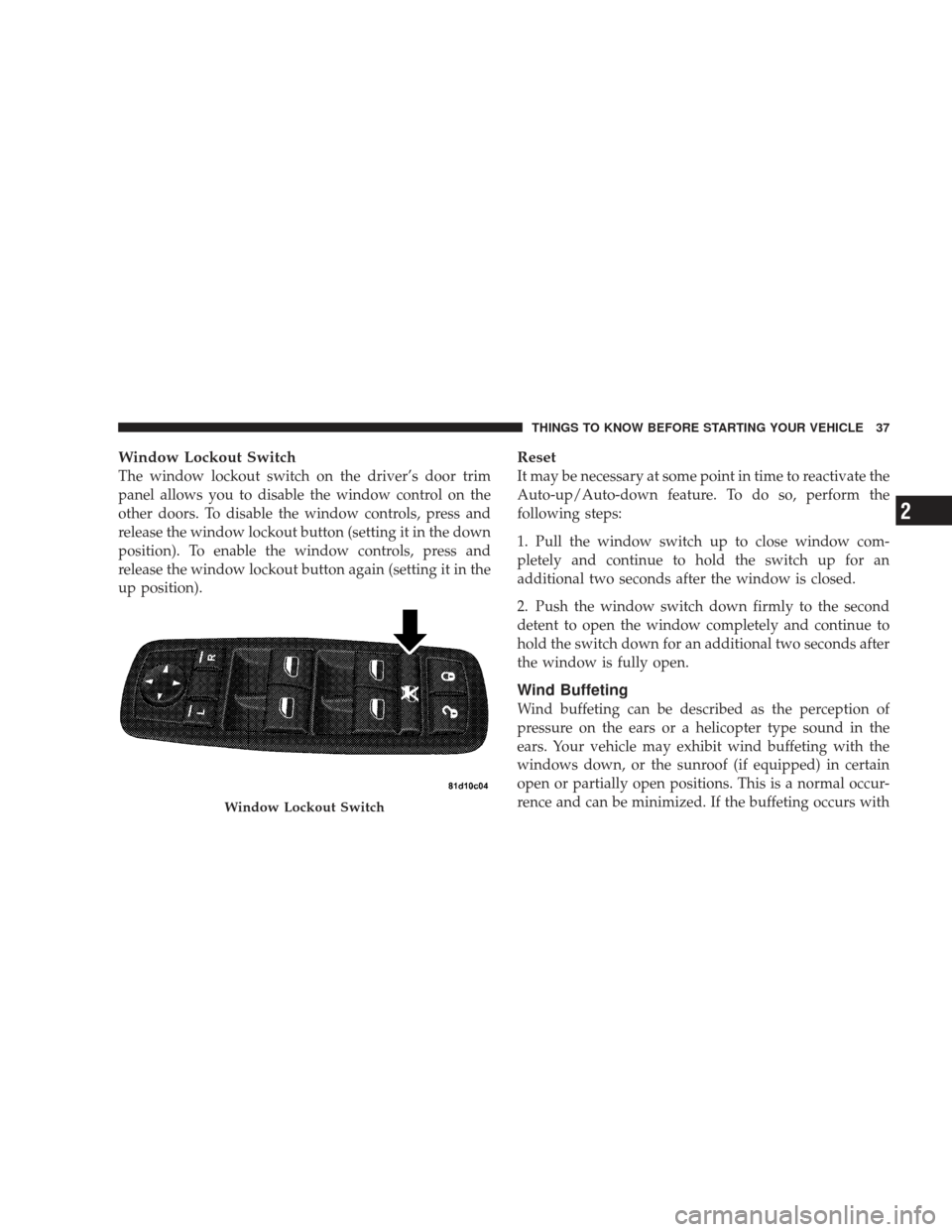
Window Lockout Switch
The window lockout switch on the driver’s door trim
panel allows you to disable the window control on the
other doors. To disable the window controls, press and
release the window lockout button (setting it in the down
position). To enable the window controls, press and
release the window lockout button again (setting it in the
up position).
Reset
It may be necessary at some point in time to reactivate the
Auto-up/Auto-down feature. To do so, perform the
following steps:
1. Pull the window switch up to close window com-
pletely and continue to hold the switch up for an
additional two seconds after the window is closed.
2. Push the window switch down firmly to the second
detent to open the window completely and continue to
hold the switch down for an additional two seconds after
the window is fully open.
Wind Buffeting
Wind buffeting can be described as the perception of
pressure on the ears or a helicopter type sound in the
ears. Your vehicle may exhibit wind buffeting with the
windows down, or the sunroof (if equipped) in certain
open or partially open positions. This is a normal occur-
rence and can be minimized. If the buffeting occurs with
Window Lockout Switch
THINGS TO KNOW BEFORE STARTING YOUR VEHICLE 37
2
Page 41 of 523

WARNING!
•Driving with the liftgate open can allow poison-
ous exhaust gases into your vehicle. These fumes
could injure you and your passengers. Keep the
liftgate closed when you are operating the vehicle.
•If you are required to drive with the liftgate open,
make sure that all windows are closed, and the
blower switch on the climate control is set at high
speed. DO NOT use the recirculation mode.
OCCUPANT RESTRAINTS
Some of the most important safety features in your
vehicle are the restraint systems. The following safety
features are standard on your vehicle:
•Front airbags for both the driver and front passenger
•Supplemental side curtain airbags for the driver and
passengers seated next to a window
•Supplemental front seat mounted side airbags
•An energy-absorbing steering column and steering
wheel
•Knee Bolsters/Blockers for front seat occupants
•Three-point lap and shoulder belts for all seating
positions
•Pretensioning and load-limiting retractors for the front
seat belts to enhance occupant protection by managing
occupant energy during an impact event.
•All seat belt systems (except the driver’s and second
row center position) include Automatic Locking Re-
tractors (ALRs).
THINGS TO KNOW BEFORE STARTING YOUR VEHICLE 39
2
Page 51 of 523

4. Turn the ignition switch to the LOCK position. A
single chime will sound to signify that you have success-
fully completed the programming.
The BeltAlert�can be reactivated by repeating this pro-
cedure.
NOTE: When the BeltAlert� is deactivated, the Seat Belt
Reminder Light will continue to illuminate as long as the
driver’s seat belt is unbuckled/retracted.
Automatic Locking Mode
In this mode, the shoulder belt is automatically pre-
locked. However, the belt will still retract to remove slack
in the shoulder belt. Use The Automatic Locking mode
any time a child safety seat is installed in a seating
position that has a seat belt with this feature. Children 12
years old and younger should be properly restrained in
the rear seat whenever possible.
How to Engage the Automatic Locking Mode
1. Buckle the combination lap and shoulder belt.
2. Grasp the shoulder portion and pull downward until
the entire belt is extracted.
3. Allow the belt to retract. As the belt retracts, you will
here a clicking sound. This indicates the safety belt is
now in the Automatic Locking mode.
How to Disengage the Automatic Locking Mode
Unbuckle the combination lap and shoulder belt and
allow it to retract completely to disengage the Automatic
Locking mode and activate the vehicle sensitive (emer-
gency) locking mode.
THINGS TO KNOW BEFORE STARTING YOUR VEHICLE 49
2
Page 64 of 523

•Turns on the interior lights, which remain on as long as
the battery has power or until the ignition key is
removed.
•Unlocks the doors automatically.
NOTE: The interior lights can only be deactivated if the
key is removed from the ignition switch or the vehicle is
driven.
Maintaining Your Airbag System
WARNING!
•Modifications to any part of the airbag system
could cause it to fail when you need it. You could
be injured because the airbags are not there to
protect you. Do not modify the components or
wiring, including adding any kind of badges or
stickers to the steering wheel hub trim cover or the
upper passenger’s side of the instrument panel.
Do not modify the front bumper, vehicle body
structure, or frame.
•You need proper knee impact protection in a
collision. Do not mount or locate any aftermarket
equipment on or behind the knee impact bolster.
•It is dangerous to try to repair any part of the
airbag system yourself. Be sure to tell anyone who
works on your vehicle that it has airbags.
62 THINGS TO KNOW BEFORE STARTING YOUR VEHICLE
Page 77 of 523

WARNING!
Improper installation of a child restraint to the
LATCH anchorages can lead to failure of an infant or
child restraint. The child could be badly injured or
killed. Follow the manufacturer’s directions exactly
when installing an infant or child restraint.
Installing Child Restraints Using the Vehicle Seat
Belt
The seat belts in the passenger seating positions are
equipped with either an Automatic Locking Retractor
(ALR) or a cinching latch plate or both. Both types of seat
belts are designed to keep the lap portion of the seat belt
tight around the child restraint so that it is not necessary
to use a locking clip. The ALR will make a ratcheting
noise if you extract the entire belt from the retractor andthen allow the belt to retract into the retractor. For
additional information on ALR, refer to “Automatic
Locking Mode” in this section.
To install a child restraint, first, pull enough of the seat
belt webbing from the retractor to route it through the
belt path of the child restraint and slide the latch plate
into the buckle. Next, extract all the seat belt webbing out
of the retractor and then allow the belt to retract into the
retractor. Finally, pull on any excess webbing to tighten
the lap portion around the child restraint. Any seat belt
system will loosen with time, so check the belt occasion-
ally, and pull it tight if necessary.
To attach a child restraint tether strap:
•
Route the tether strap to provide the most direct path
for the strap between the anchor and the child seat,
preferably between the head restraint posts underneath
the head restraint.
THINGS TO KNOW BEFORE STARTING YOUR VEHICLE 75
2
Page 93 of 523

Models with Express Window Feature
Press and release the mirror SELECT button marked L or
R and then press one of the four arrow buttons to move
the mirror in the direction the arrow is pointing. The
selection times out after 30 seconds of inactivity in order
to guard against accidentally changing a mirror position
following an adjustment.
Heated Remote Control Mirrors — If Equipped
These mirrors are heated to melt frost or ice. This feature
is activated whenever you turn on the Electric Rear
Window Defroster.
Illuminated Vanity Mirrors — If Equipped
An illuminated vanity mirror is on each sun visor. To use
the mirror, rotate the sun visor downward and swing the
mirror cover upward. The light will turn on automati-
cally. Closing the mirror cover will turn off the light.Sun Visor “Slide-On Rod” Feature — If Equipped
This feature allows for additional flexibility in position-
ing the visor to block out the sun.
1. Fold down the sun visor.
2. Unclip the visor from the center clip.
Illuminated Vanity Mirror
UNDERSTANDING THE FEATURES OF YOUR VEHICLE 91
3
Page 144 of 523
To Fold the Seat
Pull the latch release-loop located at the top of the
seatback upward, push the seat forward slightly, and
release the release-loop. Then, continue to push the seat
forward. The head restraints will fold automatically as
the seat moves forward.
To Unfold the Seat
Grasp the assist strap loop on the seatback and pull it
toward you to raise the seatback. Continue to raise the
seatback until it locks in place. Then, raise the head
restraint to lock it in place.
Seatback Release
Assist Strap
142 UNDERSTANDING THE FEATURES OF YOUR VEHICLE
Page 149 of 523

Automatic Headlights — If Equipped
This system automatically turns the headlights on or off
according to ambient light levels. To turn the system ON,
turn the end of the multifunction lever to the AUTO
position (third detent). When the system is on, the
headlight time delay feature is also on. This means the
headlights will stay on for up to 90 seconds after you turn
the ignition switch to the LOCK position. To turn the
Automatic System OFF, turn the end of the multifunction
lever out of the AUTO position.
NOTE:The engine must be running before the head-
lights will turn on in the automatic mode.
Headlights with Wipers (Available with Auto
Headlights Only)
When this feature is active, the headlights will turn on
approximately 10 seconds after the wipers are turned ON
if the multifunction lever is placed in the AUTO position. In addition, the headlights will turn off when the wipers
are turned OFF if they were turned ON by this feature.
The Headlights with Wipers feature can be turned on or
off through the Electronic Vehicle Information Center
(EVIC) (if equipped). Refer to ”Headlights With Wipers,”
under “Personal Settings (Customer Programmable Fea-
tures)” under “Electronic Vehicle Information Center” in
Section 4.
Headlight Time Delay — If Equipped
This feature is particularly useful when exiting your
vehicle in an unlit area. It provides the safety of headlight
illumination for up to 90 seconds after turning the
ignition switch to the LOCK position.
To activate the delay, turn the ignition switch to the
LOCK position while the headlights are still on. Then,
turn OFF the headlights within 45 seconds. The delay
interval begins when you turn OFF the headlights. Only
the headlights will illuminate during this time.
UNDERSTANDING THE FEATURES OF YOUR VEHICLE 147
3
