Page 177 of 498
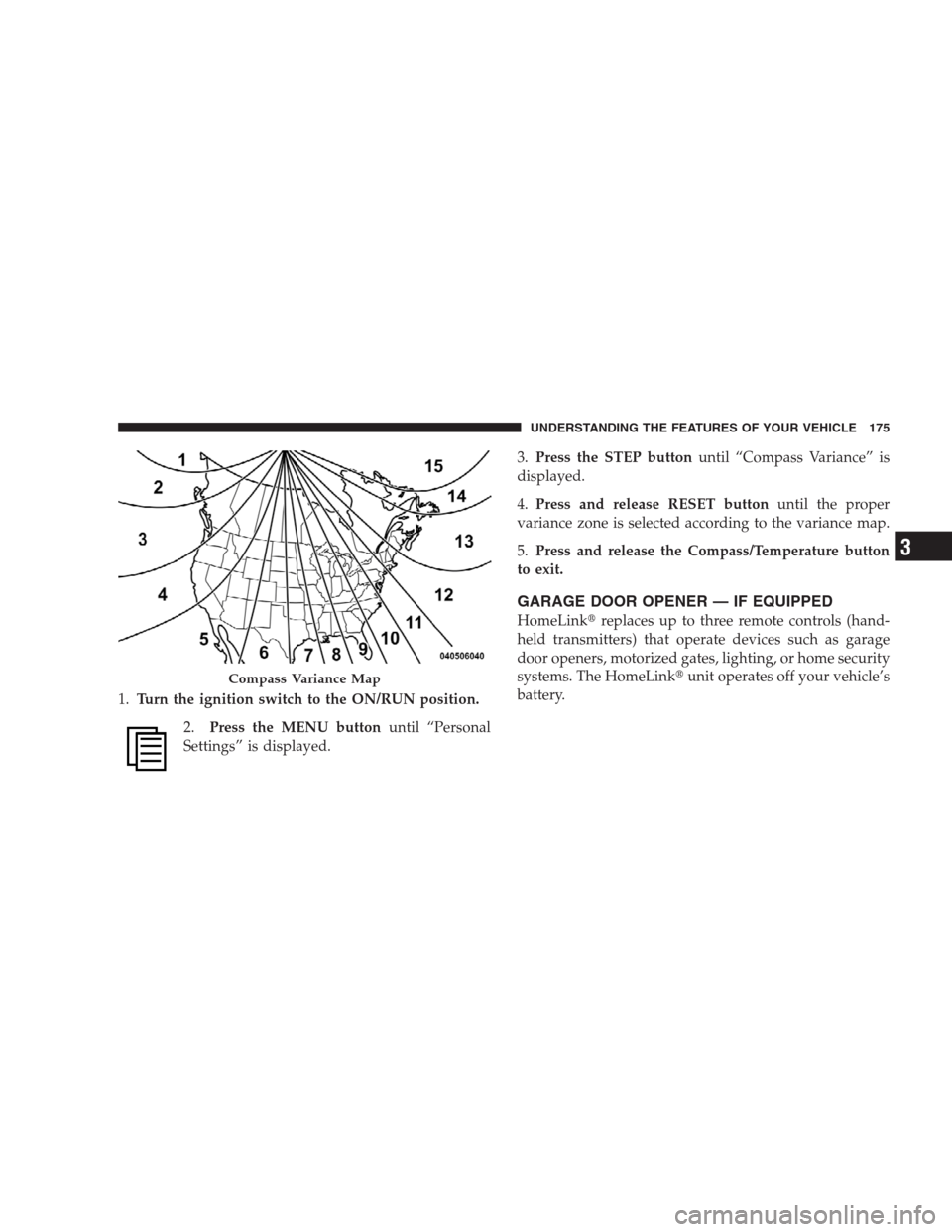
1.Turn the ignition switch to the ON/RUN position.
2.Press the MENU buttonuntil “Personal
Settings” is displayed.3.Press the STEP buttonuntil “Compass Variance” is
displayed.
4.Press and release RESET buttonuntil the proper
variance zone is selected according to the variance map.
5.Press and release the Compass/Temperature button
to exit.
GARAGE DOOR OPENER — IF EQUIPPED
HomeLink�replaces up to three remote controls (hand-
held transmitters) that operate devices such as garage
door openers, motorized gates, lighting, or home security
systems. The HomeLink�unit operates off your vehicle’s
battery.
Compass Variance Map
UNDERSTANDING THE FEATURES OF YOUR VEHICLE 175
3
Page 179 of 498

Programming HomeLink�
Before You Begin
If you have not trained any of the HomeLink�buttons,
erase all channels before you begin training.
To do this, press and hold the two outside buttons for up
to 20 seconds. The EVIC will display “CLEARING
CHANNELS.” Release the buttons when the EVIC mes-
sage states “CHANNELS CLEARED.”
It is recommended that a new battery be placed in the
hand-held transmitter of the device being programmed
to HomeLink�for more efficient training and accurate
transmission of the radio-frequency signal.
Your vehicle should be parked outside of the garage
while training.
1. Turn the ignition switch to the ON/RUN position.2. Place the hand-held transmitter 1 to 3 in (3 to 8 cm)
from the HomeLink�buttons while keeping the EVIC
display in view.
For optimal training, point the battery end of the hand-
held transmitter away from the HomeLink�.
3. Simultaneously, press and hold both the chosen
HomeLink�button and the hand-held transmitter button
until the EVIC display changes from “CHANNEL #
TRAINING” to “CHANNEL # TRAINED.”
Then release both the HomeLink�and hand-held trans-
mitter buttons.
If the EVIC display states “DID NOT TRAIN” repeat
Step 3. If the signal is too weak, replace the battery in the
original hand-held transmitter.
It may take up to 30 seconds, or longer, in rare cases. The
garage door may open and close while you train.
UNDERSTANDING THE FEATURES OF YOUR VEHICLE 177
3
Page 182 of 498

has successfully accepted the frequency signal. The
EVIC display will change from “CHANNEL # TRAIN-
ING” to “CHANNEL # TRAINED.”
If you unplugged the device for training, plug it back in
at this time.
Then proceed with Step 4 under “Programming
HomeLink�” earlier in this section.
Using HomeLink�
To operate, simply press and release the programmed
HomeLink�button. Activation will now occur for the
trained device (i.e., garage door opener, gate operator,
security system, entry door lock, home/office lighting,
etc.) The hand-held transmitter of the device may also be
used at any time.
Reprogramming A Single HomeLink�Button
To reprogram a channel that has been previously trained,
follow these steps:
1. Turn the ignition switch to the ON/RUN position.
2. Press and hold the desired HomeLink�button for
20 seconds until the EVIC display states “CHANNEL #
TRAINING.”Do not release the button.
3.Without releasing the button,proceed with Program-
ming HomeLink�Step 2 and follow all remaining steps.
Security
It is advised to erase all channels before you sell or turn
in your vehicle.
To do this, press and hold the two outside buttons for
20 seconds until the EVIC message states “CHANNELS
CLEARED.” Note that all channels will be erased. Indi-
vidual channels cannot be erased.
180 UNDERSTANDING THE FEATURES OF YOUR VEHICLE
Page 184 of 498

POWER SUNROOF — IF EQUIPPED
The power sunroof control is located between the sun
visors on the overhead console.
Press and hold the OPEN button rearward to fully open
the sunroof. The sunroof can be stopped at any position
between closed and full open. Momentarily pressing the
OPEN button rearward will activate the Express Open
Feature, causing the sunroof to open automatically.
To close the panel, the CLOSE end of the switch must be
pressed and held.
Press and hold the VENT button to open the vent. The
sunroof can be stopped at any position between closed
and full vent. To close the sunroof from the vent position,
press and hold the CLOSE button forward. Releasing the
button will stop the movement of the sunroof and the
sunroof will remain in the partial vent position until the
button is pushed forward again.NOTE:•The sunroof will continue to operate for 10 minutes
after the ignition is turned OFF or until the driver’s
door is opened. This feature may be disabled by your
authorized dealer.
•The Power Accessory Delay feature is programmable
on vehicles equipped with the Electronic Vehicle In-
formation Center (EVIC). For details, refer to “Per-
sonal Settings (Customer-Programmable Features)”
under “Overhead Console with Electronic Vehicle In-
formation Center (EVIC) – If Equipped” in Section 3.
Express Open Feature
During the Express Open operation, any movement of
the switch will stop the sunroof and it will remain in a
partial open position. Again, momentarily pressing the
switch rearward will activate the Express Open Feature.
To close the sunroof, hold the switch in the forward
position. Again, any release of the switch will stop the
182 UNDERSTANDING THE FEATURES OF YOUR VEHICLE
Page 185 of 498

movement and the sunroof will remain in a partial open
condition until the switch is pushed forward again. To
close fully, hold the switch in the forward position until
the glass movement has stopped.
The sunshade can be opened manually. It will also open
as the sunroof opens. The sunshade cannot be closed if
the sunroof is open.
WARNING!
•Never leave children alone in a vehicle. Leaving
unattended children in a vehicle is dangerous for a
number of reasons. A child or others could be
seriously or fatally injured. Don’t leave the key in
the ignition. A child could operate power win-
dows, other controls, or move the vehicle.
(Continued)
WARNING! (Continued)
•In an accident, there is a greater risk of being
thrown from a vehicle with an open sunroof. You
could also be seriously injured or killed. Always
fasten your seat belt properly and make sure all
passengers are properly secured too.
•Do not allow small children to operate the sun-
roof. Never allow fingers or other body parts, or
any object to project through the sunroof opening.
Injury may result.
Wind Buffeting
Wind buffeting can be described as the perception of
pressure on the ears or a helicopter-type sound in the
ears. Your vehicle may exhibit wind buffeting with the
windows down, or the sunroof (if equipped) in certain
open or partially open positions. This is a normal occur-
rence and can be minimized. If the buffeting occurs with
the rear windows open, open the front and rear windows
UNDERSTANDING THE FEATURES OF YOUR VEHICLE 183
3
Page 186 of 498

together to minimize the buffeting. If the buffeting occurs
with the sunroof open, adjust the sunroof opening to
minimize the buffeting or open any window.
Sunroof Maintenance
Use only a nonabrasive cleaner and a soft cloth to clean
the glass panel.
ELECTRICAL POWER OUTLETS
This vehicle has three 12-Volt auxiliary power outlets that
can provide up to 20 Amps of current for accessories
designed for use with the standard power outlet adapt-
ers. The outlet located in the lower portion of the
instrument panel has a snap on plastic cap so that it can
be covered when not in use. As a safety precaution, the
outlet in the instrument panel only operates with the
ignition switch ON. When the optional Cigar Lighter
heating element is used, it heats when pushed in and
pops out automatically when ready for use.To preservethe heating element, do not hold the lighter in the
heating position.
There are two additional 12-Volt (20 total Amps for both
outlets) power outlets, one located in the storage bin of
the center console and another located in the right rear
cargo area. These outlets can be configured by the
customer to operate only when the ignition is ON
(switched battery fed) or with the ignition ON or OFF
(battery fed) to allow for cellular telephone charging and
operation while the ignition is OFF.
NOTE:All accessories connected to these outlets should
be removed or turned off when the vehicle is not in use
to protect the battery against discharge (unless the cus-
tomer has configured the fuse block to switched battery
feed).
184 UNDERSTANDING THE FEATURES OF YOUR VEHICLE
Page 188 of 498
Configuring Power Outlets
To configure the outlets, be sure the ignition is OFF before
removing the fuse. The “reconfigurable” fuse location is a
special design that allows the fuse to be installed in two
different ways. If the fuse is located in the�Upper or Top
Position�the outlets will work at all times. If the fuse is
located in the�Lower or Bottom Position�the power
outlets will only work when the ignition is ON.
NOTE:The fuse block is located in the left side kick
panel behind a removable cover near the park brake
pedal. A fuse puller is attached to the inside surface of the
fuse panel cover to aid in removing fuses, if necessary.
Top Fuse Block
1 — 20 Amp Reconfigurable
Fuse3 — Ign = Bottom Location
2 — Battery = Top Location 4 — Yellow Airbag Fuses 186 UNDERSTANDING THE FEATURES OF YOUR VEHICLE
Page 196 of 498

For vehicles equipped with Automatic Climate Controls
(ATC) the controls can be found on the lower right corner.
A rotating switch located on the climate control
panel turns the rear wiper ON or OFF. Pressing the
rotating switch inward activates the rear window washer.
Rotating the switch will enable one of five intermittentdelay times for the rear wiper. The delay times range
from 1 second to approximately 20 seconds.
If the rear wiper is operating when the ignition is turned
OFF, the wiper will automatically return to the Park
position. When the vehicle is restarted, the wiper will
resume operation.
Rear Window Defrosting
A push-button type switch is located in the climate
control panel. Press the switch and the rear window
defroster and electric remote control heated mirrors (if
equipped) will turn on. An amber indicator on the push-
button will light when the defroster is turned on. A symbol
will be displayed when the defroster is turned on with an
ATC control. Push again to turn off prior to time-out. The
defroster will automatically turn off after 15 minutes. For
an additional 10 minutes of operation, push the button a
second time. To prevent excessive battery drain, use the
defroster only when the engine is operating.
Automatic Climate Control Panel
194 UNDERSTANDING THE FEATURES OF YOUR VEHICLE