Page 265 of 498

SCAN Button (When Equipped)
Pressing the SCAN button causes the tuner to search for
the next channel, pausing for eight seconds before con-
tinuing to the next. To stop the search, press the SCAN
button a second time.
INFO Button — Except REU Radio
Pressing the INFO button will cycle the display informa-
tion between Artist, Song Title, and Composer (if avail-
able). Also, pressing and holding the INFO button for an
additional three seconds will make the radio display the
song title all of the time (press and hold again to return to
normal display).
INFO Button — REU Radio
Pressing the INFO button will display information about
Artist, Song Title, and Composer (if available). Pressing
the INFO button again will close the INFO screen.
RW/FF
Pressing the RW (Rewind) or FF (Fast Forward) buttons
causes the tuner to search for the next channel in the
direction of the arrows.
TUNE Control (Rotary)
Turn the rotary TUNE/SCROLL control knob clockwise
to increase or counterclockwise to decrease the channel.
MUSIC TYPE Button — Except REU Radio
Pressing this button once will turn on the Music Type
mode for five seconds. Pressing the MUSIC TYPE button
or turning the TUNE/SCROLL control knob within five
seconds will allow the program format type to be se-
lected.
Toggle the MUSIC TYPE button again to select the music
type.
UNDERSTANDING YOUR INSTRUMENT PANEL 263
4
Page 272 of 498

NOTE:The compressor will not engage until the engine
has been running for several seconds. Slight changes in
engine speed or power may be noticed when the com-
pressor cycles. This is a normal occurrence since the
compressor will cycle on and off to maintain comfort and
improve fuel economy.
Front Blower Control
The front blower controls the amount
of air delivered to the passenger com-
partment. There are four blower
speeds. The fan speed increases as you
turn the control clockwise. When the
front blower control is turned to OFF,
the blower will be turned off and the
system will be positioned in recirculation mode.NOTE:For vehicles equipped with Remote Start, the
climate controls will not function during Remote Start
operation if the blower control is left in the “O” (Off)
position.
Front Mode Control
The mode control allows you to
choose from several patterns of air
distribution.
NOTE:To improve your selection choices, the system
allows you to operate at intermediate positions between
the major modes. These intermediate positions are iden-
tified by the small dots and give an even blend of both
modes.
270 UNDERSTANDING YOUR INSTRUMENT PANEL
Page 277 of 498
feature. Refer to�Overhead Console Customer-
Programmable Features�in Section 3. The mode will
also be shown in the display and will change as
required during automatic operation.
•The system can be put into recirculate mode without
affecting ATC operation. This will prevent outside air
from entering the vehicle. Use this mode to tempo-
rarily block out any outside odors, smoke, or dust.
Manual Control (ATC)
You may also choose to customize your comfort by
selecting the fan speed and mode manually. Turning the
fan speed knob or any mode button places the system
into manual operation.
While in manual operation there are six fan speeds
available and the choice of any mode. The airflow
temperature is adjusted automatically to maintain the
desired comfort level. You can adjust the temperature by
pressing the + or - Temp rocker switches.
FAN Control
Use this knob to regulate the amount of air delivered
through the system in any mode you select. Rotation
of the knob to increase (clockwise) or decrease (counter-
clockwise) fan speed.
Air Conditioning Operation
Press this button to enable the air conditioning
system. Compressor operation is automatic when
you press the AUTO button and no snowflake is
shown. A snowflake indicates that the A/C system is
enabled. The snowflake will not be displayed in AUTO
mode even though the A/C system is enabled.
The compressor may operate at any temperature above
32°F (0°C).
NOTE:The compressor will not engage until the engine
has been running for several seconds. Slight changes in
UNDERSTANDING YOUR INSTRUMENT PANEL 275
4
Page 281 of 498

Headliner air comes from the outlets in the headliner.
Each of these outlets can be individually adjusted to
direct the flow of air. Moving the air vane knobs on the
outlets to one side will shut off the airflow.
The rear compartment control uses two rotary knobs: one
for the temperature control and the other for the fan
speed control. The mode for the rear air conditioning andheating system is always controlled by the front control
unit. Fan and temperature can be controlled from the
front control unit or the rear control unit.
Rear Rotary Blower Control
The second row seat occupants have control of the rear
blower speed only when the front control unit is in the
“REAR CONTROL” position or “CONTROL IN REAR
for ATC.�
The rear blower switch has an OFF position and a range
of blower speeds. Rotating the rear blower control clock-
wise will increase the blower speed.
Rear Rotary Temperature Control
The second row seat occupants have control of the rear
temperature only when the front control unit is in the
�REAR CONTROL�position.
UNDERSTANDING YOUR INSTRUMENT PANEL 279
4
Page 383 of 498

3. Turn the wrench counterclockwise to lower the spare
tire. Continue to turn the wrench until the spare tire can
be pulled out from under the vehicle.
It is recommended that you stow the flat tire or spare to
avoid tangling the loose cable.
CAUTION!
The winch mechanism is designed for use with the
jack extension tube only. Use of an air wrench or
other power tools is not recommended and can dam-
age the winch.
Tire Changing Procedure
WARNING!
Getting under a jacked-up vehicle is dangerous. The
vehicle could slip off the jack and fall on you. You
could be crushed. Never get any part of your body
under a vehicle that is on a jack. Never start or run
the engine while the vehicle is on a jack. If you need
to get under a raised vehicle, take it to a service center
where it can be raised on a lift.
Do not raise this vehicle using a bumper jack. The scissor
jack is designed as a tool for changing tires on this vehicle
only. It is not recommended that the jack be used for
service purposes or to lift more than one wheel at a time.
WHAT TO DO IN EMERGENCIES 381
6
Page 386 of 498
1. Remove the spare wheel, jack, and tools from storage.
2. Using the wheel wrench, loosen, but do not remove,
the wheel nuts by turning them counterclockwise one
turn while the wheel is still on the ground.
3. When changing a front wheel, place the jack under the
frame rail behind the wheel. Locate the jack as far
forward as possible on the straight part of the frame
(prior to inboard transition). Operate the jack using the
jack drive tube and the wheel wrench; the tube extension
may be used but is not required.When changing a rear wheel, assemble the jack drive
tube to the jack and connect the drive tube to the
extension tube. Place the jack under the axle as close to
the tire as possible with the drive tubes extending to the
rear. Connect the jack tube extension and wheel wrench.
Jack Warning Label
Front Jacking Location
384 WHAT TO DO IN EMERGENCIES
Page 387 of 498
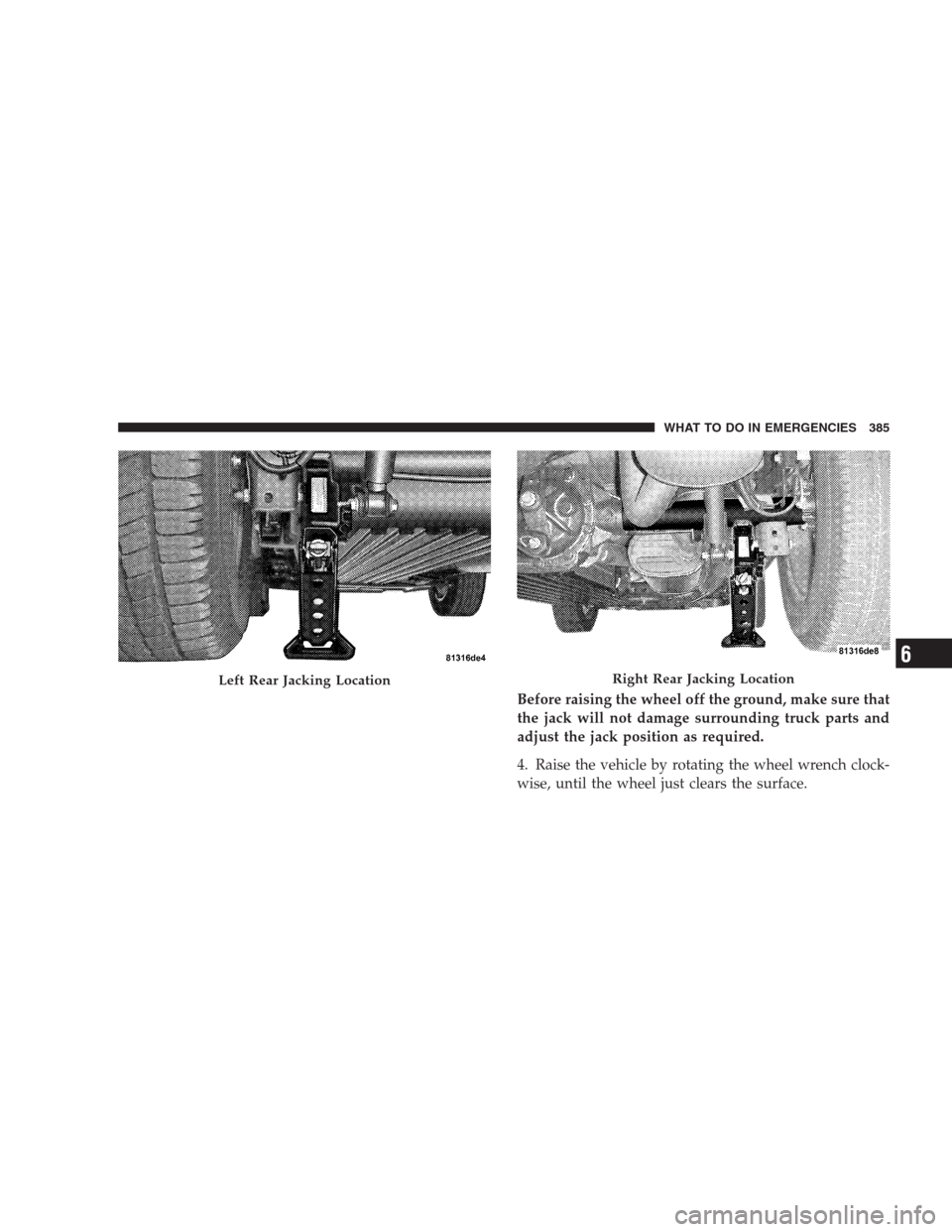
Before raising the wheel off the ground, make sure that
the jack will not damage surrounding truck parts and
adjust the jack position as required.
4. Raise the vehicle by rotating the wheel wrench clock-
wise, until the wheel just clears the surface.
Left Rear Jacking LocationRight Rear Jacking Location
WHAT TO DO IN EMERGENCIES 385
6
Page 442 of 498
License Lights
1. Remove the two screws securing the lens to the
liftgate.2. Rotate the socket 1/4 turn counterclockwise.
3. Pull bulb from socket.
440 MAINTAINING YOUR VEHICLE