Page 175 of 498

the RKE Transmitter. To make your selection, press
and release the RESET button until “OFF,” “30 sec.,”
“60 sec.,” or “90 sec.” appears.
•PARK ASST. SYSTEM > ON – When YES is selected,
the Rear Park Assist System is activated. When NO is
selected, the System is deactivated.
•“UNIT IN > U.S./METRIC” – The EVIC odometer can
be changed between English and Metric units of
measure. To make your selection, press and release the
RESET button until “US” or “METRIC” appears.
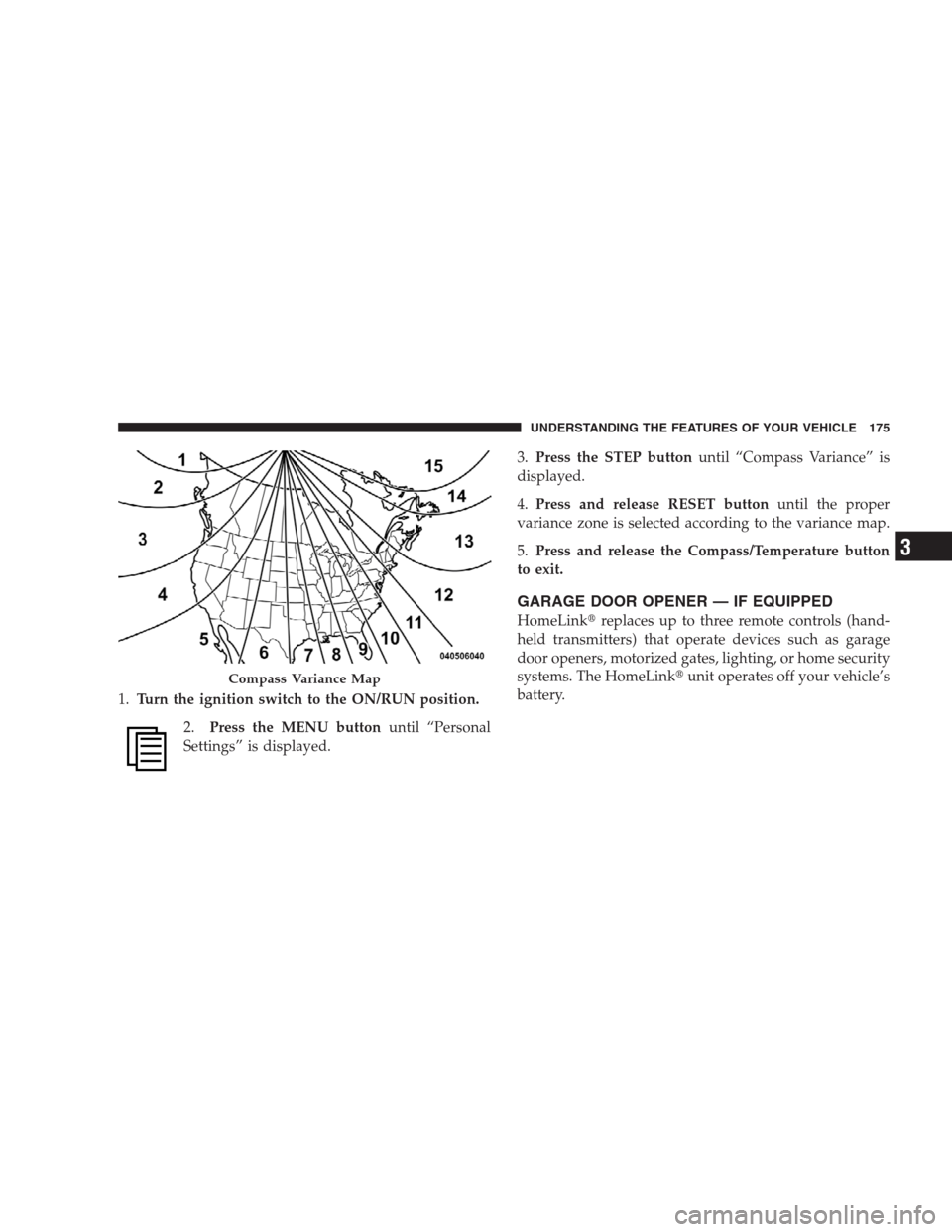
•“COMPASS VARIANCE > 8” – Press the RESET
button to change the compass variance setting. Set this
to your current location. If you change location,
change your variance according to your variance on
the variance map. Refer to Compass Variance Map in
this section.
•“COMPASS CALIBRATE > YES” – Press the RESET
button to manually calibrate the compass. Refer to
Manual Compass Calibration in this section.
Compass/Temperature Button
Pressing the Compass/Temperature button
will return the display to the normal compass/
temperature display.
NOTE:Temperature accuracy can be affected from heat
soak. For best accuracy, the vehicle should be driven at a
speed greater than 20 mph (32 km/h) for several min-
utes.
Automatic Compass Calibration
This compass is self-calibrating, which reduces the need
to calibrate the compass manually. When the vehicle is
new, the compass may appear erratic and the EVIC will
display “CAL” until the compass is calibrated. You may
also calibrate the compass by completing one or more
360° turns at speeds less than 5 mph (8 km/h) (in an area
UNDERSTANDING THE FEATURES OF YOUR VEHICLE 173
3
Page 176 of 498

free from large metal or metallic objects) until the “CAL”
message displayed in the EVIC turns off. The compass
will now function normally.
Manual Compass Calibration
If the compass appears erratic and the “CAL” message
does not appear in the EVIC display, you must put the
compass into the Calibration Mode manually as follows:
1.Turn the ignition switch to the ON/RUN position.
2.Press the MENU buttonuntil “Personal
Settings” is displayed.
3.Press the STEP buttonuntil “Calibrate Compass YES”
is displayed.
4.Press and release the RESET buttonto start the
calibration. The message “CAL” will display on the
compass temperature screen in the EVIC.5.Slowly drive the vehicle at a speed of 5 mph (8 km/h)
in a complete 360°circle, (in an area free from large
metal or metallic objects) until the “CAL” message
turns off. The compass will now function normally.Compass Variance
Compass variance is the difference between magnetic
North and geographic North. In some areas of the
country, the difference between magnetic and geographic
North is great enough to cause the compass to give false
readings. If this occurs, the compass variance must be set
using the following procedure:
NOTE:Magnetic materials should be kept away from
the overhead console. This is where the compass sensor is
located.
174 UNDERSTANDING THE FEATURES OF YOUR VEHICLE
Page 177 of 498
1.Turn the ignition switch to the ON/RUN position.
2.Press the MENU buttonuntil “Personal
Settings” is displayed.3.Press the STEP buttonuntil “Compass Variance” is
displayed.
4.Press and release RESET buttonuntil the proper
variance zone is selected according to the variance map.
5.Press and release the Compass/Temperature button
to exit.
GARAGE DOOR OPENER — IF EQUIPPED
HomeLink�replaces up to three remote controls (hand-
held transmitters) that operate devices such as garage
door openers, motorized gates, lighting, or home security
systems. The HomeLink�unit operates off your vehicle’s
battery.
Compass Variance Map
UNDERSTANDING THE FEATURES OF YOUR VEHICLE 175
3
Page 208 of 498

When the voltage is above this value again, the malfunc-
tion indicator light should go out and the ABS is opera-
tional. If the malfunction indicator light stays illumi-
nated, have the system checked at an authorized dealer
as soon as possible.
12. Oil Pressure Warning Light
This light indicates low engine oil pressure. The
light should turn on momentarily when the engine
is started. If the light turns on while driving, stop the
vehicle and shut off the engine as soon as possible. A
chime will sound when this light turns on.
Do not operate the vehicle until the cause is corrected.
This light does not show how much oil is in the engine.
The engine oil level must be checked under the hood.
13. Tachometer
This gauge measures engine Revolutions-Per-Minute
(RPM x 1000).14. Shift Lever Indicator
The shift lever indicator is self-contained within the
instrument cluster. It displays the position of the auto-
matic transmission shift lever, and the relation of each
position to all other positions. For a good signal the
display will place a box around the selected transmission
range (PRND21). If the PRNDL displays only the char-
acters PRND21 (no boxes),or if all of the gear positions
are boxed, have the system checked by an authorized
dealer.
15. Odometer / Trip Odometer
The two trip odometers show individual trip mileage. To
switch from odometer to trip odometers, press and
release the Trip Odometer button.
To reset a trip odometer, display the desired trip odom-
eter to be reset then push and hold the button until the
display resets (approximately two seconds).
206 UNDERSTANDING YOUR INSTRUMENT PANEL
Page 209 of 498

Vehicle Warning Messages
For non-Electronic Vehicle Information Center (EVIC)
equipped vehicles, when the appropriate conditions ex-
ist, messages such as “door ajar” (indicates that a door(s)
may be ajar), “gASCAP” (which indicates that your gas
cap is possibly loose or damaged),�CHANgE OIL”
(indicates that the engine oil should be changed), “Lo-
WASH” (low washer fluid), “Lo tirE” (low tire pressure),
and “noFUSE” (indicates that the IOD fuse is removed
from the Integrated Power Module), will display in the
odometer.
NOTE:If the vehicle is equipped with an EVIC, most
warnings will display in the EVIC. For additional infor-
mation, refer to “Electronic Vehicle Information Center
(EVIC) — If Equipped” in Section 4.
The outside temperature will display in the odometer for
non-EVIC equipped vehicles. Pressing the trip odometer
RESET button toggles the feature back to the odometer.LoW tirE
When the appropriate condition exists the odometer
display will toggle between LoW and tirE for three
cycles.
Change Oil Message
Your vehicle is equipped with an engine oil change
indicator system. The “Change Oil” message will flash in
the instrument cluster odometer for approximately
12 seconds after a single chime has sounded to indicate
the next scheduled oil change interval. The engine oil
change indicator system is duty cycle based, which
means the engine oil change interval may fluctuate
dependent upon your personal driving style.
Unless reset, this message will continue to display each
time you turn the ignition switch to the ON/RUN
position. To turn off the message temporarily, press and
release the Trip Odometer button on the instrument
UNDERSTANDING YOUR INSTRUMENT PANEL 207
4
Page 210 of 498

cluster. To reset the oil change indicator system (after
performing the scheduled maintenance) refer to the fol-
lowing procedure.
1. Turn the ignition switch to the ON position(Do not
start the engine).
2. Fully depress the accelerator pedal slowly three
times within 10 seconds.
3. Turn the ignition switch to the OFF/LOCK position.
NOTE:If the indicator message illuminates when you
start the vehicle, the oil change indicator system did not
reset. If necessary repeat this procedure.
16. Odometer
The odometer shows the total distance the vehicle has
been driven.
U.S. federal regulations require that upon transfer of
vehicle ownership, the seller certify to the purchaser thecorrect mileage that the vehicle has been driven. There-
fore, if the odometer reading is changed during repair or
replacement, be sure to keep a record of the reading
before and after the service so that the correct mileage can
be determined.
17. Fog Light Indicator
This light shows when the fog lights are ON.
18. Electronic Stability Program (ESP) Indicator Light
The yellow Electronic Stability Program (ESP)
indicator light in the speedometer area illumi-
nates with the key in the ignition switch turned
to the ON/RUN position and it should go out
with the engine running. The ESP is also combined with
the Traction Control System (TCS), when the�ESP/TCS”
Indicator Light�starts to flash as soon as the tires lose
traction and the ESP system becomes active. The�ESP/
TCS Indicator Light�also flashes when TCS is active. If
208 UNDERSTANDING YOUR INSTRUMENT PANEL
Page 217 of 498

28. Cruise Indicator
The cruise light indicator illuminates when the
electronic speed control system is turned on.
29. TOW/HAUL
The TOW/HAUL button is located at the end
of the shift lever. This light will illuminate
when the TOW/HAUL button has been se-
lected.
30. 4LOW Indicator
Indicates the transfer case is in 4LOW position.
31. Odometer / Trip Odometer Button
Press this button to toggle between the odometer and the
trip odometer display. Holding the button in resets the
trip odometer reading.ELECTRONIC DIGITAL CLOCK
The clock and radio each use the display panel built into
the radio. A digital readout shows the frequency and/or
time in hours and minutes (depending on your radio
model), whenever the ignition switch is in the ON or
ACC position.
When the ignition switch is in the OFF position, or when
the radio frequency is being displayed, timekeeping is
accurately maintained.
On the AM/FM/CD (6-disc) radio, the time button
alternates the location of the time and frequency on the
display. On the AM/FM/CD (single-disc) radio, only one
of the two, time or frequency, is displayed.
Clock Setting Procedure
1. Press and hold the TIME button until the hours blink.
2. Adjust the hours by turning the TUNE/AUDIO con-
trol knob.
UNDERSTANDING YOUR INSTRUMENT PANEL 215
4
Page 225 of 498
Program Type16-Digit Character
Display
Personality Persnlty
Public Public
Rhythm and Blues R & B
Religious Music Rel Musc
Religious Talk Rel Talk
Rock Rock
Soft Soft
Soft Rock Soft Rck
Soft Rhythm and Blues Soft R & B
Sports Sports
Talk Talk
Top 40 Top 40
Weather WeatherBy pressing the SEEK button when the Music Type icon
is displayed, the radio will be tuned to the next frequency
station with the same selected Music Type name. The
Music Type function only operates when in the FM
mode.
If a preset button is activated while in the Music Type
(Program Type) mode, the Music Type mode will be
exited and the radio will tune to the preset station.
SETUP Button
Pressing the SETUP button allows you to select between
the following items:
NOTE:Turn the TUNE/SCROLL control knob to scroll
through the entries. Push the AUDIO/SELECT button to
select an entry and make changes.
UNDERSTANDING YOUR INSTRUMENT PANEL 223
4