Page 173 of 381

on the first press of the RKE UNLOCK button. To make
your selection, press and release the FUNCTION SE-
LECT button until “Driver Door 1st Press” or “All Doors
1st Press” appears.
Sound Horn with Remote Key Lock
When ON is selected, a short horn sound will occur when
the RKE LOCK button is pressed. This feature may be
selected with or without the flash lights on lock/unlock
feature. To make your selection, press and release the
FUNCTION SELECT button until “ON” or “OFF” ap-
pears.
Flash Lights with Remote Key Lock
When ON is selected, the front and rear turn signals will
flash when the doors are locked or unlocked with the
RKE transmitter. This feature may be selected with or
without the sound horn on lock feature selected. To make
your selection, press and release the FUNCTION SE-
LECT button until “ON” or “OFF” appears.
Headlamps On with Wipers (Available with Auto
Headlights Only)
When ON is selected, and the headlight switch is in the
AUTO (A) position, the headlights will turn on approxi-
mately 10 seconds after the wipers are turned on. The
headlights will also turn off when the wipers are turned
off if they were turned on by this feature. To make your
selection, press and release the FUNCTION SELECT
button until “ON” or “OFF” appears.
NOTE:Turning the headlights on during the daytime
causes the instrument panel lights to dim. To increase the
brightness, refer to “Lights” in Section 3.
Delay Turning Headlights Off
When this feature is selected, the driver can choose to
have the headlights remain on for 0, 30, 60, or 90 seconds
when exiting the vehicle. To make your selection, press
and release the FUNCTION SELECT button until “0,”
“30,” “60,” or “90” appears.
UNDERSTANDING YOUR INSTRUMENT PANEL 173
4
Page 174 of 381

Turn Headlights On with Remote Key Unlock
When this feature is selected, the headlights will activate
and remain on for up to 90 seconds when the doors are
unlocked with the RKE transmitter. To make your selec-
tion, press and release the FUNCTION SELECT button
until “OFF,” “30 sec.,” “60 sec.,” or “90 sec.” appears.
Delay Power Off to Accessories Until Exit
When this feature is selected, the power window
switches, radio, hands-free system (if equipped), power
sunroof (if equipped), and ignition-powered power out-
lets will remain active for up to 60 minutes after the
ignition switch is turned OFF. Opening a vehicle door
will cancel this feature. To make your selection, press and
release the FUNCTION SELECT button until “Off,” “45
sec.,” “5 min.,” “10 min.,” “30 min.,” or “60 min.”
appears.
Turn-by-Turn Navigation — If Equipped
When ON is selected, the Turn-by-Turn directions will
appear in the display as the vehicle approaches a desig-
nated turn within a programmed route. To make your
selection, press and release the FUNCTION SELECT
button until “ON” or “OFF” appears.
Display Units of Measure In
The EVIC, odometer, and navigation system (if
equipped) can be changed between English and Metric
units of measure. To make your selection, press and
release the FUNCTION SELECT button until “US” or
“METRIC” appears.
174 UNDERSTANDING YOUR INSTRUMENT PANEL
Page 294 of 381

▫Power Steering — Fluid Check............310
▫Front And Rear Suspension Ball Joints......311
▫Steering Linkage......................311
▫Body Lubrication.....................311
▫Windshield Wiper Blades................312
▫Windshield Washers...................312
▫Exhaust System......................313
▫Cooling System.......................314
▫Hoses And Vacuum/Vapor Harnesses.......319
▫Fuel System.........................319
▫Brake System........................320
▫Automatic Transmission................322
▫Front And Rear Wheel Bearings...........324▫Appearance Care And Protection From
Corrosion...........................324
▫Cleaning The Center Console Cupholders....328
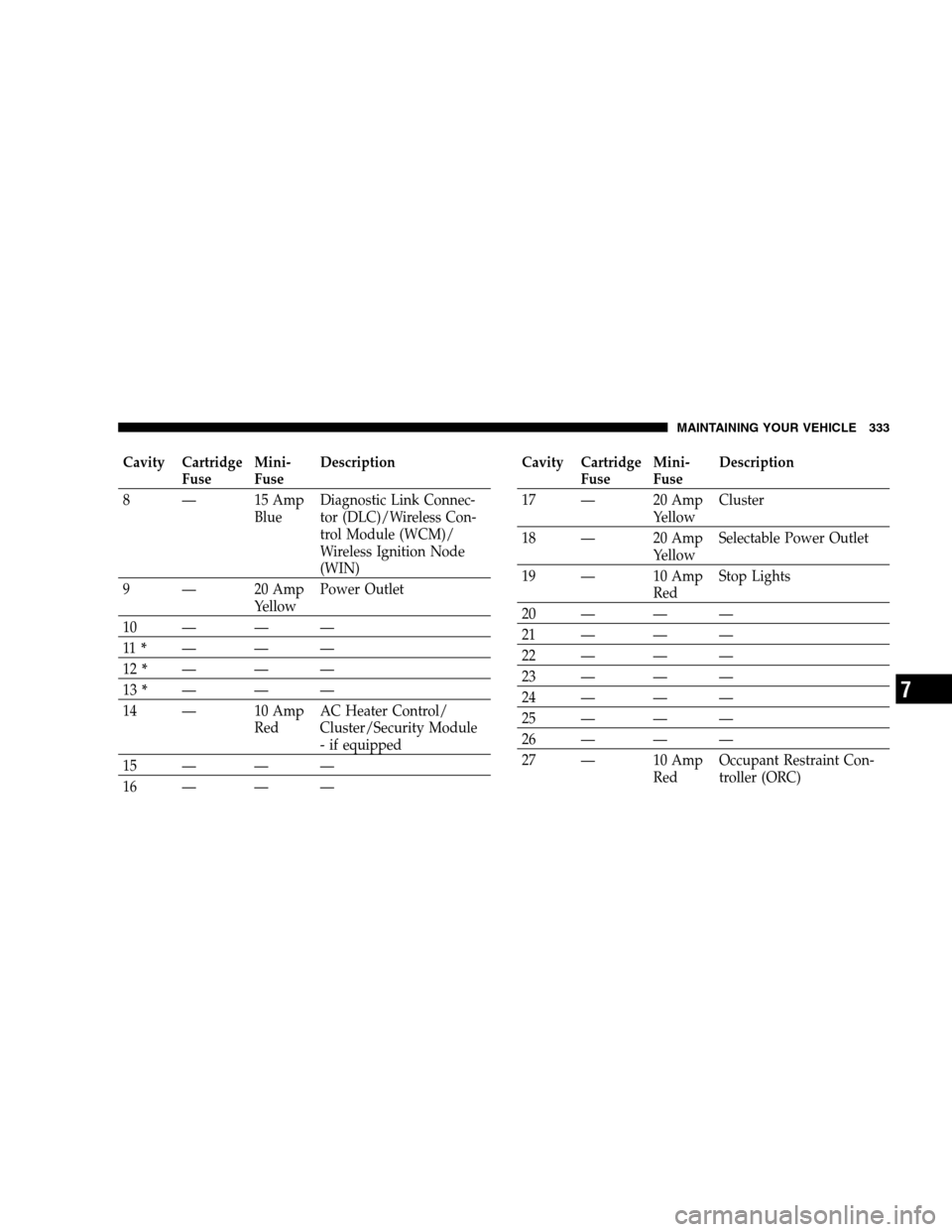
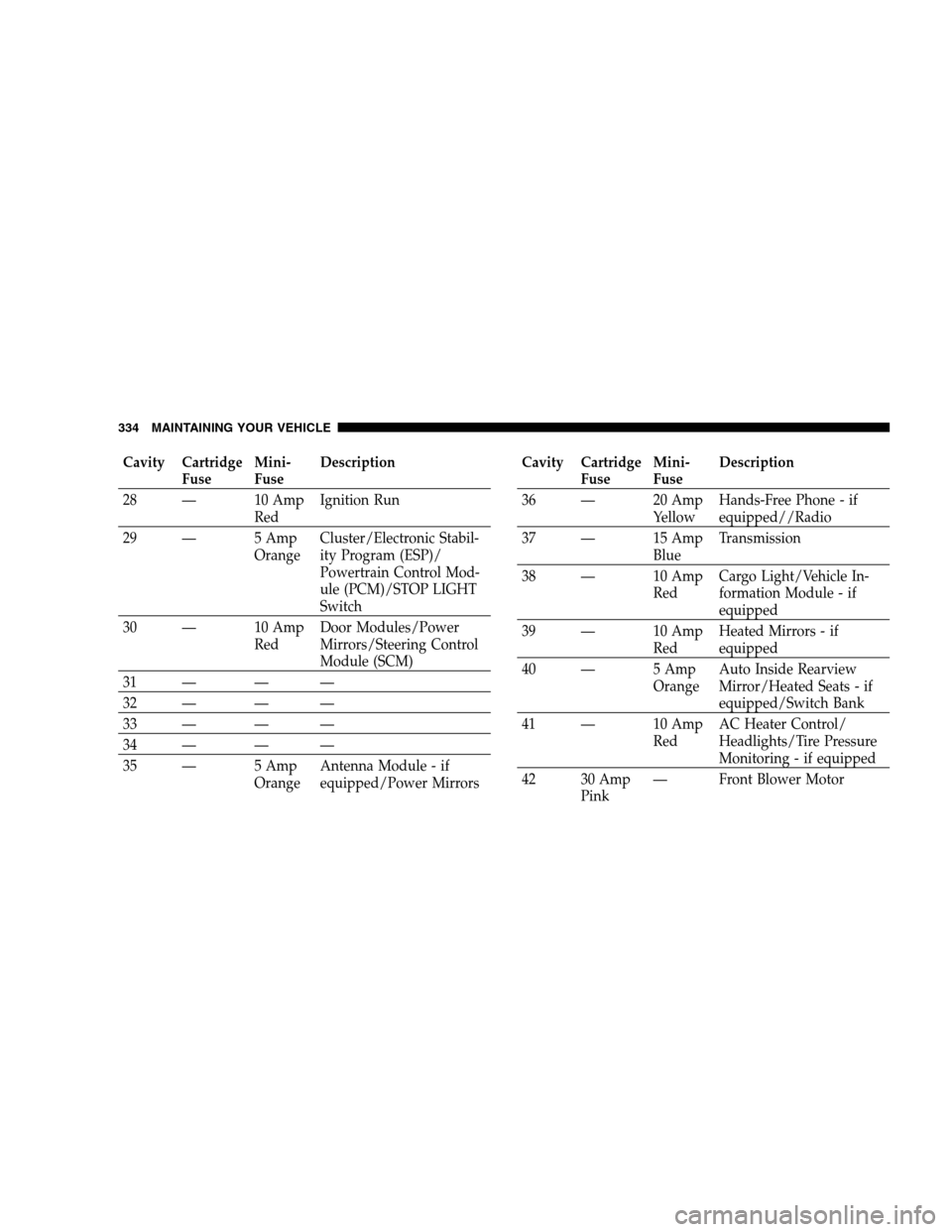
�Fuses...............................329
▫Integrated Power Module (IPM)...........329
▫Rear Power Distribution Center...........331
�Vehicle Storage........................335
�Replacement Light Bulbs.................336
�Bulb Replacement......................337
▫Low Beam Headlight, High Beam Headlight,
And Park/Turn Light — Models With High
Intensity Discharge (HID) Headlights.......337
▫Front/Rear Side Marker Light............338
▫Tail/Turn/Stop Light..................338
294 MAINTAINING YOUR VEHICLE
Page 327 of 381
Your leather upholstery can be best preserved by regular
cleaning with a damp soft cloth. Small particles of dirt
can act as an abrasive and damage the leather upholstery
and should be removed promptly with a damp cloth.
Stubborn soils can be removed easily with a soft cloth
and MOPAR�Total Clean or equivalent. Care should be
taken to avoid soaking your leather upholstery with any
liquid. Please do not use polishes, oils, cleaning fluids,
solvents, detergents, or ammonia-based cleaners to clean
your leather upholstery. Application of a leather condi-
tioner is not required to maintain the original condition.
WARNING!
Do not use volatile solvents for cleaning purposes.
Many are potentially flammable, and if used in
closed areas they may cause respiratory harm.
Cleaning Headlights
Your vehicle has plastic headlights that are lighter and
less susceptible to stone breakage than glass headlights.
Plastic is not as scratch resistant as glass; and therefore,
different lens cleaning procedures must be followed.
To minimize the possibility of scratching the lenses and
reducing light output, avoid wiping with a dry cloth. To
remove road dirt, wash with a mild soap solution fol-
lowed by rinsing.
Do not use abrasive cleaning components, solvents, steel
wool or other aggressive material to clean the lenses.
Glass Surfaces
All glass surfaces should be cleaned on a regular basis
with MOPAR�Glass Cleaner or any commercial
household-type glass cleaner. Never use an abrasive type
cleaner. Use caution when cleaning the inside rear win-
dow equipped with electric defrosters or the right rear
MAINTAINING YOUR VEHICLE 327
7
Page 333 of 381
Cavity Cartridge
FuseMini-
FuseDescription
8 — 15 Amp
BlueDiagnostic Link Connec-
tor (DLC)/Wireless Con-
trol Module (WCM)/
Wireless Ignition Node
(WIN)
9 — 20 Amp
YellowPower Outlet
10 — — —
11*———
12*———
13*———
14 — 10 Amp
RedAC Heater Control/
Cluster/Security Module
- if equipped
15 — — —
16 — — —Cavity Cartridge
FuseMini-
FuseDescription
17 — 20 Amp
YellowCluster
18 — 20 Amp
YellowSelectable Power Outlet
19 — 10 Amp
RedStop Lights
20 — — —
21 — — —
22 — — —
23 — — —
24 — — —
25 — — —
26 — — —
27 — 10 Amp
RedOccupant Restraint Con-
troller (ORC)
MAINTAINING YOUR VEHICLE 333
7
Page 334 of 381
Cavity Cartridge
FuseMini-
FuseDescription
28 — 10 Amp
RedIgnition Run
29 — 5 Amp
OrangeCluster/Electronic Stabil-
ity Program (ESP)/
Powertrain Control Mod-
ule (PCM)/STOP LIGHT
Switch
30 — 10 Amp
RedDoor Modules/Power
Mirrors/Steering Control
Module (SCM)
31 — — —
32 — — —
33 — — —
34 — — —
35 — 5 Amp
OrangeAntenna Module - if
equipped/Power MirrorsCavity Cartridge
FuseMini-
FuseDescription
36 — 20 Amp
YellowHands-Free Phone - if
equipped//Radio
37 — 15 Amp
BlueTransmission
38 — 10 Amp
RedCargo Light/Vehicle In-
formation Module - if
equipped
39 — 10 Amp
RedHeated Mirrors - if
equipped
40 — 5 Amp
OrangeAuto Inside Rearview
Mirror/Heated Seats - if
equipped/Switch Bank
41 — 10 Amp
RedAC Heater Control/
Headlights/Tire Pressure
Monitoring - if equipped
42 30 Amp
Pink— Front Blower Motor
334 MAINTAINING YOUR VEHICLE
Page 336 of 381

REPLACEMENT LIGHT BULBS
LIGHT BULBS — Interior Bulb Number
Rear Courtesy/Reading Lights.............. W5W
Rear Compartment (Trunk) Light............. 562
Overhead Console Reading Lights............. 578
Visor Vanity Lights.....................A6220
Glove Box Light......................... 194
Door Courtesy.......................... 562
Shift Indicator Light.................JKLE14140
Optional Door Map Pocket /
Cupholder Lighting...................... LED
(Serviced at Authorized Dealer)
NOTE:For lighted switches, see your authorized dealer
for replacement instructions.
All of the interior bulbs are glass wedge base or glass
cartridge types. Aluminum base bulbs are not approved
and should not be used for replacement.LIGHT BULBS — Exterior Bulb Number
Low Beam Headlight –
High Intensity Discharge (HID).............. D1S
(Serviced at Authorized Dealer)
High Beam Headlight.....................9005
Front Park/Turn Light...................3157A
Front Fog Light......................9145/H10
(Serviced at Authorized Dealer)
Front Side Marker........................ 168
Tail Light............................3057K
Tail/Stop/Turn Light....................3057K
Rear Side Marker........................ 168
Backup Light........................... 921
Center High-Mount Stop Light
(CHMSL)............................. LED
(Serviced at Authorized Dealer)
License................................ 168
336 MAINTAINING YOUR VEHICLE
Page 337 of 381
BULB REPLACEMENT
Low Beam Headlight, High Beam Headlight, and
Park/Turn Light — Models with High Intensity
Discharge (HID) Headlights
HID Headlights
The headlights are a type of high voltage discharge tube.
High voltage can remain in the circuit even with the
HEADLIGHT switch off and the key removed.Because
of this, you should not attempt to service a headlight
bulb yourself. If a headlight bulb fails, take your
vehicle to an authorized dealer for service.
WARNING!
A transient high tension occurs at the bulb sockets of
HID headlights when the HEADLIGHT switch is
turned ON. It may cause serious electrical shock or
electrocution if not serviced properly. See your au-
thorized dealer for service.
NOTE:On vehicles equipped with HID headlights,
when the headlights are turned on, there is a blue hue to
the lights. This diminishes and becomes more white after
approximately 10 seconds, as the system charges.
MAINTAINING YOUR VEHICLE 337
7