Page 177 of 469
Keyless Go Display — If Equipped
When the ENGINE START/STOP button is pressed to
change ignition switch positions, the Keyless Go icon
momentarily appears in the EVIC display showing the
new ignition switch position.The round symbol in the middle rotates to point at the
new ignition switch position. If desired, the ignition
switch position graphic can be set to be constantly visible
by pressing the EVIC MENU button until the display
appears.
NOTE:Under certain conditions, the display may be
superseded by another display of higher priority. But
when the ignition switch position is changed, the display
always re-appears.
Compass Display
COMPASS Button
The compass readings indicate the direction
the vehicle is facing. Press and release the
COMPASS button to display one of eight com-
pass readings and the outside temperature.
Keyless Go Display
4
UNDERSTANDING YOUR INSTRUMENT PANEL 175
Page 178 of 469

Automatic Compass Calibration
This compass is self-calibrating, which eliminates the
need to set the compass manually. When the vehicle is
new, the compass may appear erratic and the EVIC will
display “CAL” until the compass is calibrated. You may
also calibrate the compass by completing one or more 360
degree turns (in an area free from large metal or metallic
objects) until the “CAL” message displayed in the EVIC
turns off. The compass will now function normally.
Manual Compass Calibration
If the compass appears erratic and the “CAL” message
does not appear in the EVIC display, you must put the
compass into the Calibration Mode manually as follows:
1. Turn the ignition switch ON.
2. Press and hold the COMPASS button for approxi-
mately two seconds.
3. Press the SCROLL button until “Calibrate Compass”
displays in the EVIC.4. Press and release the FUNCTION SELECT button to
start the calibration. The message “CAL” will display in
the EVIC.
5. Complete one or more 360 degree turns (in an area free
from large metal or metallic objects) until the “CAL”
message turns off. The compass will now function
normally.
Compass Variance
Compass Variance is the difference between magnetic
North and geographic North. In some areas of the
country, the difference between magnetic and geographic
North is great enough to cause the compass to give false
readings. If this occurs, the compass variance must be set
using the following procedure:
NOTE:Magnetic materials should be kept away from
the overhead console. This is where the compass sensor is
located.
176 UNDERSTANDING YOUR INSTRUMENT PANEL
Page 179 of 469
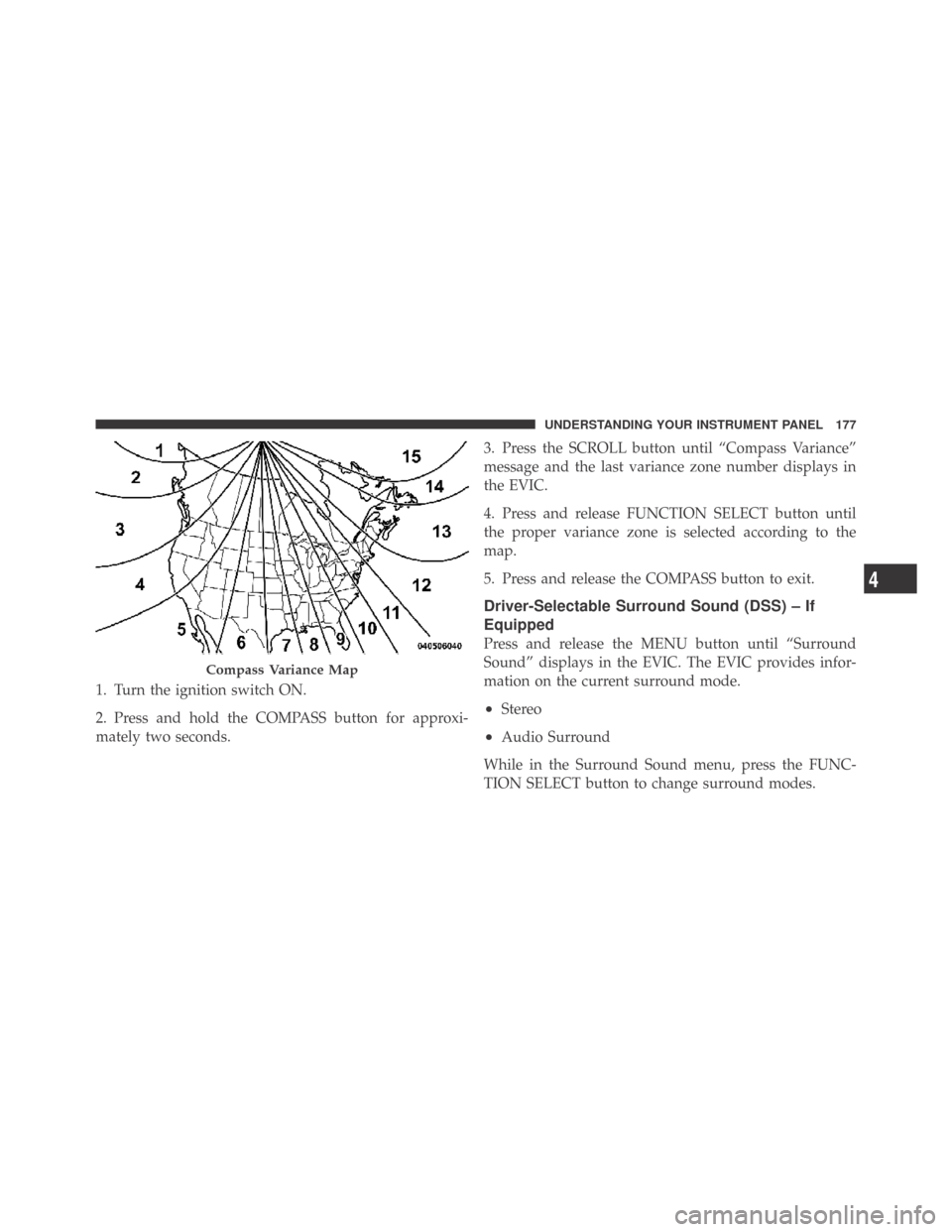
1. Turn the ignition switch ON.
2. Press and hold the COMPASS button for approxi-
mately two seconds.3. Press the SCROLL button until “Compass Variance”
message and the last variance zone number displays in
the EVIC.
4. Press and release FUNCTION SELECT button until
the proper variance zone is selected according to the
map.
5. Press and release the COMPASS button to exit.
Driver-Selectable Surround Sound (DSS) – If
Equipped
Press and release the MENU button until “Surround
Sound” displays in the EVIC. The EVIC provides infor-
mation on the current surround mode.
•Stereo
•Audio Surround
While in the Surround Sound menu, press the FUNC-
TION SELECT button to change surround modes.
Compass Variance Map
4
UNDERSTANDING YOUR INSTRUMENT PANEL 177
Page 183 of 469
Delay Power Off to Accessories Until Exit
When this feature is selected, the power window
switches, radio, uconnect™ phone (if equipped), power
sunroof (if equipped), and ignition-powered power out-
lets will remain active for up to 60 minutes after the
ignition switch is turned OFF. Opening a vehicle door
will cancel this feature. To make your selection, press and
release the FUNCTION SELECT button until “Off,”
“45 sec.,” “5 min.,” “10 min.,” “30 min.,” or “60 min.”
appears.
Turn-by-Turn Navigation — If Equipped
When ON is selected, the Turn-by-Turn directions will
appear in the display as the vehicle approaches a desig-
nated turn within a programmed route. To make your
selection, press and release the FUNCTION SELECT
button until “ON” or “OFF” appears.
Display ECO — If Equipped
The “ECO” message is located in the Compass/
Temperature display, this message can be turned on or
off. To make your selection, press and release the FUNC-
TION SELECT button until “ON” or “OFF” appears.
Display Units of Measure In
The EVIC, odometer, and uconnect™ gps (if equipped)
can be changed between English and Metric units of
measure. To make your selection, press and release the
FUNCTION SELECT button until “ENGLISH” or “MET-
RIC” appears.4
UNDERSTANDING YOUR INSTRUMENT PANEL 181
Page 184 of 469
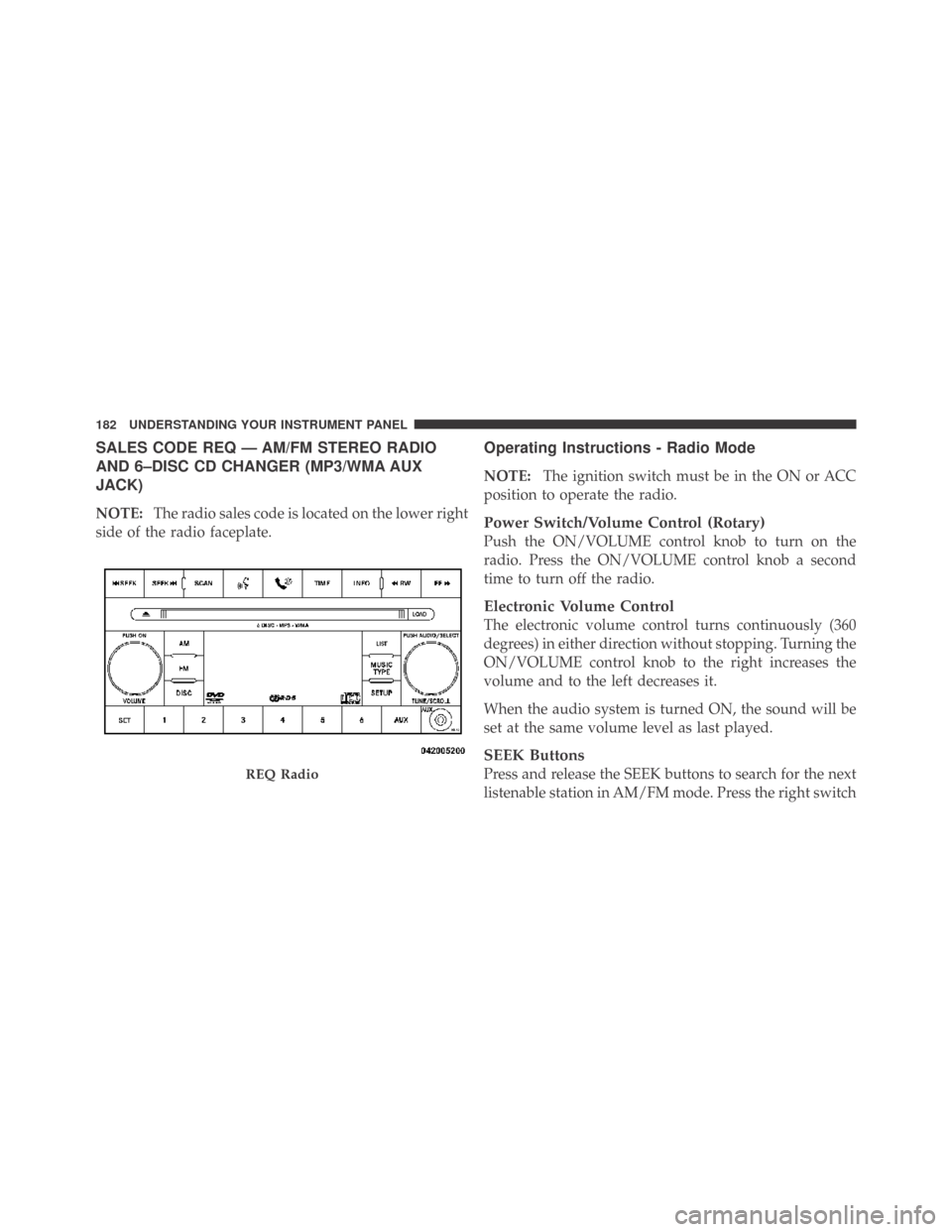
SALES CODE REQ — AM/FM STEREO RADIO
AND 6–DISC CD CHANGER (MP3/WMA AUX
JACK)
NOTE:The radio sales code is located on the lower right
side of the radio faceplate.
Operating Instructions - Radio Mode
NOTE:The ignition switch must be in the ON or ACC
position to operate the radio.
Power Switch/Volume Control (Rotary)
Push the ON/VOLUME control knob to turn on the
radio. Press the ON/VOLUME control knob a second
time to turn off the radio.
Electronic Volume Control
The electronic volume control turns continuously (360
degrees) in either direction without stopping. Turning the
ON/VOLUME control knob to the right increases the
volume and to the left decreases it.
When the audio system is turned ON, the sound will be
set at the same volume level as last played.
SEEK Buttons
Press and release the SEEK buttons to search for the next
listenable station in AM/FM mode. Press the right switchREQ Radio
182 UNDERSTANDING YOUR INSTRUMENT PANEL
Page 189 of 469
selected within five seconds after pressing the SET but-
ton, the station will continue to play but will not be
stored into pushbutton memory.
You may add a second station to each pushbutton by
repeating the above procedure with this exception: Press
the SET button twice and SET 2 will show in the display
window. Each button can be set for SET 1 and SET 2 in
both AM and FM. This allows a total of 12 AM, 12 FM,
and 12 Satellite (if equipped) stations to be stored into
pushbutton memory. The stations stored in SET 2
memory can be selected by pressing the pushbutton
twice.
Every time a preset button is used, a corresponding
button number will display.
Buttons1-6
These buttons tune the radio to the stations that you
commit to pushbutton memory {12 AM, 12 FM, and 12
Satellite (if equipped) stations}.
DISC Button
Pressing the DISC button will allow you to switch from
AM/FM modes to Disc modes.
Operation Instructions - (DISC MODE for CD and
MP3/WMA Audio Play)
NOTE:The ignition switch must be in the ON or ACC
position to operate the radio.
LOAD Button — Loading Compact Disc(s)
Press the LOAD button and the pushbutton with the
corresponding number (1-6) where the CD is being
loaded. The radio will display PLEASE WAIT and
prompt when to INSERT DISC. After the radio displays
�INSERT DISC,�insert the CD into the player.
Radio display will show�LOADING DISC�when the disc
is loading and “READING DISC” when the radio is
reading the disc.
4
UNDERSTANDING YOUR INSTRUMENT PANEL 187
Page 190 of 469
CAUTION!
This CD player will accept 4–3/4 in (12 cm) discs only.
The use of other sized discs may damage the CD
player mechanism.
Eject Button — Ejecting Compact Disc(s)
Press the EJECT button and the pushbutton
with the corresponding number (1-6) where the
CD was loaded and the disc will unload and
move to the entrance for easy removal. Radio
display will show�EJECTING DISC�when the disc is
being ejected and prompt the user to remove the disc.
Press and hold the EJECT button for five seconds and all
CDs will be ejected from the radio.
The disc can be ejected with the radio and ignition OFF.
SEEK Button (CD MODE)
Press the right SEEK button for the next selection on the
CD. Press the left SEEK button to return to the beginning
of the current selection, or return to the beginning of the
previous selection if the CD is within the first second of
the current selection. Pressing and holding the SEEK
button will allow you to scroll through the tracks faster in
CD and MP3/MWA modes.
SCAN Button (CD MODE)
Press the SCAN button to scan through each track on the
CD currently playing.
TIME Button (CD MODE)
Press this button to change the display from a large CD
playing time display to a small CD playing time display.
188 UNDERSTANDING YOUR INSTRUMENT PANEL
Page 199 of 469
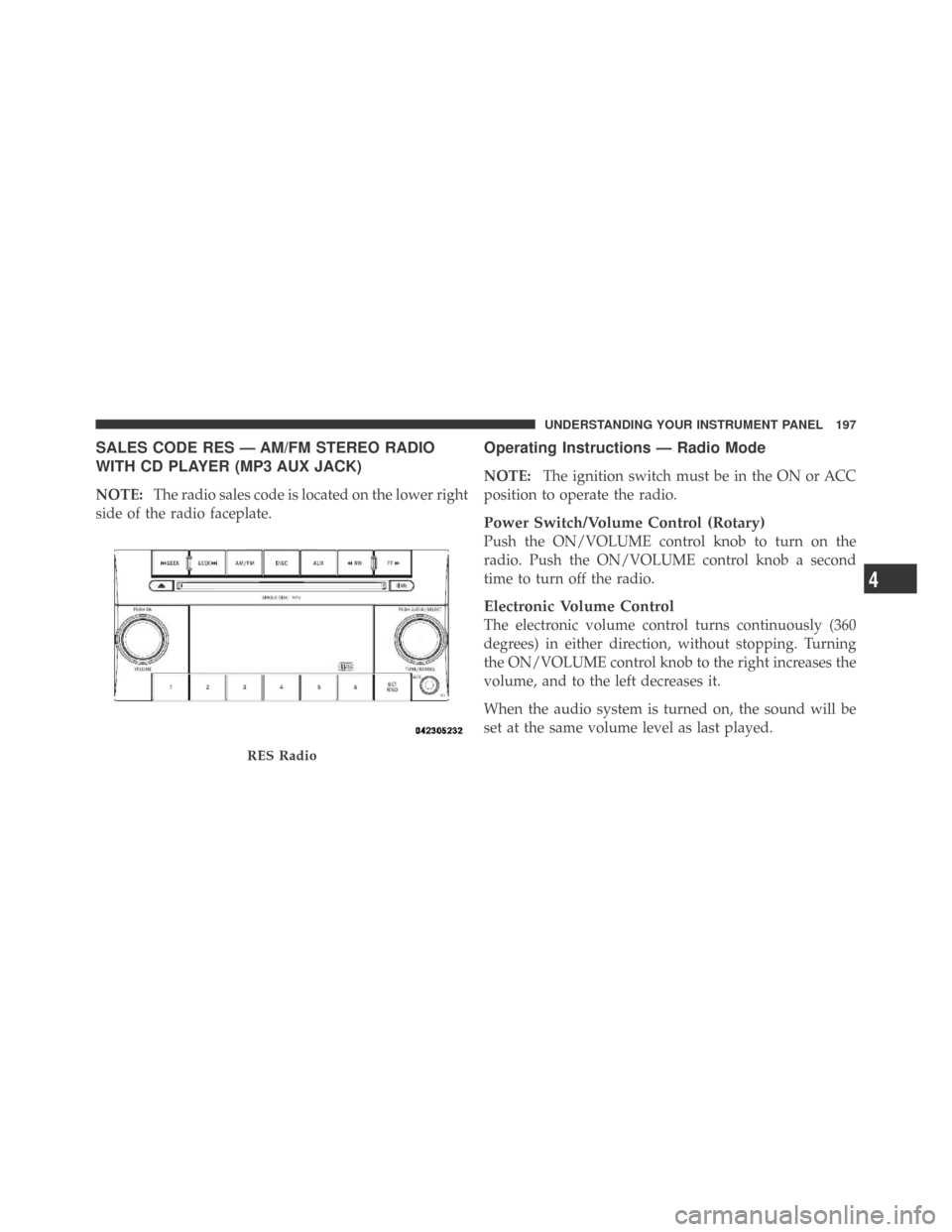
SALES CODE RES — AM/FM STEREO RADIO
WITH CD PLAYER (MP3 AUX JACK)
NOTE:The radio sales code is located on the lower right
side of the radio faceplate.
Operating Instructions — Radio Mode
NOTE:The ignition switch must be in the ON or ACC
position to operate the radio.
Power Switch/Volume Control (Rotary)
Push the ON/VOLUME control knob to turn on the
radio. Push the ON/VOLUME control knob a second
time to turn off the radio.
Electronic Volume Control
The electronic volume control turns continuously (360
degrees) in either direction, without stopping. Turning
the ON/VOLUME control knob to the right increases the
volume, and to the left decreases it.
When the audio system is turned on, the sound will be
set at the same volume level as last played.
RES Radio
4
UNDERSTANDING YOUR INSTRUMENT PANEL 197