Page 98 of 469
Mute/Un-Mute (Mute OFF)
When you mute the uconnect�phone, you will still be
able to hear the conversation coming from the other
party, but the other party will not be able to hear you. In
order to mute the uconnect�phone:
•Press the VOICE RECOGNITION button.
•Following the beep, say�Mute.�
In order to un-mute the uconnect�phone:
•Press the VOICE RECOGNITION button.
•Following the beep, say�Mute off.�
Advanced Phone Connectivity
Transfer Call to and from Cellular Phone
The uconnect�phone allows ongoing calls to be trans-
ferred from your cellular phone to the uconnect�phone
without terminating the call. To transfer an ongoing call
from your uconnect�phone paired cellular phone to theuconnect�phone or vice versa, press the VOICE REC-
OGNITION button and say�Transfer Call.�
Connect or Disconnect Link Between the
uconnect�phone and Cellular Phone
Your cellular phone can be paired with many different
electronic devices, but can only be actively�connected�
with one electronic device at a time.
If you would like to connect or disconnect the Bluetooth�
connection between a uconnect�phone paired cellular
phone and the uconnect�phone, follow the instructions
described in your cellular phone User’s Manual.
List Paired Cellular Phone Names
•
Press the PHONE button to begin.
•After the “Ready” prompt and the following beep, say
“Setup Phone Pairing.”
•When prompted, say�List Phones.�
96 UNDERSTANDING THE FEATURES OF YOUR VEHICLE
Page 102 of 469
•In a convertible vehicle, system performance may be
compromised with the convertible top down.
Far End Audio Performance
•
Audio quality is maximized under:
•low-to-medium blower setting,
•low-to-medium vehicle speed,
•low road noise,
•smooth road surface,
•fully closed windows,
•dry weather conditions, and
•operation from the driver’s seat.
•Performance, such as audio clarity, echo, and loudness
to a large degree rely on the phone and network, and
not the uconnect�phone.
•Echo at the far end can sometimes be reduced by
lowering the in-vehicle audio volume.
•In a convertible vehicle, system performance may be
compromised with the convertible top down.
Bluetooth�Communication Link
Cellular phones have been found to lose connection to
the uconnect�phone. When this happens, the connection
can generally be reestablished by switching the phone
off/on. Your cellular phone is recommended to remain in
Bluetooth�ON mode.
Power-Up
After switching the ignition key from OFF to either the
ON or ACC position, or after a language change, you
must wait at least five seconds prior to using the system.
100 UNDERSTANDING THE FEATURES OF YOUR VEHICLE
Page 188 of 469
Program Type16-Digit Character
Display
Personality Persnlty
Public Public
Rhythm and Blues R & B
Religious Music Rel Musc
Religious Talk Rel Talk
Rock Rock
Soft Soft
Soft Rock Soft Rck
Soft Rhythm and Blues Soft R & B
Sports Sports
Ta l k Ta l k
Top 40 Top 40
Weather WeatherBy pressing the SEEK button when the Music Type icon
is displayed, the radio will be tuned to the next frequency
station with the same selected Music Type name. The
Music Type function only operates when in the FM
mode.
If a preset button is activated while in the Music Type
(Program Type) mode, the Music Type mode will be
exited and the radio will tune to the preset station.
AM and FM Buttons
Press the buttons to select AM or FM mode.
SET Button — To Set the Pushbutton Memory
When you are receiving a station that you wish to
commit to pushbutton memory, press the SET button.
The symbol SET 1 will now show in the display window.
Select the button (1-6) you wish to lock onto this station
and press and release that button. If a button is not
186 UNDERSTANDING YOUR INSTRUMENT PANEL
Page 211 of 469
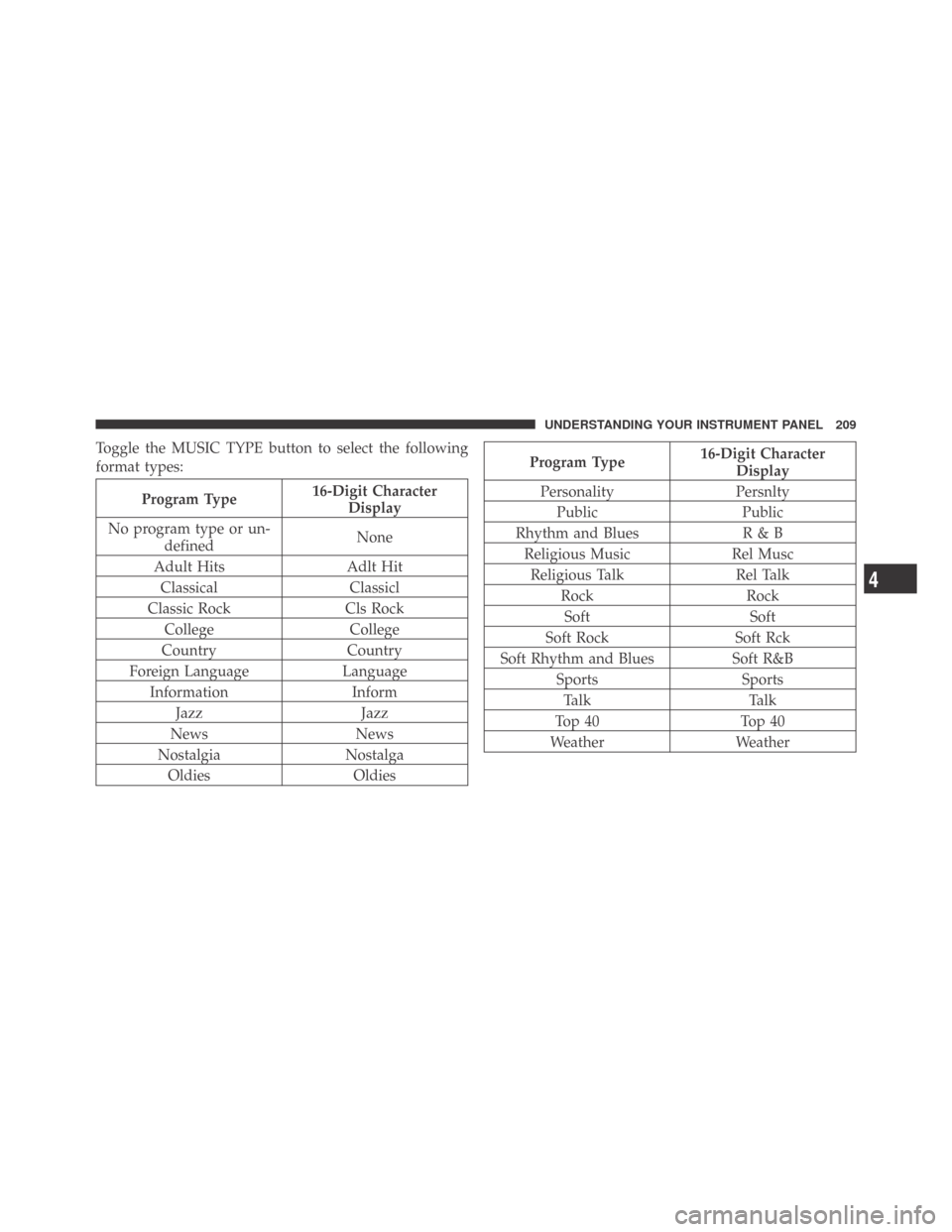
Toggle the MUSIC TYPE button to select the following
format types:
Program Type16-Digit Character
Display
No program type or un-
definedNone
Adult Hits Adlt Hit
Classical Classicl
Classic Rock Cls Rock
College College
Country Country
Foreign Language Language
Information Inform
Jazz Jazz
News News
Nostalgia Nostalga
Oldies Oldies
Program Type16-Digit Character
Display
Personality Persnlty
Public Public
Rhythm and Blues R & B
Religious Music Rel Musc
Religious Talk Rel Talk
Rock Rock
Soft Soft
Soft Rock Soft Rck
Soft Rhythm and Blues Soft R&B
Sports Sports
Ta l k Ta l k
Top 40 Top 40
Weather Weather
4
UNDERSTANDING YOUR INSTRUMENT PANEL 209
Page 233 of 469
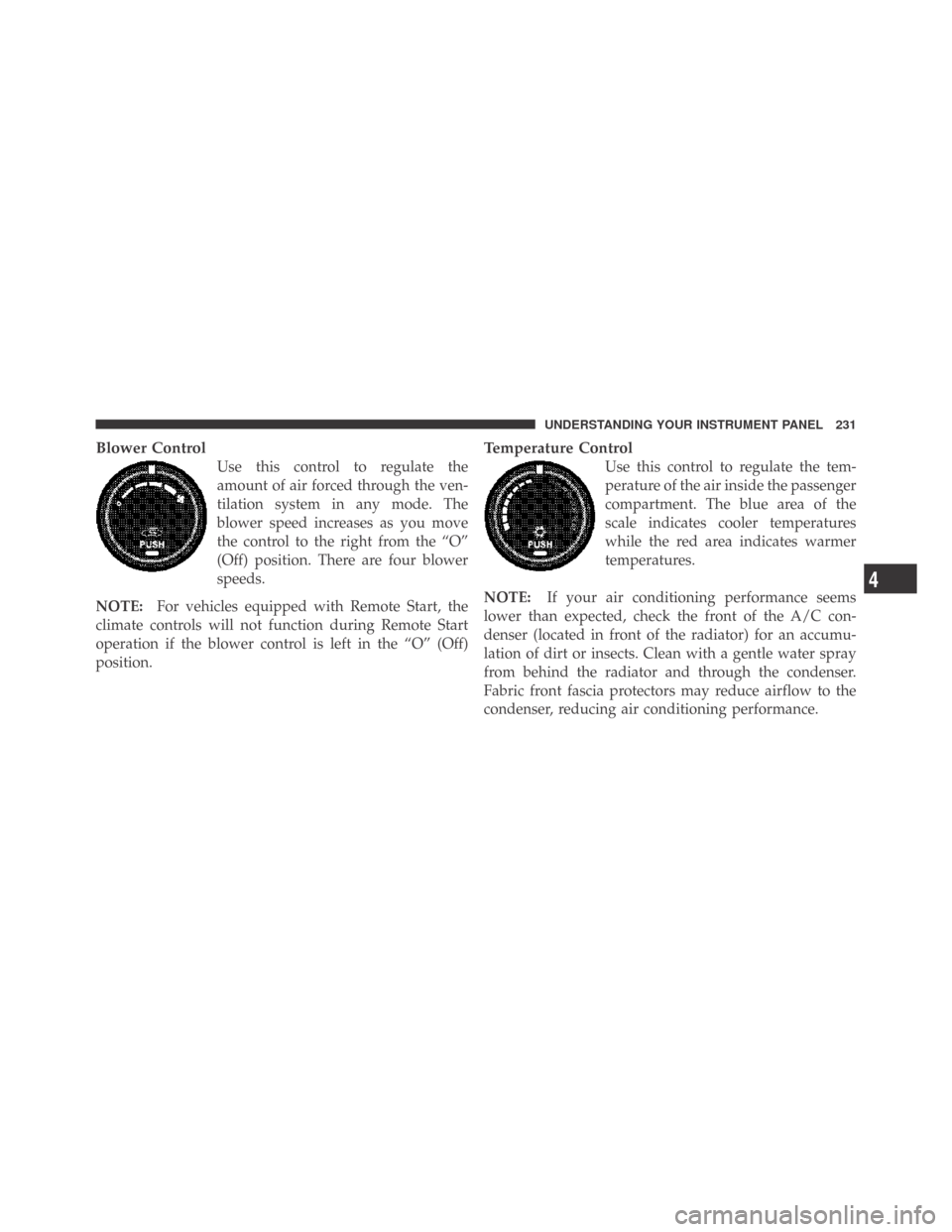
Blower Control
Use this control to regulate the
amount of air forced through the ven-
tilation system in any mode. The
blower speed increases as you move
the control to the right from the “O”
(Off) position. There are four blower
speeds.
NOTE:For vehicles equipped with Remote Start, the
climate controls will not function during Remote Start
operation if the blower control is left in the “O” (Off)
position.
Temperature Control
Use this control to regulate the tem-
perature of the air inside the passenger
compartment. The blue area of the
scale indicates cooler temperatures
while the red area indicates warmer
temperatures.
NOTE:If your air conditioning performance seems
lower than expected, check the front of the A/C con-
denser (located in front of the radiator) for an accumu-
lation of dirt or insects. Clean with a gentle water spray
from behind the radiator and through the condenser.
Fabric front fascia protectors may reduce airflow to the
condenser, reducing air conditioning performance.
4
UNDERSTANDING YOUR INSTRUMENT PANEL 231
Page 403 of 469
CAUTION!
•When installing the integrated power module
cover, it is important to ensure the cover is prop-
erly positioned and fully latched. Failure to do so
may allow water to get into the integrated power
module and possibly result in an electrical system
failure.
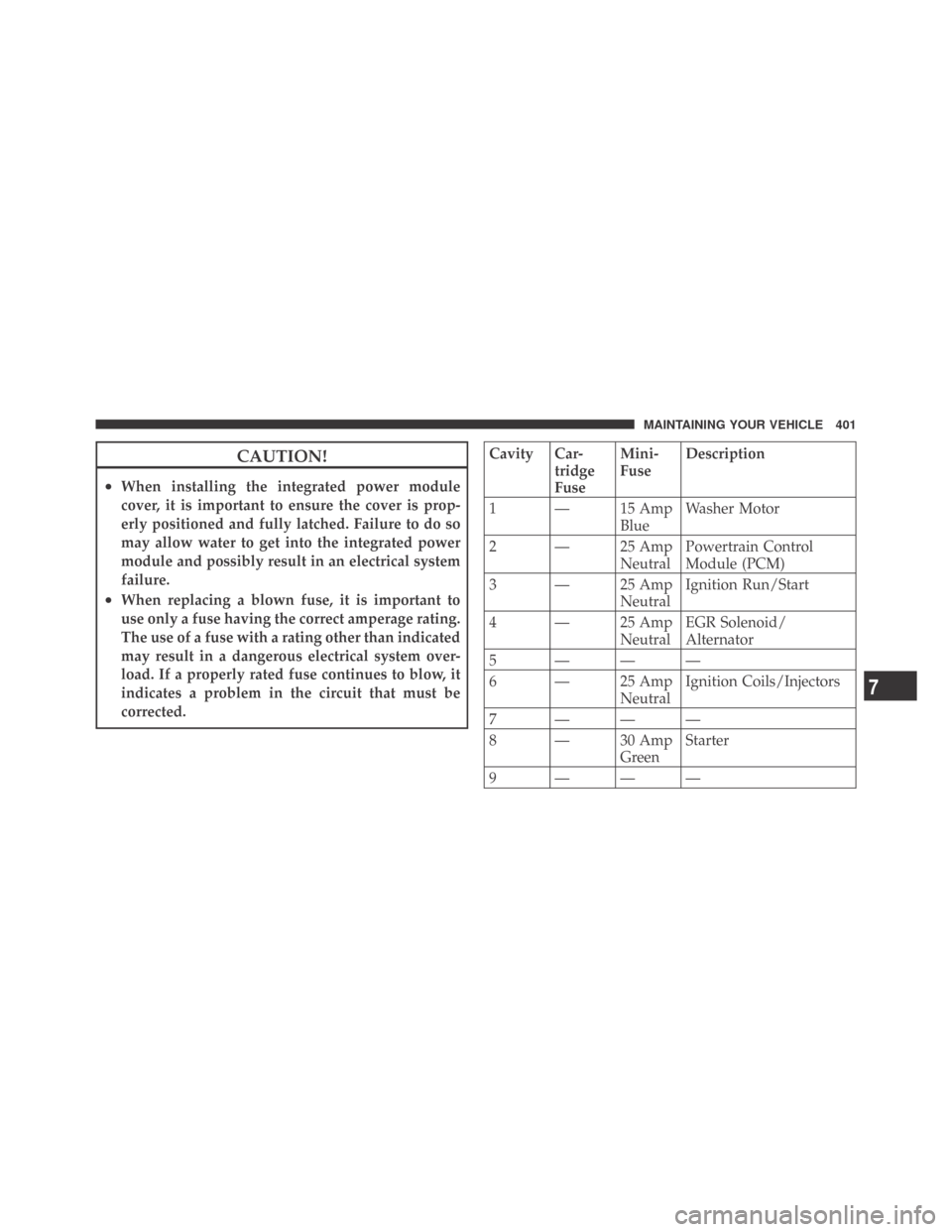
•When replacing a blown fuse, it is important to
use only a fuse having the correct amperage rating.
The use of a fuse with a rating other than indicated
may result in a dangerous electrical system over-
load. If a properly rated fuse continues to blow, it
indicates a problem in the circuit that must be
corrected.
Cavity Car-
tridge
FuseMini-
FuseDescription
1 — 15 Amp
BlueWasher Motor
2 — 25 Amp
NeutralPowertrain Control
Module (PCM)
3 — 25 Amp
NeutralIgnition Run/Start
4 — 25 Amp
NeutralEGR Solenoid/
Alternator
5 ———
6 — 25 Amp
NeutralIgnition Coils/Injectors
7 ———
8 — 30 Amp
GreenStarter
9 ———
7
MAINTAINING YOUR VEHICLE 401
Page 407 of 469
Cavity Car-
tridge
FuseMini-
FuseDescription
5 30 Amp
Pink— Heated Seats - if
equipped
6 — 20 Amp
YellowFuel Pump
7 — 15 Amp
BlueSub Amp - if equipped
8 — 15 Amp
BlueDiagnostic Link Connec-
tor (DLC)/Wireless Con-
trol Module (WCM)/
Wireless Ignition Node
(WIN)
9 — 20 Amp
YellowPower Outlet
10———
11*———
12*———Cavity Car-
tridge
FuseMini-
FuseDescription
13*———
14 — 10 Amp
RedAC Heater Control/
Cluster/Security Mod-
ule - if equipped
15———
16———
17 — 20 Amp
YellowCluster
18 — 20 Amp
YellowSelectable Power Outlet
19 — 10 Amp
RedStop Lights
20———
21———
22———
7
MAINTAINING YOUR VEHICLE 405
Page 408 of 469
Cavity Car-
tridge
FuseMini-
FuseDescription
23———
24———
25———
26———
27 — 10 Amp
RedOccupant Restraint Con-
troller (ORC)
28 — 10 Amp
RedIgnition Run
29 — 5 Amp
OrangeCluster/Electronic Sta-
bility Program (ESP)/
Powertrain Control
Module (PCM)/STOP
LIGHT Switch
30 — 10 Amp
RedDoor Modules/Power
Mirrors/Steering Con-
trol Module (SCM)Cavity Car-
tridge
FuseMini-
FuseDescription
31———
32———
33———
34———
35 — 5 Amp
OrangeAntenna Module - if
equipped/Power Mir-
rors
36 — 25 Amp
ClearHands-Free Phone - if
equipped/Radio/
Amplifier Feed
37 — 15 Amp
BlueTransmission
38 — 10 Amp
RedCargo Light/Vehicle In-
formation Module - if
equipped
406 MAINTAINING YOUR VEHICLE