Page 35 of 410
Rear Window Switches
There are also rear passenger window switches located at
the rear of the center console.
Wind Buffeting
Wind buffeting can be described as the perception of
pressure on the ears or a helicopter-type sound in the
ears. Your vehicle may exhibit wind buffeting with the
windows down, or the sunroof (if equipped) in certain
open or partially open positions. This is a normal occur-
rence and can be minimized. If the buffeting occurs with
the rear windows open, open the front and rear windows
together to minimize the buffeting. If the buffeting occurs
with the sunroof open, adjust the sunroof opening to
minimize the buffeting.
LIFTGATE
The liftgate can be unlocked by pressing twice on the
Remote Keyless Entry (RKE) transmitter button or by
activating the power door lock switches located on the
front doors.
Power Rear Window Switches
2
THINGS TO KNOW BEFORE STARTING YOUR VEHICLE 33
Page 79 of 410
�Tilt Steering Column ................... 132
� Electronic Speed Control — If Equipped ..... 133
▫ To Activate ......................... 134
▫ To Set a Desired Speed ................ 134
▫ To Deactivate ....................... 134
▫ To Resume Speed .................... 134
▫ To Vary The Speed Setting .............. 135
▫ Manual Transaxle .................... 135
▫ To Accelerate For Passing .............. 136
▫ Using Electronic Speed Control On Hills .... 136
� Garage Door Opener — If Equipped ........ 136
▫ Programming HomeLink� .............. 137
▫ Gate Operator/Canadian Programming .... 141▫
Security ........................... 141
▫ Troubleshooting Tips .................. 142
▫ General Information .................. 142
� Power Sunroof — If Equipped ............ 143
▫ Express-Open Feature ................. 143
▫ Wind Buffeting ...................... 144
▫ Sunroof Maintenance ................. 145
� Electrical Power Outlets ................. 145
� Storage ............................. 147
▫ Center Console/Armrest Storage Bin ...... 147
▫ Storage Pockets ..................... 148
� Console Features ...................... 148
3
UNDERSTANDING THE FEATURES OF YOUR VEHICLE 77
Page 145 of 410
POWER SUNROOF — IF EQUIPPED
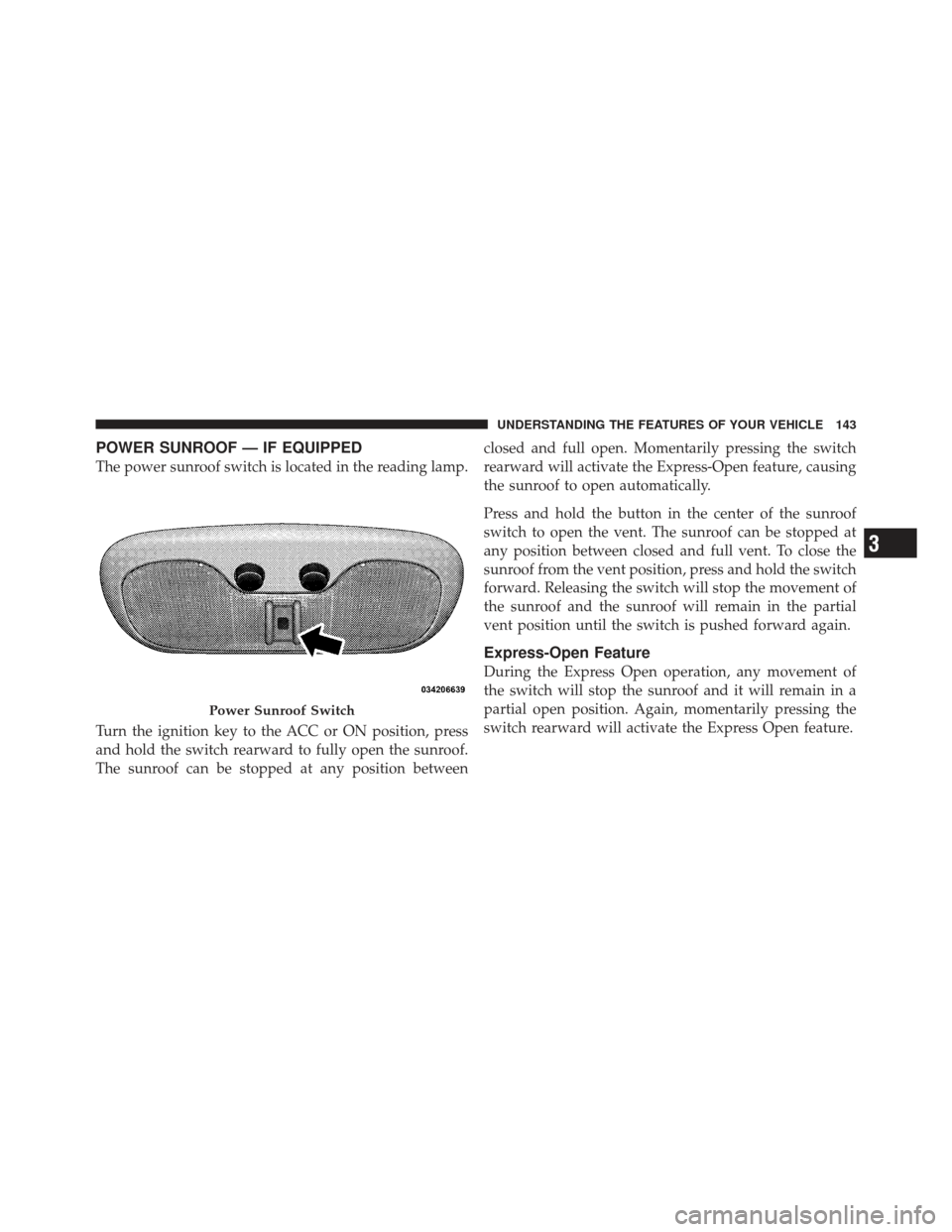
The power sunroof switch is located in the reading lamp.
Turn the ignition key to the ACC or ON position, press
and hold the switch rearward to fully open the sunroof.
The sunroof can be stopped at any position betweenclosed and full open. Momentarily pressing the switch
rearward will activate the Express-Open feature, causing
the sunroof to open automatically.
Press and hold the button in the center of the sunroof
switch to open the vent. The sunroof can be stopped at
any position between closed and full vent. To close the
sunroof from the vent position, press and hold the switch
forward. Releasing the switch will stop the movement of
the sunroof and the sunroof will remain in the partial
vent position until the switch is pushed forward again.
Express-Open Feature
During the Express Open operation, any movement of
the switch will stop the sunroof and it will remain in a
partial open position. Again, momentarily pressing the
switch rearward will activate the Express Open feature.
Power Sunroof Switch
3
UNDERSTANDING THE FEATURES OF YOUR VEHICLE 143
Page 146 of 410
To close the sunroof, hold the switch in the forward
position. Again, any release of the switch will stop the
movement and the sunroof will remain in a partial open
condition until the switch is pushed forward again.
The sunshade can be opened manually. It will also open
as the sunroof opens. The sunshade cannot be closed if
the sunroof is open.
WARNING!
•Never leave children in a vehicle with the key in
the ignition switch. Occupants, particularly unat-
tended children, can become entrapped by the
power sunroof while operating the power sunroof
switch. Such entrapment may result in serious
injury or death.(Continued)
WARNING! (Continued)
•In an accident, there is a greater risk of being
thrown from a vehicle with an open sunroof. You
could also be seriously injured or killed. Always
fasten your seat belt properly and make sure all
passengers are properly secured too.
•Do not allow small children to operate the sun-
roof. Never allow your fingers, other body parts, or
any object to project through the sunroof opening.
Injury may result.
Wind Buffeting
Wind buffeting can be described as the perception of
pressure on the ears or a helicopter-type sound in the
ears. Your vehicle may exhibit wind buffeting with the
windows down, or the sunroof (if equipped) in certain
open or partially open positions. This is a normal occur-
rence and can be minimized. If the buffeting occurs with
the rear windows open, open the front and rear windows
144 UNDERSTANDING THE FEATURES OF YOUR VEHICLE
Page 147 of 410
together to minimize the buffeting. If the buffeting occurs
with the sunroof open, adjust the sunroof opening to
minimize the buffeting or open any window.
Sunroof Maintenance
Use only a non-abrasive cleaner and a soft cloth to clean
the glass panel.
ELECTRICAL POWER OUTLETS
The 12-Volt power outlets include tethered caps, labeled
with a key symbol or battery symbol, indicating power
source. All outlets are protected by a single 20 Amp fuse.
The standard outlet in the front of the center floor console
is a conventional cigar lighter outlet.It will accept a cigar lighter unit, which is part of the
optional Smokers Package. To preserve the heating ele-
ment of the cigar lighter unit, do not hold the lighter in
the heating position. As a child safety precaution, this
power outlet is powered by the ignition switch, only
when the switch is in the ON or ACC position.
Front Power Outlet
3
UNDERSTANDING THE FEATURES OF YOUR VEHICLE 145
Page 185 of 410

Remote Unlock All Doors is selected, all doors will
unlock at the first press of the RKE transmitter UNLOCK
button. Press and hold the EVIC button when in this
display until Driver’s Door 1st or All Doors appears, to
make your selection.
Sound Horn On Lock
When ON is selected, a short horn sound will occur when
the RKE transmitter LOCK button is pressed. This feature
may be selected with or without the Flash Lights On
Lock/Unlock feature. Press and hold the EVIC button
when in this display until ON or OFF appears, to make
your selection.
Flash Lights On Lock
When ON is selected, the front and rear turn signals will
flash when the doors are locked or unlocked using the
RKE transmitter. This feature may be selected with orwithout the Sound Horn On Lock feature activated. Press
and hold the EVIC button when in this display until ON
or OFF appears, to make your selection.
Delay Turning Headlights Off
When this feature is selected the driver can choose to
have the headlights remain on for 0, 30, 60, or 90 seconds
when exiting the vehicle. Press and hold the EVIC button
when in this display until 0, 30, 60, or 90 appears to make
your selection.
Delay Power Off to Accessories Until Exit
When this feature is selected, the power window
switches, radio, hands–free system, DVD video system,
power sunroof, and power outlets will remain active for
up to 60 minutes after the ignition switch has been turned
OFF. Opening a vehicle door will cancel this feature.
Press and hold the EVIC button when in this display until
OFF, 45 sec, 5 min, or 10 min appears, to make your
selection.
4
UNDERSTANDING YOUR INSTRUMENT PANEL 183
Page 213 of 410

moving on to the next channel. The word�SCAN�will
appear in the display between each channel change. Press
the SCAN button a second time to stop the search.
NOTE: Channels that may contain objectionable content
can be blocked. Contact Sirius Customer Care at 888-539-
7474 to discuss options for channel blocking or unblock-
ing. Please have your ESN/SID information available.
Storing and Selecting Pre-Set Channels
In addition to the 12 AM and 12 FM pre-set stations, you
may also commit 12 satellite stations to push button
memory. These satellite channel pre-set stations will not
erase any AM or FM pre-set memory stations. Follow the
memory pre-set procedures that apply to your radio.
Using the PTY (Program Type) Button (if
equipped)
Follow the PTY button instructions that apply to your
radio.
PTY Button \bSCAN\b
When the desired program type is obtained, press the
�SCAN�button within five seconds. The radio will play
7 seconds of the selected channel before moving to the
next channel of the selected program type. Press the
�SCAN� button a second time to stop the search.
NOTE: Pressing the �SEEK�or�SCAN� button while
performing a music-type scan will change the channel by
one and stop the search. Pressing a pre-set memory
button during a music-type scan, will call up the memory
channel and stop the search.
PTY Button \bSEEK\b
When the desired program is obtained, press the �SEEK�
button within five seconds. The channel will change to
the next channel that matches the program type selected.
Satellite Antenna
To ensure optimum reception, do not place items on the
roof around the rooftop antenna location. Metal objects
4
UNDERSTANDING YOUR INSTRUMENT PANEL 211
Page 344 of 410
CavityCartridge
Fuse Mini-Fuse Description
15 50 Amp Red RAD Fan
Relay
Battery Feed
16 15 Amp Lt.
BlueIGN Run/
Acc Cigar
Ltr/Sunroof
17 10 Amp Red IOD Feed
CVT Mod/
Mod_Wcm
18 40 Amp
Green ASD Relay
Contact
Feed
19 20 Amp
YellowPWR Amp
1 & Amp 2
Feed
20 15 Amp Lt.
BlueIOD Feed
RadioCavity
Cartridge
Fuse Mini-Fuse Description
21 10 Amp Red IOD Feed
Intrus
Mod/Siren
22 10 Amp Red IGN RUN
Hvac/
Compass
Sensor
23 15 Amp Lt.
BlueENG ASD
Relay Feed
3
24 25 Amp
NaturalPWR
Sunroof
Feed
25 10 Amp Red Heated
Mirror
342 MAINTAINING YOUR VEHICLE