Page 190 of 410
Operating Instructions - Radio Mode
NOTE:The ignition switch must be in the ON or ACC
position to operate the radio.
Power Switch/Volume Control (Rotary)
Push the ON/VOL control to turn the radio ON. Push the
ON/VOL a second time to turn OFF the radio.
Electronic Volume Control
The electronic volume control turns continuously (360
degrees) in either direction without stopping. Turning the
volume control to the right increases the volume and to
the left decreases it.
When the audio system is turned on, the sound will be
set at the same volume level as last played.
For your convenience, the volume can be turned down,
but not up, when the audio system is off and the ignition
is ON.
MODE Button (Radio Mode)
Press the MODE button repeatedly to select between the
CD player, Satellite Radio, or Video Entertainment Sys-
tem (VES)™ (if equipped).
SEEK Button (Radio Mode)
Press and release the SEEK button to search for the next
listenable station in either AM/FM or Satellite (if
equipped) mode. Press the right side of the button to seek
up and the left side to seek down. The radio will remain
tuned to the new station until you make another selec-
tion. Holding the button will bypass stations without
stopping until you release it.
MUTE Button (Radio Mode)
Press the MUTE button to cancel the sound from the
speakers. �MUTE�will be displayed. Press the MUTE
button a second time and the sound from the speakers
188 UNDERSTANDING YOUR INSTRUMENT PANEL
Page 191 of 410

will return. Rotating the volume control, turning the
radio ON/OFF, or turning OFF the ignition will also
return the sound from the speakers
NOTE:In Hands Free Phone (if equipped) mode, the
MUTE button mutes the microphone.
SCAN Button (Radio Mode)
Pressing the SCAN button causes the tuner to search for
the next listenable station, in either AM, FM or Satellite (if
equipped) frequencies, pausing for 5 seconds at each
listenable station before continuing to the next. To stop
the search, press SCAN a second time.
MSG or INFO Button (Radio Mode)
Press the MSG or INFO button for an RBDS station (one
with call letters displayed). The radio will return a radio
text message broadcast from an FM station (FM mode
only).
TIME Button
Press the TIME button and the time of day will be
displayed for 5 seconds.
Clock Setting Procedure
1. Press and hold the TIME button until the hours blink.
2. Adjust the hours by turning the right side Tune /
Audio control.
3. After the hours are adjusted, press the right side Tune
/ Audio control to set the minutes. The minutes will
begin to blink.
4. Adjust the minutes using the right side Tune / Audio
control.
5. To exit, press any button/knob or wait 5 seconds.
4
UNDERSTANDING YOUR INSTRUMENT PANEL 189
Page 192 of 410

RW/FF (Radio Mode)
Pressing the Rewind/Fast Forward button causes the
tuner to search for the next frequency in the direction of
the arrows. This feature operates in either AM, FM or
Satellite (if equipped) frequencies.
TUNE Control (Radio Mode)
Turn the right side rotary TUNE control clockwise to
increase or counter-clockwise to decrease the channel
number.
AM/FM Button (Radio Mode)
Press the button to select AM or FM modes.
Setting the Tone, Balance, and Fade
Press the rotary TUNE control and “BASS” will display.
Turn the TUNE control to the right or left to increase or
decrease the Bass tones.Press the rotary TUNE control a second time and “MID”
will display. Turn the TUNE control to the right or left to
increase or decrease the Mid Range tones.
Press the rotary TUNE control a third time and
“TREBLE” will display. Turn the TUNE control to the
right or left to increase or decrease the Treble tones.
Press the rotary TUNE control a fourth time and “BAL-
ANCE” will display. Turn the TUNE control to the right
or left to adjust the sound level from the right or left side
speakers.
Press the rotary TUNE control a fifth time and “FADE”
will display. Turn the TUNE control to the left or right to
adjust the sound level between the front and rear speak-
ers.
Press the rotary TUNE control again to exit setting tone,
balance and fade.
190 UNDERSTANDING YOUR INSTRUMENT PANEL
Page 193 of 410
RND/PTY Button (Program Type Radio Mode)
Pressing this button once will turn on the PTY mode for
5 seconds. If no action is taken during the 5 second time
out the PTY icon will turn off. Pressing the PTY button or
turning the TUNE rotary knob within 5 seconds will
allow the program format type to be selected. Many radio
stations do not currently broadcast PTY information.
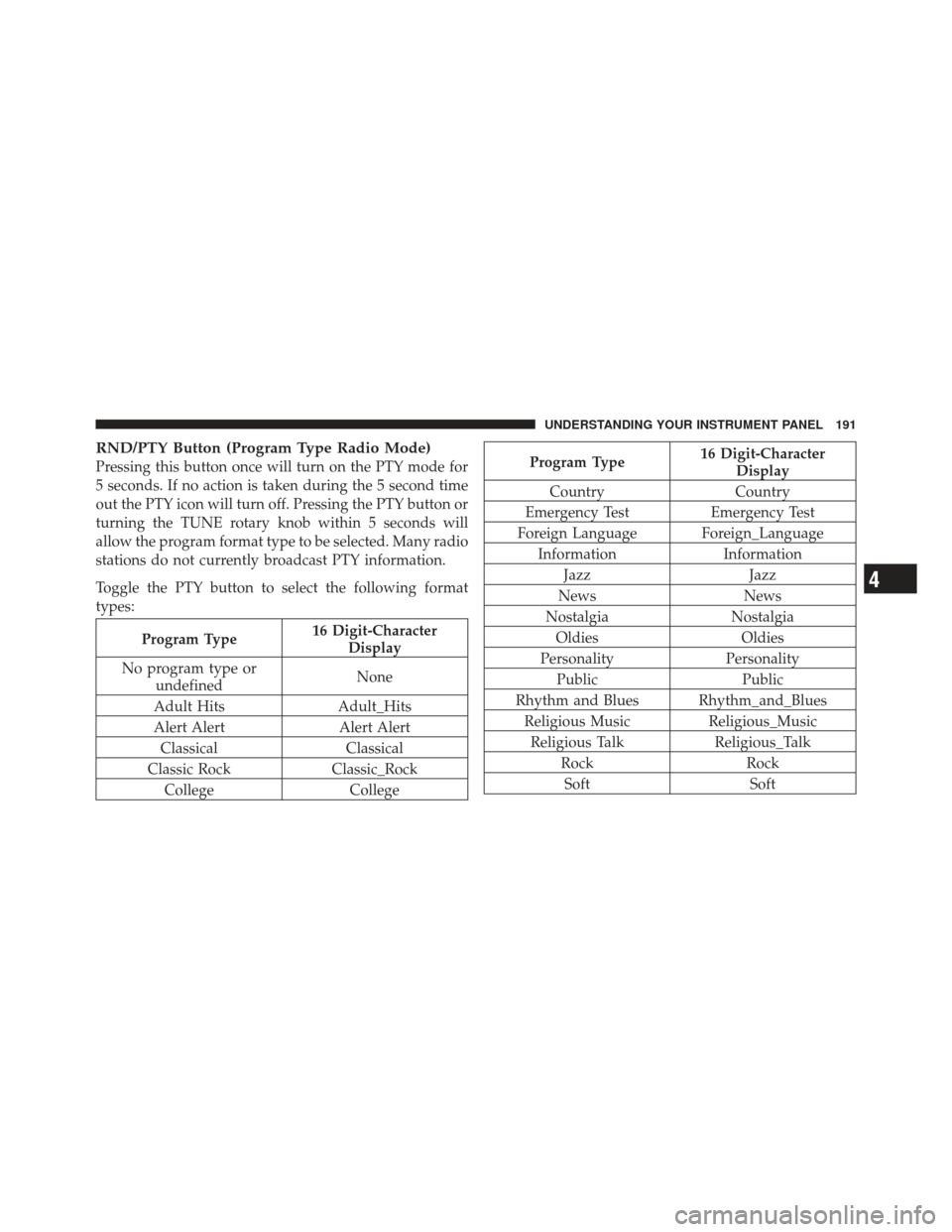
Toggle the PTY button to select the following format
types:
Program Type16 Digit-Character
Display
No program type or undefined None
Adult Hits Adult_Hits
Alert Alert Alert Alert Classical Classical
Classic Rock Classic_Rock
College College
Program Type16 Digit-Character
Display
Country Country
Emergency Test Emergency Test
Foreign Language Foreign_Language Information Information
Jazz Jazz
News News
Nostalgia Nostalgia
Oldies Oldies
Personality Personality
Public Public
Rhythm and Blues Rhythm_and_Blues Religious Music Religious_Music
Religious Talk Religious_Talk
Rock Rock
Soft Soft
4
UNDERSTANDING YOUR INSTRUMENT PANEL 191
Page 194 of 410
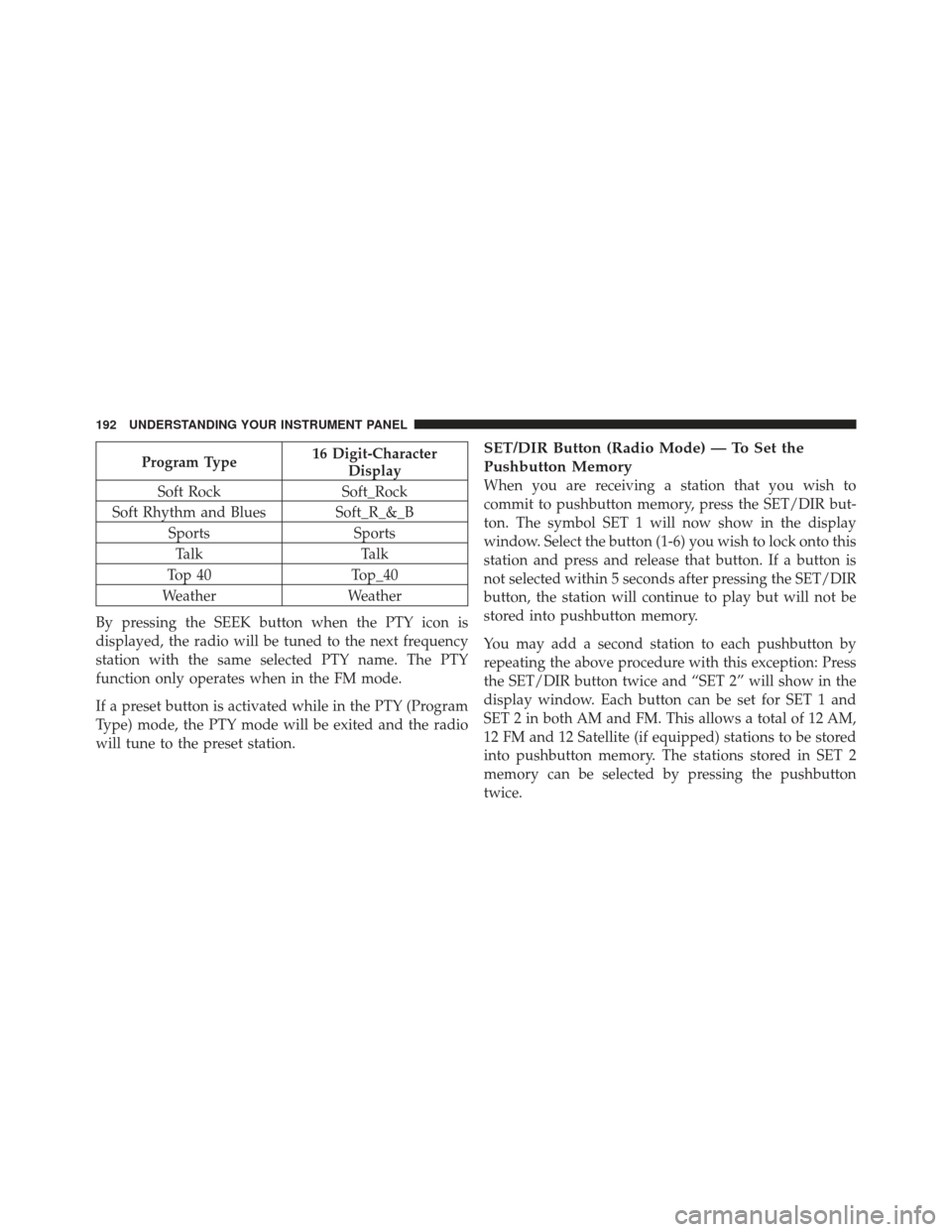
Program Type16 Digit-Character
Display
Soft Rock Soft_Rock
Soft Rhythm and Blues Soft_R_&_B Sports SportsTalk Talk
Top 40 Top_40
Weather Weather
By pressing the SEEK button when the PTY icon is
displayed, the radio will be tuned to the next frequency
station with the same selected PTY name. The PTY
function only operates when in the FM mode.
If a preset button is activated while in the PTY (Program
Type) mode, the PTY mode will be exited and the radio
will tune to the preset station.SET/DIR Button (Radio Mode) — To Set the
Pushbutton Memory
When you are receiving a station that you wish to
commit to pushbutton memory, press the SET/DIR but-
ton. The symbol SET 1 will now show in the display
window. Select the button (1-6) you wish to lock onto this
station and press and release that button. If a button is
not selected within 5 seconds after pressing the SET/DIR
button, the station will continue to play but will not be
stored into pushbutton memory.
You may add a second station to each pushbutton by
repeating the above procedure with this exception: Press
the SET/DIR button twice and “SET 2” will show in the
display window. Each button can be set for SET 1 and
SET 2 in both AM and FM. This allows a total of 12 AM,
12 FM and 12 Satellite (if equipped) stations to be stored
into pushbutton memory. The stations stored in SET 2
memory can be selected by pressing the pushbutton
twice.
192 UNDERSTANDING YOUR INSTRUMENT PANEL
Page 195 of 410
Every time a preset button is used a corresponding
button number will be displayed.
Buttons1-6(Radio Mode)
These buttons tune the radio to the stations that you
commit to pushbutton memory {12 AM, 12 FM, and 12
Satellite (if equipped) stations}.
Operation Instructions - (CD Mode for CD Audio
Play)
NOTE:
•The ignition switch must be in the ON or ACC
position to operate the radio.
•Note: This radio is capable of playing compact discs
(CD), recordable compact discs (CD-R), rewritable
compact discs (CD-RW) compact discs with MP3
tracks and multisession compact discs with CD and
MP3 tracks.
Inserting Compact Disc(s)
Gently insert one CD into the CD player with the CD
label facing up. The CD will automatically be pulled into
the CD player and the CD icon will illuminate on the
radio display.
CAUTION!
This CD player will accept 4 3/4 inch (12 cm) discs
only. The use of other sized discs may damage the
CD player mechanism.
You may eject a disc with the radio OFF.
If you insert a disc with the ignition ON and the radio
ON, the unit will switch from radio to CD mode and
begin to play when you insert the disc. The display will
show the disc number, the track number, and index time
in minutes and seconds. Play will begin at the start of
track 1.4
UNDERSTANDING YOUR INSTRUMENT PANEL 193
Page 196 of 410
SEEK Button (CD Mode for CD Audio Play)
Press the right side of the SEEK button for the next
selection on the CD. Press the left side of the button to
return to the beginning of the current selection, or return
to the beginning of the previous selection if the CD is
within the first 10 seconds of the current selection.
MUTE Button (CD Mode for CD Audio Play)
Press the MUTE button to cancel the sound from the
speakers.�MUTE�will be displayed. Press the MUTE
button a second time and the sound from the speakers
will return. Rotating the volume control, turning the
radio ON/OFF, or turning OFF the ignition will also
return the sound from the speakers.
SCAN Button (CD Mode for CD Audio Play)
Press the SCAN button to scan through each track on the
CD currently playing.
LOAD/EJECT Button (CD Mode for CD Audio
Play)
LOAD/ EJECT - Load
Press the LOAD/ EJECT button and the push-
button with the corresponding number where
the CD is being loaded. The radio will display
“PLEASE WAIT” and prompt when to INSERT
DISC. After the radio displays �LOAD DISC�insert the
CD into the player.
The radio display will show �LOADING DISC�when the
disc is loading, and “READING DISC” when the radio is
reading the disc.
LOAD/ EJECT - Eject
Press the LOAD/ EJECT button and the push-
button with the corresponding number where
the CD was loaded and the disc will unload
and move to the entrance for easy removal. The
194 UNDERSTANDING YOUR INSTRUMENT PANEL
Page 197 of 410
radio display will show�EJECTING DISC�when the disc
is being ejected and prompt the user to remove the disc.
Press and hold the LOAD/ EJECT button for 5 seconds
and all CDs will be ejected from the radio.
If you have ejected a disc and have not removed it within
15 seconds, it will be reloaded. If the CD is not removed,
the radio will continue to play the non-removed CD. If
the CD is removed and there are other CD’s in the radio,
the radio will play the next CD after a 2 minute timeout.
If the CD is removed and there are no other CD’s in the
radio, the radio will remain in CD mode and display
�INSERT DISC” for 10 seconds. If no discs are inserted
within 10 seconds “NO DISCS LOADED” will be dis-
played.
On some vehicles a disc can be ejected with the radio and
ignition OFF.TIME Button (CD Mode for CD Audio Play)
Press this button to change the display from a large CD
playing time display to a small CD playing time display.
RW/FF (CD Mode for CD Audio Play)
Press and hold FF (Fast Forward) and the CD player will
begin to fast forward until FF is released or RW or
another CD button is pressed. The RW (Rewind) button
works in a similar manner.
TUNE Control (CD Mode for CD Audio Play)
Pressing the TUNE control allows the setting of the Tone,
Fade, and Balance. See Radio Mode.
AM/FM Button (CD Mode for CD Audio Play)
Switches the radio into the AM or FM radio mode.
4
UNDERSTANDING YOUR INSTRUMENT PANEL 195