Page 163 of 410
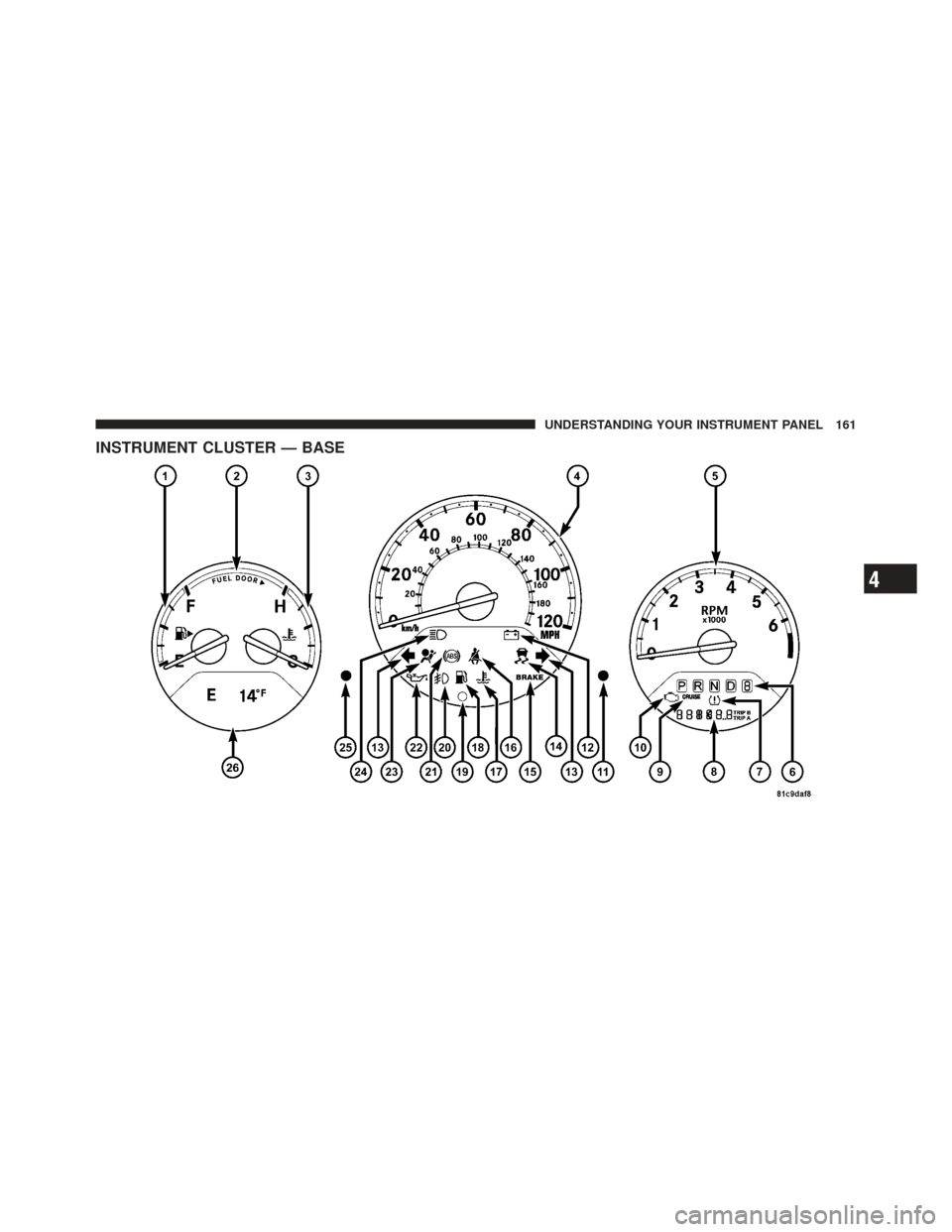
INSTRUMENT CLUSTER — BASE
4
UNDERSTANDING YOUR INSTRUMENT PANEL 161
Page 164 of 410
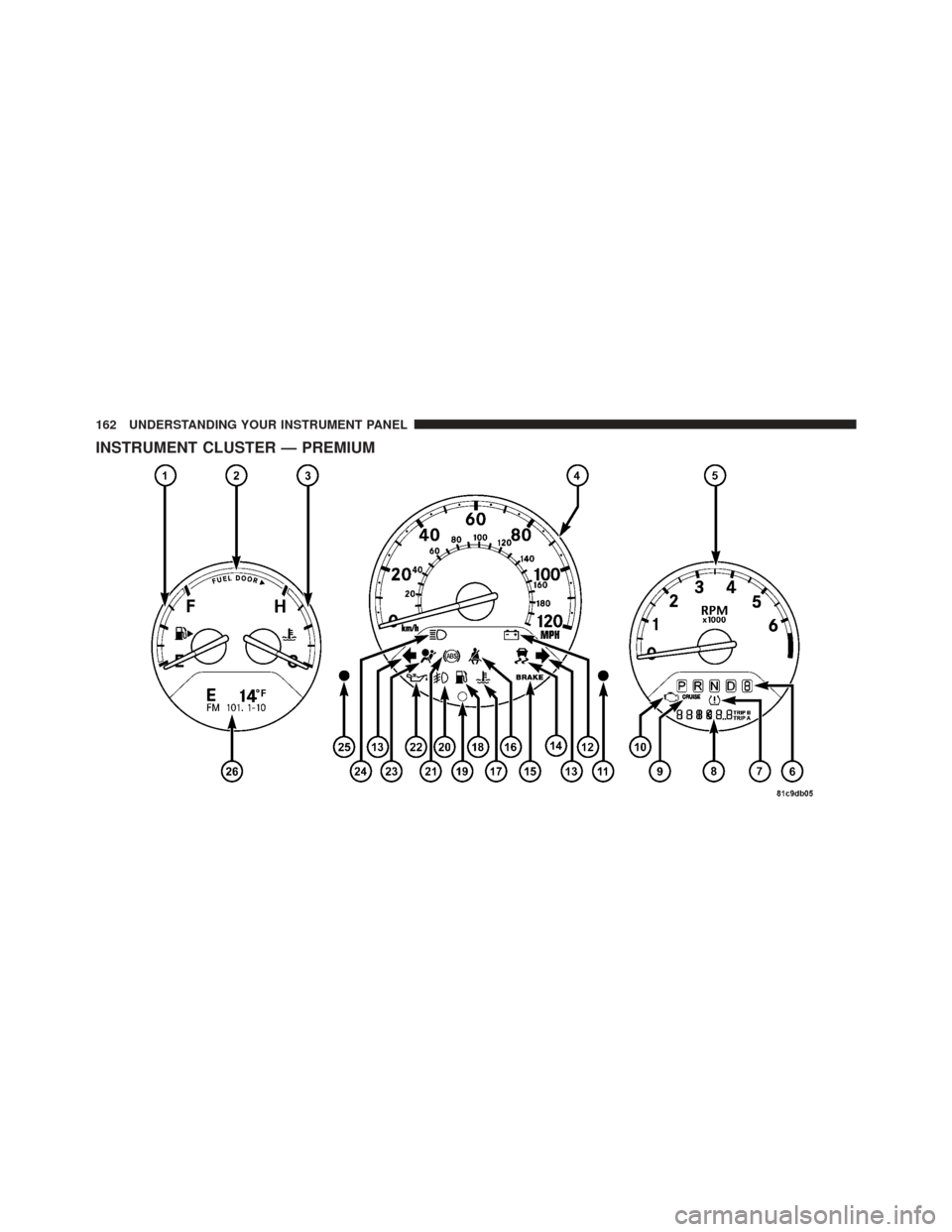
INSTRUMENT CLUSTER — PREMIUM
162 UNDERSTANDING YOUR INSTRUMENT PANEL
Page 165 of 410
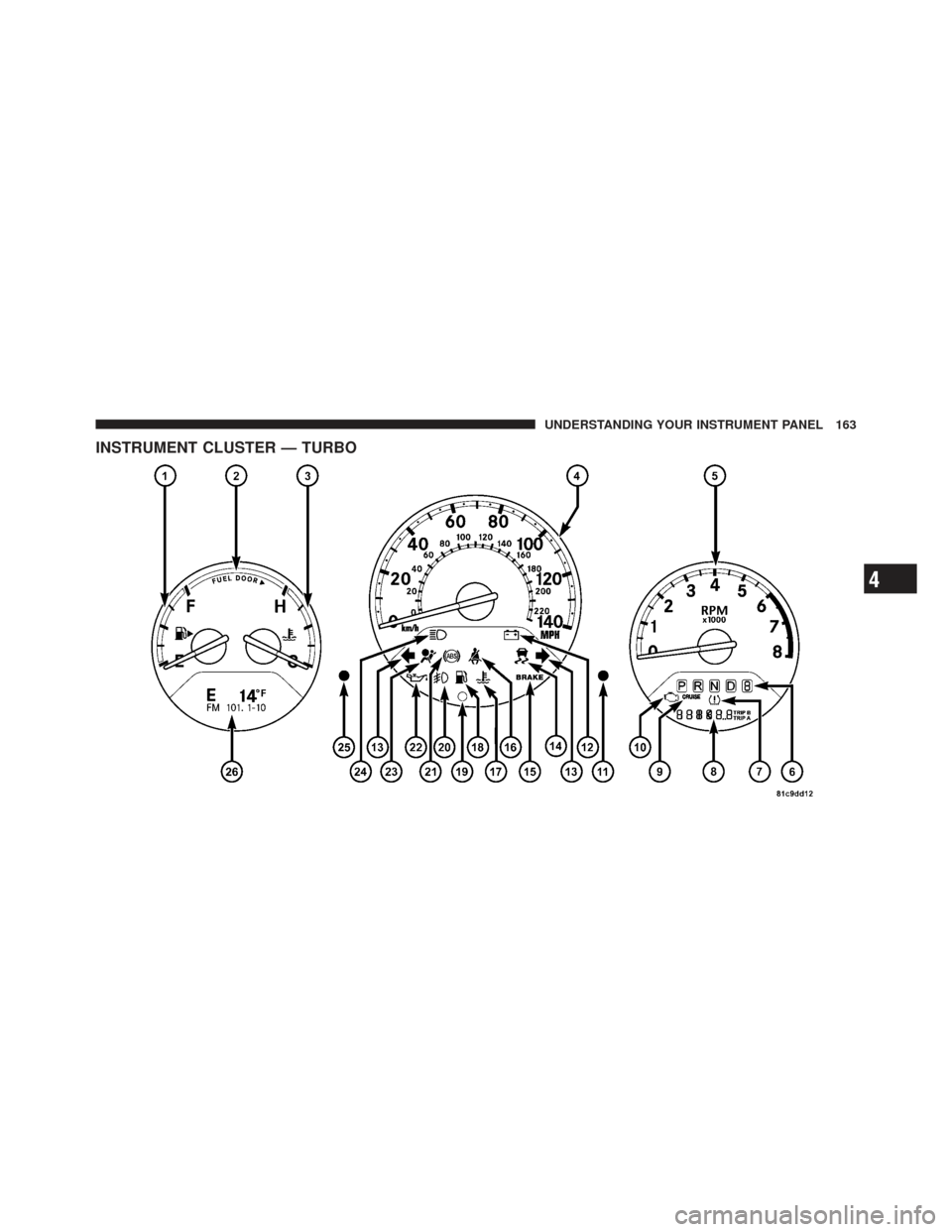
INSTRUMENT CLUSTER — TURBO
4
UNDERSTANDING YOUR INSTRUMENT PANEL 163
Page 166 of 410

INSTRUMENT CLUSTER DESCRIPTIONS
1. Fuel Gauge
When the ignition switch is in the ON position, the
pointer will show the level of fuel remaining in the fuel
tank.
2. Fuel Door Reminder
This is a reminder that the Fuel Filler Door is located on
the front passenger’s (right) side of the vehicle.
3. Temperature Gauge
The temperature gauge shows engine coolant tempera-
ture. Any reading within the normal range indicates that
the engine cooling system is operating satisfactorily.The gauge pointer will likely indicate a higher tempera-
ture when driving in hot weather, up mountain grades,
or when towing a trailer. It should not be allowed to
exceed the upper limits of the normal operating range.
CAUTION!
Driving with a hot engine cooling system could
damage your vehicle. If temperature gauge reads “H”
pull over and stop the vehicle. Idle the vehicle with
the air conditioner turned off until the pointer drops
back into the normal range. If the pointer remains on
the “H” and you hear continuous chimes, turn the
engine off immediately, and call an authorized deal-
ership for service.
164 UNDERSTANDING YOUR INSTRUMENT PANEL
Page 167 of 410

WARNING!
A hot engine cooling system is dangerous. You or
others could be badly burned by steam or boiling
coolant. You may want to call an authorized dealer-
ship for service if your vehicle overheats. If you
decide to look under the hood yourself, see Section 7
of this manual. Follow the warnings under the Cool-
ing System Pressure Cap paragraph.
4. Speedometer
The Speedometer shows the vehicle speed in miles per
hour (mph) and/or kilometers per hour (km/h).
5. Tachometer
The white area of the scale shows the permissible engine
revolutions-per-minute (RPM x 1000) for each gear range.
Before reaching the red area, ease up on the accelerator to
prevent engine damage. 6. Shift Lever Indicator
The Shift Lever Indicator is self-contained within the
instrument cluster. It displays the gear position of the
automatic transmission.
NOTE:
You must apply the brakes before shifting from
PARK.
7. Tire Pressure Monitoring Telltale Light — If
Equipped Each tire, including the spare (if provided),
should be checked monthly, when cold and
inflated to the inflation pressure recommended
by the vehicle manufacturer on the vehicle
placard or tire inflation pressure label. (If your vehicle
has tires of a different size than the size indicated on the
vehicle placard or tire inflation pressure label, you should
determine the proper tire inflation pressure for those
tires.)
4
UNDERSTANDING YOUR INSTRUMENT PANEL 165
Page 169 of 410

CAUTION!
The TPMS has been optimized for the original
equipment tires and wheels. TPMS pressures and
warning have been established for the tire size
equipped on your vehicle. Undesirable system opera-
tion or sensor damage may result when using re-
placement equipment that is not of the same size,
type, and/or style. Aftermarket wheels can cause
sensor damage. Do not use tire sealant from a can, or
balance beads if your vehicle is equipped with a
TPMS, as damage to the sensors may result.
8. Odometer/Trip Odometer
The odometer shows the total distance the vehicle has
been driven. U.S. federal regulations require that upon
transfer of vehicle ownership, the seller certify to the
purchaser the correct mileage that the vehicle has been
driven. Therefore, if the odometer reading is changed during repair or replacement, be sure to keep a record of
the reading before and after the service so that the correct
mileage can be determined.
Vehicle Warning Messages
When the appropriate conditions exist, “door,” “gate,”
“LoW TirE,” “CHAngE OIL”or “GASCAP” will display
in the odometer.
NOTE:
If the instrument cluster is equipped with the
optional Electronic Vehicle Information Center (EVIC),
then all warnings including ”Low Tire,” “Door Ajar” and
“Liftgate Ajar” will only display in the EVIC. (Refer to
“Electronic Vehicle Information Center (EVIC)” in this
section for specific messages).
LoW TirE
When the appropriate condition exists, the odometer
display will toggle between LoW and TirE for three
cycles.
4
UNDERSTANDING YOUR INSTRUMENT PANEL 167
Page 176 of 410

exist, this display shows the EVIC messages. Refer to
“Electronic Vehicle Information Center” in this section.
On vehicles equipped with Compass Mini-Trip Com-
puter (CMTC) the display provides the outside tempera-
ture, one of eight compass headings to indicate the
direction the vehicle is facing and the current radio
station. Refer to “Compass Mini-Trip Computer” in this
section.
COMPASS MINI-TRIP COMPUTER (CMTC) — IF
EQUIPPED
NOTE:The compass on your vehicle is self-calibrating,
eliminating the need to manually calibrate the compass.
The Compass Mini-Trip Computer features a driver-
interactive display (displays information on outside tem-
perature, compass direction, and trip information). The
display is located on the lower left part of the cluster
below the fuel and engine temperature gauge.
Compass Mini-Trip Computer Reset Button
CMTC Reset Button — Secondary Reset Button
Press the left Compass/Temperature RESET button to
scroll through sub-menus (i.e., Trip Functions: AVG Fuel
Economy, DTE Elapsed Time, and Units (US or Metric).
When the appropriate conditions exist, the following
messages will display in the window below the fuel and
engine temperature gauge:
E .................. Eight-point compass headings
are displayed (N, S, E, W, NE, NW, SE, SW)
14°F ............ T emperature (Fahrenheit or Celsius)
AV G .......... Average Fuel Economy (US or Metric)
DTE ....................... Distance to Empty
ET ............................ Elapsed Time
NOTE: Temperature and Average Fuel Economy can be
changed from U.S. or Metric. by pressing and holding the
(left) secondary pushbutton.
174 UNDERSTANDING YOUR INSTRUMENT PANEL
Page 179 of 410

3. Release the RESET button, then press and hold again
(approximately 10 seconds), until the direction is dis-
played with the CAL indicator on continuously in the
display.
4. To complete the compass calibration, drive the vehicle
in one or more complete 360 degree circles, under 5 mph
(8 km/h) in an area free from power lines and large
metallic objects, until the CAL indicator turns off. The
compass will now function normally.
Odometer Display
When the appropriate conditions exist, the following
odometer messages will display:
CRUISE...................... Cruise Activated
gASCAP ....................... Fuel Cap Fault
noFUSE .......................... Fuse Fault
These messages can be manually turned off by pressing
the right reset button (on the instrument cluster).
Trip Odometer (ODO)
This display shows the distance traveled since the last
reset. Press and release the right button (on the instru-
ment cluster) to switch from odometer, to trip A or trip B.
Press and hold the right button while the odometer/trip
odometer is displayed, to reset.
Trip A
Shows the total distance traveled for trip A since the last
reset.
Trip B
Shows the total distance traveled for trip B since the last
reset.
4
UNDERSTANDING YOUR INSTRUMENT PANEL 177