Page 193 of 410
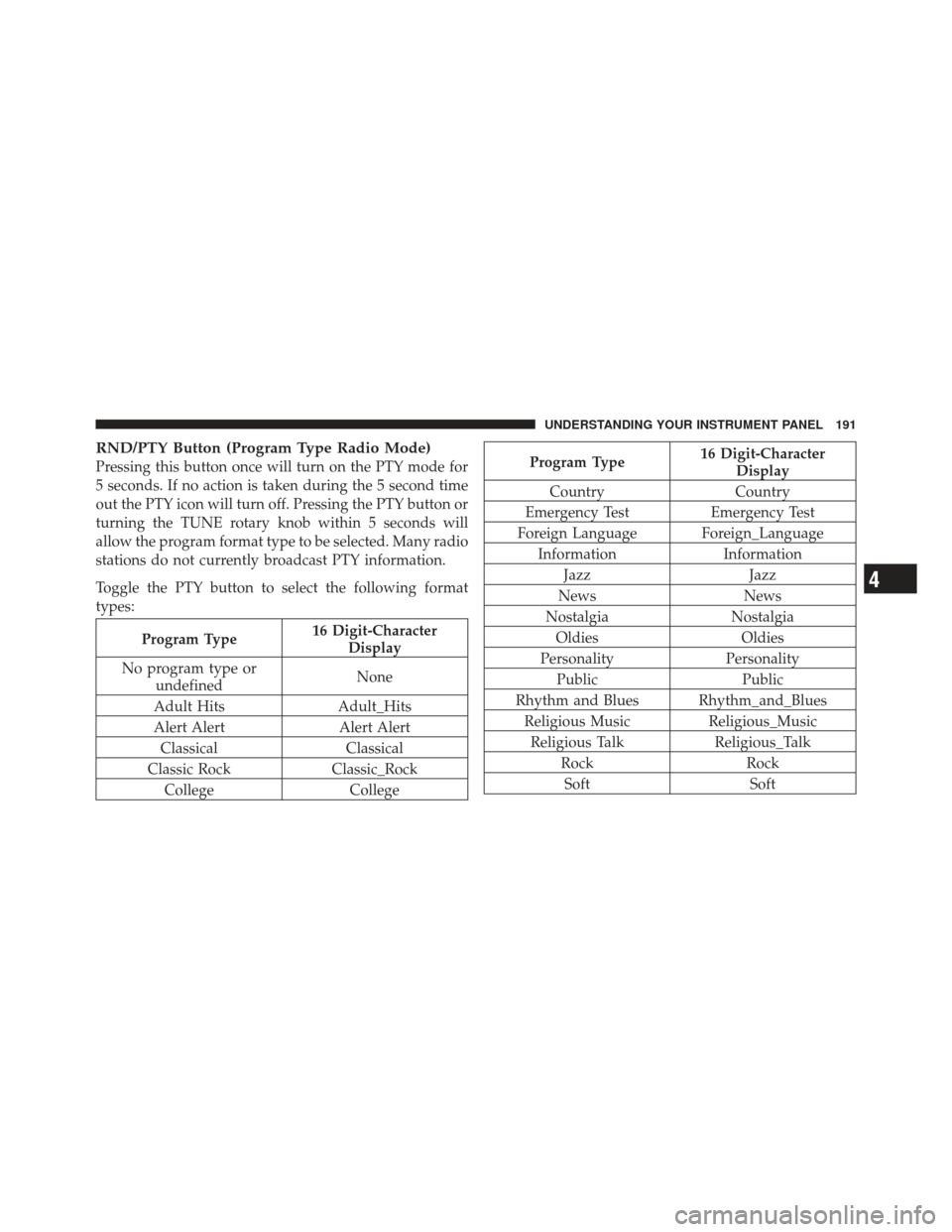
RND/PTY Button (Program Type Radio Mode)
Pressing this button once will turn on the PTY mode for
5 seconds. If no action is taken during the 5 second time
out the PTY icon will turn off. Pressing the PTY button or
turning the TUNE rotary knob within 5 seconds will
allow the program format type to be selected. Many radio
stations do not currently broadcast PTY information.
Toggle the PTY button to select the following format
types:
Program Type16 Digit-Character
Display
No program type or undefined None
Adult Hits Adult_Hits
Alert Alert Alert Alert Classical Classical
Classic Rock Classic_Rock
College College
Program Type16 Digit-Character
Display
Country Country
Emergency Test Emergency Test
Foreign Language Foreign_Language Information Information
Jazz Jazz
News News
Nostalgia Nostalgia
Oldies Oldies
Personality Personality
Public Public
Rhythm and Blues Rhythm_and_Blues Religious Music Religious_Music
Religious Talk Religious_Talk
Rock Rock
Soft Soft
4
UNDERSTANDING YOUR INSTRUMENT PANEL 191
Page 194 of 410
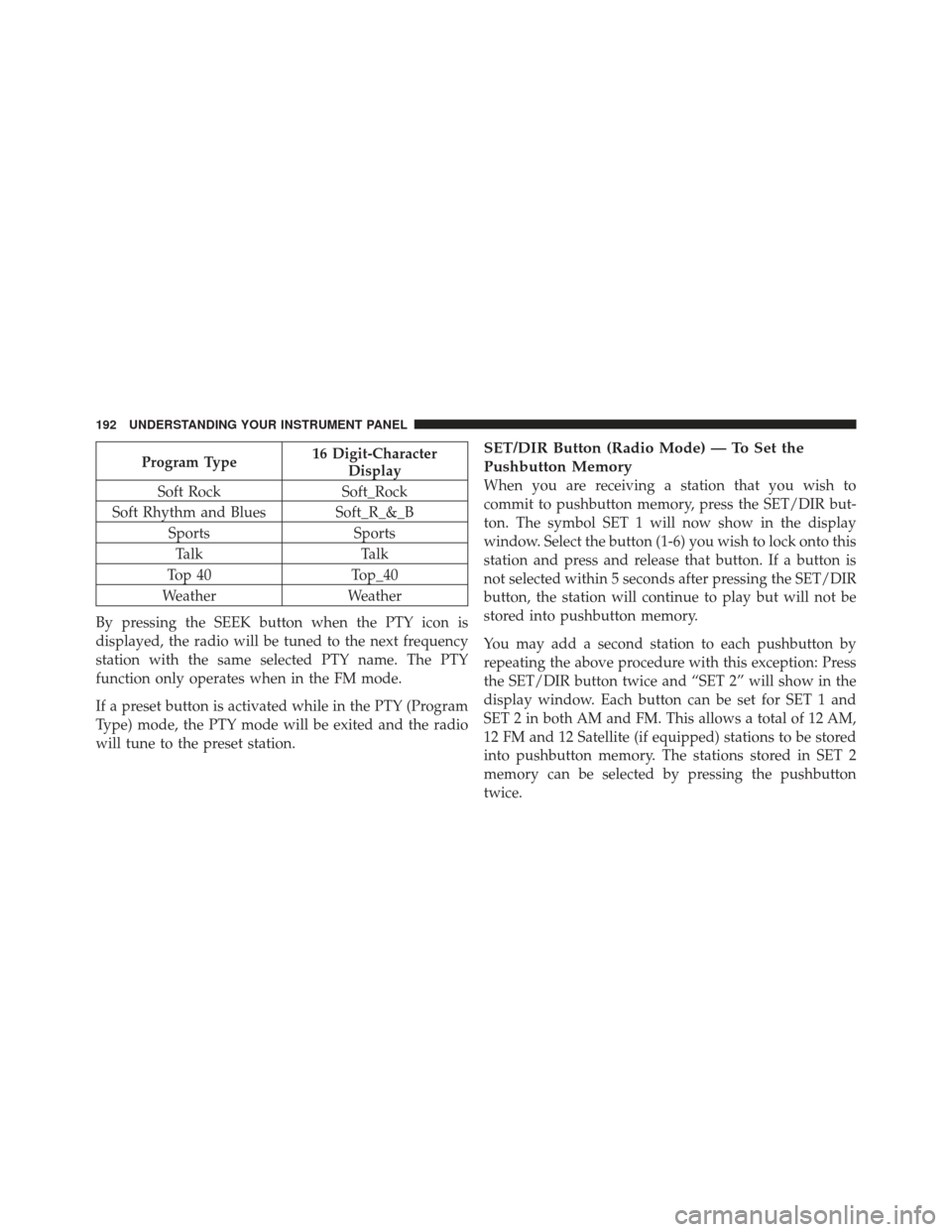
Program Type16 Digit-Character
Display
Soft Rock Soft_Rock
Soft Rhythm and Blues Soft_R_&_B Sports SportsTalk Talk
Top 40 Top_40
Weather Weather
By pressing the SEEK button when the PTY icon is
displayed, the radio will be tuned to the next frequency
station with the same selected PTY name. The PTY
function only operates when in the FM mode.
If a preset button is activated while in the PTY (Program
Type) mode, the PTY mode will be exited and the radio
will tune to the preset station.SET/DIR Button (Radio Mode) — To Set the
Pushbutton Memory
When you are receiving a station that you wish to
commit to pushbutton memory, press the SET/DIR but-
ton. The symbol SET 1 will now show in the display
window. Select the button (1-6) you wish to lock onto this
station and press and release that button. If a button is
not selected within 5 seconds after pressing the SET/DIR
button, the station will continue to play but will not be
stored into pushbutton memory.
You may add a second station to each pushbutton by
repeating the above procedure with this exception: Press
the SET/DIR button twice and “SET 2” will show in the
display window. Each button can be set for SET 1 and
SET 2 in both AM and FM. This allows a total of 12 AM,
12 FM and 12 Satellite (if equipped) stations to be stored
into pushbutton memory. The stations stored in SET 2
memory can be selected by pressing the pushbutton
twice.
192 UNDERSTANDING YOUR INSTRUMENT PANEL
Page 218 of 410
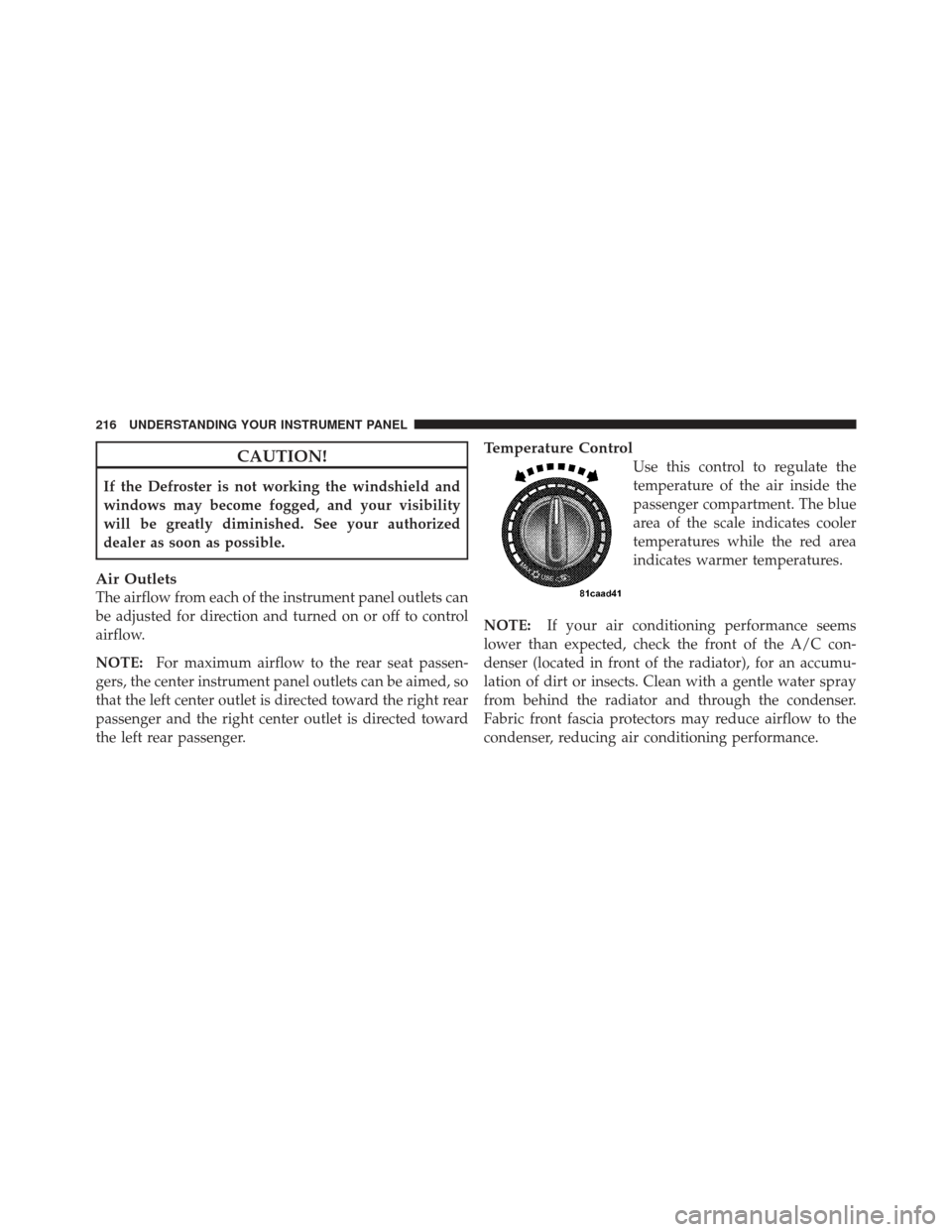
CAUTION!
If the Defroster is not working the windshield and
windows may become fogged, and your visibility
will be greatly diminished. See your authorized
dealer as soon as possible.
Air Outlets
The airflow from each of the instrument panel outlets can
be adjusted for direction and turned on or off to control
airflow.
NOTE:For maximum airflow to the rear seat passen-
gers, the center instrument panel outlets can be aimed, so
that the left center outlet is directed toward the right rear
passenger and the right center outlet is directed toward
the left rear passenger.
Temperature Control
Use this control to regulate the
temperature of the air inside the
passenger compartment. The blue
area of the scale indicates cooler
temperatures while the red area
indicates warmer temperatures.
NOTE: If your air conditioning performance seems
lower than expected, check the front of the A/C con-
denser (located in front of the radiator), for an accumu-
lation of dirt or insects. Clean with a gentle water spray
from behind the radiator and through the condenser.
Fabric front fascia protectors may reduce airflow to the
condenser, reducing air conditioning performance.
216 UNDERSTANDING YOUR INSTRUMENT PANEL
Page 343 of 410
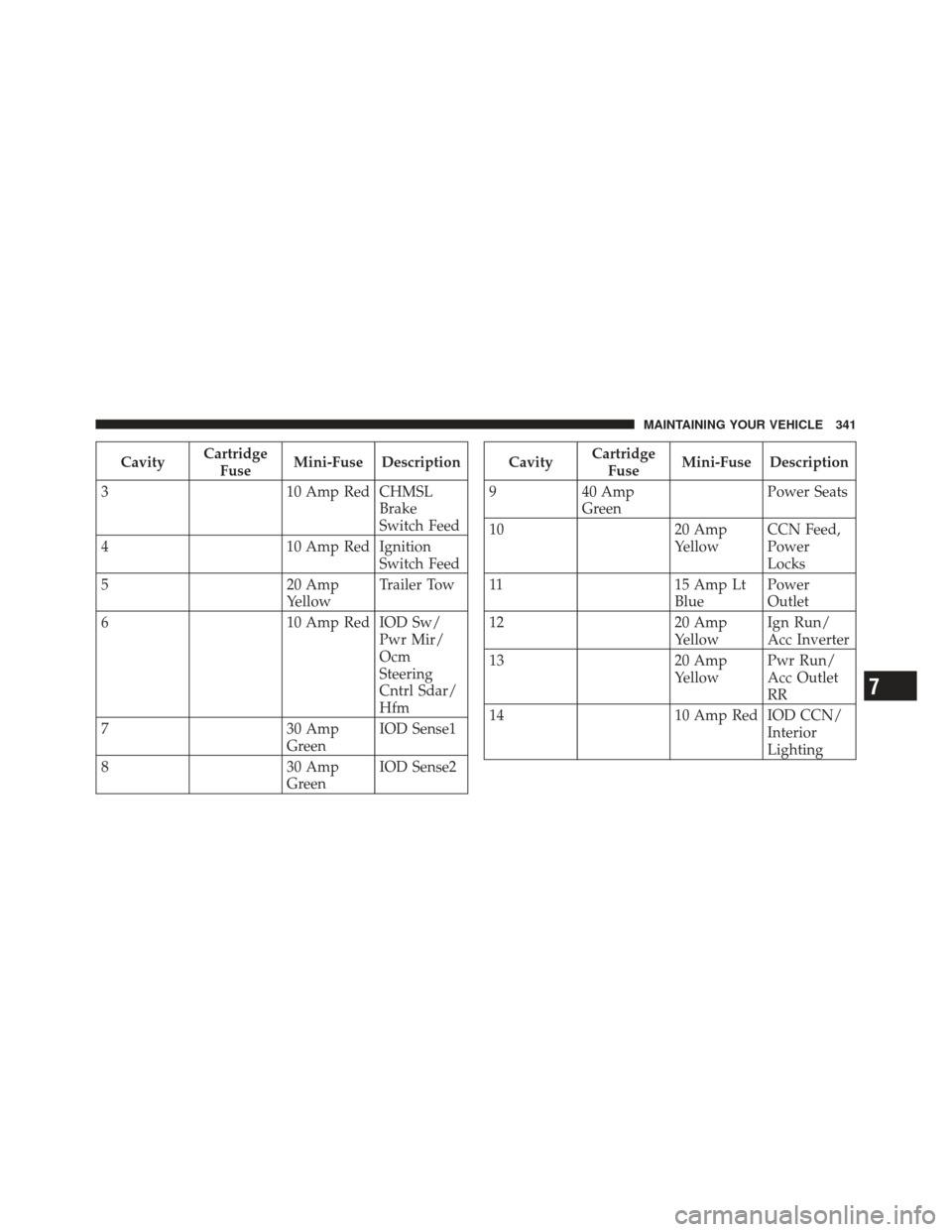
CavityCartridge
Fuse Mini-Fuse Description
3 10 Amp Red CHMSL
Brake
Switch Feed
4 10 Amp Red Ignition
Switch Feed
5 20 Amp
YellowTrailer Tow
6 10 Amp Red IOD Sw/
Pwr Mir/
Ocm
Steering
Cntrl Sdar/
Hfm
7 30 Amp
GreenIOD Sense1
8 30 Amp
GreenIOD Sense2Cavity
Cartridge
Fuse Mini-Fuse Description
9 40 Amp
Green Power Seats
10 20 Amp
YellowCCN Feed,
Power
Locks
11 15 Amp Lt
Blue Power
Outlet
12 20 Amp
YellowIgn Run/
Acc Inverter
13 20 Amp
YellowPwr Run/
Acc Outlet
RR
14 10 Amp Red IOD CCN/
Interior
Lighting
7
MAINTAINING YOUR VEHICLE 341
Page 344 of 410
CavityCartridge
Fuse Mini-Fuse Description
15 50 Amp Red RAD Fan
Relay
Battery Feed
16 15 Amp Lt.
BlueIGN Run/
Acc Cigar
Ltr/Sunroof
17 10 Amp Red IOD Feed
CVT Mod/
Mod_Wcm
18 40 Amp
Green ASD Relay
Contact
Feed
19 20 Amp
YellowPWR Amp
1 & Amp 2
Feed
20 15 Amp Lt.
BlueIOD Feed
RadioCavity
Cartridge
Fuse Mini-Fuse Description
21 10 Amp Red IOD Feed
Intrus
Mod/Siren
22 10 Amp Red IGN RUN
Hvac/
Compass
Sensor
23 15 Amp Lt.
BlueENG ASD
Relay Feed
3
24 25 Amp
NaturalPWR
Sunroof
Feed
25 10 Amp Red Heated
Mirror
342 MAINTAINING YOUR VEHICLE
Page 345 of 410
CavityCartridge
Fuse Mini-Fuse Description
26 15 Amp Lt.
BlueENG ASD
Relay Feed
2
27 10 Amp Red IGN RUN
Only ORC
Feed
28 10 Amp Red IGN RUN
ORC/OCM
Feed
29 EMPTY
30 20 Amp
YellowHeated
Seats
31 10 Amp Red Headlamp
Washer
Relay
ControlCavityCartridge
Fuse Mini-Fuse Description
32 30 Amp
Pink ENG ASD
Control
Feed 1
33 10 Amp Red ABS MOD/
J1962
Conn/PCM
34 30 Amp
Pink ABS Valve
Feed
35 40 Amp
Green ABS Pump
Feed
36 30 Amp
Pink Headlamp
Washer
Relay
Contact
Feed
37 25 Amp
NaturalSpare
7
MAINTAINING YOUR VEHICLE 343