Page 291 of 410
NOTE:Using the third gear range while operating the
vehicle under heavy operating conditions will improve
performance and extend transmission life by reducing
excessive shifting and heat build up. This action will also
provide better engine braking.
The automatic transmission fluid and filter should be
changed if you REGULARLY tow a trailer for more than
45 minutes of continuous operation. Refer to the “Main-
tenance Schedule” in Section 8 for the proper mainte-
nance intervals.
NOTE: Check the automatic transmission fluid level
before towing.Electronic Speed Control — If Equipped
•
Do not use in hilly terrain or with heavy loads.
•When using the speed control, if you experience speed
drops greater than 10 mph (16 km/h), disengage until
you can get back to cruising speed.
•Use speed control in flat terrain and with light loads to
maximize fuel efficiency.
5
STARTING AND OPERATING 289
Page 301 of 410
Do not raise the vehicle until you are sure the jack is
securely engaged.
3. Raise the vehicle by turning the jack screw to the right,
using the swivel wrench. Raise the vehicle only until the
tire just clears the surface and enough clearance is
obtained to install the spare tire. Minimum tire lift
provides maximum stability.
WARNING!
Raising the vehicle higher than necessary can make
the vehicle less stable. It could slip off the jack and
hurt someone near it. Raise the vehicle only enough
to remove the tire.
4. Remove the wheel nuts and pull the wheel and wheel
covers where applicable off the hub. Install the spare
wheel and wheel nuts with the cone-shaped end of the
nuts toward the wheel. Lightly tighten the nuts. To avoid the risk of forcing the vehicle off the jack, do not tighten
the nuts fully until the vehicle has been lowered.
WARNING!
To avoid possible personal injury, handle the wheel
covers with care to avoid contact with any sharp
edges.
NOTE: The wheel cover is held on the wheel by the
wheel nuts. When reinstalling original wheel, properly
align the wheel cover to the valve stem, place the wheel
cover onto the wheel, then install the wheel nuts.
5. Lower the vehicle by turning the jack screw to the left.
6. Finish tightening the nuts. Push down on the wrench
while tightening the wheel nuts. Alternate nuts until each
nut has been tightened twice. The correct wheel nut
torque is 100 ft lbs (135 N m). If you doubt that you have
6
WHAT TO DO IN EMERGENCIES 299
Page 308 of 410

▫Exhaust System ..................... 321
▫ Cooling System ..................... 323
▫ Brake System ....................... 329
▫ Automatic Transaxle .................. 331
▫ Manual Transaxle .................... 334
▫ Appearance Care And Protection From
Corrosion .......................... 334
� Fuses .............................. 340
▫ Integrated Power Module (IPM) .......... 340
� Vehicle Storage ....................... 344
� Replacement Bulbs .................... 344 �
Bulb Replacement ..................... 345
▫ Headlights ......................... 345
▫ Front Parking, Turn Signal, And Side Marker
Lights ............................ 346
▫ Front Fog Lights — If Equipped .......... 347
▫ Tail/Stop Lights And Rear
Turn Signal Lights .................... 347
▫ Backup Lights ...................... 348
▫ Center High-Mounted Stop Light (CHMSL) . . 348
� Fluids And Capacities .................. 349
� Fluids, Lubricants And Genuine Parts ....... 350
▫ Engine ............................ 350
▫ Chassis ........................... 351
306 MAINTAINING YOUR VEHICLE
Page 311 of 410

ONBOARD DIAGNOSTIC SYSTEM — OBD II
Your vehicle is equipped with a sophisticated onboard
diagnostic system called OBD II. This system monitors
the performance of the emissions, engine, and automatic
transmission control systems. When these systems are
operating properly, your vehicle will provide excellent
performance and fuel economy, as well as engine emis-
sions well within current government regulations.
If any of these systems require service, the OBD II system
will turn on the Malfunction Indicator Light (MIL). OBD
II will also store diagnostic codes and other information
to assist an authorized service technician in making
repairs. Although your vehicle will usually be drivable
and not need towing, see your authorized dealer for
service as soon as possible.
Loose Fuel Filler Cap Message
After fuel is added, the vehicle diagnostic system can
determine if the fuel filler cap is loose, improperlyinstalled, or damaged. A “gASCAP” message will be
displayed in the instrument cluster. Tighten the gas cap
until a
�clicking� sound is heard. This is an indication that
the gas cap is properly tightened. Press the odometer
reset button to turn the message off. If the problem
persists, the message will appear the next time the
vehicle is started. This might indicate a damaged cap. If
the problem is detected twice in a row, the system will
turn on the MIL. Resolving the problem will turn the MIL
light off.
EMISSIONS INSPECTION AND MAINTENANCE
PROGRAMS
In some localities, it may be a legal requirement to pass
an inspection of your vehicle’s emissions control system.
Failure to pass could prevent vehicle registration.
For states that require an Inspection and Mainte-
nance (I/M), this check verifies the “Malfunction7
MAINTAINING YOUR VEHICLE 309
Page 312 of 410

Indicator Light (MIL)” is functioning and is not on when
the engine is running, and that the OBD II system is
ready for testing.
Normally, the OBD II system will be ready. The OBD II
system maynotbe ready if your vehicle was recently
serviced, recently had a dead battery or a battery replace-
ment. If the OBD II system should be determined not
ready for the I/M test, your vehicle may fail the test.
Your vehicle has a simple ignition key-actuated test,
which you can use prior to going to the test station. To
check if your vehicle’s OBD II system is ready, you must
do the following:
1. Insert your ignition key into the ignition switch.
2. Turn the ignition to the ON position, but do not crank
or start the engine.
3. If you crank or start the engine, you will have to start
this test over. 4. As soon as you turn your key to the ON position, you
will see the MIL symbol come on as part of a normal bulb
check.
5. Approximately 15 seconds later, one of two things will
happen:
a. The MIL will flash for about 10 seconds and then
return to being fully illuminated until you turn OFF
the ignition or start the engine. This means that your
vehicle’s OBD II system is not readyand you should
not proceed to the I/M station.
b. The MIL will not flash at all and will remain fully
illuminated until you turn OFF the ignition or start the
engine. This means that your vehicle’s OBD II system
is ready and you can proceed to the I/M station.
If your OBD II system is not ready,you should see your
authorized dealer or repair facility. If your vehicle was
recently serviced or had a battery failure or replacement,
310 MAINTAINING YOUR VEHICLE
Page 331 of 410

Brake System
In order to assure brake system performance, all brake
system components should be inspected periodically.
Refer to the “Maintenance Schedules” in Section 8 for the
proper maintenance intervals.
WARNING!
Riding the brakes can lead to brake failure and
possibly an accident. Driving with your foot resting
or riding on the brake pedal can result in abnormally
high brake temperatures, excessive lining wear, and
possible brake damage. You would not have your full
braking capacity in an emergency.
Master Cylinder - Brake Fluid Level Check
Check the fluid level in the master cylinder immediately
if the Brake System Warning Telltale Light indicates
system failure.Check the fluid level in the master cylinder when per-
forming underhood services.
Clean the top of the master cylinder area before removing
the cap. If necessary, add fluid to bring the fluid level up
to the requirements described on the brake fluid reser-
voir.
Overfilling of fluid is not recommended because it may
cause leaking in the system.
Fluid level can be expected to fall as the brake pads wear.
Brake fluid level should be checked when pads are
replaced. However, low fluid level may be caused by a
leak and a checkup may be needed.
NOTE:
If your vehicle is equipped with a manual
transaxle, the Brake Fluid Reservoir supplies fluid to both
the Brake System and the Clutch Release System. The
two systems are separated in the reservoir and a leak in
one system will not affect the other system. The manual
7
MAINTAINING YOUR VEHICLE 329
Page 340 of 410
Cleaning Interior Trim
Interior Trim should be cleaned starting with a damp
cloth, a damp cloth with MOPAR�Total Clean, then
MOPAR� Spot & Stain Remover if absolutely necessary.
Do not use harsh cleaners or Armorall. Use MOPAR �
Total Clean to clean vinyl upholstery
Cleaning Leather Upholstery
MOPAR� Total Clean is specifically recommended for
leather upholstery.
Your leather upholstery can be best preserved by regular
cleaning with a damp soft cloth. Small particles of dirt
can act as an abrasive and damage the leather upholstery,
and should be removed promptly with a damp cloth.
Stubborn soils can be removed easily with a soft cloth
and MOPAR� Total Clean. Care should be taken to avoid
soaking your leather upholstery with any liquid. Please
do not use polishes, oils, cleaning fluids, solvents, deter-
gents, or ammonia-based cleaners to clean your leather upholstery. Application of a leather conditioner is not
required to maintain the original condition.
WARNING!
Do not use volatile solvents for cleaning purposes.
Many are potentially flammable, and if used in
closed areas they may cause respiratory harm.
Cleaning Headlights
Your vehicle has plastic headlights that are lighter and
less susceptible to stone breakage than glass headlights.
Plastic is not as scratch resistant as glass and therefore
different lens cleaning procedures must be followed.
To minimize the possibility of scratching the lenses and
reducing light output, avoid wiping with a dry cloth. To
remove road dirt, wash with a mild soap solution fol-
lowed by rinsing.
338 MAINTAINING YOUR VEHICLE
Page 343 of 410
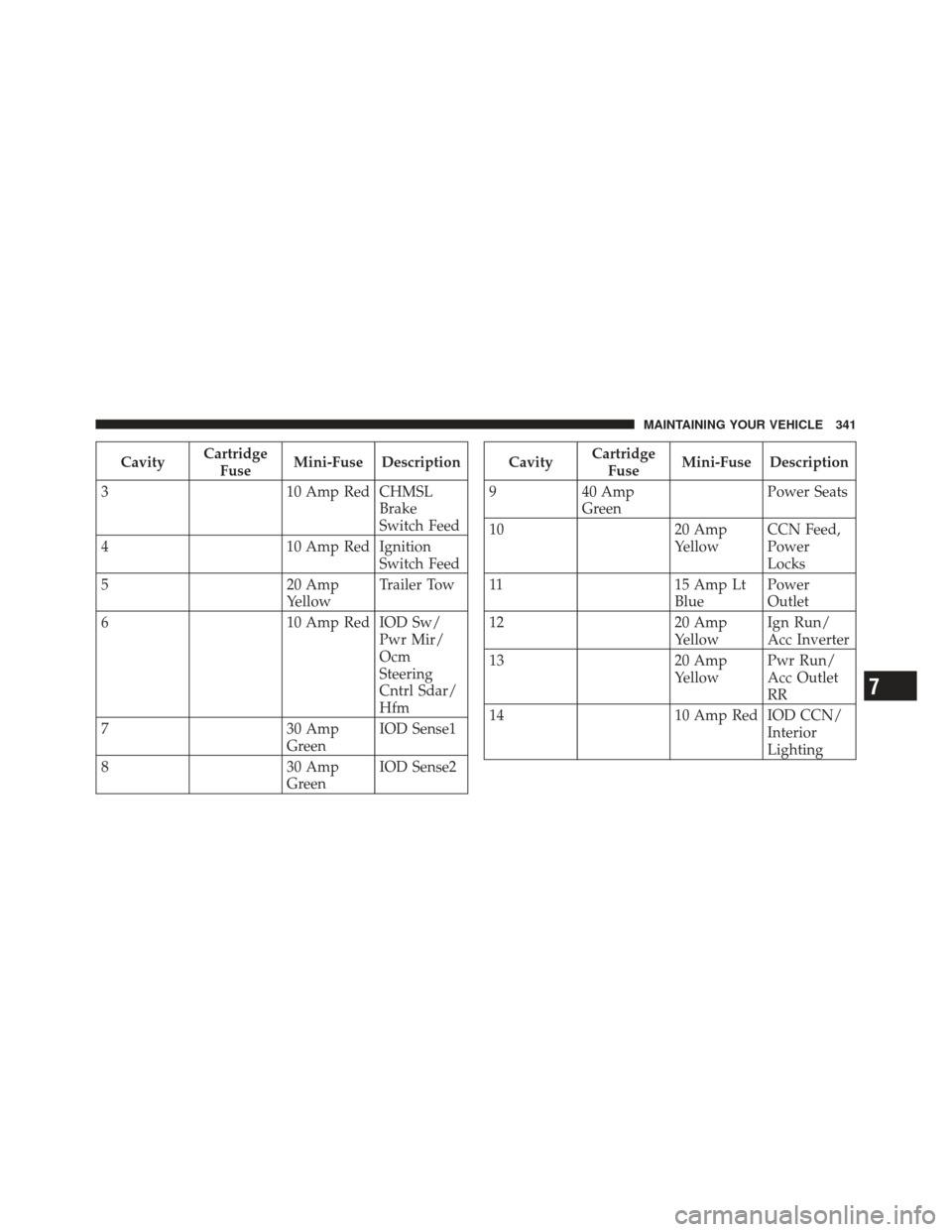
CavityCartridge
Fuse Mini-Fuse Description
3 10 Amp Red CHMSL
Brake
Switch Feed
4 10 Amp Red Ignition
Switch Feed
5 20 Amp
YellowTrailer Tow
6 10 Amp Red IOD Sw/
Pwr Mir/
Ocm
Steering
Cntrl Sdar/
Hfm
7 30 Amp
GreenIOD Sense1
8 30 Amp
GreenIOD Sense2Cavity
Cartridge
Fuse Mini-Fuse Description
9 40 Amp
Green Power Seats
10 20 Amp
YellowCCN Feed,
Power
Locks
11 15 Amp Lt
Blue Power
Outlet
12 20 Amp
YellowIgn Run/
Acc Inverter
13 20 Amp
YellowPwr Run/
Acc Outlet
RR
14 10 Amp Red IOD CCN/
Interior
Lighting
7
MAINTAINING YOUR VEHICLE 341