Page 226 of 493
Braking Distance
When selected, this screen displays the vehicle’s braking
distance and the speed at which the brake pedal was
depressed.
•This feature will only function when applying the
brakes at speeds above 30 mph (48 km/h).
•Engaging the parking brake will disable this feature.
•The word “READY” will flash when conditions are
met for the event to begin.
•The distance and speed measurements display while
the event is taking place.
•The distance measurement will be aborted if the brake
pedal is released before the vehicle comes to a com-
plete stop.
•The distance and speed measurements will continue to
display until the FUNCTION SELECT button is
pressed.
•Pressing the FUNCTION SELECT button will clear the
current run and prepare the cluster to record a new
run.
1/8 Mile, 1/4 Mile
When selected, this screen displays the time it takes the
vehicle to travel 1/8 mile (1/4 mile) within 30 seconds
and the vehicle’s speed when it reaches 1/8 mile (1/
4 mile).
•The feature will “ready” when the vehicle is at 0 mph
(0 km/h). The word “READY” will flash when condi-
tions are met for the event to begin.
•Dashes will display if the vehicle fails to reach
1/8 mile (1/4 mile) in less then 30 seconds.
224 UNDERSTANDING YOUR INSTRUMENT PANEL
Page 306 of 493
�Driving On Slippery Surfaces............. 323
▫Acceleration........................ 323
▫Traction........................... 323
�Driving Through Water................. 324
▫Flowing/Rising Water................. 324
▫Shallow Standing Water............... 324
�Power Steering....................... 326
▫Power Steering Fluid Check............. 326
�Parking Brake........................ 327
�Brake System........................ 329
▫Anti-Lock Brake System............... 329
�Electronic Brake Control System........... 332
▫ABS (Anti-Lock Brake System)........... 332▫TCS (Traction Control System)........... 332
▫BAS (Brake Assist System).............. 333
▫ESP (Electronic Stability Program)........ 333
▫Synchronizing ESP................... 337
▫ESP/BAS Malfunction Indicator Light And
ESP/TCS Indicator Light............... 337
�Tire Safety Information................. 338
▫Tire Markings....................... 338
▫Tire Identification Number (TIN)......... 342
▫Tire Loading And Tire Pressure.......... 343
�Tires — General Information............. 347
▫Tire Pressure....................... 347
▫Tire Inflation Pressures................ 348
▫Tire Pressures For High Speed Operation . . . 349
304 STARTING AND OPERATING
Page 317 of 493
WARNING!
Unintended movement of a vehicle could injure
those in and near the vehicle. As with all vehicles,
you should never exit a vehicle while the engine is
running. Before exiting a vehicle, you should always
shift the transmission into PARK, remove the key
from the ignition, and apply the parking brake. Once
the key is removed from the ignition, the transmis-
sion shift lever is locked in the PARK position,
securing the vehicle against unwanted movement.
Furthermore, you should never leave unattended
children inside a vehicle.
Over-Temperature Mode
The transmission electronics constantly monitor the
transmission oil temperature. If the transmission exceeds
normal operating temperature, the transmission will
change the way it shifts to help control the condition.
This may result in a slightly different feeling or response
during normal operation in DRIVE position. After the
transmission cools down, it will return to normal
operation.
Brake/Transmission Shift Interlock System
This vehicle is equipped with a Brake Transmission Shift
Interlock (BTSI) system that holds the shift lever in the
PARK position when the ignition switch is in the LOCK
position. To move the shift lever out of the PARK
position, the ignition switch must be turned to the ON
position, and the brake pedal must be depressed.
STARTING AND OPERATING 315
5
Page 319 of 493
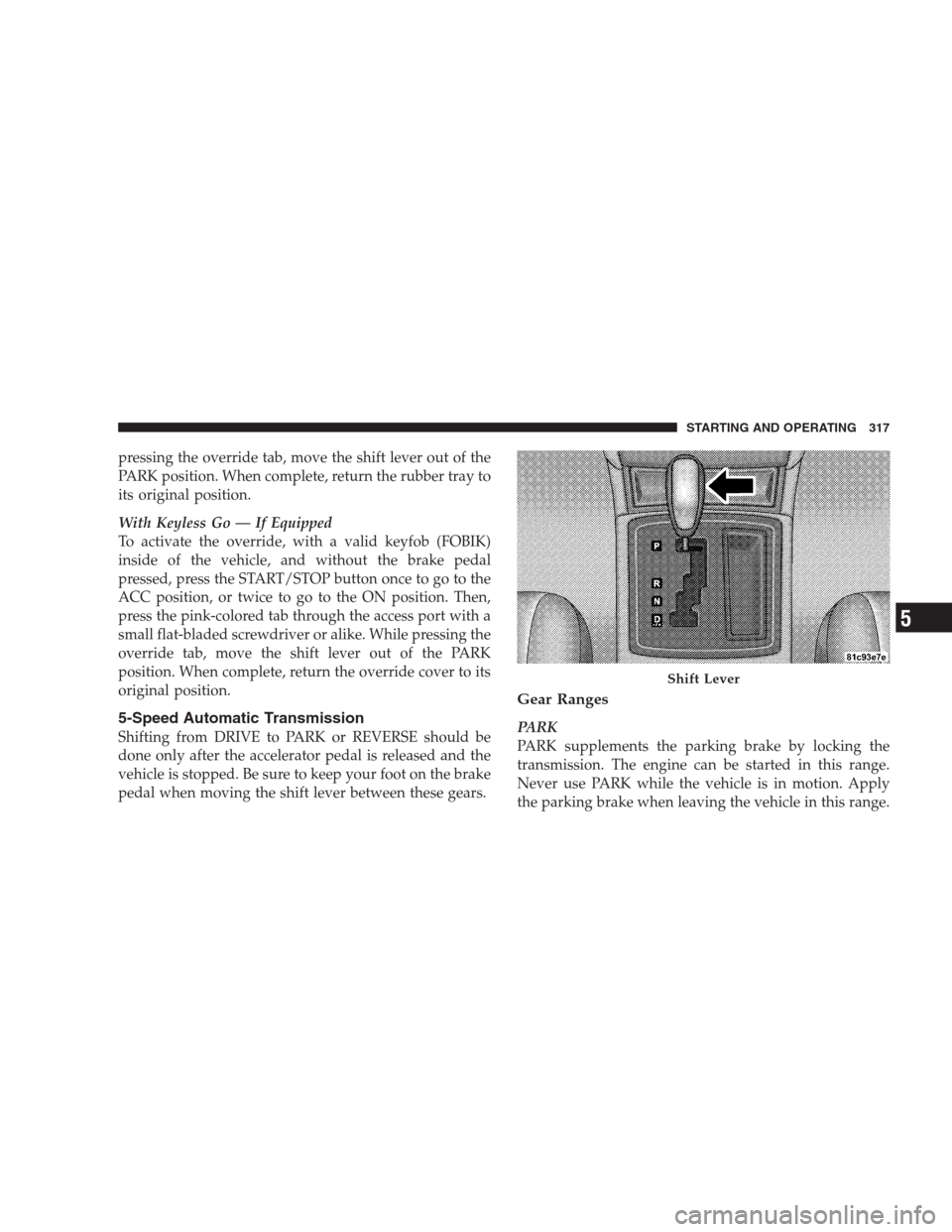
pressing the override tab, move the shift lever out of the
PARK position. When complete, return the rubber tray to
its original position.
With Keyless Go — If Equipped
To activate the override, with a valid keyfob (FOBIK)
inside of the vehicle, and without the brake pedal
pressed, press the START/STOP button once to go to the
ACC position, or twice to go to the ON position. Then,
press the pink-colored tab through the access port with a
small flat-bladed screwdriver or alike. While pressing the
override tab, move the shift lever out of the PARK
position. When complete, return the override cover to its
original position.
5-Speed Automatic Transmission
Shifting from DRIVE to PARK or REVERSE should be
done only after the accelerator pedal is released and the
vehicle is stopped. Be sure to keep your foot on the brake
pedal when moving the shift lever between these gears.
Gear Ranges
PARK
PARK supplements the parking brake by locking the
transmission. The engine can be started in this range.
Never use PARK while the vehicle is in motion. Apply
the parking brake when leaving the vehicle in this range.
Shift Lever
STARTING AND OPERATING 317
5
Page 320 of 493
When parking on a flat surface, place the shift lever in the
PARK position first, and then apply the parking brake.
When parking on a hill, it is important to set the parking
brake before placing the shift lever in PARK, otherwise
the load on the transmission locking mechanism may
make it difficult to move the shift lever out of PARK. As
an added precaution, turn the front wheels toward the
curb on a downhill grade and away from the curb on an
uphill grade.
WARNING!
Never use PARK position on an automatic transmis-
sion as a substitute for the parking brake. Always
apply parking brake fully when parked to guard
against vehicle movement and possible injury or
damage.
The following indicators should be used to ensure that
you have engaged the shift lever in the PARK position:
•When shifting into PARK, move the shift lever all the
way forward and left until it stops and is fully seated.
•Look at the shift indicator display on the instrument
panel to ensure it is in the P position.
CAUTION!
Damage to the shifter could result if the shift lever is
moved out of PARK before the ignition is turned
from the LOCK to ON position.
REVERSE
Shift into REVERSE gear only when the vehicle is com-
pletely stopped.
NEUTRAL
In NEUTRAL, no power is transmitted from the engine to
the drive axle. When the brakes are released, the vehicle
can be moved freely (pushed or towed). Do not engage
318 STARTING AND OPERATING
Page 329 of 493
apparent, and/or the system is not functioning as antici-
pated. Coordinate inspection efforts through an autho-
rized dealer.
No chemical flushes should be used in any power
steering system; only the approved lubricant may be
used.
WARNING!
Fluid level should be checked on a level surface and
with the engine off to prevent injury from moving
parts and to ensure accurate fluid level reading. Do
not overfill. Use only manufacturer’s recommended
power steering fluid.
If necessary, add fluid to restore to the proper indicated
level. With a clean cloth, wipe any spilled fluid from all
surfaces. Refer to “Fluids, Lubricants, and Genuine
Parts” in Section 7 for the correct fluid type.
PARKING BRAKE
The parking brake should always be applied when the
driver is not in the vehicle.
WARNING!
Never use PARK position on an automatic transmis-
sion as a substitute for the parking brake. Always
apply the parking brake fully when parked to guard
against vehicle movement and possible injury or
damage.
When parking on a flat surface, place the shift lever in the
PARK position first and then apply the parking brake.
When parking on a hill, it is important to apply the
parking brake before placing the shift lever in PARK,
otherwise the load on the transmission locking mecha-
nism may make it difficult to move the shift lever out of
STARTING AND OPERATING 327
5
Page 330 of 493
PARK. As an added precaution, turn the front wheels
toward the curb on a downhill grade and away from the
curb on an uphill grade.
The foot operated parking brake is positioned below the
lower left corner of the instrument panel. To apply the
parking brake, push the parking brake pedal down and
then remove your foot from the pedal. To release the
parking brake, push down on the parking brake pedal
and then release.
The BRAKE light in the instrument cluster will turn on
when the parking brake is applied and the ignition
switch is ON.
NOTE:This light only shows that the parking brake is
applied. It does not show the degree of brake application.
Parking Brake
328 STARTING AND OPERATING
Page 331 of 493
WARNING!
•Never leave children alone in a vehicle. Leaving
unattended children in a vehicle is dangerous for a
number of reasons. A child or others could be
seriously or fatally injured. Do not leave the key in
the ignition. A child could operate power win-
dows, other controls, or move the vehicle.
•Be sure the parking brake is fully disengaged
before driving; failure to do so can lead to brake
failure and an accident.
BRAKE SYSTEM
Your vehicle is equipped with dual hydraulic
brake systems. If either of the two hydraulic
systems loses normal capability, the remaining
system will still function. There will be some
loss of overall braking effectiveness. This may be evidentby increased pedal travel during application, greater
pedal force required to slow or stop, and potential
activation of the Brake Warning Light.
In the event power assist is lost for any reason (for
example, repeated brake applications with the engine
OFF) the brakes will still function. The effort required to
brake the vehicle will be much greater than that required
with the power system operating.
Anti-Lock Brake System
The Anti-Lock Brake System (ABS) provides increased
vehicle stability and brake performance under most
braking conditions. The system automatically “pumps”
the brakes during severe braking conditions to prevent
wheel lock-up.
The electronic brake force distribution (EBD) prevents the
rear wheels from over-braking and provides greater
control of available braking forces applied to the rear
axle.
STARTING AND OPERATING 329
5